| Author |
Message |
kal
Forum Administrator

Joined: 06 Mar 2006
Posts: 18114
Location: Ottawa, Canada
TV/Projector: JVC DLA-NZ7
|
|
| Back to top |
|
 |
garyfritz

Joined: 08 Apr 2006
Posts: 12088
Location: Fort Collins, CO
|
| Posted: Sun Mar 30, 2008 8:15 pm Post subject: |
|
|
|
Have you made the changes in HCFR to take longer and multiple readings at low IREs? It takes a lot longer that way but the results seem to be pretty repeatable. At least I think they were, the last time I checked it.
|
|
| Back to top |
|
|
kal
Forum Administrator
Joined: 06 Mar 2006
Posts: 18114
Location: Ottawa, Canada
TV/Projector: JVC DLA-NZ7
|
| Posted: Sun Mar 30, 2008 8:20 pm Post subject: |
|
|
I haven't done anything yet... I've only played with a CA-100 colorimeter and did everything manually with a spreadsheet in the past to record xyY values.
I've got a Spyder2 now and HCFR running and have gone through doing my LCD display readings (before and after) as Rec601 and that worked well so I want to try it in the CRT projector.
I'll increase the HCFR read times then for lower readings. Thanks Gary. What's a good read time value in seconds?
As well, I'm assuming I should point the sensor at the screen at an angle and have HCFR set up for "LCD/projector" and not "CRT" right? Should the sensor filter be on or off?
I'll be calibrating for Rec709 (HD colourspace) using the "manual" reading option of HCFR using the free AVS HD 709 calibration disk. (HD is more inportant to me than SD so I won't bother calibrating for SD ... should be fairly close though).
Kal
_________________

Support our site by using our affiliate links. We thank you!
My basement/HT/bar/brewery build 2.0
|
|
| Back to top |
|
|
garyfritz
Joined: 08 Apr 2006
Posts: 12088
Location: Fort Collins, CO
|
| Posted: Sun Mar 30, 2008 8:47 pm Post subject: |
|
|
I actually don't even have HCFR installed right now so I can't look it up, but I think 500ms was good enough. I use a shorter exposure for the "constant" dynamic readings you use to tweak the PJ, and longer exposures for more accurate readings when I actually sweep the IREs to measure the grayscale.
Point toward screen or PJ: supposedly sensors can work either way, but with my Spyder at least, it was *NOT* repeatable pointing at the projector. Readings changed based on distance, angle, etc. So I always point it at the screen. That means you get less light into the sensor but HCFR can handle that with longer exposures.
LCD vs CRT, filter on or off -- I honestly don't remember, and barely understood it when I did. I think I used CRT and filter off.
|
|
| Back to top |
|
|
pfloydphanatic

Joined: 26 Jan 2007
Posts: 240
|
| Posted: Sun Mar 30, 2008 9:01 pm Post subject: |
|
|
|
this may be a dumb question but how do you use a suction cup colorimeter with a crt projector? put it right on the tube face? and i guess you're using it with a HT computer to save the profiles?
|
|
| Back to top |
|
|
garyfritz
Joined: 08 Apr 2006
Posts: 12088
Location: Fort Collins, CO
|
| Posted: Sun Mar 30, 2008 9:15 pm Post subject: |
|
|
No, you point the sensor at the screen (or PJ, but that didn't work well with my Spyder). Put it on a tripod or something like that.
You can use an HTPC to really fine-tune the tweaking, but you can usually get perfectly acceptable results just by adjusting the Bias and Gain on the projector.
|
|
| Back to top |
|
|
tse
Joined: 03 May 2006
Posts: 1014
Location: Sweatbucket, Fl.
|
| Posted: Sun Mar 30, 2008 10:53 pm Post subject: |
|
|
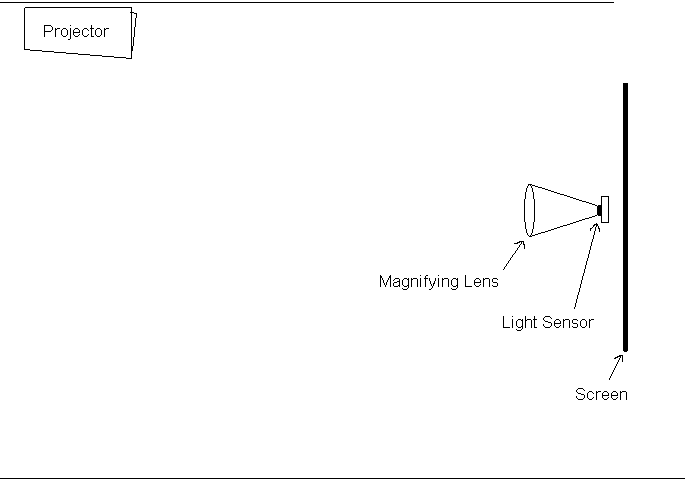
Get a large magnifying lens and focus the projector light on the sensor. Much lower light level can be measured. Compare color readings, with and without lens, at higher level as lens might change color slightly. Make a correction value if necessary.
Scott
| Description: |
|
| Filesize: |
3.81 KB |
| Viewed: |
582 Time(s) |
|
_________________
"Were we directed from Washington when to sow and when to reap, we would soon want bread."
Thomas Jefferson
|
|
| Back to top |
|
|
GEBrown

Joined: 08 Mar 2006
Posts: 729
Location: Denver
|
| Posted: Sun Mar 30, 2008 11:05 pm Post subject: |
|
|
Look in Measures/Sensor/Configure
_________________
Member of the Marquee Maniacs Club
|
|
| Back to top |
|
|
Gino

Joined: 22 Apr 2006
Posts: 1363
Location: Trinity Beach, AUSTRALIA
|
| Posted: Sun Mar 30, 2008 11:38 pm Post subject: |
|
|
Kal - I believe its accurate to 30IRE, 20IRE and below fluctuate too much compared to other sensors
_________________
( B ) ( G ) ( R ) Blendzilla Down Under ( R ) ( G ) ( B ) - Tubes of Fury
|
|
| Back to top |
|
|
kal
Forum Administrator
Joined: 06 Mar 2006
Posts: 18114
Location: Ottawa, Canada
TV/Projector: JVC DLA-NZ7
|
| Posted: Mon Mar 31, 2008 12:04 am Post subject: |
|
|
THanks guys! I've got it pointed at the screen right now and am getting pretty consistent readings no matter what the angle is at higher IRE's. I'll do some sweeps and compare it to what the Minolta CA-100 showed me 2 years ago (see here).
HCFR's really nice and easy to use. Been using S2Fly too to just take xyY raw readings when I want something simple.
EDIT: I'm getting really consistent readings as low as 10IRE using S2Fly and the Spyder2 sensor pointed at the screen, even if I change the angle a bit. I've got the read time set to 1000 (seems like 10 seconds).
Kal
_________________
Support our site by using our affiliate links. We thank you!
My basement/HT/bar/brewery build 2.0
|
|
| Back to top |
|
|
Andrew Low
Joined: 19 Apr 2007
Posts: 28
|
| Posted: Mon Mar 31, 2008 4:12 pm Post subject: |
|
|
Wow 10IRE readings are better than I've ever had stable. 30IRE was usually the end of the useful range for the Spyder2 for me - however, I'm not terribly patient and waiting for 10seconds is way beyond what I've ever tried.
Kal - care to document exactly how you've got HCFR setup?
Roo
|
|
| Back to top |
|
|
kal
Forum Administrator
Joined: 06 Mar 2006
Posts: 18114
Location: Ottawa, Canada
TV/Projector: JVC DLA-NZ7
|
| Posted: Mon Mar 31, 2008 4:22 pm Post subject: |
|
|
| Andrew Low wrote: | | Kal - care to document exactly how you've got HCFR setup? |
I plan on (hopefully) putting together some step by step instructions on how to do use HCFR with a Spyder2 sensor now that they're under $60 new! I've heard that the Spyder3 ($165) is even more sensitive so it may be a better option for someone buying new.
I suggest people use those links to buy their sensor - by the time it arrives I'll have instuctions as to how to use it with HCFR. 
To read as low as 10IRE, you just need to extend the time to 1000ms. I don't suggest you set it like that to take continuous readings when first playing with the gains/cuttoffs between say 30 and 70IRE, just set it there when you do the final 0-100IRE readings. 10 seconds per reading only takes about 2 minutes total.
Kal
_________________
Support our site by using our affiliate links. We thank you!
My basement/HT/bar/brewery build 2.0
|
|
| Back to top |
|
|
SYC
Joined: 16 May 2006
Posts: 269
|
| Posted: Tue Apr 01, 2008 5:30 am Post subject: |
|
|
Kal,
Did you compare the result between CA-100 and Spyder2? I compare mine with my friend's. They haven't the same result when I measure the primary colors.
|
|
| Back to top |
|
|
kschmit2
Joined: 09 Mar 2006
Posts: 1141
Location: Heidelberg, Germany
|
| Posted: Tue Apr 01, 2008 8:20 am Post subject: |
|
|
Kal, I got a loaner Spyder3 Elite Studio here atm.
The sensor appears to be very accurate down into low IREs.
I'm not willing to buy it yet, though. I will wait until HCFR can be used with it, then give that a shot, and potentially decide to buy Calman as well.
Currently I have only used the Spyder3 to calibrate EVR in Vista. The PJ itself is still calibrated, but I never got around to calibrating Vista before. The results are extremely pleasing. Full fades to black, no highlight clipping, incredible shadow detail.
Calibrating Overlay of course doesn't work with the Spyder3 Elite software.
So, results so far are good, but we need better software support.
|
|
| Back to top |
|
|
kschmit2
Joined: 09 Mar 2006
Posts: 1141
Location: Heidelberg, Germany
|
| Posted: Tue Apr 01, 2008 8:22 am Post subject: |
|
|
| kal wrote: |
I plan on (hopefully) putting together some step by step instructions on how to do use HCFR with a Spyder2 sensor now that they're under $60 new! I've heard that the Spyder3 ($165) is even more sensitive so it may be a better option for someone buying new.
I suggest people use those links to buy their sensor - by the time it arrives I'll have instuctions as to how to use it with HCFR.
|
I thought the Spyder3 wasn't supported in HCFR yet? (Last time I checked was last week though)
They are working on support, but nothing has been released or so.
|
|
| Back to top |
|
|
kal
Forum Administrator
Joined: 06 Mar 2006
Posts: 18114
Location: Ottawa, Canada
TV/Projector: JVC DLA-NZ7
|
| Posted: Tue Apr 01, 2008 6:52 pm Post subject: |
|
|
| SYC wrote: | Kal,
Did you compare the result between CA-100 and Spyder2? I compare mine with my friend's. They haven't the same result when I measure the primary colors. |
I didn't compare primaries between the CA-100 and the Spyder2 as I never measured the primaries/secondaries when I had the CA-100.
It's also been 2 years since I measured with the CA-100 so comparing the greyscale numbers between the two is meaningless, not to mention the following changed as well:
CA-100 measurements in 2006 were done with:
- Rec601 (SD) IRE patterns
- HTPC source with video card gamma boost
Spyder2 measurements in 2008 were done with:
- Rec709 (HD) IRE patterns
- PS3 source with HDfury & RTC2200 gamma boost
Kal
_________________
Support our site by using our affiliate links. We thank you!
My basement/HT/bar/brewery build 2.0
|
|
| Back to top |
|
|
kal
Forum Administrator
Joined: 06 Mar 2006
Posts: 18114
Location: Ottawa, Canada
TV/Projector: JVC DLA-NZ7
|
| Posted: Tue Apr 01, 2008 6:54 pm Post subject: |
|
|
| kschmit2 wrote: | | kal wrote: |
I plan on (hopefully) putting together some step by step instructions on how to do use HCFR with a Spyder2 sensor now that they're under $60 new! I've heard that the Spyder3 ($165) is even more sensitive so it may be a better option for someone buying new.
I suggest people use those links to buy their sensor - by the time it arrives I'll have instuctions as to how to use it with HCFR.
|
I thought the Spyder3 wasn't supported in HCFR yet? (Last time I checked was last week though)
They are working on support, but nothing has been released or so. |
Good point. I'll make sure to mention that in the writeup so that people don't run into troubles.
Given that HCFR and test patterns I use I'll likely host both here so that consistent versions can be used that match the instructions. There's nothing worse than finding instructions online as to how to do something only to realise that the software's gone throguh 14 revisions since then and nothing is same anymore.
Of course, I'll mention that people are always welcome to go to the official sites and download the latest and greatest versions but they need to be aware that the step by step instructions may not longer work exactly the same.
Kal
_________________
Support our site by using our affiliate links. We thank you!
My basement/HT/bar/brewery build 2.0
|
|
| Back to top |
|
|
kschmit2
Joined: 09 Mar 2006
Posts: 1141
Location: Heidelberg, Germany
|
| Posted: Wed Apr 02, 2008 8:25 am Post subject: |
|
|
Ohh, and another update:
so far the Spyder3 sensor offers no improvement over the Spyder2 sensor when calibrating phosphor based displays (Plasma and CRT).
Datacolor is working on that though, and they believe to have an updated DLL in the near future. It is apparently not a hardware problem.
|
|
| Back to top |
|
|
kal
Forum Administrator
Joined: 06 Mar 2006
Posts: 18114
Location: Ottawa, Canada
TV/Projector: JVC DLA-NZ7
|
|
| Back to top |
|
|
kschmit2
Joined: 09 Mar 2006
Posts: 1141
Location: Heidelberg, Germany
|
| Posted: Wed Apr 02, 2008 7:40 pm Post subject: |
|
|
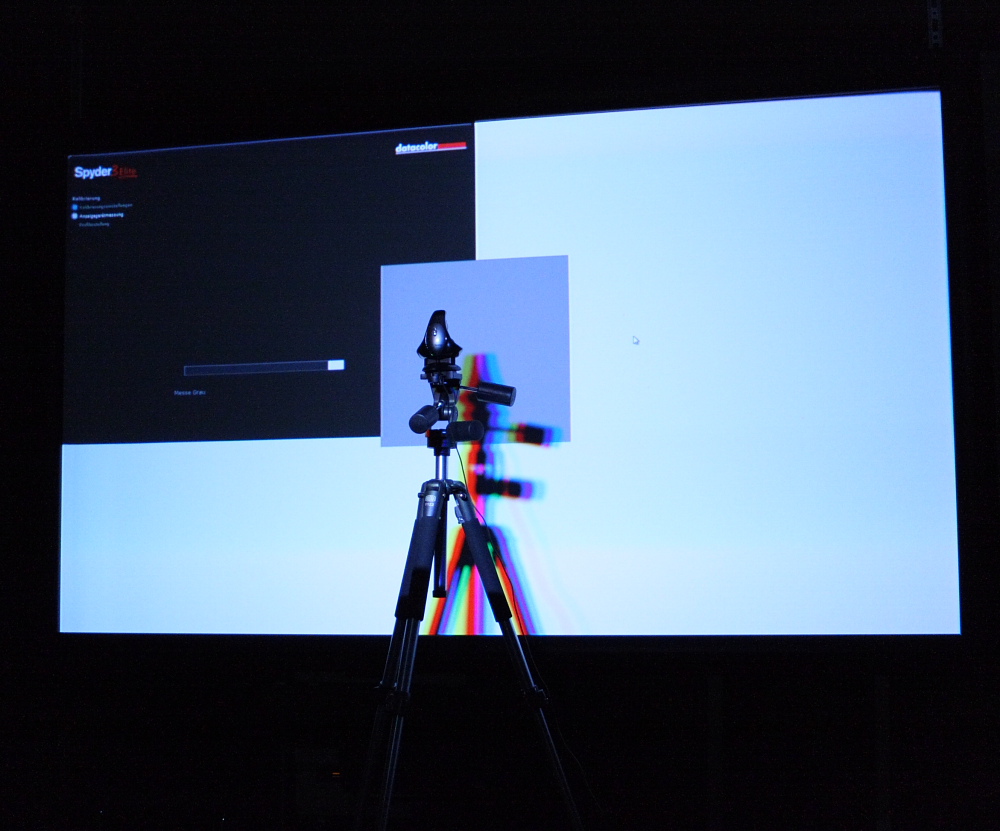
I don't know the details of where they are _off_ so to speak wrt plasma and CRT atm.
The results I got using the Spyder3 are extremely pleasing though, with by far the best low APL detail I have ever had. I get no crushed blacks, no highlight clipping, perfect fades to black.
The software is still very buggy though imho.
E.g. I can't imagine the black background in this shot is not supposed to expand to cover the full screen:
| Description: |
|
| Filesize: |
240.85 KB |
| Viewed: |
349 Time(s) |
|
|
|
| Back to top |
|
|
|
|




