| Author |
Message |
Brooklyn

Joined: 17 Sep 2007
Posts: 494
Location: Morgan Hill, CA
|
| Posted: Mon Mar 17, 2008 3:20 am Post subject: Sony IFB-12 Help |
|
|
|
Hello, I cannot get the component input option on the IFB-12 to work at all. I followed the directions on the site, and all I get is a blank picture. This is 480P. If I switch DIP 2 off, I get a green picture. Regular RGBHV works fine, when it is setup for that input. Any ideas? Is the card bad?
|
|
| Back to top |
|
 |
AnalogRocks
Forum Moderator

Joined: 08 Mar 2006
Posts: 26706
Location: Toronto, Ontario, Canada
TV/Projector: Sony 1252Q, AMPRO 4000G
|
| Posted: Mon Mar 17, 2008 4:40 am Post subject: |
|
|
Are you running Componnet or RGBHV?
_________________
Tech support for nothing
CRT.
HD done right!
|
|
| Back to top |
|
|
Brooklyn
Joined: 17 Sep 2007
Posts: 494
Location: Morgan Hill, CA
|
| Posted: Mon Mar 17, 2008 6:40 am Post subject: |
|
|
|
Component. RGBHV works fine, but I don't want to use that.
|
|
| Back to top |
|
|
macgyver655
Joined: 22 Aug 2007
Posts: 8508
|
| Posted: Mon Mar 17, 2008 1:38 pm Post subject: |
|
|
|
There is an IFB-12 and a IFB-12A card. They are different according to the schematic's but I dont know if the procedure is for both or either. Which one do you have?
|
|
| Back to top |
|
|
Sonynut

Joined: 08 Aug 2006
Posts: 367
Location: Bradford,PA
|
| Posted: Mon Mar 17, 2008 2:13 pm Post subject: |
|
|
There are jumpers on the card that have to be set correctly also. I'll be darned if I can find the settings in my computer here. IF I get the chance, I'll take a hi-res photo of mine that is installed in my main 1272... that may take a bit though, as unfortunately my projectors are buried in my upstairs goody corner, not set up at them moment 
_________________
1272 Stack coming soon:)
|
|
| Back to top |
|
|
macgyver655
Joined: 22 Aug 2007
Posts: 8508
|
| Posted: Mon Mar 17, 2008 2:46 pm Post subject: |
|
|
|
In looking at the schematics, the circuits for component input are pretty straight forward. There are differences in the dip switch circuits from the 12 and 12A. Looking there I'm curious, is there a setting in the menu for component input ?
|
|
| Back to top |
|
|
Brooklyn
Joined: 17 Sep 2007
Posts: 494
Location: Morgan Hill, CA
|
| Posted: Tue Mar 18, 2008 3:14 am Post subject: |
|
|
|
Do you mean menu setting in the projector? I don't think so. I have the manual for the IFB-12A, but my card is the IFB-12. I followed the directions on this site, at the bottom of the manuals section of the 12xx page on this site.
|
|
| Back to top |
|
|
messerfloh

Joined: 04 Dec 2007
Posts: 18
Location: Bavaria, Germany
|
| Posted: Tue Mar 18, 2008 8:46 am Post subject: |
|
|
Hi, i have the IFB 12 in my sony 1252. The correct settings are:
DIP switches 2 AND 3 "On", all others "Off". The jumpers (on the board itself): JP5 -> GS, JP3 & 4 -> Video
With this setting, it will accept component signals up to 1080p.
I´m running it with 576p (my player doesn´t scale up more) and it works FINE!
Don´t forget you´ll have to do the convergence newly for each new input frequency 
Good luck!
Floh
|
|
| Back to top |
|
|
Brooklyn
Joined: 17 Sep 2007
Posts: 494
Location: Morgan Hill, CA
|
| Posted: Tue Mar 18, 2008 9:48 am Post subject: |
|
|
|
Hi, those are the settings I use, but I still get no picture from component. What is your setting for SW6 and SW7?
|
|
| Back to top |
|
|
messerfloh
Joined: 04 Dec 2007
Posts: 18
Location: Bavaria, Germany
|
| Posted: Tue Mar 18, 2008 11:57 am Post subject: |
|
|
|
Well I have to look. I´ll tell you tonight.
|
|
| Back to top |
|
|
messerfloh
Joined: 04 Dec 2007
Posts: 18
Location: Bavaria, Germany
|
| Posted: Tue Mar 18, 2008 9:39 pm Post subject: |
|
|
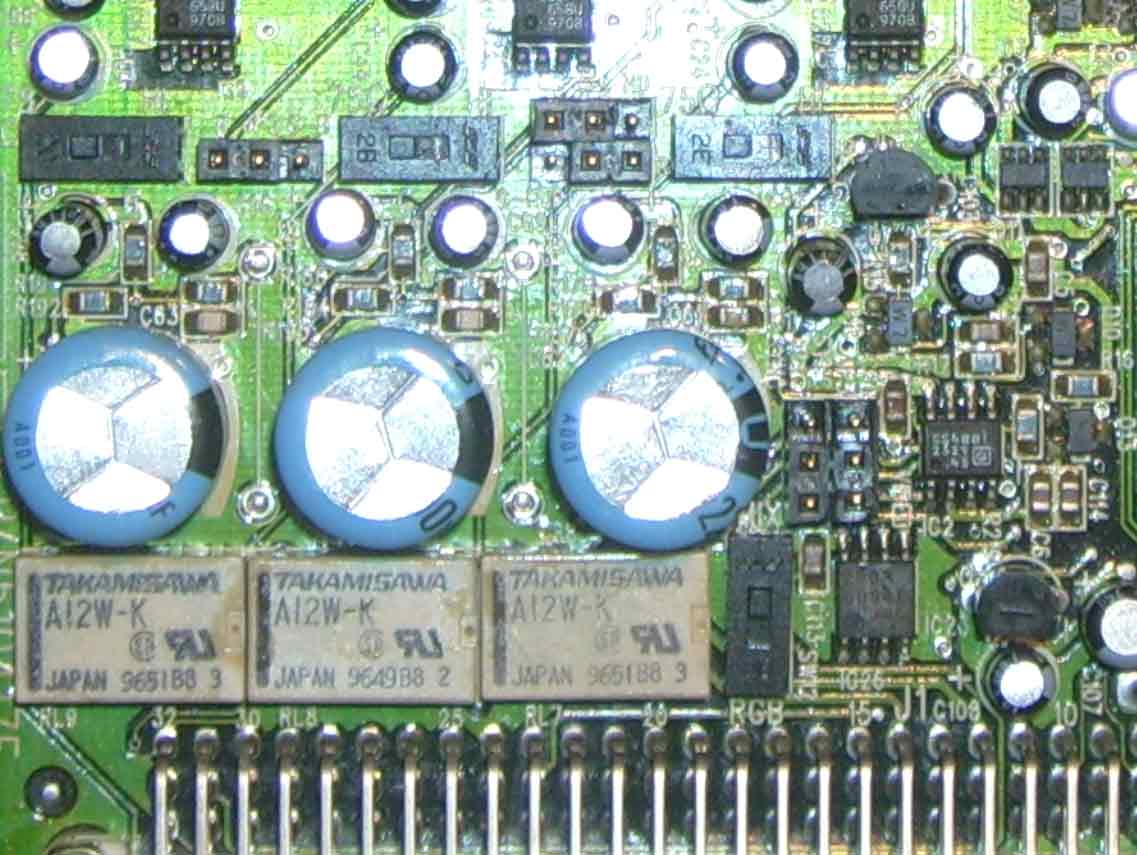
OK here we are:
Switches R + G + B (above the lower 3 fat blue caps): set to 75 Ohm.
Switch 12 (right and under 3rd cap) set to MIX
Switches 6 + 7 (not on the photo, they are at the upper right corner where the red connector is):
Sw6: ON, Sw7:Off
Switch 8 (blue trimpot) set to "1"
Jumpers:
JP2 (between the B and G switch) to B
JP5 (between the G and R Switch) to GS
JP 1 (right under JP5) to HD
JP3+4 (right and up the sw12) to VIDEO
Thats all I can see on my board.
Good luck again!
Floh
| Description: |
|
| Filesize: |
80.79 KB |
| Viewed: |
2959 Time(s) |
|
|
|
| Back to top |
|
|
|
|




