| Author |
Message |
cornelius
Joined: 19 Aug 2006
Posts: 123
|
| Posted: Sat Feb 16, 2008 2:44 am Post subject: NEC PG6 Raster is not square with zeroed settings |
|
|
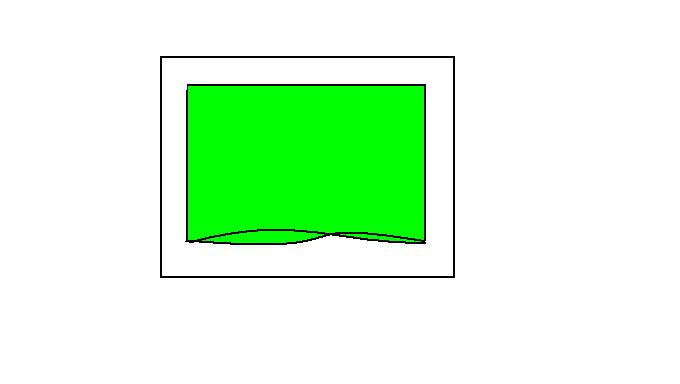
The top portion of all 3 rasters on my NEC pg6 are not square, even though I have all of the settings zeroed. There is also a single bright line arching inwards from the top on all 3 tubes as well. Anyone have any idea what i'm talking about? I don't have a camera, so I can't take a picture. I'm guessing somebody messed with the g2 settings on the projector, and the voltage is distorting the border. [/img]
| Description: |
|
| Filesize: |
10.22 KB |
| Viewed: |
4876 Time(s) |
|
Last edited by cornelius on Sat Feb 16, 2008 2:09 pm; edited 2 times in total
|
|
| Back to top |
|
 |
dropzone7

Joined: 12 Jun 2007
Posts: 1069
Location: Charlotte, NC
|
| Posted: Sat Feb 16, 2008 5:16 am Post subject: |
|
|
Is the blanking opened all the way up on all four sides? Do you have a source running to the projector while working with the raster?
_________________
"Coffee is for Closers."
|
|
| Back to top |
|
|
kschmit2
Joined: 09 Mar 2006
Posts: 1141
Location: Heidelberg, Germany
|
|
| Back to top |
|
|
cornelius
Joined: 19 Aug 2006
Posts: 123
|
| Posted: Sat Feb 16, 2008 1:21 pm Post subject: |
|
|
|
I have a source connected, and blanking set to 100. I'll check out the link about the AKB lines, and see if that helps.
|
|
| Back to top |
|
|
cornelius
Joined: 19 Aug 2006
Posts: 123
|
| Posted: Sat Feb 16, 2008 5:26 pm Post subject: |
|
|
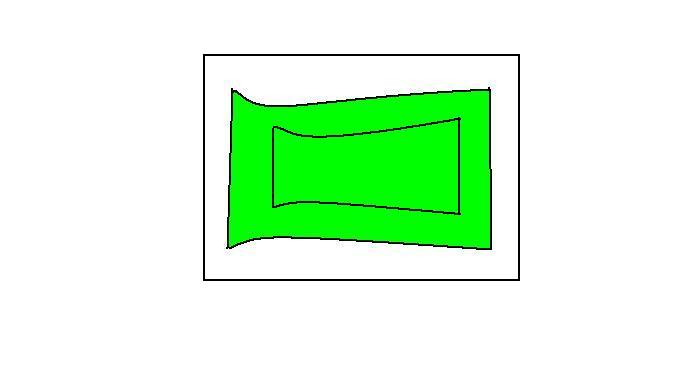
Some of the blanking settings were off, I have since adjusted them. I have also turned off AKB. The 3 rasters I am left with look like the drawing below. All 3 rasters a clearly visible, and the blue and green have a clear image in them, but the red the image is very faint. Should I continue with my setup, and worry about the raster shape later, or should I fix this problem first.
| Description: |
|
| Filesize: |
13.19 KB |
| Viewed: |
4863 Time(s) |
|
|
|
| Back to top |
|
|
kschmit2
Joined: 09 Mar 2006
Posts: 1141
Location: Heidelberg, Germany
|
| Posted: Sat Feb 16, 2008 6:51 pm Post subject: |
|
|
does your projector have a point convergence board?
And did you check that the horizontal, vertical and convergence polarity plugs are plugged in properly (proper orientation)?
|
|
| Back to top |
|
|
dropzone7
Joined: 12 Jun 2007
Posts: 1069
Location: Charlotte, NC
|
| Posted: Sat Feb 16, 2008 7:02 pm Post subject: |
|
|
| kschmit2 wrote: |
And did you check that the horizontal, vertical and convergence polarity plugs are plugged in properly (proper orientation)? |
Exactly what I was going to ask next. I believe I recall seeing something like this when I had "H" and "V" BNC connections reversed at the projector. As for the point convergence card if this is a plain PG then I bet it does not have one.
|
|
| Back to top |
|
|
dbaisey
Joined: 09 Mar 2006
Posts: 821
Location: Southern Cal LA / Seattle WA
|
| Posted: Sat Feb 16, 2008 7:12 pm Post subject: |
|
|
Depending on your version check the alignment menu and see if you have phase at the bottom. If so adjust phase for the signal.
Look at the inside of the projector lid and look for the decal for polarity. The settings mode also has front floor or ceiling front. There are manuals in the PG section also. Doug
|
|
| Back to top |
|
|
cornelius
Joined: 19 Aug 2006
Posts: 123
|
| Posted: Sat Feb 16, 2008 9:11 pm Post subject: |
|
|
|
The pg6 is actually a Runco dtv933. I think it has the point board, but am unsure. I just graduated from electrohome ecps, and am still a little unsure of this projector. I believe I have phase in the alignment menu, I will try adjusting that now.
|
|
| Back to top |
|
|
cornelius
Joined: 19 Aug 2006
Posts: 123
|
| Posted: Sat Feb 16, 2008 10:21 pm Post subject: |
|
|
|
If I zero out all of the settings, should i end up with a square raster?
|
|
| Back to top |
|
|
Brooklyn

Joined: 17 Sep 2007
Posts: 494
Location: Morgan Hill, CA
|
| Posted: Sun Feb 17, 2008 1:02 am Post subject: |
|
|
|
Unlikely. Did the phase adjustment help at all? Also, like the guys already said, it is possible one of the polarity wires got switched around the wrong way.
|
|
| Back to top |
|
|
cornelius
Joined: 19 Aug 2006
Posts: 123
|
| Posted: Sun Feb 17, 2008 1:49 am Post subject: |
|
|
|
Yes the phase adjustments did help. I now have a more square raster. I zeroed out some convergence settings that I didn't realize were there. Is there anyway to reset the point convergence? I have a couple of wavy parts on the covergence grid that I can't seem to get rid of, I keep getting out of range error.
|
|
| Back to top |
|
|
kschmit2
Joined: 09 Mar 2006
Posts: 1141
Location: Heidelberg, Germany
|
| Posted: Sun Feb 17, 2008 9:28 am Post subject: |
|
|
some things to keep in mind:
- don't reset or zero out the Kelvin/White Balance settings
- don't do an EEPROM init
Kai
|
|
| Back to top |
|
|
kschmit2
Joined: 09 Mar 2006
Posts: 1141
Location: Heidelberg, Germany
|
| Posted: Sun Feb 17, 2008 9:31 am Post subject: |
|
|
| cornelius wrote: | | Yes the phase adjustments did help. I now have a more square raster. I zeroed out some convergence settings that I didn't realize were there. Is there anyway to reset the point convergence? I have a couple of wavy parts on the covergence grid that I can't seem to get rid of, I keep getting out of range error. |
To zero out the point convergence hit ADJUST, then go to CONVERGENCE, hit ENTER, move the cursor to POINT, hit NORMAL, then select YES, hit ENTER
|
|
| Back to top |
|
|
cornelius
Joined: 19 Aug 2006
Posts: 123
|
| Posted: Sun Feb 17, 2008 10:43 pm Post subject: |
|
|
|
Thanx for the help, I think everything is ok now.
|
|
| Back to top |
|
|
|
|




