| Author |
Message |
jacket_fan
Joined: 02 Sep 2007
Posts: 99
|
| Posted: Wed Dec 19, 2007 3:17 pm Post subject: Help me recover, getting the picture centered |
|
|
Would some be so kind as to help me step through the set up process to get the picture centered back on the screen.
I am recovering from getting a new tube put into the old XG 135. During the reinstallation I have gotten the picture off. Is there a guide on getting things re-centered?
Or just a step by step that you would do to recover?
I looked a this link http://www.curtpalme.com/TubeRasterSetup.shtm on raster centering. I have to admit, I am not 100% sure what I am looking at when looking into the lenses as far as telling if they are centered or not.
I have also looked in the manual, but do not see much on centering the picture. I may be there but I am not seeing it.
When I put the projector back up, I did the process of taping thread in front of the screen to form a cross in the center of the screen and then doing raster alignment. That messed things up a bit as far as getting the picture in the center of the screen. From there I am sure I have gotten other things off, from the picture size to the other controls under “Operate”.
_________________
Mark
|
|
| Back to top |
|
 |
jacket_fan
Joined: 02 Sep 2007
Posts: 99
|
| Posted: Wed Dec 19, 2007 4:42 pm Post subject: |
|
|
I also checked out the thread on the XG set up, but it seems to only discuss raster centering.
Then problem I have is on how to throw the picture correctly on the screen.
_________________
Mark
|
|
| Back to top |
|
|
jacket_fan
Joined: 02 Sep 2007
Posts: 99
|
| Posted: Thu Dec 20, 2007 11:55 am Post subject: |
|
|
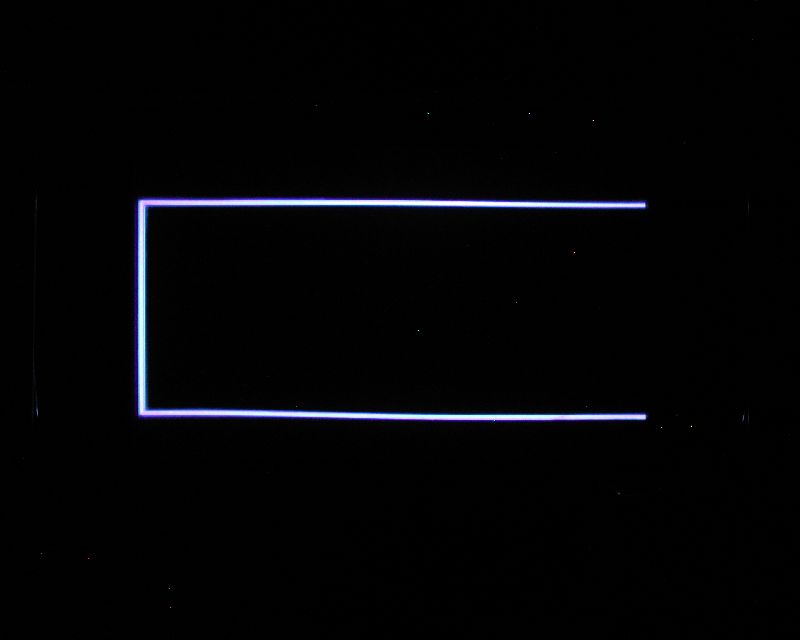
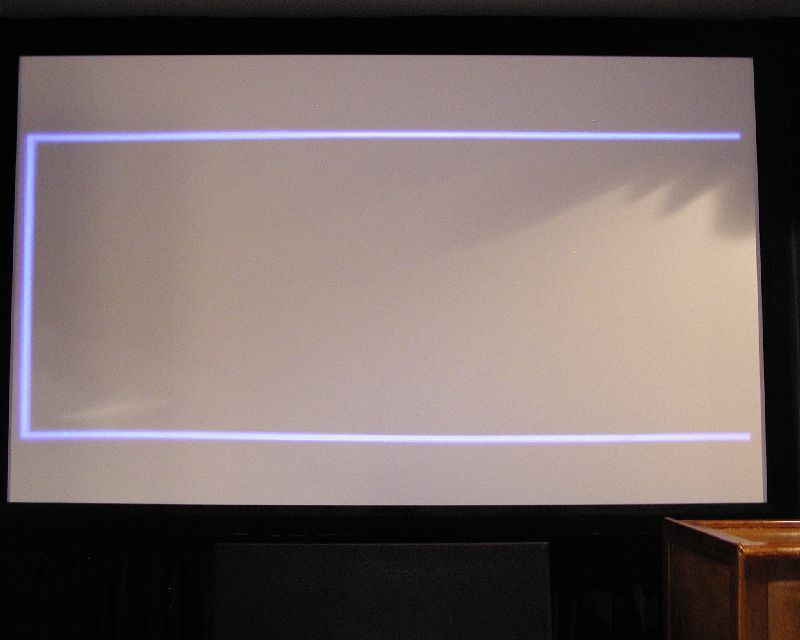
Here are a couple of pictures showing what I am having a problem with.
This is the blue box from the thx intro. It shows the right hand side being chopped off. Also, the very right hand side of the picture is chopped off.
I have read the setup guide for the XG, and even for the PG, but did not see where it describes fixing what I am seeing here. I suspect it tis there and the questions I am asking are really stupid.
There must be something between raster centering, blanking and position that I am doing wrong. I am not sure I have not screwed up the aspect ratio as well. It seems like the more I mess with it the worse it gets.
| Description: |
|
| Filesize: |
24.98 KB |
| Viewed: |
2141 Time(s) |
|
| Description: |
|
| Filesize: |
55.21 KB |
| Viewed: |
2141 Time(s) |
|
_________________
Mark
|
|
| Back to top |
|
|
Chuchuf
Joined: 11 Mar 2006
Posts: 548
|
| Posted: Thu Dec 20, 2007 3:10 pm Post subject: |
|
|
1. Do you have any blaning turned on on the right side on the XG??
2. Try Picture, shift and see if the vertical line on th right doesn't come back.
Terry
|
|
| Back to top |
|
|
jacket_fan
Joined: 02 Sep 2007
Posts: 99
|
| Posted: Thu Dec 20, 2007 7:48 pm Post subject: |
|
|
Thanks Terry.
Blanking - I will check again. And yes I have adjusted it at some point during this process. My problem is that I keep tweeking a little bit at a time, then not touch if for a few days.
Picture - Shift If I remember correctly, if I shift it, I start to lose the other side. But will go back and make sure. Like I said I have messed with it enough, I am worried I have gotten everything geometry related off. It still looks like the rasters are pretty mcuh in the center and have plenty of room around them.
Is there something on AVIA or another method to make sure all of the picture is being presented on the screen? It seems like when I mess with the blanking I am changing the aspect ratio.
I know I have gone back with the Lumagen to get the top left and bottom right adjusted to get all the picture back in.
_________________
Mark
|
|
| Back to top |
|
|
|
|




