| Author |
Message |
dementian27
Joined: 21 Sep 2024
Posts: 7
|
| Posted: Tue Oct 29, 2024 4:08 pm Post subject: VPH-D50 Mark II with HDFury 2 not working |
|
|
I am trying to hook up either a PS4 slim or an Apple TV HD (2015) to the projector using an HDFury 2.
Right now I am getting no video at all. I have tried both A & B inputs on the projector. Switching the PS4 to 1080i and the Apple TV to 720p.
The HDFury 2 has a blue light when a source is plugged into it. I am using a power supply for the fury.
Am I doing something wrong? Will these components not work together? Any help would be greatly appreciated.
|
|
| Back to top |
|
 |
kal
Forum Administrator

Joined: 06 Mar 2006
Posts: 18114
Location: Ottawa, Canada
TV/Projector: JVC DLA-NZ7
|
|
| Back to top |
|
|
dementian27
Joined: 21 Sep 2024
Posts: 7
|
| Posted: Tue Oct 29, 2024 7:37 pm Post subject: |
|
|
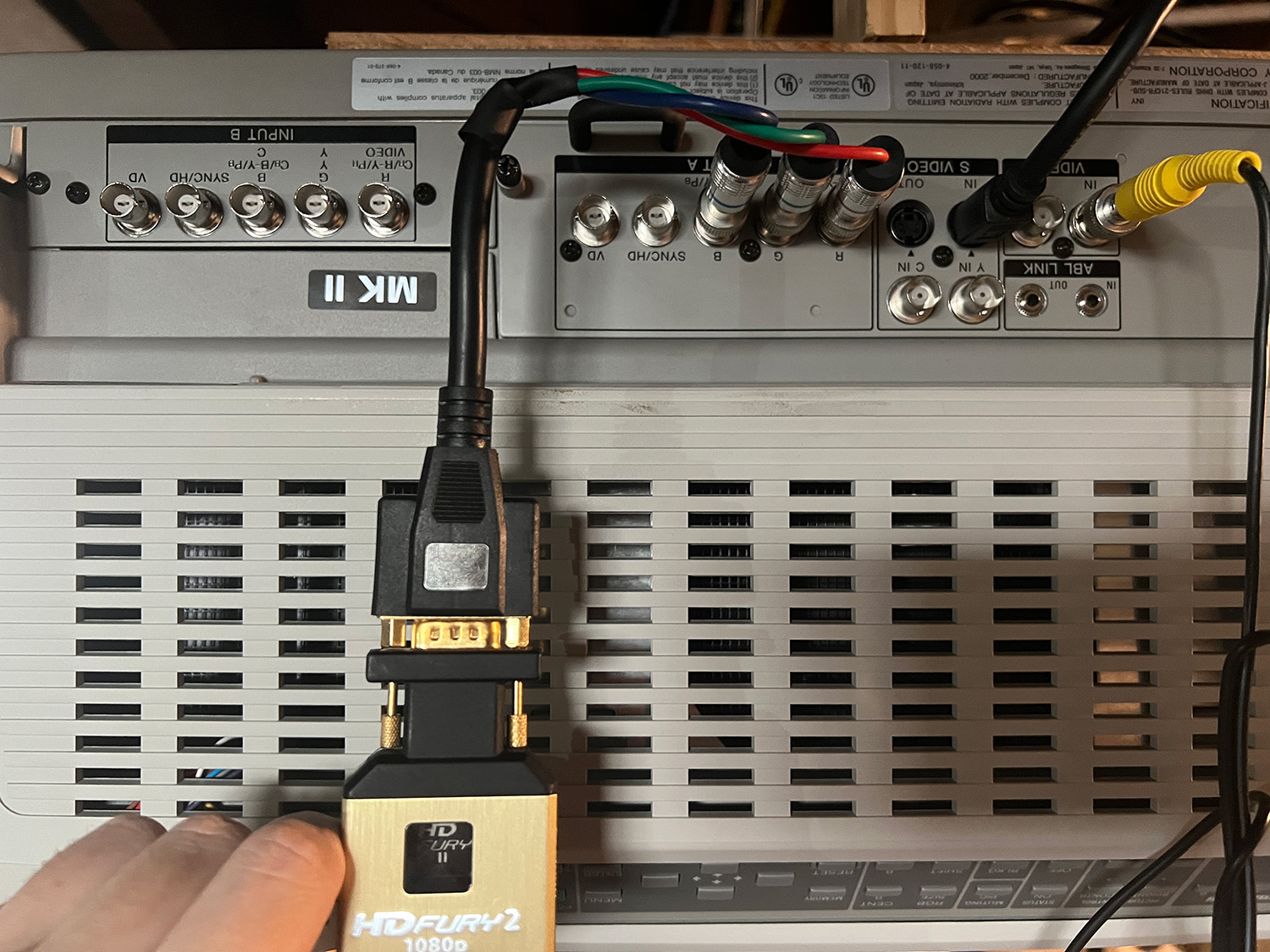
| kal wrote: | Make sure to turn off 24 fps (hz) in the source devices. CRT projectors can't do 24Hz. Go with 1080i at 60Hz.
Make sure your HDFury2 is set to RGB mode. You need to use all 5 RGBHV wires. Don't use YUV.
Kal |
Thanks for the response Kal!
The HDFury 2 I purchased only came with an RGB cable. Is this incorrect?
PS4 is set to 1080i @ 60hz
| Description: |
|
| Filesize: |
448.05 KB |
| Viewed: |
462 Time(s) |
|
|
|
| Back to top |
|
|
kal
Forum Administrator
Joined: 06 Mar 2006
Posts: 18114
Location: Ottawa, Canada
TV/Projector: JVC DLA-NZ7
|
| Posted: Tue Oct 29, 2024 8:00 pm Post subject: |
|
|
That's not an RGB cable. That's a 3 wire component (YUV/YPbPr) cable. TRGB signals require 5 wires to do RGBHV (sometimes they can do it in 4 if they have sync on green). You can't do RGB with 3 cables.
There appears to be some writing on some of the BNCs that say Y / Pb / Pr so the Sony D50 supports component it would seem. No idea how well it does or at what resolutions/refresh rates but most CRT projectors prefer RGBHV. You'll have to check the manual and see what the various settings need to be set to if you wish to use YUV out of the HDfury2.
Cheers,
Kal
_________________

Support our site by using our affiliate links. We thank you!
My basement/HT/bar/brewery build 2.0
|
|
| Back to top |
|
|
dementian27
Joined: 21 Sep 2024
Posts: 7
|
| Posted: Tue Oct 29, 2024 8:39 pm Post subject: |
|
|
| kal wrote: | That's not an RGB cable. That's a 3 wire component (YUV/YPbPr) cable. TRGB signals require 5 wires to do RGBHV (sometimes they can do it in 4 if they have sync on green). You can't do RGB with 3 cables.
There appears to be some writing on some of the BNCs that say Y / Pb / Pr so the Sony D50 supports component it would seem. No idea how well it does or at what resolutions/refresh rates but most CRT projectors prefer RGBHV. You'll have to check the manual and see what the various settings need to be set to if you wish to use YUV out of the HDfury2.
Cheers,
Kal |
Ahhhhh. Well that would explain it. I was able to get a green video by changing the input in settings to RGB. Component wouldn't work at all. I guess i'll order a new cable that is RGBHV compatible. Would this work, if I also use a female to female VGA converter to attach it to the HDFury?
https://amzn.to/3Yqrhiv
|
|
| Back to top |
|
|
kal
Forum Administrator
Joined: 06 Mar 2006
Posts: 18114
Location: Ottawa, Canada
TV/Projector: JVC DLA-NZ7
|
|
| Back to top |
|
|
AnalogRocks
Forum Moderator

Joined: 08 Mar 2006
Posts: 26706
Location: Toronto, Ontario, Canada
TV/Projector: Sony 1252Q, AMPRO 4000G
|
| Posted: Tue Dec 24, 2024 5:32 pm Post subject: |
|
|
ENTER, ENTER, UP, DOWN ENTER (iirc) on the remote to get into the service mode of the D50, (make sure display is ON)
Change Input 1 to YPbPr/Componenet
Set your sources to 1080i
720P should work but pushes the little D50 harder.
_________________
Tech support for nothing
CRT.
HD done right!
|
|
| Back to top |
|
|
|
|




