| Author |
Message |
alb_qwerti
Joined: 30 Sep 2008
Posts: 54
Location: Italy
|
| Posted: Wed Oct 16, 2024 2:40 pm Post subject: Barco 909 raster width |
|
|
Hi all,
I'm trying to set up my "new" Barco Reality 909 after the 1209s died because of a shorted green tube.
I'm setting up with 1600x1200 definition that was perfect for the 1209s
Even with 99% horizontal screen size I can't make the image large enough to cover the screen width of 2,20m (87").
The projector distance is correct, maybe some inch greater for testing this issue.
Using a lower resolution of 1600x900 I can cover the total screen width at 60%.
It seems that the PJ was tuned for 16/9 aspect ratio.
Is it possible?
Maybe someone messed with the width coils ?
Other questions about the 909 layout, that seems a little different from the 909.
The service manual on the site reports only boards layout, not description, pictures or board locations.
Where are the width coils ?
The 17v on the SMPS should be really 17v or 17.5v ?
Is it mandatory to check with the test point and voltmetre or could you trust the voltages of the on screen menu?
Thanks,
Alberto
|
|
| Back to top |
|
 |
Hulio
Joined: 15 Apr 2006
Posts: 494
Location: Belgium
|
| Posted: Thu Oct 17, 2024 7:38 am Post subject: |
|
|
Hi Alberto,
Stay away from the raster width coils. If you ran out of horizontal width, this is the proper adjustment:
- display video signal at the rezolution you will mostly watch
- put the horizontal width in geometry menu at 95 with the remote
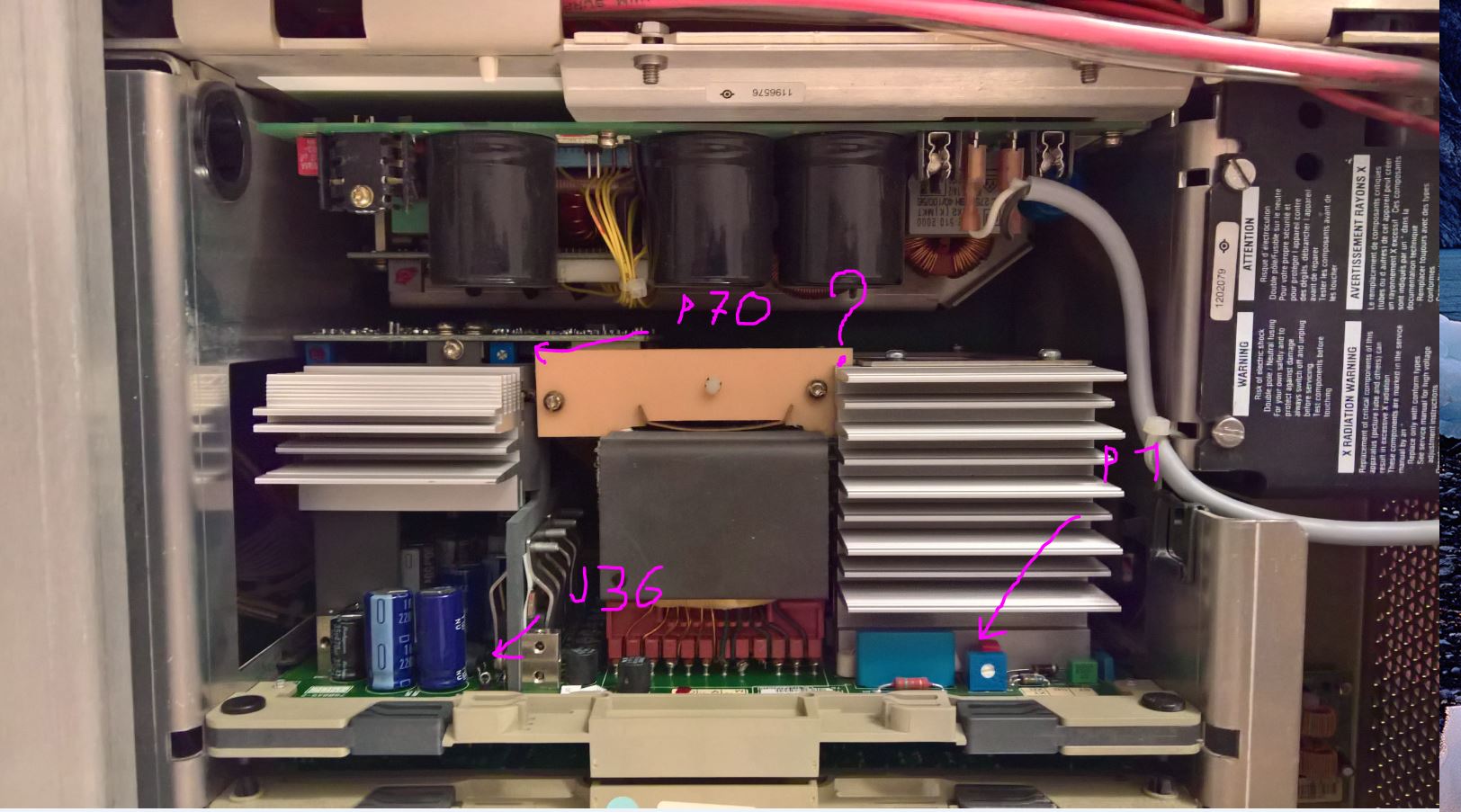
- now adjust pot P700 (max. horizontal amplitude) on SMPS sub-board till you get the desired width on the screen
This will affect the 17v setting too, so you'll have to re-adjust:
- black probe on the chassis, red probe on J36 test point of SMPS and adjust pot P1 for a reading of 17,3v
Shouldn't be too far away from the voltage in the menu, but tweaking with a multimeter is always beter.
If you need more in depth tips, contact me at Stan.iulian@telenet.be
Cheers
|
|
| Back to top |
|
|
alb_qwerti
Joined: 30 Sep 2008
Posts: 54
Location: Italy
|
| Posted: Thu Oct 17, 2024 4:52 pm Post subject: |
|
|
Hi Hulio,
I don't have the layout of the 909 boards and they are a little different from those of the 1209s.
Are correctly marked the components?
I'm not sure where P70 is .
| Description: |
|
| Filesize: |
200.84 KB |
| Viewed: |
880 Time(s) |
|
|
|
| Back to top |
|
|
Hulio
Joined: 15 Apr 2006
Posts: 494
Location: Belgium
|
| Posted: Thu Oct 17, 2024 5:52 pm Post subject: |
|
|
|
Yes, you got it right. Is P700, not 70.
|
|
| Back to top |
|
|
alb_qwerti
Joined: 30 Sep 2008
Posts: 54
Location: Italy
|
| Posted: Fri Oct 18, 2024 4:23 pm Post subject: |
|
|
Great Hulio, problem solved !
But a new one is ready !
The blue Output Amplifier is bad.
The tube is luminous even without feeding an image and there are diagonal lines.
I swapped with the red one and the problem go to the red, so it should be the amplifier.
I don't think it is compatible with the 1209s one!
A tech note in the manual tell all the difference.
Could it be repaired?
Maybe one power transistor is failing?
Thanks!
| Description: |
|

Download |
| Filename: |
20241005_225119 - Copia.jpg |
| Filesize: |
437.2 KB |
| Downloaded: |
76 Time(s) |
|
|
| Back to top |
|
|
Hulio
Joined: 15 Apr 2006
Posts: 494
Location: Belgium
|
| Posted: Fri Oct 18, 2024 9:19 pm Post subject: |
|
|
Hi Alberto,
Yes, the RGB end stage is bad, if the problem moved to red. And no, the ones used in 1209 will not work. You could inspect it with a magnifier for bad solder or bad components.
Should you won't be able to fix it, i can sale you a working one.
What's the history of the projector, you bought it broken ?
|
|
| Back to top |
|
|
alb_qwerti
Joined: 30 Sep 2008
Posts: 54
Location: Italy
|
| Posted: Sun Dec 15, 2024 11:25 am Post subject: |
|
|
Hi members,
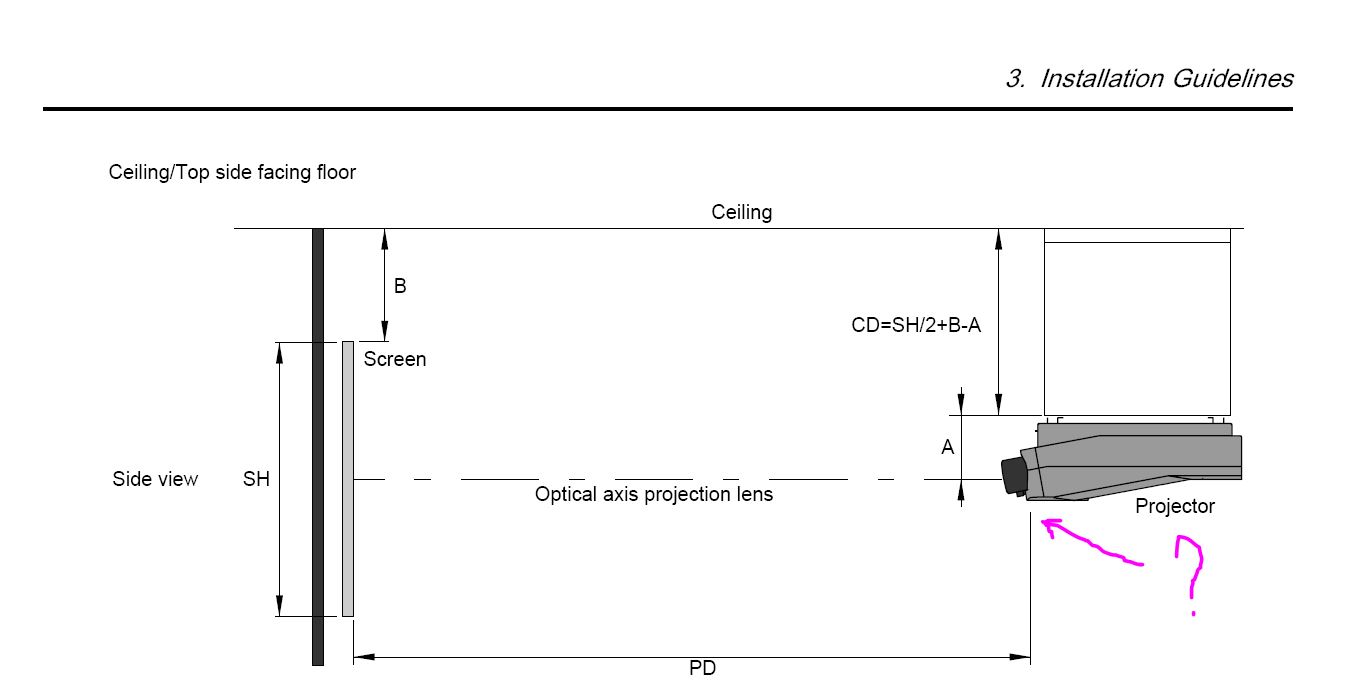
From the installation manual I can't understand exactly the point to misure the projector distance of BR 909.
Is it not from the same point as the other Barcos, the L shaped frame attachment ?
From lens calculation it should be closer to the screen than the BG 1209s.
Thanks.
| Description: |
|
| Filesize: |
56.52 KB |
| Viewed: |
593 Time(s) |
|
|
|
| Back to top |
|
|
kal
Forum Administrator

Joined: 06 Mar 2006
Posts: 18114
Location: Ottawa, Canada
TV/Projector: JVC DLA-NZ7
|
| Posted: Sun Dec 15, 2024 1:33 pm Post subject: |
|
|
Doesn't matter as it's far from optimal, especially on every Barco I've ever owned. Here's the correct throw distance for any CRT projector, taken from the main site:
While following the manual for throw distance is always a good bet (and recommended for new users), to maximize tube life even further do the following steps:
- Put the projector on the cart or simply leave it on the floor so that you can move it.
- Display something that fills the screen entirely (like a grid test pattern).
- Using only the green (middle) tube, look into the tube and increase the image width on the tube face until it is around 1/8" to 1/4" from the edge of the white phosphor. Under no circumstances should you allow the image to go off of the white phosphor surface!
- Move the projector back and forth until the image fits your screen.
- THAT is the correct throw distance for optimal phosphor usage.
It'll usually be 5-8% closer than what the manual tell you because the manual throw instructions are conservative since they make you install blindly without even looking in the tubes at all.
Kal
_________________

Support our site by using our affiliate links. We thank you!
My basement/HT/bar/brewery build 2.0
|
|
| Back to top |
|
|
alb_qwerti
Joined: 30 Sep 2008
Posts: 54
Location: Italy
|
| Posted: Sun Dec 15, 2024 3:11 pm Post subject: |
|
|
Thank'you Kal !
I'll go this way.
|
|
| Back to top |
|
|
CasetheCorvetteman

Joined: 09 Nov 2008
Posts: 6326
Location: Australia
|
| Posted: Sun Apr 20, 2025 12:36 pm Post subject: Re: Barco 909 raster width |
|
|
| alb_qwerti wrote: | Hi all,
Where are the width coils ?
The 17v on the SMPS should be really 17v or 17.5v ?
Is it mandatory to check with the test point and voltmetre or could you trust the voltages of the on screen menu?
Thanks,
Alberto |
The width coils are on the main backplane board near the neckboard connections. Use only do get the three widths the same as each other.
Set the 17v using a good multimeter, forget the menu voltages, they're not worth a damn.
Set it to 17.3v with the screen full white using the source you intend to use most of. Then calibrate the whole set.
If you haven't yet, replace ever capacitor in the SMPS, the set will be significantly more stable as a result.
_________________
Barco Cine 9, ,Sony VPL570ES 4K SXRD, 135" OZ Theatre Majestic 16:9 screen, Denon X6700in preamp mode, 2x 7ch Tonewinner amps, 2x Tonewinner 15" subs, 2x 10" subs, 7.2.6...
RUNCO DTV991 LC ( NEC XG 852 LC ) 100" 4:3 screen, H/K AVR 7.1...
|
|
| Back to top |
|
|
|
|





