| Author |
Message |
helfriwj
Joined: 29 Oct 2006
Posts: 51
Location: Pittsburgh,PA
|
| Posted: Mon Jan 09, 2023 4:15 pm Post subject: Sony G90 Remote |
|
|
|
I have a Sony Model RM-PJ1001 Remote Commander that is not controlling my G90 and was wondering if it is the correct remote for the G90?
|
|
| Back to top |
|
 |
bluemoonhu
Joined: 16 Feb 2021
Posts: 259
|
| Posted: Tue Jan 10, 2023 2:49 pm Post subject: |
|
|
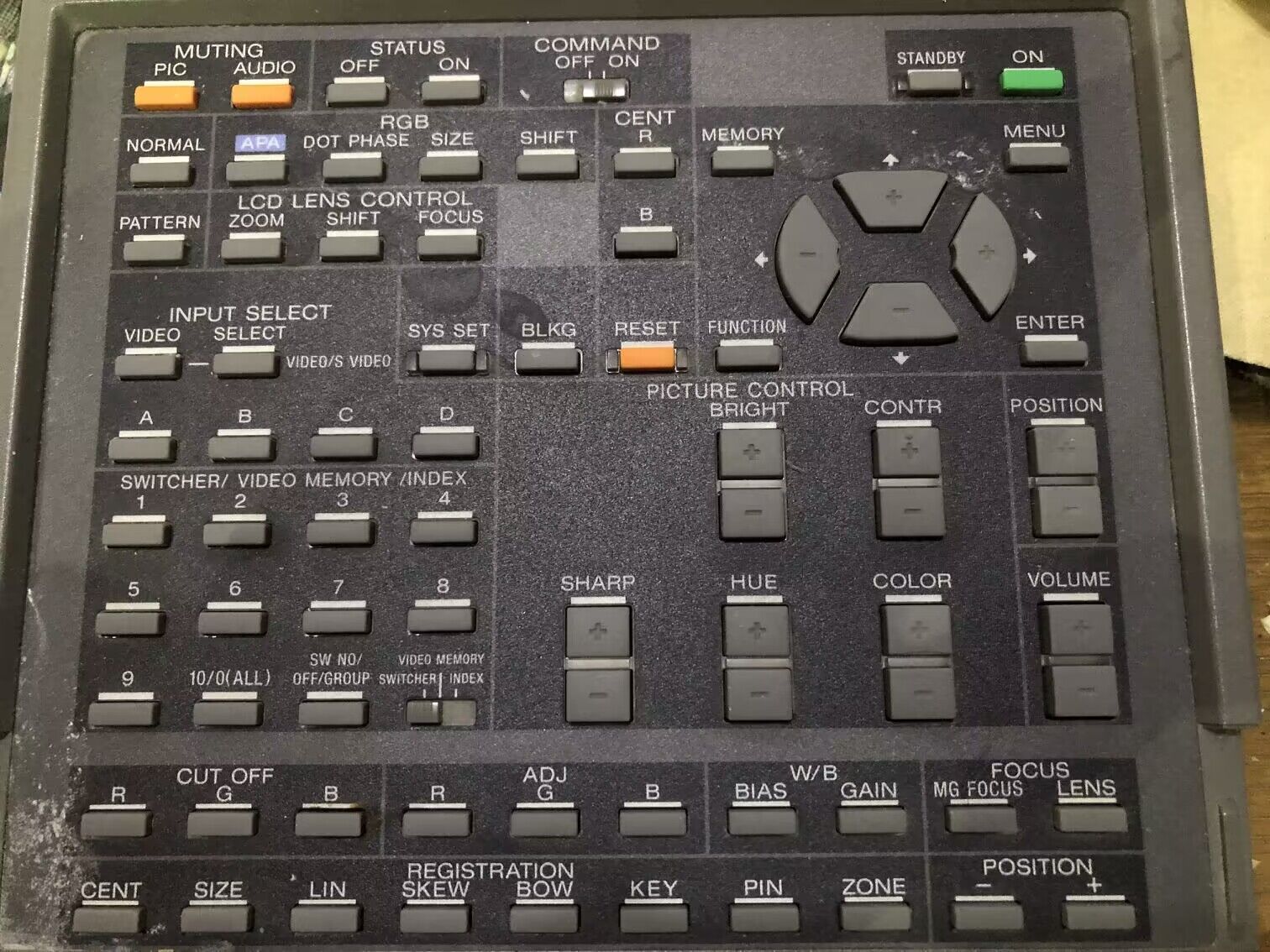
This is my Model RM-PJ1001 Remote
| Description: |
|
| Filesize: |
308.38 KB |
| Viewed: |
4226 Time(s) |
|
|
|
| Back to top |
|
|
bluemoonhu
Joined: 16 Feb 2021
Posts: 259
|
| Posted: Tue Jan 10, 2023 2:50 pm Post subject: |
|
|
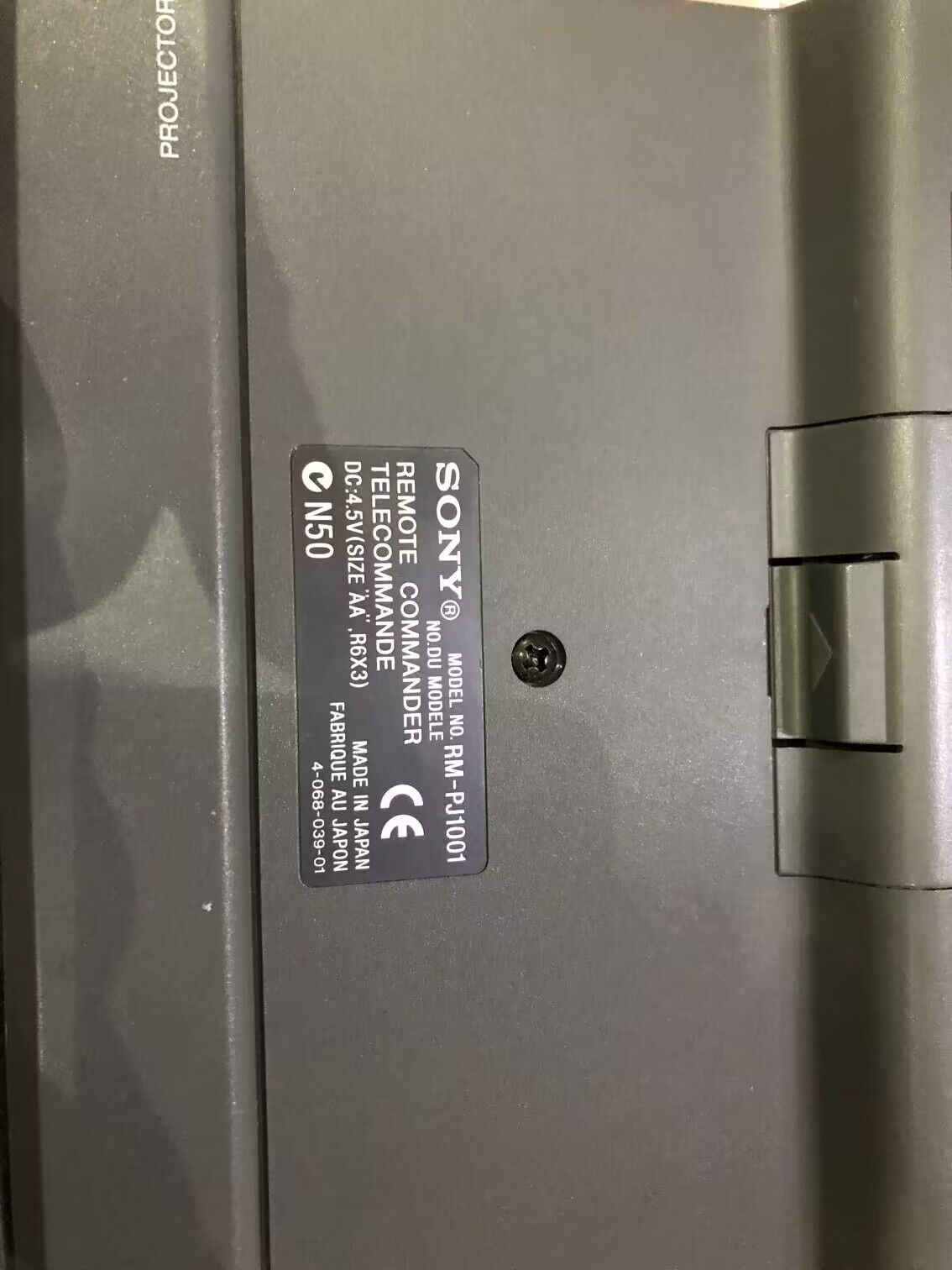
This is my Model RM-PJ1001 Remote of G90
| Description: |
|
| Filesize: |
134.27 KB |
| Viewed: |
4225 Time(s) |
|
|
|
| Back to top |
|
|
bluemoonhu
Joined: 16 Feb 2021
Posts: 259
|
| Posted: Tue Jan 10, 2023 3:01 pm Post subject: |
|
|
|
Make sure "command" is in the ON position
|
|
| Back to top |
|
|
helfriwj
Joined: 29 Oct 2006
Posts: 51
Location: Pittsburgh,PA
|
| Posted: Tue Jan 10, 2023 3:20 pm Post subject: |
|
|
|
That is the same one I have but it does not seem to be controlling my G90. They show that I could use a cable would you know what kind of cable it looks like an audio cable with mini phone jacks
|
|
| Back to top |
|
|
Curt Palme
CRT Tech
Joined: 08 Mar 2006
Posts: 24396
Location: Langley, BC
TV/Projector: All of them!
|
| Posted: Wed Jan 11, 2023 2:54 am Post subject: |
|
|
It is a stereo 3.5mm jack. With the remotes, if the red LED flickers as you hit buttons, then USUALLY the remote is working.
ALso, the DIP switches on the back of the projector on the Ya board need to be in the 0,1 position. If not, chances are the remote will not work. Make sure the batteries are fresh, and that the IR pickups are turned on in the service menu. I don't think you can turn them both off, but I know you can turn one or the other on and off.
Any 12XX or G70/90 remote will work with the G90, at least for the basic commands, so if you know of anyone else with a Sony CRT, you can at least take over your remote to see if it works on another set.
|
|
| Back to top |
|
|
helfriwj
Joined: 29 Oct 2006
Posts: 51
Location: Pittsburgh,PA
|
| Posted: Wed Jan 11, 2023 5:49 pm Post subject: |
|
|
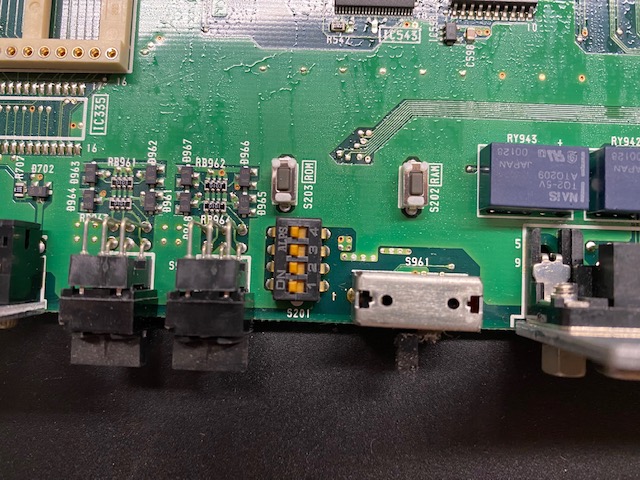
Curt the only dip switches I see on the YA are shown in the picture what do you mean in the 0,1 position?
| Description: |
|
| Filesize: |
127.83 KB |
| Viewed: |
4177 Time(s) |
|
|
|
| Back to top |
|
|
Curt Palme
CRT Tech
Joined: 08 Mar 2006
Posts: 24396
Location: Langley, BC
TV/Projector: All of them!
|
| Posted: Wed Jan 11, 2023 9:57 pm Post subject: |
|
|
|
No, sorry the rotary switches to the top left of the picture, poking through the back panel of the YA board. Make sure they are set to 0,1.
|
|
| Back to top |
|
|
helfriwj
Joined: 29 Oct 2006
Posts: 51
Location: Pittsburgh,PA
|
| Posted: Thu Jan 12, 2023 1:28 am Post subject: |
|
|
|
Well that fixed my remote problem it was set at 00
|
|
| Back to top |
|
|
helfriwj
Joined: 29 Oct 2006
Posts: 51
Location: Pittsburgh,PA
|
| Posted: Thu Jan 12, 2023 2:15 am Post subject: |
|
|
|
also found out that the remote for the projector is not outputting infrared any thoughts the red light flashes but no infrared
|
|
| Back to top |
|
|
bluemoonhu
Joined: 16 Feb 2021
Posts: 259
|
| Posted: Fri Jan 13, 2023 7:21 am Post subject: |
|
|
|
Pressing any key on the remote will emit infrared light from a small circular window on the top of the remote . If not, it means that the remotel is faulty.
|
|
| Back to top |
|
|
Curt Palme
CRT Tech
Joined: 08 Mar 2006
Posts: 24396
Location: Langley, BC
TV/Projector: All of them!
|
| Posted: Sat Jan 14, 2023 3:57 pm Post subject: |
|
|
|
There may be a cracked solder joint at the infrared LED, that can happen if the remote is dropped too many times. Otherwise, see if you can find another remote on eBay.
|
|
| Back to top |
|
|
garyfritz

Joined: 08 Apr 2006
Posts: 12088
Location: Fort Collins, CO
|
| Posted: Sun Jan 15, 2023 12:14 am Post subject: |
|
|
|
If you haven't already -- try looking at your remote with your phone camera while you press keys. Phones can see infrared, so that'll tell you for sure if it's not emitting anything.
|
|
| Back to top |
|
|
helfriwj
Joined: 29 Oct 2006
Posts: 51
Location: Pittsburgh,PA
|
| Posted: Sun Jan 15, 2023 1:23 am Post subject: |
|
|
|
Yes I did that and it is not emitting infrared thanks
|
|
| Back to top |
|
|
Curt Palme
CRT Tech
Joined: 08 Mar 2006
Posts: 24396
Location: Langley, BC
TV/Projector: All of them!
|
| Posted: Sun Jan 15, 2023 4:35 pm Post subject: |
|
|
|
Just sure that the camera is activated to show infrared. On the later Iphones, the main camera will not, but the selfie camera will.
|
|
| Back to top |
|
|
helfriwj
Joined: 29 Oct 2006
Posts: 51
Location: Pittsburgh,PA
|
| Posted: Sun Jan 15, 2023 4:39 pm Post subject: |
|
|
|
Yes I checked it out on a working remote thanks
|
|
| Back to top |
|
|
jarseneau

Joined: 06 Nov 2007
Posts: 323
Location: WI
|
| Posted: Sun Nov 26, 2023 12:41 am Post subject: |
|
|
You could check the 3.5mm jack on the front of the remote. I think the IR is disabled when you use the jack to use a cord to connect to the pj. It could be that the prong is bent inside as if it is plugged in.
_________________
Jerry
|
|
| Back to top |
|
|
|
|





