| Author |
Message |
massimo
Joined: 25 Jan 2022
Posts: 15
|
|
| Back to top |
|
 |
Curt Palme
CRT Tech
Joined: 08 Mar 2006
Posts: 24396
Location: Langley, BC
TV/Projector: All of them!
|
|
| Back to top |
|
|
AnalogRocks
Forum Moderator

Joined: 08 Mar 2006
Posts: 26706
Location: Toronto, Ontario, Canada
TV/Projector: Sony 1252Q, AMPRO 4000G
|
| Posted: Wed Jan 26, 2022 1:13 am Post subject: |
|
|
Which model firestick do you have? Can it be set to 720P or 1080i video? 1080P is to much resolution for the ECP projector to handle
_________________
Tech support for nothing
CRT.
HD done right!
|
|
| Back to top |
|
|
kal
Forum Administrator

Joined: 06 Mar 2006
Posts: 18114
Location: Ottawa, Canada
TV/Projector: JVC DLA-NZ7
|
|
| Back to top |
|
|
massimo
Joined: 25 Jan 2022
Posts: 15
|
| Posted: Wed Jan 26, 2022 8:30 pm Post subject: |
|
|
hi guys, thank you so much for the replies!
to answer all:
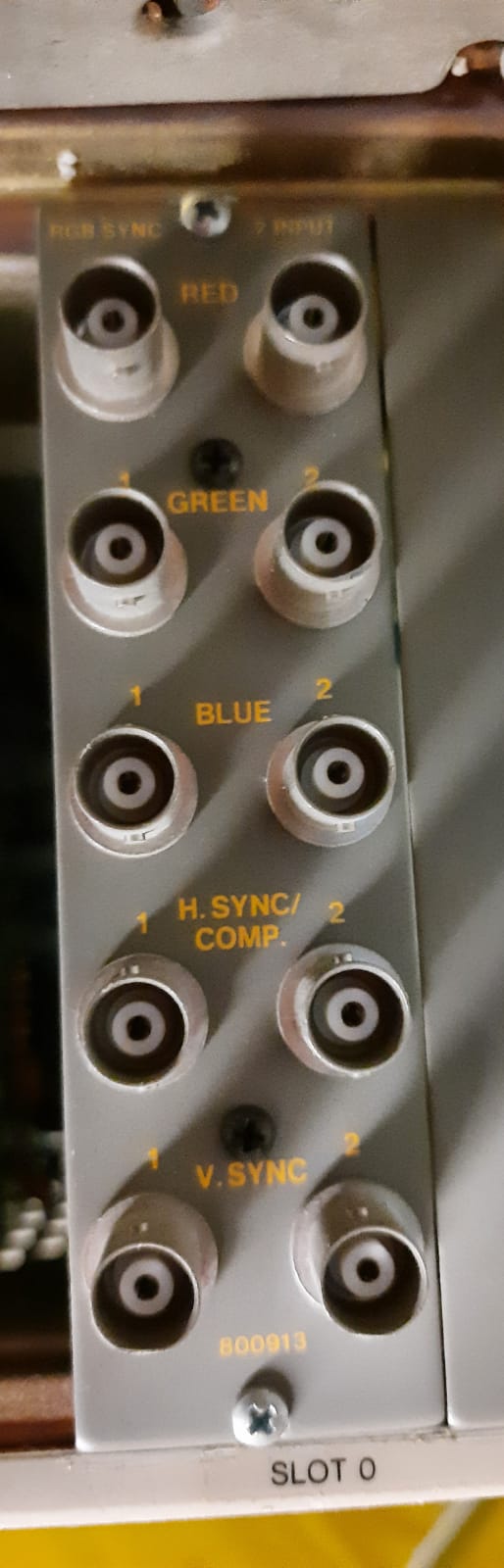
Curt: yes, I have the card with 2 RGBHV inputs, more precisely it is the "rgb sync 2 input module".
but reading that card from the manual should also be able to accept synchronism on Y .. am I wrong?
AnalogRocks: it is one of the first series, it can be set with these resolutions:
720p 50hz
720p 60hz
1080p 50hz
1080p 60hz
premise, I have tried all the resolutions but nothing changes ...
kal: sorry and sorry who will tie .. but can you explain to me in amateur terms what changes from 1080p to 1080i? thanks, sorry again
having said that, thank you again and look forward to hearing from you, hello everyone! 
|
|
| Back to top |
|
|
kal
Forum Administrator
Joined: 06 Mar 2006
Posts: 18114
Location: Ottawa, Canada
TV/Projector: JVC DLA-NZ7
|
| Posted: Wed Jan 26, 2022 8:50 pm Post subject: |
|
|
| massimo wrote: | | kal: sorry and sorry who will tie .. but can you explain to me in amateur terms what changes from 1080p to 1080i? thanks, sorry again |
1080p is progressive: The image is painted in a single pass. 1080i is interlaced and requires two passes to paint and therefore half the bandwidth and half the vertical sync rate. Your projector is bandwidth limited and can't sync to 1080p to begin with. It can sync to 720p but it's harder on the electronics than 1080i. For comparison sake, 1080i uses the same bandwidth and vertical sync rate as 540p. The lower the bandwidth and sync rate the easier it is on the electronics, and therefore the sharper the image is as it has more time to speed up/slow down correctly.
The only downside to interlaced signals like 1080i is that in fast motion it may not be as clear. In today's 100% digital world 1080i has pretty much disappeared as 1080p isn't as hard to do in the digital domain as it was in analog. For this reason you'll rarely see devices (like a Firestick) that offers 1080i output. Nobody uses it.
This is pretty high level. For more, google "1080p vs 1080i" for pages and pages of info. 
More here too: http://www.curtpalme.com/CRTPrimer_14.shtm
Kal
_________________

Support our site by using our affiliate links. We thank you!
My basement/HT/bar/brewery build 2.0
|
|
| Back to top |
|
|
Curt Palme
CRT Tech
Joined: 08 Mar 2006
Posts: 24396
Location: Langley, BC
TV/Projector: All of them!
|
| Posted: Thu Jan 27, 2022 3:21 am Post subject: |
|
|
| massimo wrote: | hi guys, thank you so much for the replies!
to answer all:
Curt: yes, I have the card with 2 RGBHV inputs, more precisely it is the "rgb sync 2 input module".
but reading that card from the manual should also be able to accept synchronism on Y .. am I wrong?
AnalogRocks: it is one of the first series, it can be set with these resolutions:
720p 50hz
720p 60hz
1080p 50hz
1080p 60hz
premise, I have tried all the resolutions but nothing changes ...
kal: sorry and sorry who will tie .. but can you explain to me in amateur terms what changes from 1080p to 1080i? thanks, sorry again
having said that, thank you again and look forward to hearing from you, hello everyone! |
Yes, but a component signal is not equal to RGBHV. See the FAQ that Kal linked to above. Read that whole thing. 
|
|
| Back to top |
|
|
kal
Forum Administrator
Joined: 06 Mar 2006
Posts: 18114
Location: Ottawa, Canada
TV/Projector: JVC DLA-NZ7
|
| Posted: Thu Jan 27, 2022 1:53 pm Post subject: Re: crt projector connection in 2022! help me! |
|
|
| massimo wrote: | | i would like to connect my electrohome ecp 4101 which only has composite analog video inputs ... |
I missed this part.
Are you sure your projector only has composite inputs? That's a one wire signal that is limited to 480i.
There's usually RGBHV inputs as well that support higher resolutions.
See your manual.
Kal
_________________
Support our site by using our affiliate links. We thank you!
My basement/HT/bar/brewery build 2.0
|
|
| Back to top |
|
|
massimo
Joined: 25 Jan 2022
Posts: 15
|
| Posted: Fri Jan 28, 2022 8:56 pm Post subject: |
|
|
hi guys, thanks as always for the answers!
then, I finally understood the difference between 1080p and 1080i
having said that, I would need to connect this video projector to a video source such as firestick tv in order to watch movies from netflix and prime videos,
but mine only supports 1080p, what do you recommend?
having said that, I'll list what my setup is now:
video source: fire stick tv
converter:
hdmi to ypbpr
video input:
ecp 4101 projector
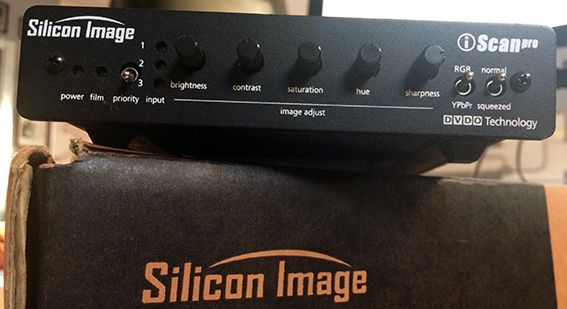
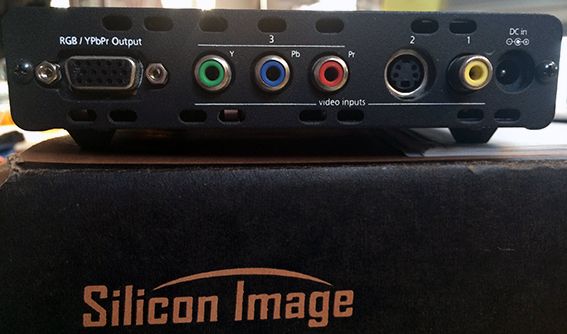
p.s. I also have a silicon image line multiplier (scanpro)
which has composite inputs on the back, but connecting the composite video to the silicon image this does not detect the video source (the silicon image works, I tested it with a dvd player)
having said that, and having these components available, what do you advise me to do? how can i connect the devices together? what should i buy to make it all work? thank you !
| Description: |
| this is the line multiplier, front photo |
|
| Filesize: |
31.11 KB |
| Viewed: |
7212 Time(s) |
|
| Description: |
| this is the multiplier of lines, photo inputs |
|
| Filesize: |
31.05 KB |
| Viewed: |
7212 Time(s) |
|
| Description: |
| this is the input board of the projector |
|
| Filesize: |
72.16 KB |
| Viewed: |
7212 Time(s) |
|
|
|
| Back to top |
|
|
kal
Forum Administrator
Joined: 06 Mar 2006
Posts: 18114
Location: Ottawa, Canada
TV/Projector: JVC DLA-NZ7
|
|
| Back to top |
|
|
massimo
Joined: 25 Jan 2022
Posts: 15
|
| Posted: Fri Jan 28, 2022 10:40 pm Post subject: |
|
|
ok, I have to give you my heartfelt congratulations for the site, it is really very detailed and updated!
p.s. I had not seen there were other pages in the link ... sorry
however, I have read everything and I have understood the great differences that exist between the various signals.
doing a report, I have a firetv that I can turn down to 720p and a converter from hdmi to component. so far everything right!
to be able to switch from component to rgbhv which scaler / transcoder do you recommend?
I should have figured out more or less everything in this round ... right? thank you so much guys !
sorry for the patience
|
|
| Back to top |
|
|
kal
Forum Administrator
Joined: 06 Mar 2006
Posts: 18114
Location: Ottawa, Canada
TV/Projector: JVC DLA-NZ7
|
| Posted: Sat Jan 29, 2022 2:54 pm Post subject: |
|
|
| massimo wrote: | | to be able to switch from component to rgbhv which scaler / transcoder do you recommend? |
I believe your silicone image scaler/transcoder already does this. It has component input and RGBHV output (as long as you set it to RGB output).
But why use it at all? Does your HDMI converter output RGB? Just skip the silicone image.
Kal
_________________
Support our site by using our affiliate links. We thank you!
My basement/HT/bar/brewery build 2.0
|
|
| Back to top |
|
|
garyfritz

Joined: 08 Apr 2006
Posts: 12088
Location: Fort Collins, CO
|
| Posted: Sat Jan 29, 2022 7:52 pm Post subject: |
|
|
|
Do you have an HDMI-capable receiver? You need something to handle the audio from the HDMI signal. My receiver is pre-HDMI, so I had to buy a little $25 box to extract the audio from the HDMI stream.
|
|
| Back to top |
|
|
AnalogRocks
Forum Moderator
Joined: 08 Mar 2006
Posts: 26706
Location: Toronto, Ontario, Canada
TV/Projector: Sony 1252Q, AMPRO 4000G
|
| Posted: Sun Jan 30, 2022 3:29 am Post subject: |
|
|
That Silicon Image is a line doubler. He needs a YPbPr to RGBHV converter. Extron something or other I'd imagine or a Kramer.
Extron CVC 300 Transcoder will do it.
So will an Extron DVS 304. I've owned many of those.
_________________
Tech support for nothing
CRT.
HD done right!
|
|
| Back to top |
|
|
kal
Forum Administrator
Joined: 06 Mar 2006
Posts: 18114
Location: Ottawa, Canada
TV/Projector: JVC DLA-NZ7
|
| Posted: Sun Jan 30, 2022 3:53 pm Post subject: |
|
|
| AnalogRocks wrote: | | That Silicon Image is a line doubler. He needs a YPbPr to RGBHV converter. Extron something or other I'd imagine or a Kramer. |
The Silicon iScanPro offers YPbPr input and RGBHV (or YPbPr) output. There's a switch on the front to choose. So it's also a YPbPr to RGBHV converter. But you're right that the output is limited 480p or 576p only. So you can't use it as a YPbPr to RGBHV converter if you're doing 720p. Good catch.
Kal
_________________
Support our site by using our affiliate links. We thank you!
My basement/HT/bar/brewery build 2.0
|
|
| Back to top |
|
|
AnalogRocks
Forum Moderator
Joined: 08 Mar 2006
Posts: 26706
Location: Toronto, Ontario, Canada
TV/Projector: Sony 1252Q, AMPRO 4000G
|
| Posted: Sun Jan 30, 2022 7:33 pm Post subject: |
|
|
| kal wrote: | | AnalogRocks wrote: | | That Silicon Image is a line doubler. He needs a YPbPr to RGBHV converter. Extron something or other I'd imagine or a Kramer. |
The Silicon iScanPro offers YPbPr input and RGBHV (or YPbPr) output. There's a switch on the front to choose. So it's also a YPbPr to RGBHV converter. But you're right that the output is limited 480p or 576p only. So you can't use it as a YPbPr to RGBHV converter if you're doing 720p. Good catch.
Kal |
You are correct. It will take YPbPr at 480i or 576i interlaced and transcode to 480/576 Progressive. The picture out of this unit is quite nice. I first got a demo in 2001(ish?) at the local A/V store on a 9PG projector from Laserdisk. At the time the US/CDN dollar was around a 45% exchange rate and I believe this landed in Toronto came in around $1100-1200 bucks.
I remember the ooo's and ahhh's as we watched the Laser Disk through this. We did before/after comparisons and concluded this was a great little device. Years later someone GAVE me one of these and it ended up paired with a 1251 projector in my buddies basement running DVD through it. He loved it. Until the flood...
So YES it will conver Component to RGBHV but as you said Kal NOT at 720P. That's why I posted the Extron numbers.
_________________
Tech support for nothing
CRT.
HD done right!
|
|
| Back to top |
|
|
massimo
Joined: 25 Jan 2022
Posts: 15
|
| Posted: Sat Feb 05, 2022 8:17 am Post subject: |
|
|
Hi guys! thank you so much for the replies! sorry if I've been absent these days, too much work ..
anyway, to answer all:
my siliconimage is too limited in input for that i can't use it.
question, is there a line multiplier like mine that however supports 720p input with an RGBHV output?
can those mentioned by AnalogRocks do this?
I have to buy a converter that solves the problem, and I would like to get a good quality one .. for that I turn to you
thank you
|
|
| Back to top |
|
|
massimo
Joined: 25 Jan 2022
Posts: 15
|
| Posted: Sat Feb 05, 2022 8:26 am Post subject: |
|
|
guys, which one of these two do you recommend?
https://ebay.us/mquZiz
https://ebay.us/8EwGKS
now I ask an impossible thing:
there are no professional converters like these in the link that go into HDMI and go out in RGBHV?
|
|
| Back to top |
|
|
AnalogRocks
Forum Moderator
Joined: 08 Mar 2006
Posts: 26706
Location: Toronto, Ontario, Canada
TV/Projector: Sony 1252Q, AMPRO 4000G
|
| Posted: Sat Feb 05, 2022 6:27 pm Post subject: |
|
|
Both those scalers are the same the second one just adds analog audio switching on pin connectors.
There are no main stream scalers that take HDMI in and RGBHV out. You need the converter in front of the scaler first.
_________________
Tech support for nothing
CRT.
HD done right!
|
|
| Back to top |
|
|
massimo
Joined: 25 Jan 2022
Posts: 15
|
|
| Back to top |
|
|
|
|




