| Author |
Message |
super-digger
Joined: 23 Nov 2008
Posts: 19
Location: Germany - Delmenhorst
|
| Posted: Wed Jan 27, 2016 6:14 pm Post subject: centering Problem with XG 135 |
|
|
Hi,
Anyone here who can help on a Problem with a NEC XG 135?
The Problem is that the Grid and the picture is not in center.
We have try to make a perfect Hardware Setup and the Offset is perfect but it is not posible to slide the vertical Testgrid and picture to the Center.
So,where is the mistake that we make.
Best wishes from Germany
_________________
there are no Proplems , only challenges
|
|
| Back to top |
|
 |
gjaky

Joined: 05 Jun 2010
Posts: 2802
Location: Budapest, Hungary
|
| Posted: Wed Jan 27, 2016 6:50 pm Post subject: |
|
|
Have you been in the service menu area? Raster centering is only accessible from the serivice menu (set up a passcode), and is set fully digitally unlike prior NEC projectors.
The proper method for centering: Set the brightnes so the raster light up on the tube face (leave all blankings full open) center the raster on each tube against the tube edges (looking directly into the tubes, you should lower the contrast to not get blind  ). ).
Once the raster is centered on the tube, center the actual image with the "position" menu, then use "Phase" to center the test pattern on the center of your actual image. This is an important step because all other convergence adjustment referenced to the center of the cross hatch pattern.
_________________
projectors in the past : NEC 6-9PG xtra, Electrohome Marquee 6-7500, NEC XG 1351 LC ( with super modified Electrohome VNB neckboard !!!)
current: VDC Marquee 9500LC
The MOD: VNB-DB, VIM-DB
|
|
| Back to top |
|
|
Curt Palme
CRT Tech
Joined: 08 Mar 2006
Posts: 24396
Location: Langley, BC
TV/Projector: All of them!
|
| Posted: Wed Jan 27, 2016 7:05 pm Post subject: |
|
|
^excellent advice! 
|
|
| Back to top |
|
|
super-digger
Joined: 23 Nov 2008
Posts: 19
Location: Germany - Delmenhorst
|
| Posted: Tue Feb 02, 2016 12:26 pm Post subject: |
|
|
Thanks for your help,
Today I wil try to make the setup complete.
It is for a friend my own projector is a G70 from Sony.
The service menue can be entered after setting password, or generally?
Which menu point is for the sliding the cross
_________________
there are no Proplems , only challenges
|
|
| Back to top |
|
|
gjaky
Joined: 05 Jun 2010
Posts: 2802
Location: Budapest, Hungary
|
| Posted: Tue Feb 02, 2016 4:26 pm Post subject: |
|
|
You have to setup a password, with that you'll have access to the service menu, BTW 3151 is the master code, that do it too.
The "Phase" button on the remote does the test pattern centering, you'll also see a hump on the horizontal line that is the center of the "point convergence", that hump can be moved by pressing CTL + arrows (only left / right)
_________________
projectors in the past : NEC 6-9PG xtra, Electrohome Marquee 6-7500, NEC XG 1351 LC ( with super modified Electrohome VNB neckboard !!!)
current: VDC Marquee 9500LC
The MOD: VNB-DB, VIM-DB
|
|
| Back to top |
|
|
Jeremy112

Joined: 28 Sep 2006
Posts: 2649
Location: Fond du Lac, WI
|
| Posted: Tue Feb 02, 2016 4:38 pm Post subject: |
|
|
I just use the 3151 as gjaky mentioned, never bothered to set a password up (too hard to remember all the damn things anyway, why would I want to remember a different one for a projector?  ) )
Great advice gjaky  The XG is a lean machine The XG is a lean machine 
_________________
When I'm asking for a Model number, that doesn't mean I'm asking for a nude photo with your number on it
|
|
| Back to top |
|
|
gjaky
Joined: 05 Jun 2010
Posts: 2802
Location: Budapest, Hungary
|
| Posted: Tue Feb 02, 2016 4:49 pm Post subject: |
|
|
| Jeremy112 wrote: | I just use the 3151 as gjaky mentioned, never bothered to set a password up (too hard to remember all the damn things anyway, why would I want to remember a different one for a projector? )
|
I use also the 3151 exclusively, but if the passcode is disabled you can't access service menu at all, so in the end you'll be forced to set up a password and it can't be 3151
_________________
projectors in the past : NEC 6-9PG xtra, Electrohome Marquee 6-7500, NEC XG 1351 LC ( with super modified Electrohome VNB neckboard !!!)
current: VDC Marquee 9500LC
The MOD: VNB-DB, VIM-DB
|
|
| Back to top |
|
|
Jeremy112
Joined: 28 Sep 2006
Posts: 2649
Location: Fond du Lac, WI
|
| Posted: Tue Feb 02, 2016 6:10 pm Post subject: |
|
|
| gjaky wrote: |
I use also the 3151 exclusively, but if the passcode is disabled you can't access service menu at all, so in the end you'll be forced to set up a password and it can't be 3151 |
Good point
_________________
When I'm asking for a Model number, that doesn't mean I'm asking for a nude photo with your number on it
|
|
| Back to top |
|
|
super-digger
Joined: 23 Nov 2008
Posts: 19
Location: Germany - Delmenhorst
|
| Posted: Sat Feb 20, 2016 5:30 pm Post subject: |
|
|
We have just try to complete the Settings.
Now we have activate the HTMI V1.3 Card an the picture with the Card is Bad !
The raisin of the Gama has no Effekt
The Probleme with the centring is a Little bit better (course Center is up to 100 percent).
_________________
there are no Proplems , only challenges
|
|
| Back to top |
|
|
super-digger
Joined: 23 Nov 2008
Posts: 19
Location: Germany - Delmenhorst
|
| Posted: Sat Feb 20, 2016 5:34 pm Post subject: Problem with nec xg |
|
|
Some photos of the Projektor
_________________
there are no Proplems , only challenges
|
|
| Back to top |
|
|
gjaky
Joined: 05 Jun 2010
Posts: 2802
Location: Budapest, Hungary
|
|
| Back to top |
|
|
super-digger
Joined: 23 Nov 2008
Posts: 19
Location: Germany - Delmenhorst
|
| Posted: Thu Feb 25, 2016 7:23 am Post subject: |
|
|
Second try!
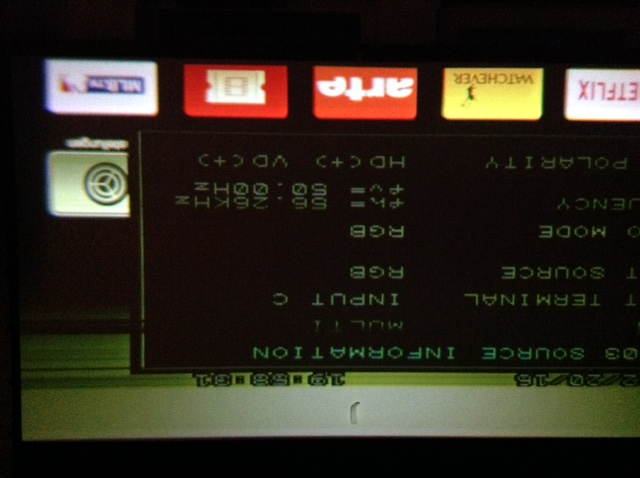
We have try to change the Gama and Contrast on the HDMI Card with the Remote and the Little screws, but with no Effekt.
| Description: |
|
| Filesize: |
95.27 KB |
| Viewed: |
6391 Time(s) |
|
_________________
there are no Proplems , only challenges
|
|
| Back to top |
|
|
|
|




