| Author |
Message |
paterlucas
Joined: 20 Jan 2015
Posts: 7
|
| Posted: Fri Sep 11, 2015 7:48 am Post subject: Ampro 3600 left edge missing |
|
|
Hi all,
Some time ago I've bought an Ampro 3600 pj,
It took a while but she's now hanging proudly in my living room!
(will post some pics later  ) )
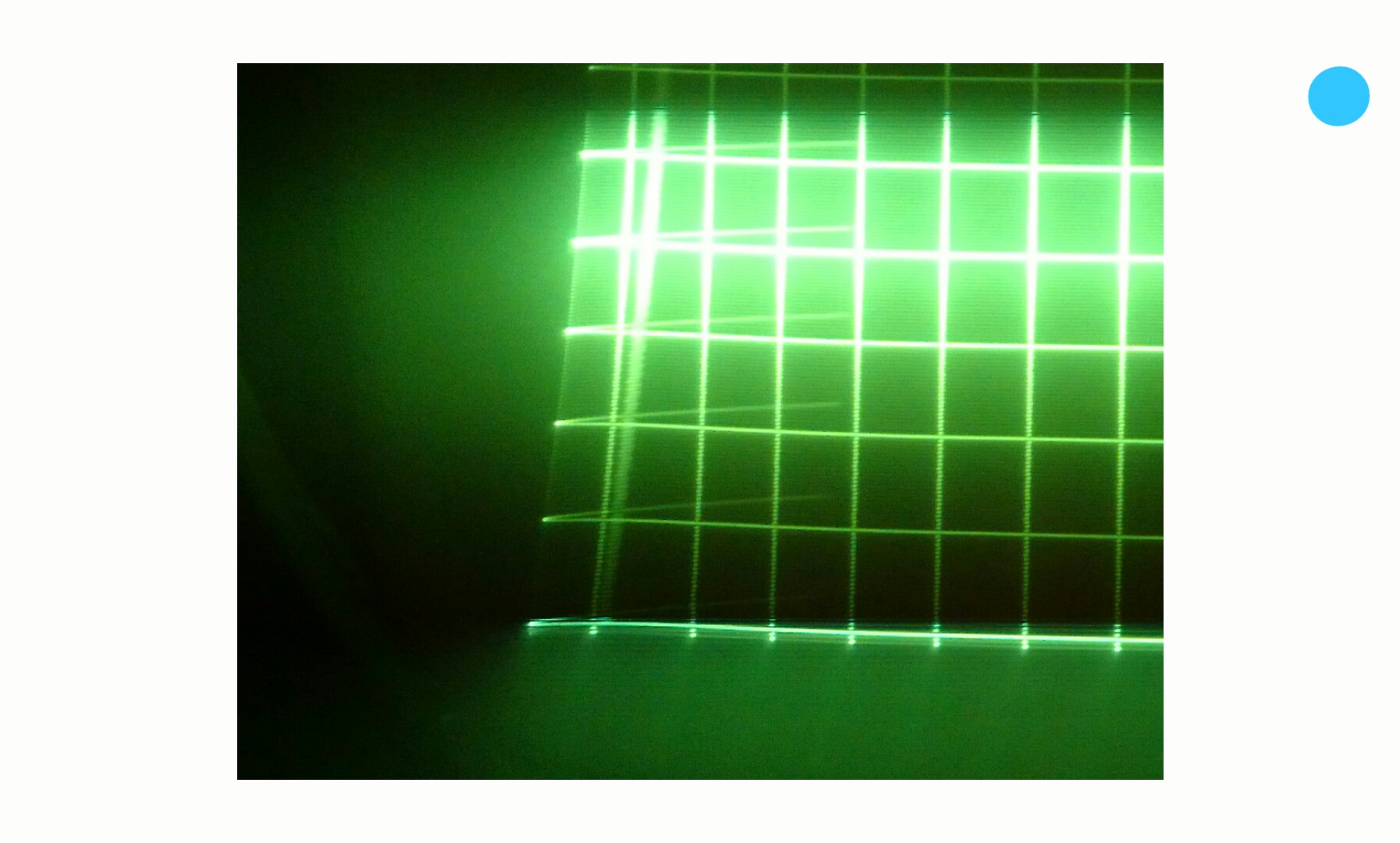
But there is a problem: during setup the left side of my image seems to be missing. The crosshair seems to be off to the left too.
While setting the left edge I can set the edge to max but i am still unable to see it.
Does anyone know what could be the cause of this?
Thanks!
Lucas
|
|
| Back to top |
|
 |
Curt Palme
CRT Tech
Joined: 08 Mar 2006
Posts: 24396
Location: Langley, BC
TV/Projector: All of them!
|
| Posted: Fri Sep 11, 2015 1:33 pm Post subject: |
|
|
It sounds like your blanking may be set too high. Do you have the manual for the set? If not, it's on the main site.
http://www.curtpalme.com/Ampro3600.shtm
|
|
| Back to top |
|
|
paterlucas
Joined: 20 Jan 2015
Posts: 7
|
| Posted: Fri Sep 11, 2015 3:06 pm Post subject: |
|
|
I have tried to lower the left blanking but this doesnt solve the problem.
What i had forgotten to mention is that it seems as if the image bounces off the side of the tube face of all three tubes.
I do have the manuals for the pj, read it multiple times but I cannot find any solution.
| Description: |
|
| Filesize: |
197.9 KB |
| Viewed: |
3869 Time(s) |
|
|
|
| Back to top |
|
|
Curt Palme
CRT Tech
Joined: 08 Mar 2006
Posts: 24396
Location: Langley, BC
TV/Projector: All of them!
|
| Posted: Fri Sep 11, 2015 3:50 pm Post subject: |
|
|
OK, the wraparound of the test pattern is normal. Use the blanking to eliminate that.
What source are you using, what resolution, and what processor, if any?
|
|
| Back to top |
|
|
paterlucas
Joined: 20 Jan 2015
Posts: 7
|
| Posted: Sun Sep 13, 2015 7:28 pm Post subject: |
|
|
|
The Pj is connected to a pc set at 720p
|
|
| Back to top |
|
|
Luuk neele
Joined: 04 Mar 2015
Posts: 186
Location: Wijk bij duurstede, the Netherlands.
|
| Posted: Mon Sep 14, 2015 1:26 pm Post subject: |
|
|
so you're the one who bought my old ampro  i remember loading it in your car. i remember loading it in your car.
i've also had the wraparound, but that can be fixed by blanking.
theres also several pots on the back you can use to adjust the red and blue, i thought it was for compensation for
convergence in relation to green. it will also change the relative size.
did you manage to fix the flickering on the top when on high contrast?
|
|
| Back to top |
|
|
paterlucas
Joined: 20 Jan 2015
Posts: 7
|
| Posted: Thu Sep 17, 2015 1:43 pm Post subject: |
|
|
Yep thats me, took some time to get the projection wall ready and hang bolt it to the ceiling.
For now I am running 720p so i havent experienced any flickering.
I am able to get a decent picture but the left side is way off.
While setting the left edge and the left key/pin theres no change at all.
Could this be caused and changed in the powerstrip settings?
|
|
| Back to top |
|
|
Luuk neele
Joined: 04 Mar 2015
Posts: 186
Location: Wijk bij duurstede, the Netherlands.
|
| Posted: Thu Sep 17, 2015 1:50 pm Post subject: |
|
|
the left side can be shifted with powerstrip, i have not adjusted any internals though.
when i used it it was also slightly off, but i managed to correct that in powerstrip.
you can also use the h shift to shift the image on the raster.
|
|
| Back to top |
|
|
Luuk neele
Joined: 04 Mar 2015
Posts: 186
Location: Wijk bij duurstede, the Netherlands.
|
| Posted: Thu Sep 17, 2015 1:51 pm Post subject: |
|
|
|
did you manage to fix the bowing on the test screens? i had a hard time fixing the geometry.
|
|
| Back to top |
|
|
paterlucas
Joined: 20 Jan 2015
Posts: 7
|
| Posted: Thu Sep 17, 2015 2:12 pm Post subject: |
|
|
The test screens dont show any bowing, only problem I had was a falling playstation battery  and that stupid left edge.. and that stupid left edge..
Seems dat my onboard video doesn't like powerstrip.
Have to find money to upgrade my pc
|
|
| Back to top |
|
|
Luuk neele
Joined: 04 Mar 2015
Posts: 186
Location: Wijk bij duurstede, the Netherlands.
|
| Posted: Thu Sep 17, 2015 2:36 pm Post subject: |
|
|
Get a Cheap AMD card.
I throught i fixed the battery with glue.
Dit it Come off?
|
|
| Back to top |
|
|
paterlucas
Joined: 20 Jan 2015
Posts: 7
|
| Posted: Thu Sep 17, 2015 2:54 pm Post subject: |
|
|
After hanging the pj to the the ceiling I had to open it up an i was hit by the battery.
Got it soldered back up and used tape to secure it.
I do have a good graphics card but no powersupply to fire it up, it needs more power.
|
|
| Back to top |
|
|
nombz

Joined: 09 Mar 2006
Posts: 119
Location: Stockholm, Sweden
|
| Posted: Wed Sep 23, 2015 4:43 pm Post subject: |
|
|
| paterlucas wrote: | The test screens dont show any bowing, only problem I had was a falling playstation battery and that stupid left edge..
Seems dat my onboard video doesn't like powerstrip.
Have to find money to upgrade my pc |
Since powerstrip stopped updated YEARS ago and it worked pretty badly for me (a bit more advanced setup PCM HDMI in parallell with VGA) I found something new. This : http://www.monitortests.com/forum/Thread-Custom-Resolution-Utility-CRU
_________________
BarcoGraphics 1208s/2 and BarcoGraphics 1209s/E
|
|
| Back to top |
|
|
|
|





