| Author |
Message |
Corleone88
Joined: 09 Dec 2006
Posts: 474
Location: France
|
| Posted: Tue Oct 15, 2013 9:07 am Post subject: Gamma adjustment |
|
|
Hello,
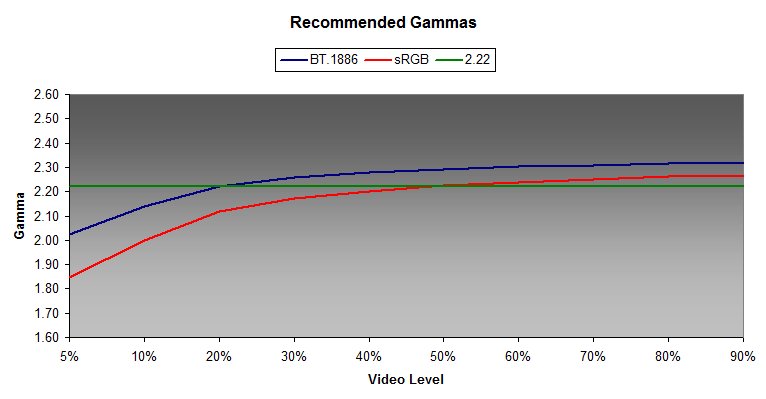
I have a BG808 + OPPO 103 + Lumagen XD + Darbee. After calibrating (Chromapure + Display 3 pro), I am happy with the greyscale and colours but not with the gamma (picture is too dark in low light) even if the theoritical results are ok : 2.22 almost everywhere in the greyscale. I tried to adjust the gamma factor on the XD (ouput->CMS->gamma factor), but if I lower it (0.85), I have to reduce the brightness of the Barco in order to get correct black with the black bars flashing pattern.
And I am not sure this is the right thing to do.
Basically, I have no idea on how to setup up the gamma correctly. I don't really know where to start and I don't know if there are patterns that I can use to set it up correctly. My only reference is the picture on my Pioneer Kuro which I think gives a great picture in low light but it is very subjective.
Thanks for your help
|
|
| Back to top |
|
 |
Nashou66

Joined: 12 Jan 2007
Posts: 16171
Location: West Seneca NY
|
|
| Back to top |
|
|
CIR Engineering

Joined: 25 Aug 2008
Posts: 4269
Location: Chicago USA & Berlin Germany
|
| Posted: Tue Oct 15, 2013 2:23 pm Post subject: |
|
|
When you get the hang of things, you can use the internal test patterns in the Lumagen along with your software to adjust the grayscale and gamma manually. This will yield much better results.
The only test patterns you need are the Lumgen black bars contrast pattern and than the white and gray widows.
craigr
_________________
JETI 1501-HiRes 2nm Spectroradiometer
JETI 1211 Spectroradiometer
Photo Research PR-650 Spectroradiometer
Klein K10-A Colorimeter
Murideo Fresco SIX-G HDMI 2.x Multimedia Generator
Murideo Fresco SIX-A HDMI 2.x Analyzer
Light Illusion ColourSpace XPT Color Calibration Software
Light Illusion LightSpace XPT Pro Version 10.x Color Calibration Software
OMARDRIS JVC Software Patch to use K10-A and Jeti with JVC OEM AutoCal Software!
Sencore CR7000 CRT Tube Analyzer / Rejuvenater
Authorized Dealer for Lumagen & just about everything worth buying 
www.CIR-Engineering.com - craigr@cir-engineering.com
Phone: 865-405-6892
|
|
| Back to top |
|
|
Corleone88
Joined: 09 Dec 2006
Posts: 474
Location: France
|
| Posted: Tue Oct 15, 2013 2:31 pm Post subject: |
|
|
| CIR Engineering wrote: | When you get the hang of things, you can use the internal test patterns in the Lumagen along with your software to adjust the grayscale and gamma manually. This will yield much better results.
The only test patterns you need are the Lumgen black bars contrast pattern and than the white and gray widows.
craigr |
I know this pattern. But what I don't know is how bright the black bars should be.
|
|
| Back to top |
|
|
Corleone88
Joined: 09 Dec 2006
Posts: 474
Location: France
|
| Posted: Tue Oct 15, 2013 2:32 pm Post subject: |
|
|
Ok thanks. I will read that carefully 
|
|
| Back to top |
|
|
CIR Engineering
Joined: 25 Aug 2008
Posts: 4269
Location: Chicago USA & Berlin Germany
|
| Posted: Tue Oct 15, 2013 2:37 pm Post subject: |
|
|
The bar in the very center of the screen in the middle of the stair steps is black. The steps to the left of the center bar are blacker than black getting darker in 1 IRE increments. The bars to the right in the steps are above black getting brighter by 1 IRE increments.
There are four wide bars, two on either side of the center step pattern. The dark bar is 2 IRE below black and the brighter bar is 2 IRE above black.
Most of the time on a CRT you will want to just barely be able to make out the thick blacker than black bars. They should not jump off the screen, but if you sit and stare at the pattern you should eventually be able to discern the blacker than black bars... or at least that's a good starting point.
craigr
_________________
JETI 1501-HiRes 2nm Spectroradiometer
JETI 1211 Spectroradiometer
Photo Research PR-650 Spectroradiometer
Klein K10-A Colorimeter
Murideo Fresco SIX-G HDMI 2.x Multimedia Generator
Murideo Fresco SIX-A HDMI 2.x Analyzer
Light Illusion ColourSpace XPT Color Calibration Software
Light Illusion LightSpace XPT Pro Version 10.x Color Calibration Software
OMARDRIS JVC Software Patch to use K10-A and Jeti with JVC OEM AutoCal Software!
Sencore CR7000 CRT Tube Analyzer / Rejuvenater
Authorized Dealer for Lumagen & just about everything worth buying
www.CIR-Engineering.com - craigr@cir-engineering.com
Phone: 865-405-6892
|
|
| Back to top |
|
|
Corleone88
Joined: 09 Dec 2006
Posts: 474
Location: France
|
| Posted: Thu Oct 17, 2013 7:50 am Post subject: |
|
|
| CIR Engineering wrote: | The bar in the very center of the screen in the middle of the stair steps is black. The steps to the left of the center bar are blacker than black getting darker in 1 IRE increments. The bars to the right in the steps are above black getting brighter by 1 IRE increments.
There are four wide bars, two on either side of the center step pattern. The dark bar is 2 IRE below black and the brighter bar is 2 IRE above black.
Most of the time on a CRT you will want to just barely be able to make out the thick blacker than black bars. They should not jump off the screen, but if you sit and stare at the pattern you should eventually be able to discern the blacker than black bars... or at least that's a good starting point.
craigr |
Thanks Craig. My English is not perfect so by "make out the thick blacker than black bars", do you mean "barely see the thick blacker than black bars" ? But I don't understand how, by changing luma values around 5%, I can see a change on blacker than black bars.
|
|
| Back to top |
|
|
CIR Engineering
Joined: 25 Aug 2008
Posts: 4269
Location: Chicago USA & Berlin Germany
|
| Posted: Thu Oct 17, 2013 2:55 pm Post subject: |
|
|
| Corleone88 wrote: | | CIR Engineering wrote: | The bar in the very center of the screen in the middle of the stair steps is black. The steps to the left of the center bar are blacker than black getting darker in 1 IRE increments. The bars to the right in the steps are above black getting brighter by 1 IRE increments.
There are four wide bars, two on either side of the center step pattern. The dark bar is 2 IRE below black and the brighter bar is 2 IRE above black.
Most of the time on a CRT you will want to just barely be able to make out the thick blacker than black bars. They should not jump off the screen, but if you sit and stare at the pattern you should eventually be able to discern the blacker than black bars... or at least that's a good starting point.
craigr |
Thanks Craig. My English is not perfect so by "make out the thick blacker than black bars", do you mean "barely see the thick blacker than black bars" ? But I don't understand how, by changing luma values around 5%, I can see a change on blacker than black bars. |
I am not suggesting that you change luma values around 5%. I am suggesting that you use the test pattern to set the black level on your projector. Make sure the Lumagen CMS is not in use when you set the black level on the projector. Then use the Lumagen after that.
craigr
_________________
JETI 1501-HiRes 2nm Spectroradiometer
JETI 1211 Spectroradiometer
Photo Research PR-650 Spectroradiometer
Klein K10-A Colorimeter
Murideo Fresco SIX-G HDMI 2.x Multimedia Generator
Murideo Fresco SIX-A HDMI 2.x Analyzer
Light Illusion ColourSpace XPT Color Calibration Software
Light Illusion LightSpace XPT Pro Version 10.x Color Calibration Software
OMARDRIS JVC Software Patch to use K10-A and Jeti with JVC OEM AutoCal Software!
Sencore CR7000 CRT Tube Analyzer / Rejuvenater
Authorized Dealer for Lumagen & just about everything worth buying
www.CIR-Engineering.com - craigr@cir-engineering.com
Phone: 865-405-6892
|
|
| Back to top |
|
|
Corleone88
Joined: 09 Dec 2006
Posts: 474
Location: France
|
| Posted: Mon Oct 21, 2013 12:22 pm Post subject: |
|
|
I calibrated my BG 808 this week-end and I am very happy with the picture now.
I followed Craig's advices to setup the black level with the brightness (=55). Then I adjusted the gamma and got a nice 2.2 gamma curve on 11 points. I added an extra point (12-point) on the 2 IRE and increased its value by 1.5 luma to get a nice picture in low light.
I watched Alien BR yesterday to check if everything looked fine. And it did, at least to my eyes
Thanks for your help.
|
|
| Back to top |
|
|
Nashou66
Joined: 12 Jan 2007
Posts: 16171
Location: West Seneca NY
|
|
| Back to top |
|
|
CIR Engineering
Joined: 25 Aug 2008
Posts: 4269
Location: Chicago USA & Berlin Germany
|
| Posted: Mon Oct 21, 2013 1:46 pm Post subject: |
|
|
| Corleone88 wrote: | I calibrated my BG 808 this week-end and I am very happy with the picture now.
I followed Craig's advices to setup the black level with the brightness (=55). Then I adjusted the gamma and got a nice 2.2 gamma curve on 11 points. I added an extra point (12-point) on the 2 IRE and increased its value by 1.5 luma to get a nice picture in low light.
I watched Alien BR yesterday to check if everything looked fine. And it did, at least to my eyes
Thanks for your help. |
Cool 
craigr
_________________
JETI 1501-HiRes 2nm Spectroradiometer
JETI 1211 Spectroradiometer
Photo Research PR-650 Spectroradiometer
Klein K10-A Colorimeter
Murideo Fresco SIX-G HDMI 2.x Multimedia Generator
Murideo Fresco SIX-A HDMI 2.x Analyzer
Light Illusion ColourSpace XPT Color Calibration Software
Light Illusion LightSpace XPT Pro Version 10.x Color Calibration Software
OMARDRIS JVC Software Patch to use K10-A and Jeti with JVC OEM AutoCal Software!
Sencore CR7000 CRT Tube Analyzer / Rejuvenater
Authorized Dealer for Lumagen & just about everything worth buying
www.CIR-Engineering.com - craigr@cir-engineering.com
Phone: 865-405-6892
|
|
| Back to top |
|
|
|
|