| Author |
Message |
joatmon
Joined: 17 Mar 2009
Posts: 127
Location: Ottawa, Ontario
|
| Posted: Wed Jul 31, 2013 3:01 pm Post subject: PG-6100 green alignment has me flustered |
|
|
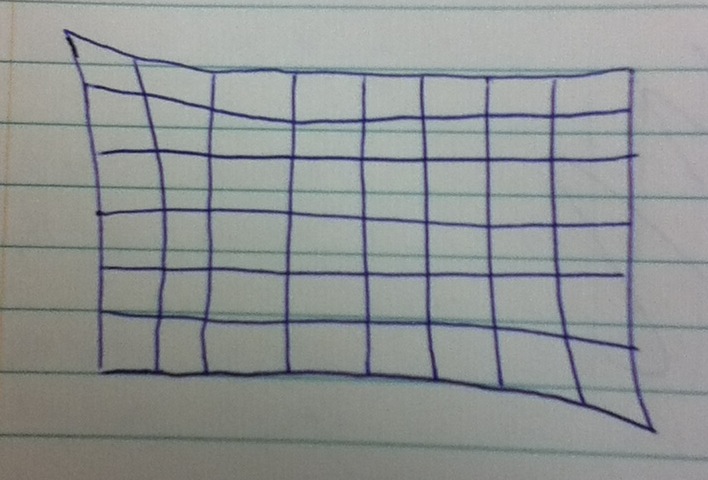
First off, I'm used to a Barco 708/Cine 7 chassis and was given a PG-6100 to play with. I'm having trouble getting the green alignment without reverting to the point controls. From reading the guides here, I'm under the impression I shouldn't be needing the point controls to fix the 'problem' I'm having.
I've drawn an exaggerated example of what the green looks like when I'm trying to align it, and for the life of me, I can't figure out how to dial this out. Without any dynamic alignment adjustments, the red and blue also have the same rough shape.
Any suggestions?
| Description: |
|
| Filesize: |
84 KB |
| Viewed: |
5930 Time(s) |
|
|
|
| Back to top |
|
 |
Curt Palme
CRT Tech
Joined: 08 Mar 2006
Posts: 24396
Location: Langley, BC
TV/Projector: All of them!
|
| Posted: Wed Jul 31, 2013 3:06 pm Post subject: |
|
|
Go through every function and set it to 50%. Don't forget the 'ctrl' 'key and pin functions, which get you into the key and pin linearity. Under normal installation conditions, those are going to be very close or at 50%. if one is at an extreme, in your case it seems like top and bottom key/pin lin functions may be at an extreme, you'll never get it.
hold down the 'ctrl' and then press the key or pin and you'll get to those menus.
|
|
| Back to top |
|
|
joatmon
Joined: 17 Mar 2009
Posts: 127
Location: Ottawa, Ontario
|
| Posted: Wed Jul 31, 2013 3:17 pm Post subject: |
|
|
Everything was centred to 0 (50%?) when I started, confirmed visually with the PC software where it's easy to see. I have about -75% keystone to get initially squared up to the screen, that's the only really big adjustment. I've gone back to everything fully centred about 4 times now and still seem to end up with the same result.
_________________
Entertained by a Runco DTV-940 (aka Barco Cine7/708)
|
|
| Back to top |
|
|
joatmon
Joined: 17 Mar 2009
Posts: 127
Location: Ottawa, Ontario
|
| Posted: Wed Jul 31, 2013 3:21 pm Post subject: |
|
|
When you say 50%.... do you mean centred or do you mean +50%? Just wanted to clarify because the NEC range seems to be -100% to +100%
_________________
Entertained by a Runco DTV-940 (aka Barco Cine7/708)
|
|
| Back to top |
|
|
Curt Palme
CRT Tech
Joined: 08 Mar 2006
Posts: 24396
Location: Langley, BC
TV/Projector: All of them!
|
| Posted: Wed Jul 31, 2013 3:31 pm Post subject: |
|
|
|
Sorry, centered.
|
|
| Back to top |
|
|
gjaky

Joined: 05 Jun 2010
Posts: 2802
Location: Budapest, Hungary
|
| Posted: Wed Jul 31, 2013 5:28 pm Post subject: |
|
|
If the image is still looking strange on the tube with adjustments at midpoint, then check if the convergence plugs (flip up the deflection board to access) are set correctly for the actual projection type, usually this is overlooked by newbie NEC PG owners (know this from first hand  ) )
_________________
projectors in the past : NEC 6-9PG xtra, Electrohome Marquee 6-7500, NEC XG 1351 LC ( with super modified Electrohome VNB neckboard !!!)
current: VDC Marquee 9500LC
The MOD: VNB-DB, VIM-DB
|
|
| Back to top |
|
|
joatmon
Joined: 17 Mar 2009
Posts: 127
Location: Ottawa, Ontario
|
| Posted: Wed Jul 31, 2013 5:32 pm Post subject: |
|
|
| gjaky wrote: | | If the image is still looking strange on the tube with adjustments at midpoint, then check if the convergence plugs (flip up the deflection board to access) are set correctly for the actual projection type, usually this is overlooked by newbie NEC PG owners (know this from first hand ) |
Thanks for the hint. I will try that. The PJ was set for ceiling/front when I received it and I did flip all of those connectors around including the convergence plugs.
|
|
| Back to top |
|
|
joatmon
Joined: 17 Mar 2009
Posts: 127
Location: Ottawa, Ontario
|
| Posted: Thu Aug 01, 2013 2:29 pm Post subject: |
|
|
| joatmon wrote: | | gjaky wrote: | | If the image is still looking strange on the tube with adjustments at midpoint, then check if the convergence plugs (flip up the deflection board to access) are set correctly for the actual projection type, usually this is overlooked by newbie NEC PG owners (know this from first hand ) |
Thanks for the hint. I will try that. The PJ was set for ceiling/front when I received it and I did flip all of those connectors around including the convergence plugs. |
Flipping the convergence connectors only makes it worse, so I had them the right way around at the start. I am able to straighten out the grid but it requires a fair bit of point correction.
|
|
| Back to top |
|
|
Curt Palme
CRT Tech
Joined: 08 Mar 2006
Posts: 24396
Location: Langley, BC
TV/Projector: All of them!
|
| Posted: Thu Aug 01, 2013 2:41 pm Post subject: |
|
|
|
Can you post an actual screen shot of the green grid?
|
|
| Back to top |
|
|
gjaky
Joined: 05 Jun 2010
Posts: 2802
Location: Budapest, Hungary
|
|
| Back to top |
|
|
blue_z
Joined: 27 Apr 2006
Posts: 63
Location: So Calif
|
| Posted: Thu Aug 01, 2013 8:44 pm Post subject: |
|
|
| joatmon wrote: | | I am able to straighten out the grid but it requires a fair bit of point correction. |
You don't want to do that.
The 6100 did not originally come with a Point Convergence board.
The PG-6100 manual (pg 58) does state that PHASE is setup differently depending on whether the Point board is installed or not.
Double check the PHASE setting. The point peak needs to be centered.
It should not be zero'd out like the other settings.
Or consider removing the Point board.
Experts like Tinman will tell you that a PG can be converged without it.
Regards
|
|
| Back to top |
|
|
blue_z
Joined: 27 Apr 2006
Posts: 63
Location: So Calif
|
| Posted: Thu Aug 01, 2013 8:51 pm Post subject: |
|
|
| blue_z wrote: | | joatmon wrote: | | I am able to straighten out the grid but it requires a fair bit of point correction. |
You don't want to do that.
The 6100 did not originally come with a Point Convergence board.
The PG-6100 manual (pg 58) does state that PHASE is setup differently depending on whether the Point board is installed or not.
Double check the PHASE setting. The point peak needs to be centered.
It should never be zero'd out like the other settings.
Or consider removing the Point board.
Experts like Tinman will tell you that a PG can be converged without it.
Regards |
|
|
| Back to top |
|
|
Curt Palme
CRT Tech
Joined: 08 Mar 2006
Posts: 24396
Location: Langley, BC
TV/Projector: All of them!
|
| Posted: Thu Aug 01, 2013 8:53 pm Post subject: |
|
|
that's sort of true, blue, but with these sets being over 20 years old, short of changing a messload of caps that undoubtedly have dritted and changed value, using the point board may be the best option here. I just want to make sure there aren't some basic setup issues.
the XG,, specifically the XGLC sets can't be converged without using point. But a good working PG can be decently setup without a point board installed for sure.
|
|
| Back to top |
|
|
CasetheCorvetteman

Joined: 09 Nov 2008
Posts: 6326
Location: Australia
|
| Posted: Fri Aug 02, 2013 2:55 am Post subject: |
|
|
Thats true indeed Curt, and with a PG depending on how much of the tube face you use, you need more point to get things right. Not much, but unless you set up too far back, you will need point for perfect geometry ( be f***en close without it, but thats not good enough for me )
Start with phase, angle the tubes, adjust the yokes, then do tilt/skew, bow, keystone, amplitude and linearity, pin cushion. Next youll make minor issues perfect using RGB point, or just green point if thats all thats there. Once you get all that close on red and blue to the green, re check the image is still center of the tube faces, cause linearity moves the edges and causes the image to be off center on red and blue. Re center, re aim, then itll be very easy to adjust keystone, amplitude and linearity from where it was before.
At that point, youll have hardly any electrical correction and itll be mostly perfect, finish it off with red and blue point once youve got as close as you can with all other settings.
|
|
| Back to top |
|
|
joatmon
Joined: 17 Mar 2009
Posts: 127
Location: Ottawa, Ontario
|
| Posted: Sat Aug 03, 2013 2:07 pm Post subject: |
|
|
Thank you for all the assistance so far.
With all the electronic controls centered again and the point board removed, I went through the deflection board and checked what I could against the service manual field adjustments (I have an o'scope and frequency generator handy and found the SM using google). The H.OUT circuit isn't happy at the recommended calibration point, but everything else checked out. Unfortunately I didn't note where they were at before, but I mechanically centered the image width/height pots. Next I adjusted the raster with the centering magnets on the tubes (again) and adjusted phase control.
I don't know what the heck I did next, but I managed to get green aligned onto the wall and it is now straight and linear (still a lot of keystone correction though). Huh? Ok, I'll take it but I don't know how I did it. Next I worked on aligning blue onto green and got to a point where I had the center and corners good but the middle of the right side was bowed. Fixed that with bow and tilt and worked the corners again. Well what do you know, I have blue aligned on green and it's awfully damn close. Next did the red and quickly got it onto green. Well I'll be a monkey's uncle, it's as good as I had it the other day with a lot of point adjustment and the point board isn't in the projector! The bottom line is that I think this projector is female because I don't know what I did to piss it off. I think I will reset all the controls a few more times and get more practice with this model. Still have yet to really fiddle with the focus and astig adjustments.
Thanks again.
_________________
Entertained by a Runco DTV-940 (aka Barco Cine7/708)
|
|
| Back to top |
|
|
gjaky
Joined: 05 Jun 2010
Posts: 2802
Location: Budapest, Hungary
|
| Posted: Sat Aug 03, 2013 2:16 pm Post subject: |
|
|
My PG xtra is configured as floor front projection and I also have to use about 50% H-keystone, it sounds you're headsing for a good setup
_________________
projectors in the past : NEC 6-9PG xtra, Electrohome Marquee 6-7500, NEC XG 1351 LC ( with super modified Electrohome VNB neckboard !!!)
current: VDC Marquee 9500LC
The MOD: VNB-DB, VIM-DB
|
|
| Back to top |
|
|
Curt Palme
CRT Tech
Joined: 08 Mar 2006
Posts: 24396
Location: Langley, BC
TV/Projector: All of them!
|
| Posted: Sat Aug 03, 2013 2:42 pm Post subject: |
|
|
From what you were stating, I figured it was operator error. 
Don't feel bad, the NEC is a bitch to learn, but once you figure it out, it's as easy as any other set to converge and align. Anyone that's had an NEC has been exactly where you were at.
|
|
| Back to top |
|
|
CasetheCorvetteman
Joined: 09 Nov 2008
Posts: 6326
Location: Australia
|
| Posted: Sat Aug 03, 2013 11:49 pm Post subject: |
|
|
|
Well i bloody wasnt!! I read the manual and it has pretty pics of what each item does!!
|
|
| Back to top |
|
|
|
|




