| Author |
Message |
Thomas Gille
Joined: 14 May 2013
Posts: 6
|
| Posted: Tue May 14, 2013 9:16 pm Post subject: Ghosting problem with HD Fury3 hook up to Sony G70Q |
|
|
I am currently running my DVD video thru a line doubler and out thru a 15 ft long VGA cable to my Sony G70 in the ceiling. I purchased a HD Fury3 with the idea of running my blu ray player thru the Fury, by passing the line doubler, and out onto my Sony G70. When I hooked up the Fury the picture had serious ghosting. Any ideas about how to hook up the Fury so that it will allow me to play my Blu Ray DVDs without ghosting?
Thanks for any help!
Tom
|
|
| Back to top |
|
 |
draganm

Joined: 08 Mar 2006
Posts: 8990
Location: Colorado
|
| Posted: Tue May 14, 2013 10:04 pm Post subject: Re: Ghosting problem with HD Fury3 hook up to Sony G70Q |
|
|
| Thomas Gille wrote: | I am currently running my DVD video thru a line doubler and out thru a 15 ft long VGA cable to my Sony G70 in the ceiling. I purchased a HD Fury3 with the idea of running my blu ray player thru the Fury, by passing the line doubler, and out onto my Sony G70. When I hooked up the Fury the picture had serious ghosting. Any ideas about how to hook up the Fury so that it will allow me to play my Blu Ray DVDs without ghosting?
Thanks for any help!
Tom |
since ghosting has been used in the past to describe a dozen different picture problems you'll need ot post a pic of the screen so we can see what's actually happening. Lights off, flash off,shutter speed set to max.
|
|
| Back to top |
|
|
AnalogRocks
Forum Moderator

Joined: 08 Mar 2006
Posts: 26706
Location: Toronto, Ontario, Canada
TV/Projector: Sony 1252Q, AMPRO 4000G
|
| Posted: Tue May 14, 2013 11:51 pm Post subject: |
|
|
What kind of cables do you have running to the projector? Lower quality cables can cause ghosting. What may be fine at 480p may not bu sufficient at 1080p.
Do you have the RGBHV BNC cable from the HDFury3? If so try hooking that cable directly from the HDFury3 to the back of the projector and see what you get.
_________________
Tech support for nothing
CRT.
HD done right!
|
|
| Back to top |
|
|
Thomas Gille
Joined: 14 May 2013
Posts: 6
|
| Posted: Thu May 16, 2013 3:34 am Post subject: Re: Ghosting problem with HD Fury3 hook up to Sony G70Q |
|
|
| draganm wrote: | | Thomas Gille wrote: | I am currently running my DVD video thru a line doubler and out thru a 15 ft long VGA cable to my Sony G70 in the ceiling. I purchased a HD Fury3 with the idea of running my blu ray player thru the Fury, by passing the line doubler, and out onto my Sony G70. When I hooked up the Fury the picture had serious ghosting. Any ideas about how to hook up the Fury so that it will allow me to play my Blu Ray DVDs without ghosting?
Thanks for any help!
Tom |
since ghosting has been used in the past to describe a dozen different picture problems you'll need ot post a pic of the screen so we can see what's actually happening. Lights off, flash off,shutter speed set to max. |
Draganm,
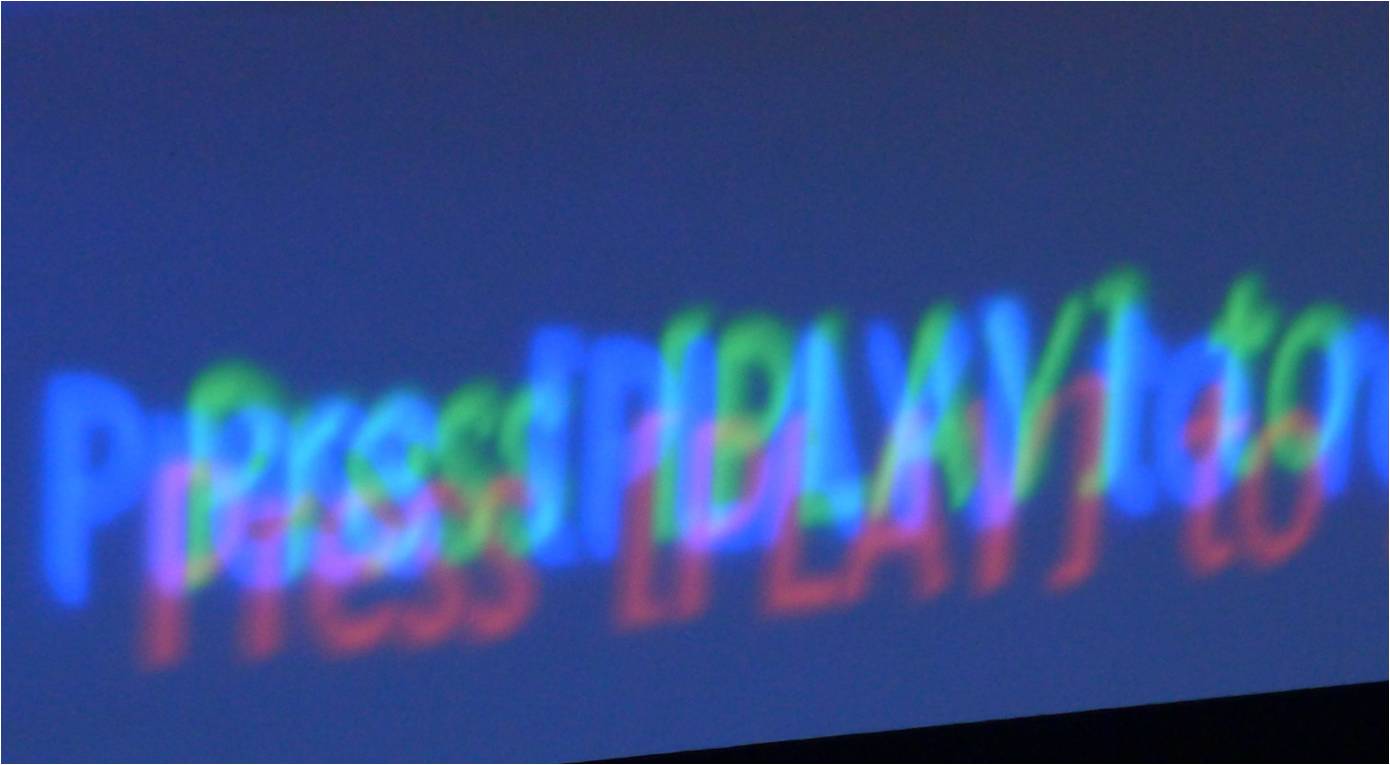
I have taken pictures so I'm hoping this helps. From the pictures it appears that the three CRTs are all slightly off of center focus. Each one shows up on the screen however they do not converge.[/img]
|
|
| Back to top |
|
|
Hulio
Joined: 15 Apr 2006
Posts: 494
Location: Belgium
|
| Posted: Thu May 16, 2013 7:05 am Post subject: |
|
|
Tom,
That's how ''picture ghosting'' looks like, indeed. There are no pictures posted.... 
|
|
| Back to top |
|
|
CasetheCorvetteman

Joined: 09 Nov 2008
Posts: 6326
Location: Australia
|
| Posted: Thu May 16, 2013 8:04 am Post subject: |
|
|
|
Ok, that sounds like you need to create a new input to me....
|
|
| Back to top |
|
|
Thomas Gille
Joined: 14 May 2013
Posts: 6
|
| Posted: Fri May 17, 2013 4:09 am Post subject: HD Fury3 and Sony G70 hook up ghosting |
|
|
I have not been on this forum for very long so I'm not sure how to post a picture of what is coming up on my screen. I added the picture as an attachment last night, but it somehow did not show up. I'm going to try one more time and see if I have better luck. 
| Description: |
| Here is what keeps showing up on my screen. It looks like the CRTs are just not converging. |
|
| Filesize: |
59.81 KB |
| Viewed: |
7640 Time(s) |
|
|
|
| Back to top |
|
|
AnalogRocks
Forum Moderator
Joined: 08 Mar 2006
Posts: 26706
Location: Toronto, Ontario, Canada
TV/Projector: Sony 1252Q, AMPRO 4000G
|
| Posted: Fri May 17, 2013 6:04 am Post subject: |
|
|
OK disregard my previous post. You need to do a setup on your projector for that resolution input.
_________________
Tech support for nothing
CRT.
HD done right!
|
|
| Back to top |
|
|
CasetheCorvetteman
Joined: 09 Nov 2008
Posts: 6326
Location: Australia
|
| Posted: Fri May 17, 2013 9:00 am Post subject: |
|
|
That is certainly not ghosting, and at the risk of repeating myself:
| CasetheCorvetteman wrote: | | Ok, that sounds like you need to create a new input to me.... |

|
|
| Back to top |
|
|
Thomas Gille
Joined: 14 May 2013
Posts: 6
|
| Posted: Fri May 17, 2013 4:55 pm Post subject: HD Fury3 and Sony VPH G70 |
|
|
First of all, thanks to everyone for all of your help. I'm new to this stuff and not too confident about my knowledge in dealing with these issues. How can I change the resolution set up in my VPH G70? Can I do it from the full remote control? My projector is mounted in the ceiling and not easy to access.
Thanks, Tom
|
|
| Back to top |
|
|
Curt Palme
CRT Tech
Joined: 08 Mar 2006
Posts: 24396
Location: Langley, BC
TV/Projector: All of them!
|
| Posted: Fri May 17, 2013 5:08 pm Post subject: |
|
|
The G70 uses a different memory location pretty much with every different signal source that you're sending to the projector. (yes, I'm oversimplfying, don't slaughter me!)
So you're now using a new memory location with the Fury that hasn't been set up or calibrated for your installation. You need to read teh manual, and walk through the setup. If you haven't done it before, it's a learning curve, but the Sony manual is well written.. if you follow it in order. Figure on 3-4 hours to do a setup, then you can tweak it for another hour or two before it's perfect.
|
|
| Back to top |
|
|
Curt Palme
CRT Tech
Joined: 08 Mar 2006
Posts: 24396
Location: Langley, BC
TV/Projector: All of them!
|
| Posted: Fri May 17, 2013 5:09 pm Post subject: |
|
|
|
BTW, once you get familiar with the setup, you can do a very passable setup within 1/2 hour.
|
|
| Back to top |
|
|
draganm
Joined: 08 Mar 2006
Posts: 8990
Location: Colorado
|
| Posted: Fri May 17, 2013 5:23 pm Post subject: |
|
|
| Curt Palme wrote: | The G70 uses a different memory location pretty much with every different signal source that you're sending to the projector. (yes, I'm oversimplfying, don't slaughter me!)
So you're now using a new memory location with the Fury that hasn't been set up or calibrated for your installation. You need to read teh manual, and walk through the setup. If you haven't done it before, it's a learning curve, but the Sony manual is well written.. if you follow it in order. Figure on 3-4 hours to do a setup, then you can tweak it for another hour or two before it's perfect. |
yeah what Curt said, you need to create a new recall memory / channel. That will also keep you from screwing up the one you have now. Although i can't see ever running "line doubling" on a G70 it could be an emergency back-up if the fury fails.
What your showing is called mis-convergence. The 3 tubes are not aligned electro-magneticically.
You'll have to go through the manual or hire someone to come out and re-calibrate for your new input. Sorry to say but I think the Sony manual is awful.
|
|
| Back to top |
|
|
Thomas Gille
Joined: 14 May 2013
Posts: 6
|
| Posted: Mon May 20, 2013 6:29 pm Post subject: How can I find out how many hours on my Sony G70 CRTs? |
|
|
I'm seriously considering just getting a whole new projector set up that has updated electronics, in-puts, resolution, etc. to replace my G70. I was told part of my decision should consider how many hours I have on my CRTs. I've had the unit over 12 years and don't really use it that much. The problem is that I don't have any idea how many hours I've used the unit. I would appreciate thoughts on at what point do you say it's time to say good bye, I got my money's worth.
Thanks for your help!
Tom
|
|
| Back to top |
|
|
AnalogRocks
Forum Moderator
Joined: 08 Mar 2006
Posts: 26706
Location: Toronto, Ontario, Canada
TV/Projector: Sony 1252Q, AMPRO 4000G
|
| Posted: Mon May 20, 2013 8:02 pm Post subject: Re: How can I find out how many hours on my Sony G70 CRTs? |
|
|
| Thomas Gille wrote: | I'm seriously considering just getting a whole new projector set up that has updated electronics, in-puts, resolution, etc. to replace my G70. I was told part of my decision should consider how many hours I have on my CRTs. I've had the unit over 12 years and don't really use it that much. The problem is that I don't have any idea how many hours I've used the unit. I would appreciate thoughts on at what point do you say it's time to say good bye, I got my money's worth.
Thanks for your help!
Tom |
Check the hour counter in the menu screens. You may need to be in serviceman mode first.
SERVICEMAN MODE: the following key presses;
ENTER, ENTER UP, DOWN, ENTER, ENTER
Then MENU, and scroll though the menu screens for the timer.
_________________
Tech support for nothing
CRT.
HD done right!
|
|
| Back to top |
|
|
CasetheCorvetteman
Joined: 09 Nov 2008
Posts: 6326
Location: Australia
|
| Posted: Tue May 21, 2013 12:08 am Post subject: |
|
|
|
You might want to also want to see just what can be done with a G70 before you condem it too.
|
|
| Back to top |
|
|
Thomas Gille
Joined: 14 May 2013
Posts: 6
|
| Posted: Tue May 21, 2013 12:50 am Post subject: How to find hours on my G70 |
|
|
I have pressed enter and hit the up button, kept my finger on the enter button for 5 seconds etc. all I get is a single message at the bottom of the screen: Index: 1
Any idea what I may be doing wrong?
Thanks for your help!
Tom
|
|
| Back to top |
|
|
Phoenixed
Joined: 13 Oct 2011
Posts: 514
Location: The mitten
|
| Posted: Tue May 21, 2013 1:17 am Post subject: |
|
|
Enter, Enter, Up, Down, Enter, then select yes to enter Service mode. You don't need to hold anything down. Just channel your old Nintendo skills.
_________________
Planar PD-8150/Runco LS-5
|
|
| Back to top |
|
|
AnalogRocks
Forum Moderator
Joined: 08 Mar 2006
Posts: 26706
Location: Toronto, Ontario, Canada
TV/Projector: Sony 1252Q, AMPRO 4000G
|
| Posted: Tue May 21, 2013 1:50 am Post subject: |
|
|
Yes, no need to hold anything down. It's like entering a cheat code on a Playstation 1 
_________________
Tech support for nothing
CRT.
HD done right!
|
|
| Back to top |
|
|
|
|





