| Author |
Message |
AnalogRocks
Forum Moderator

Joined: 08 Mar 2006
Posts: 26706
Location: Toronto, Ontario, Canada
TV/Projector: Sony 1252Q, AMPRO 4000G
|
| Posted: Tue Jul 24, 2012 11:11 pm Post subject: MAC: 2008 Hitachi RPTV model 65F59A gone green |
|
|
Picture has gone to a green tint.
Mac??
_________________
Tech support for nothing
CRT.
HD done right!
|
|
| Back to top |
|
 |
Curt Palme
CRT Tech
Joined: 08 Mar 2006
Posts: 24396
Location: Langley, BC
TV/Projector: All of them!
|
| Posted: Tue Jul 24, 2012 11:15 pm Post subject: |
|
|
Is that a question or a statement? 
Are the R and B still there? Is the b/w pic tinted green as well?
|
|
| Back to top |
|
|
AnalogRocks
Forum Moderator
Joined: 08 Mar 2006
Posts: 26706
Location: Toronto, Ontario, Canada
TV/Projector: Sony 1252Q, AMPRO 4000G
|
| Posted: Tue Jul 24, 2012 11:20 pm Post subject: |
|
|
I'm diagnosing remotely. He tells me all inputs, HDMI, component and composite as well as antenna (ATSC) have a green tint.
When he does the magic focus beam alignment he can still see the red come up.
They had a storm blow through last night and a possible brownout. Something's not right.
_________________
Tech support for nothing
CRT.
HD done right!
|
|
| Back to top |
|
|
AnalogRocks
Forum Moderator
Joined: 08 Mar 2006
Posts: 26706
Location: Toronto, Ontario, Canada
TV/Projector: Sony 1252Q, AMPRO 4000G
|
| Posted: Wed Jul 25, 2012 2:19 am Post subject: |
|
|
| AnalogRocks wrote: | I'm diagnosing remotely. He tells me all inputs, HDMI, component and composite as well as antenna (ATSC) have a green tint.
When he does the magic focus beam alignment he can still see the red come up.
They had a storm blow through last night and a possible brownout. Something's not right. |
He was watching OTA TV, switched back to satelite on HDMI and everything was green.
Maybe got zapped by the storm?
_________________
Tech support for nothing
CRT.
HD done right!
|
|
| Back to top |
|
|
macgyver655
Joined: 22 Aug 2007
Posts: 8508
|
| Posted: Wed Jul 25, 2012 3:05 pm Post subject: |
|
|
|
Switch to an input with no connection so you have a black screen. Is the green tint there? If so then reduce the green screen control.
|
|
| Back to top |
|
|
AnalogRocks
Forum Moderator
Joined: 08 Mar 2006
Posts: 26706
Location: Toronto, Ontario, Canada
TV/Projector: Sony 1252Q, AMPRO 4000G
|
| Posted: Wed Jul 25, 2012 3:42 pm Post subject: |
|
|
| macgyver655 wrote: | | Switch to an input with no connection so you have a black screen. Is the green tint there? If so then reduce the green screen control. |
Do you mean in the service menu? I'll be there to have a look on Friday.
_________________
Tech support for nothing
CRT.
HD done right!
|
|
| Back to top |
|
|
macgyver655
Joined: 22 Aug 2007
Posts: 8508
|
| Posted: Wed Jul 25, 2012 3:57 pm Post subject: |
|
|
| AnalogRocks wrote: | | macgyver655 wrote: | | Switch to an input with no connection so you have a black screen. Is the green tint there? If so then reduce the green screen control. |
Do you mean in the service menu? I'll be there to have a look on Friday. |
No, the screen controls are on the focus pack. You have to remove the back cover. Some are behind the front cover but I'm pretty sure they are in the back on this one. Set them like a projector. Go to black screen, set main brightness at 50%, turn up a color until you can see a raster, then reduce until raster is just gone. Do all 3 colors. You can also focus all 3 while you are there but you'll need a mirror, probably.
|
|
| Back to top |
|
|
AnalogRocks
Forum Moderator
Joined: 08 Mar 2006
Posts: 26706
Location: Toronto, Ontario, Canada
TV/Projector: Sony 1252Q, AMPRO 4000G
|
| Posted: Wed Jul 25, 2012 4:12 pm Post subject: |
|
|
| macgyver655 wrote: | | AnalogRocks wrote: | | macgyver655 wrote: | | Switch to an input with no connection so you have a black screen. Is the green tint there? If so then reduce the green screen control. |
Do you mean in the service menu? I'll be there to have a look on Friday. |
No, the screen controls are on the focus pack. You have to remove the back cover. Some are behind the front cover but I'm pretty sure they are in the back on this one. Set them like a projector. Go to black screen, set main brightness at 50%, turn up a color until you can see a raster, then reduce until raster is just gone. Do all 3 colors. You can also focus all 3 while you are there but you'll need a mirror, probably. |
Right right right. Now we're on the same page.
What do you think may of happened?
_________________
Tech support for nothing
CRT.
HD done right!
|
|
| Back to top |
|
|
macgyver655
Joined: 22 Aug 2007
Posts: 8508
|
| Posted: Wed Jul 25, 2012 4:20 pm Post subject: |
|
|
| AnalogRocks wrote: |
What do you think may of happened? |
Hahaha, your asking a question without me knowing just whats wrong yet. I could give an assumption thinking it's 1 problem and the real problem ends up being something else which would then have a different assumption.
After you find the true problem I can then give a better assumption....
For all I know it has a failed neckboard or tube at this point. Or something in a completely different area.
How do the menus look? Does the black background look green tint when doing the magic focus?
|
|
| Back to top |
|
|
AnalogRocks
Forum Moderator
Joined: 08 Mar 2006
Posts: 26706
Location: Toronto, Ontario, Canada
TV/Projector: Sony 1252Q, AMPRO 4000G
|
| Posted: Wed Jul 25, 2012 4:23 pm Post subject: |
|
|
| macgyver655 wrote: | | AnalogRocks wrote: |
What do you think may of happened? |
Hahaha, your asking a question without me knowing just whats wrong yet. I could give an assumption thinking it's 1 problem and the real problem ends up being something else which would then have a different assumption.
After you find the true problem I can then give a better assumption....
For all I know it has a failed neckboard or tube at this point. Or something in a completely different area.
How do the menus look? Does the black background look green tint when doing the magic focus? |
Hey, just asking a silly question....

_________________
Tech support for nothing
CRT.
HD done right!
|
|
| Back to top |
|
|
AnalogRocks
Forum Moderator
Joined: 08 Mar 2006
Posts: 26706
Location: Toronto, Ontario, Canada
TV/Projector: Sony 1252Q, AMPRO 4000G
|
| Posted: Fri Jul 27, 2012 10:46 pm Post subject: |
|
|
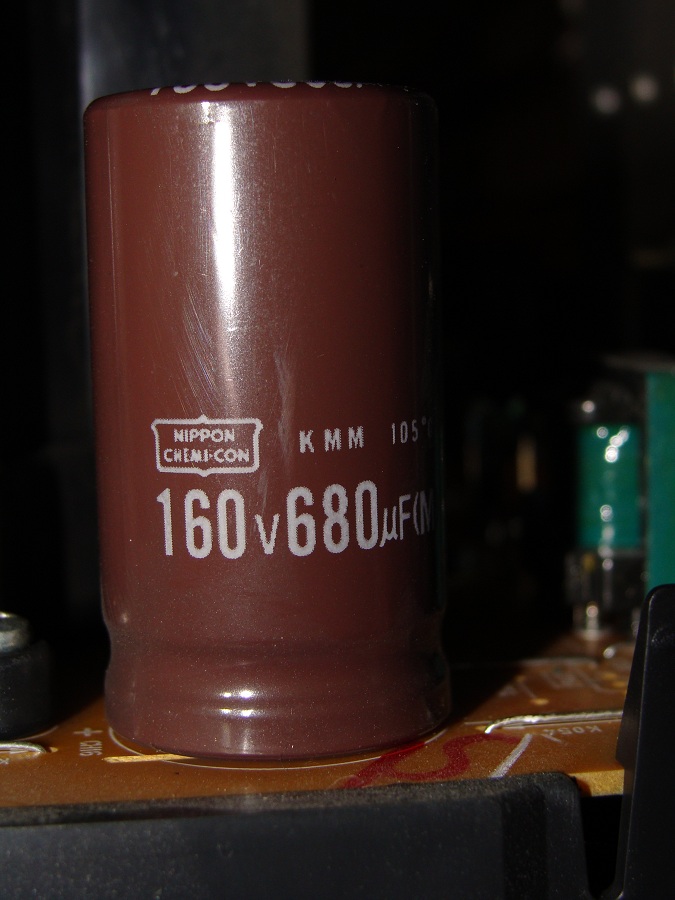
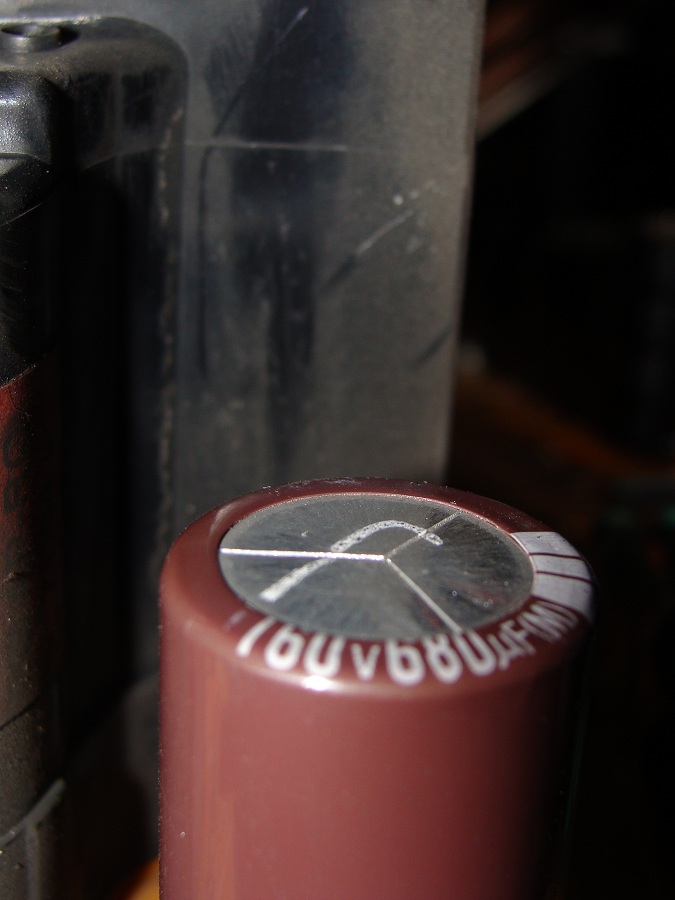
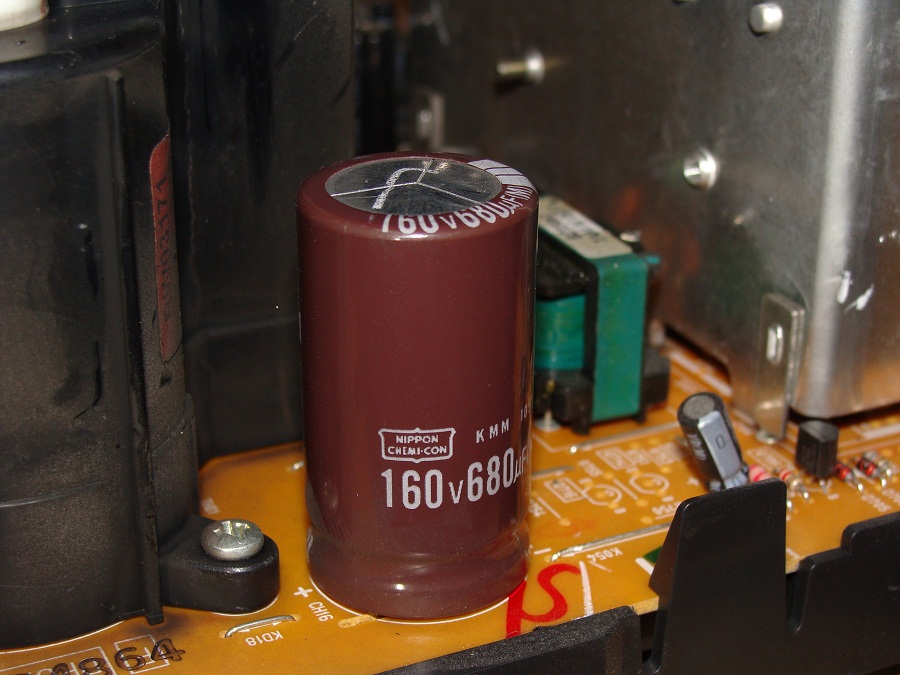
OK, fixed All I did was open it up and clean it and it works now. However I found a puffed capacitor. Does it look like it's time to change this? It's located beside the HV flyback:
| Description: |
|
| Filesize: |
157.38 KB |
| Viewed: |
47 Time(s) |
|
| Description: |
|
| Filesize: |
130.65 KB |
| Viewed: |
47 Time(s) |
|
| Description: |
|
| Filesize: |
187.36 KB |
| Viewed: |
47 Time(s) |
|
_________________
Tech support for nothing
CRT.
HD done right!
|
|
| Back to top |
|
|
macgyver655
Joined: 22 Aug 2007
Posts: 8508
|
| Posted: Sat Jul 28, 2012 1:58 pm Post subject: |
|
|
|
Hard to tell. What makes you think it's swollen?
|
|
| Back to top |
|
|
AnalogRocks
Forum Moderator
Joined: 08 Mar 2006
Posts: 26706
Location: Toronto, Ontario, Canada
TV/Projector: Sony 1252Q, AMPRO 4000G
|
| Posted: Sun Jul 29, 2012 11:25 am Post subject: |
|
|
| macgyver655 wrote: | | Hard to tell. What makes you think it's swollen? |
I can feel the top of it. It's domed up as compared to the other capacitors in the set.
_________________
Tech support for nothing
CRT.
HD done right!
|
|
| Back to top |
|
|
macgyver655
Joined: 22 Aug 2007
Posts: 8508
|
| Posted: Mon Jul 30, 2012 3:33 pm Post subject: |
|
|
|
Based on what I see I would still not condemn it. Only an ESR and/or value test would confirm whether it needs to be replaced or not.
|
|
| Back to top |
|
|
AnalogRocks
Forum Moderator
Joined: 08 Mar 2006
Posts: 26706
Location: Toronto, Ontario, Canada
TV/Projector: Sony 1252Q, AMPRO 4000G
|
| Posted: Mon Jul 30, 2012 4:45 pm Post subject: |
|
|
Funny how it was marked at the factory though.
It's working,I'll leave it alone for now.
Thanks for the help!
_________________
Tech support for nothing
CRT.
HD done right!
|
|
| Back to top |
|
|
AnalogRocks
Forum Moderator
Joined: 08 Mar 2006
Posts: 26706
Location: Toronto, Ontario, Canada
TV/Projector: Sony 1252Q, AMPRO 4000G
|
| Posted: Sat Jan 05, 2013 11:05 am Post subject: |
|
|
Had a double snap over the holidays with the accompanying picture drop out. Where can I get HV parts for this one?
_________________
Tech support for nothing
CRT.
HD done right!
|
|
| Back to top |
|
|
macgyver655
Joined: 22 Aug 2007
Posts: 8508
|
| Posted: Sat Jan 05, 2013 4:39 pm Post subject: |
|
|
|
Well I think the first thing is to find out where the snap is coming from, lol.
|
|
| Back to top |
|
|
macgyver655
Joined: 22 Aug 2007
Posts: 8508
|
| Posted: Sat Jan 05, 2013 4:45 pm Post subject: |
|
|
|
There is a service bulletin on this model for arcing or snapping. The cure is to cover the entire anode boot on all 3 tubes with silicon.
|
|
| Back to top |
|
|
AnalogRocks
Forum Moderator
Joined: 08 Mar 2006
Posts: 26706
Location: Toronto, Ontario, Canada
TV/Projector: Sony 1252Q, AMPRO 4000G
|
| Posted: Sat Jan 05, 2013 5:48 pm Post subject: |
|
|
Cool thanks!
_________________
Tech support for nothing
CRT.
HD done right!
|
|
| Back to top |
|
|
|
|





