| Author |
Message |
rambon
Joined: 19 Feb 2012
Posts: 12
Location: Finland
|
| Posted: Sun Feb 19, 2012 12:15 pm Post subject: Ecp-4100 problems |
|
|
Hello!
So my ecp-4100 suddenly stopped working, the projector just didn't go on and the h.inhibit light turned on.
So I changed all the H deflection/convergence output boards and it still didn't turn on. After that I changed the focus board and the low power supply. Finaly the projector turned on, but now the problem is that the blue tube is alot brighter than the other tubes, so the picture is really blue. Does anyone know what might be wrong ?
|
|
| Back to top |
|
 |
CasetheCorvetteman

Joined: 09 Nov 2008
Posts: 6326
Location: Australia
|
| Posted: Sun Feb 19, 2012 12:19 pm Post subject: |
|
|
|
Yeah, you couldve bumped the G2 pot, turn the blue one down abit.
|
|
| Back to top |
|
|
rambon
Joined: 19 Feb 2012
Posts: 12
Location: Finland
|
| Posted: Sun Feb 19, 2012 2:25 pm Post subject: |
|
|
Thank you!
That was the problem. But now of course I have a new problem. There seems to be some dirt inside the glass of the green crt tube, a huge peace of dirt in the midle.
I have a spare green tube from ecp-4101 and it is exactly same as in the 4100, no fungus problem there, But I remember that the tubes on the ecp-4101 was not as bright as in 4100. Is that possible?
Should I change the whole crt or just clean the glycol chamber from the 4100 crt?
|
|
| Back to top |
|
|
Curt Palme
CRT Tech
Joined: 08 Mar 2006
Posts: 24396
Location: Langley, BC
TV/Projector: All of them!
|
| Posted: Sun Feb 19, 2012 3:09 pm Post subject: |
|
|
THe gains of tubes will be different, that's what the G2 adjustments will balance out. The key is finding tubes that focus well, meaning they are low hour tubes. I know you're across the ocean, but I do have some minty tubes for the ECP. If both yours turn out to be bad/weak or whatever, shipping isn't too bad for a single tube, about $65 I think, if you want perfection.
I may even have a brand new green tube (and I think I have a red), I'd have to check.
BTW, this might help:
http://www.curtpalme.com/ES_Tube_Projector_Gray_Scale_Adjustment1.shtm
|
|
| Back to top |
|
|
rambon
Joined: 19 Feb 2012
Posts: 12
Location: Finland
|
| Posted: Sun Feb 19, 2012 7:55 pm Post subject: |
|
|
| Curt Palme wrote: | THe gains of tubes will be different, that's what the G2 adjustments will balance out. The key is finding tubes that focus well, meaning they are low hour tubes. I know you're across the ocean, but I do have some minty tubes for the ECP. If both yours turn out to be bad/weak or whatever, shipping isn't too bad for a single tube, about $65 I think, if you want perfection.
I may even have a brand new green tube (and I think I have a red), I'd have to check.
BTW, this might help:
http://www.curtpalme.com/ES_Tube_Projector_Gray_Scale_Adjustment1.shtm |
Thanks Curt but I don't want to put any money to this set because I am going to upgrade to a sony g90 or g70 or some high performance projector as soon as I will find a good deal.
Changed the green tube with the one from 4101, I don't think that it is any dimmer than the 4100 .
Found out that the tube from 4100 didn't have any dirt, the huge peace of dirt was silicone, the last owner had changed the glycole in it because of fungus problem, so actually the tube is ok. I think I will just clean the chamber and put it back some day, because the tubes are minty.
But every time I get rid of one problem, I find a new one. Now for some reason I can't convense the right top and bottom corners of the red tube to match the green tube? It just wont let me move it down. Just the red tube blue is fine.
Does anyone have a clue what's happening here ?
|
|
| Back to top |
|
|
Curt Palme
CRT Tech
Joined: 08 Mar 2006
Posts: 24396
Location: Langley, BC
TV/Projector: All of them!
|
| Posted: Sun Feb 19, 2012 9:14 pm Post subject: |
|
|
|
Do a hard reset first, with the recall and reset buttons. that will wipe all memories. Reseat all the chips on the convergence board. That will most likely do it.
|
|
| Back to top |
|
|
rambon
Joined: 19 Feb 2012
Posts: 12
Location: Finland
|
| Posted: Mon Feb 20, 2012 5:35 pm Post subject: |
|
|
| Curt Palme wrote: | | Do a hard reset first, with the recall and reset buttons. that will wipe all memories. Reseat all the chips on the convergence board. That will most likely do it. |
Did it, didn't help, did it five times and still didn't help. The right side corners wont fit with the green crt. When I do the convergence, the red crt goes crazy .
what might be wrong ? can it be the red crt ? I even changed the convengence board and cpu board and did the hard reset still didn't help.
|
|
| Back to top |
|
|
rambon
Joined: 19 Feb 2012
Posts: 12
Location: Finland
|
| Posted: Mon Feb 20, 2012 6:11 pm Post subject: |
|
|
| rambon wrote: | | Curt Palme wrote: | | Do a hard reset first, with the recall and reset buttons. that will wipe all memories. Reseat all the chips on the convergence board. That will most likely do it. |
Did it, didn't help, did it five times and still didn't help. The right side corners wont fit with the green crt. When I do the convergence, the red crt goes crazy .
what might be wrong ? can it be the red crt ? I even changed the convengence board and cpu board and did the hard reset still didn't help. |
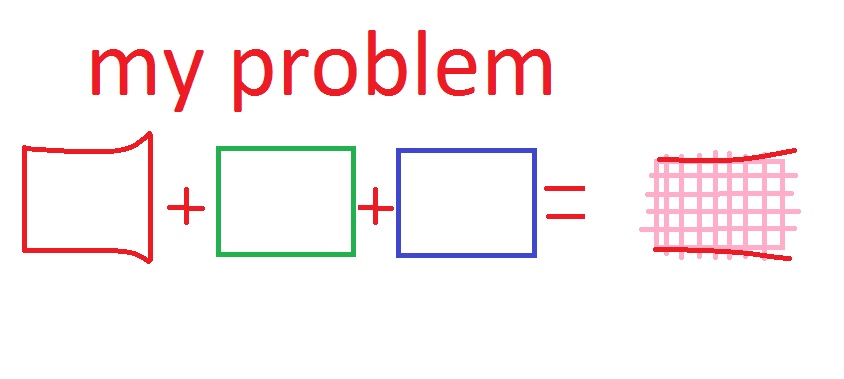
The picture in red crt is not symmetrical, it is bigger from the right top and bottom corner. Does anyone know why ?
|
|
| Back to top |
|
|
Curt Palme
CRT Tech
Joined: 08 Mar 2006
Posts: 24396
Location: Langley, BC
TV/Projector: All of them!
|
| Posted: Mon Feb 20, 2012 6:18 pm Post subject: |
|
|
|
Post a pix of the test grid please.
|
|
| Back to top |
|
|
rambon
Joined: 19 Feb 2012
Posts: 12
Location: Finland
|
| Posted: Mon Feb 20, 2012 7:09 pm Post subject: |
|
|
| Curt Palme wrote: | | Post a pix of the test grid please. |
I don't have a cam, but now I can show my amaizing paint skills!
So when I look inside the crt when doing the full set up the corners on the red tube goes like in the picture and when I try to convergence the tubes to match, I can't move the lines all the way down.
Hope this helps you guys to figure out whats happening.
| Description: |
|
| Filesize: |
39.7 KB |
| Viewed: |
7082 Time(s) |
|
|
|
| Back to top |
|
|
CasetheCorvetteman
Joined: 09 Nov 2008
Posts: 6326
Location: Australia
|
| Posted: Tue Feb 21, 2012 6:52 am Post subject: |
|
|
|
The yoke is loose or not centered properly on your red id say. Then adjust the pin abit, followed by the sideshot keystone. If youve got those, i dont know what settings youve got to adjust...
|
|
| Back to top |
|
|
rambon
Joined: 19 Feb 2012
Posts: 12
Location: Finland
|
| Posted: Wed Feb 22, 2012 1:27 pm Post subject: |
|
|
| CasetheCorvetteman wrote: | | The yoke is loose or not centered properly on your red id say. Then adjust the pin abit, followed by the sideshot keystone. If youve got those, i dont know what settings youve got to adjust... |
Didn't help, yes the yoke was loose, but moving it didn't help. I even changed the crt and I still had the same problem.
I have tried everything, don't have a clue why it is bigger from the other side.
|
|
| Back to top |
|
|
mc86
Joined: 20 Sep 2008
Posts: 767
Location: pittsburgh, pa
TV/Projector: ECP 4500 (Vidikron box), ECP4500+, wanting 07MS/07MTS, evaluating pc soft-blend
|
| Posted: Thu Feb 23, 2012 1:26 am Post subject: |
|
|
You said "when I do convergence" the red goes wonky -- does it only do it then? If you turn off blue and green and feed it a video signal does the same thing still happen? I'm not sure this matters really, but might be a clue...
Matt
|
|
| Back to top |
|
|
CasetheCorvetteman
Joined: 09 Nov 2008
Posts: 6326
Location: Australia
|
| Posted: Thu Feb 23, 2012 8:47 am Post subject: |
|
|
|
It will be part of the convergence circuitry, i dont know anything about these projectors apart from the simularities with other simple ES focusing sets.
|
|
| Back to top |
|
|
rambon
Joined: 19 Feb 2012
Posts: 12
Location: Finland
|
| Posted: Thu Feb 23, 2012 8:50 am Post subject: |
|
|
| mc86 wrote: | You said "when I do convergence" the red goes wonky -- does it only do it then? If you turn off blue and green and feed it a video signal does the same thing still happen? I'm not sure this matters really, but might be a clue...
Matt |
Yes, the same thing still happens.
|
|
| Back to top |
|
|
CasetheCorvetteman
Joined: 09 Nov 2008
Posts: 6326
Location: Australia
|
| Posted: Thu Feb 23, 2012 1:12 pm Post subject: |
|
|
|
First off you need to clean all the connections on all the boards, and then see how you go, any socketed chips need to come out and be reseated too.
|
|
| Back to top |
|
|
Curt Palme
CRT Tech
Joined: 08 Mar 2006
Posts: 24396
Location: Langley, BC
TV/Projector: All of them!
|
| Posted: Thu Feb 23, 2012 3:15 pm Post subject: |
|
|
|
BTW, when you did the hard reset, did all settings go back to 50%, and did the contrast drop to about 3 out of 10? If not, then you may not be doing the reset correctly.
|
|
| Back to top |
|
|
rambon
Joined: 19 Feb 2012
Posts: 12
Location: Finland
|
| Posted: Fri Feb 24, 2012 6:56 am Post subject: |
|
|
| Curt Palme wrote: | | BTW, when you did the hard reset, did all settings go back to 50%, and did the contrast drop to about 3 out of 10? If not, then you may not be doing the reset correctly. |
Yes, all the settings got back to the value that they should have gone.
|
|
| Back to top |
|
|
CasetheCorvetteman
Joined: 09 Nov 2008
Posts: 6326
Location: Australia
|
| Posted: Fri Feb 24, 2012 8:44 am Post subject: |
|
|
|
What happens when you move the sideshot keystone for the red?
|
|
| Back to top |
|
|
rambon
Joined: 19 Feb 2012
Posts: 12
Location: Finland
|
| Posted: Fri Feb 24, 2012 9:20 am Post subject: |
|
|
| CasetheCorvetteman wrote: | | What happens when you move the sideshot keystone for the red? |
I'm not sure how to adjust the sideshot keystone for red tube, can you try to explain it to me ?
|
|
| Back to top |
|
|
|
|




