|
As this forum is rarely used anymore, we've locked it. Feel free to browse and read. Questions? Please reach out to us directly. Cheers! |

|
 |
|
|
| Author |
Message |
csica
Joined: 21 Nov 2011
Posts: 5
|
| Posted: Mon Nov 21, 2011 7:30 pm Post subject: PT-AE4000U Greyscale Calibration using HCFR & Eye1 Displ |
|
|
Greeting folks, this is my first post to this forum, although I have been an avid reader for several years. Let me first start off by giving a loud "THANK YOU" to all the experts who post to this forum, especially the "calibration for dummies" post has been extremely helpful, so thank you!
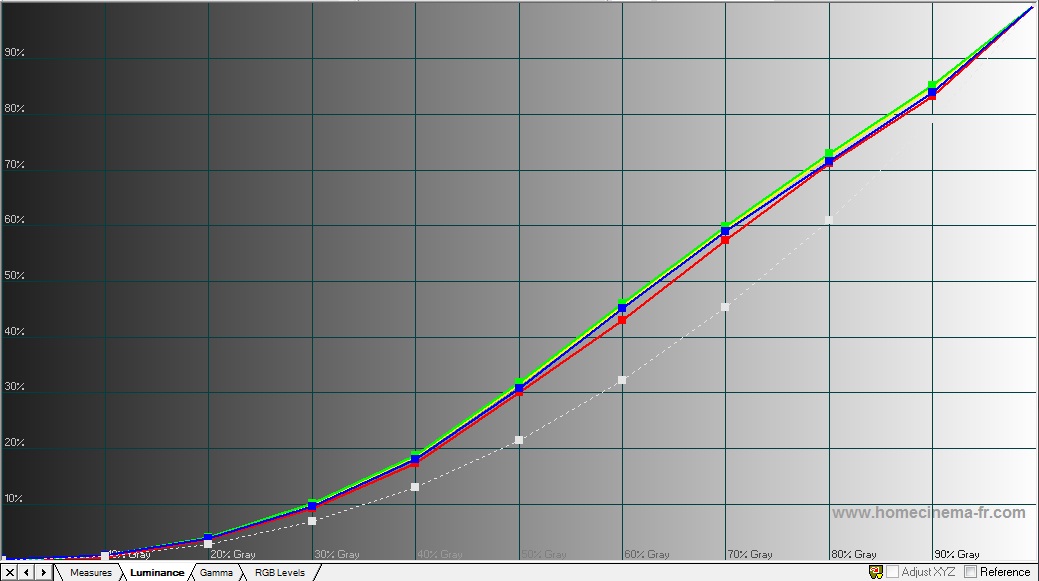
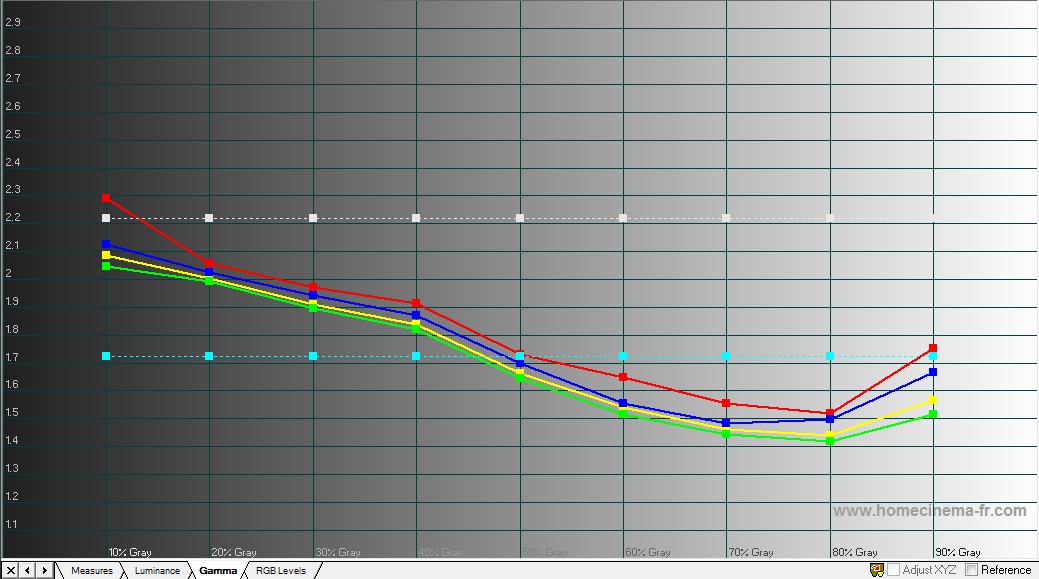
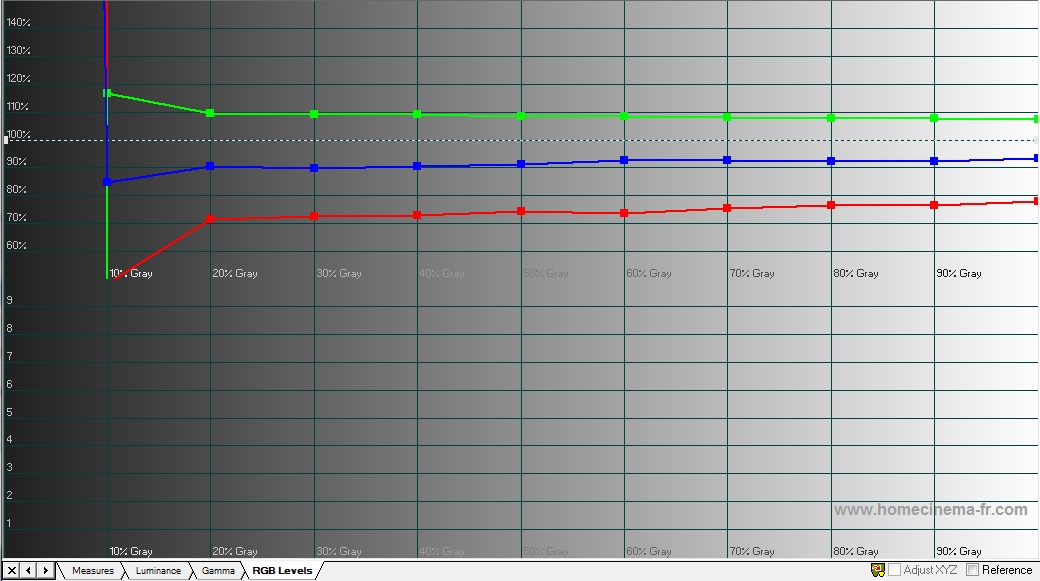
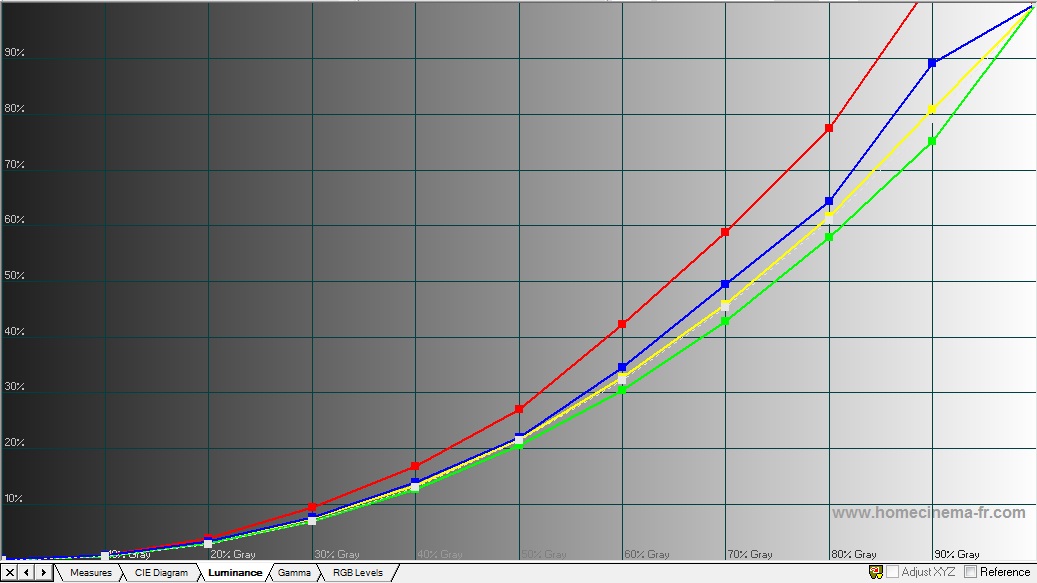
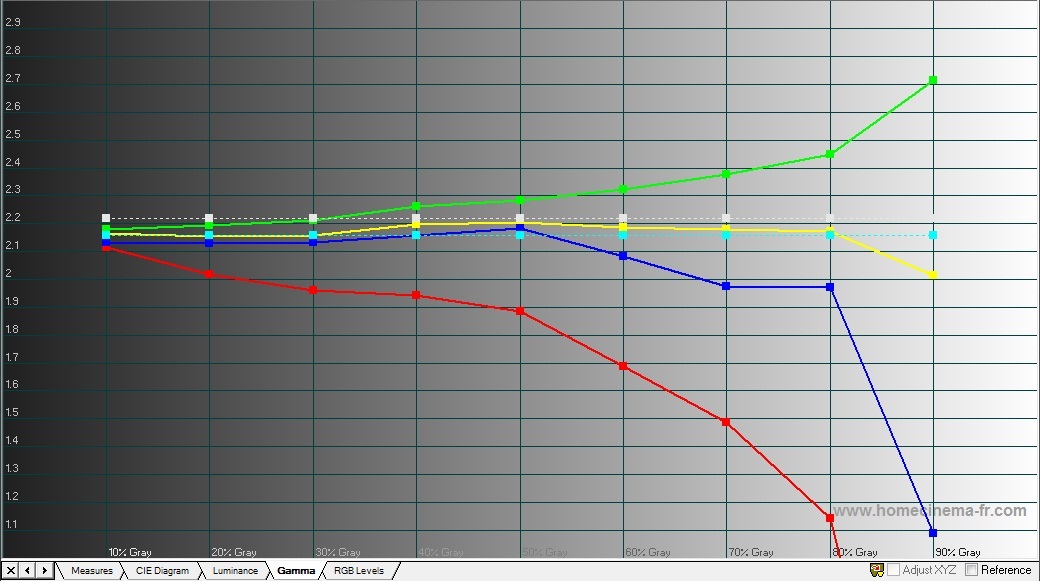
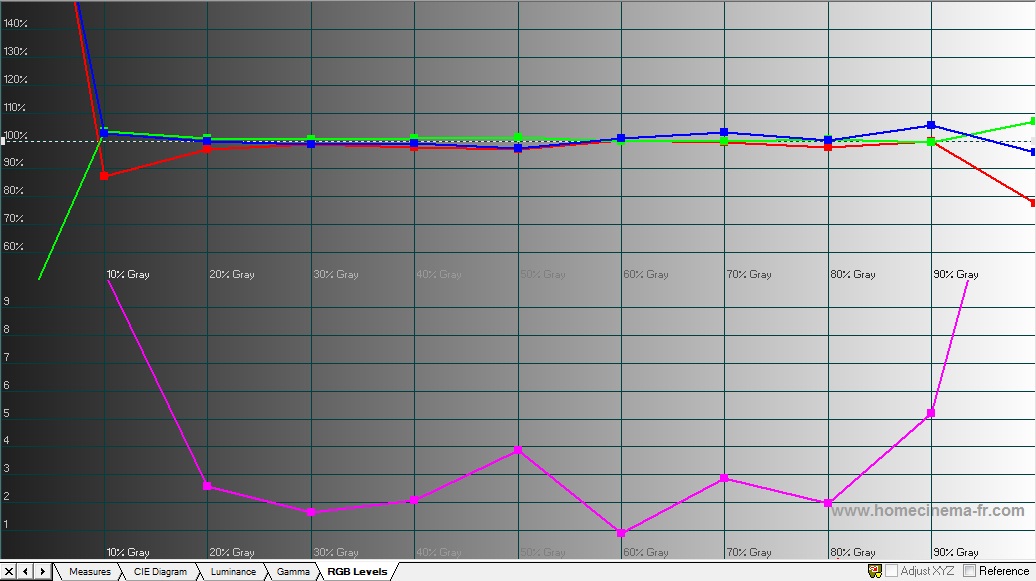
Ok, so here is my dilema. I have a Panasonic PT-AE4000u and have been trying to perform a good greyscale calibration. I have been following the proceedures outlined in the greyscale calibration post by Curt as well as some other pointers from other posts. What i find is that when i set the greyscale, using the both the contrast/brightness RGB as well as the 9 point gamma controls, i find the picture is improved, but things still look off. It seems like to get D65 color for each IRE 10 step level, my red has to be turned up too high. So when I look at the luminance and gamma graph on HCFR, i can gey the yellow line to hit perfect on the luminance curve, and near perfect 2.2 on gamma. However, when i look at the individual colors, it is severely out of whack. The red is almost always too high (at 90-100 IRE its somtimes off the charts), blue is not far behind and green is below the curve. So i can get the average to line up correctly, but not all three. I am guessing this is important as in some scenes, it appears that some reds high on the IRE scale almost look like they are blooming (overly bright). Then on the other hand, if i calibrate it so that d65 is perfect across the board, my luminance is off and gamma is all over the place. So i am reaching out to you experts here for help to see what i am doing wrong. What am i missing? Thanks in advance for your assistance!
Thx,
Chris
|
|
| Back to top |
|
 |
kal
Forum Administrator

Joined: 06 Mar 2006
Posts: 18114
Location: Ottawa, Canada
TV/Projector: JVC DLA-NZ7
|
|
| Back to top |
|
|
csica
Joined: 21 Nov 2011
Posts: 5
|
| Posted: Tue Nov 22, 2011 2:21 pm Post subject: Before & After Graphs |
|
|
Sure, here you go. Thanks!
| Description: |
|
| Filesize: |
110.81 KB |
| Viewed: |
29 Time(s) |
|
| Description: |
|
| Filesize: |
143.81 KB |
| Viewed: |
25 Time(s) |
|
| Description: |
|
| Filesize: |
133.07 KB |
| Viewed: |
24 Time(s) |
|
| Description: |
|
| Filesize: |
120.45 KB |
| Viewed: |
28 Time(s) |
|
| Description: |
|
| Filesize: |
142.18 KB |
| Viewed: |
26 Time(s) |
|
| Description: |
|
| Filesize: |
144.68 KB |
| Viewed: |
23 Time(s) |
|
Last edited by csica on Sat Dec 03, 2011 2:14 pm; edited 1 time in total
|
|
| Back to top |
|
|
csica
Joined: 21 Nov 2011
Posts: 5
|
| Posted: Sat Dec 03, 2011 2:10 pm Post subject: Updated Graphs |
|
|
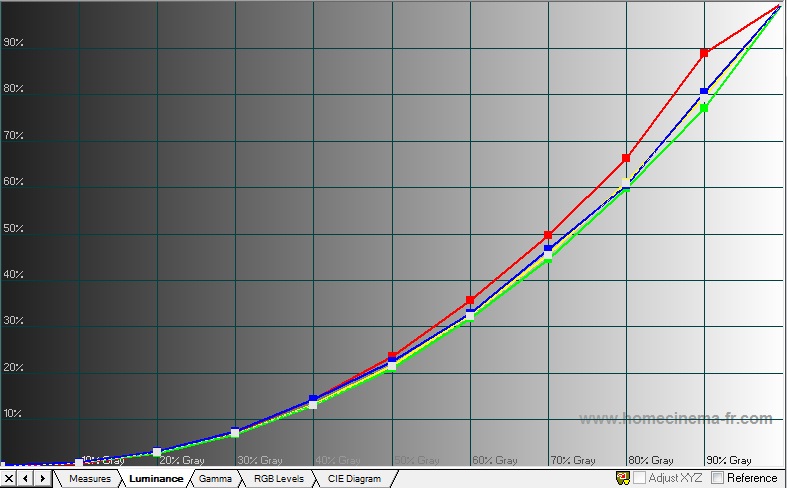
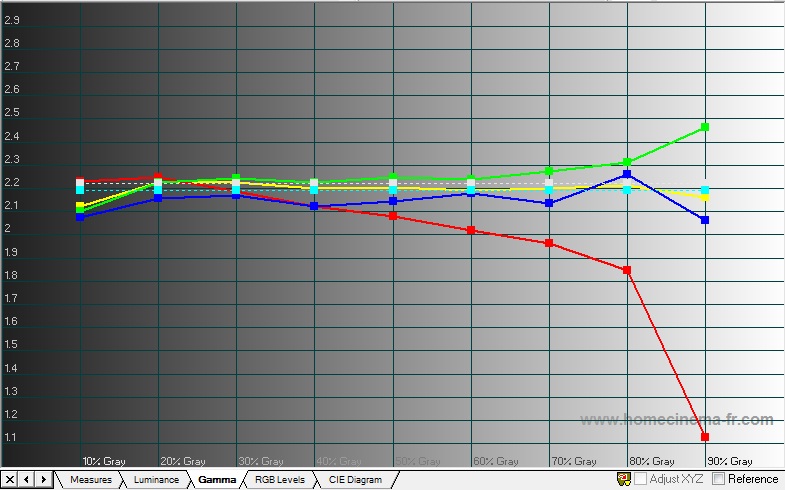
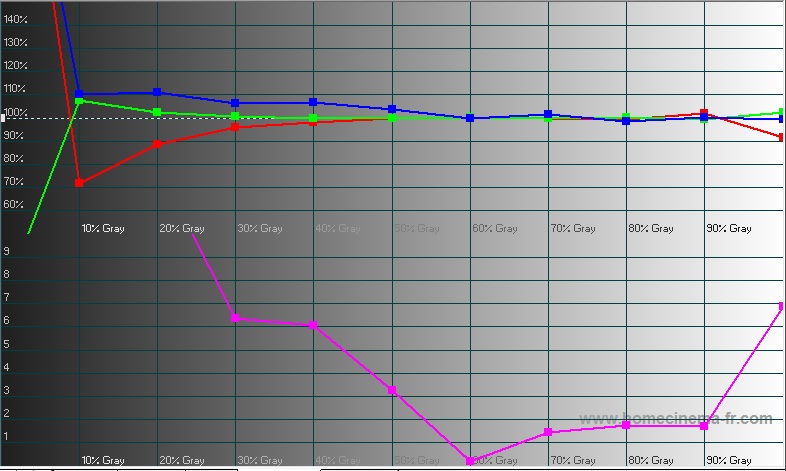
Ok, over the past week I spent some extra time playing with the calibration. Here is what I got. Looks like I got a lot closer, but the image still doesnt look right. The red's a still to bright, and i'm getting a bit frustrated since lately it seems I spend more time calibrating than watching, with no worthwhile results to show for it.
So just to make sure i understand the process, i start by setting the brightness/contrast, then i move on to greyscale/gamma. This is where i spend a lot of time spinning my wheels. The PT-AE4000U has two sets of controls here, there is RGB Contrast/Brightness and the Advanced Gamma with RGBY 9 point adjustment. I have tried ajusting one, not the other, one first then the other...still...no good picture. When i get the luminance perfect, the color temp is off. I get the color temp perfect, the luminance is off. Is getting this right really possible or am i wasting my time?
Then the last step is color adjustment. The PT-AE4000U has dencent CMS controls that allow me to adjust color/tint/brightness for all 6 primary & secondary colors. This too has been a bit painful, since making adjustments to these controls to me is a bit confusing as its tough to get the color lined up on the CIE chart where it needs to be. Then after adjusting the colors, after doing the greyscale, i ran another greyscal check and guess what, my greyscale and luminance were both off...again! At this point i pulled out the whisky and threw in the towel.
I cant help but feel that what i am doing is wrong, taking way too long, and most likely is the most difficult way of doing this. I know all of you are very busy being that this is the holiday season, but any help or guidance would be very much appreciated!
Thx,
Chris
| Description: |
|
| Filesize: |
88.62 KB |
| Viewed: |
103 Time(s) |
|
| Description: |
|
| Filesize: |
109.65 KB |
| Viewed: |
103 Time(s) |
|
| Description: |
|
| Filesize: |
100.1 KB |
| Viewed: |
103 Time(s) |
|
|
|
| Back to top |
|
|
Ron W
Joined: 07 Aug 2009
Posts: 860
Location: Mississauga
|
| Posted: Mon Dec 05, 2011 5:30 pm Post subject: Re: Updated Graphs |
|
|
| csica wrote: | Ok, over the past week I spent some extra time playing with the calibration. Here is what I got. Looks like I got a lot closer, but the image still doesnt look right. The red's a still to bright, and i'm getting a bit frustrated since lately it seems I spend more time calibrating than watching, with no worthwhile results to show for it.
So just to make sure i understand the process, i start by setting the brightness/contrast, then i move on to greyscale/gamma. This is where i spend a lot of time spinning my wheels. The PT-AE4000U has two sets of controls here, there is RGB Contrast/Brightness and the Advanced Gamma with RGBY 9 point adjustment. I have tried ajusting one, not the other, one first then the other...still...no good picture. When i get the luminance perfect, the color temp is off. I get the color temp perfect, the luminance is off. Is getting this right really possible or am i wasting my time?
Then the last step is color adjustment. The PT-AE4000U has dencent CMS controls that allow me to adjust color/tint/brightness for all 6 primary & secondary colors. This too has been a bit painful, since making adjustments to these controls to me is a bit confusing as its tough to get the color lined up on the CIE chart where it needs to be. Then after adjusting the colors, after doing the greyscale, i ran another greyscal check and guess what, my greyscale and luminance were both off...again! At this point i pulled out the whisky and threw in the towel.
I cant help but feel that what i am doing is wrong, taking way too long, and most likely is the most difficult way of doing this. I know all of you are very busy being that this is the holiday season, but any help or guidance would be very much appreciated!
Thx,
Chris |
Incidentally, just wondering what pattern source are you using to take your measurements and how old is your meter? I couldn't actually see what model of meter you have in your equipment list. The Colour HCFR program is somewhat dated and in my opinion, much harder to work with. The first time I tried it, I eventually threw my hands up in the air too. I believe it may be worthwhile spending a little extra money for the Chromapure software. Along with the grayscale and gamma program that are combined so you can see what is happening in real time in both categories on the screen, the CMS charts are much easier to use as well. Check the website and you can see examples of how the Chromapure software works in all the categories. For me and I am sure many others, it was money well spent, much easier to work with(especially for a novice) constantly updated and when it comes to help, support and prompt follow-up, Tom Huffman is without peer.
|
|
| Back to top |
|
|
csica
Joined: 21 Nov 2011
Posts: 5
|
| Posted: Mon Dec 05, 2011 8:25 pm Post subject: |
|
|
|
Thanks for the reply. The meter I am using is the X-Rite Eye1 Diplay LT. For patern generating I have two things I use, I have the AVS-HD blu-ray I use in my PS3, and I also have the MP4's from the MP4-2C download which has all the greyscale and color patterns. I have been seriously considering either Calman or Chromapure, as I am getting a bit frustrated trying to calibrate using HFCR, however, before shelling out $200 or so, i want to make sure I am using the right controls to make the right adjustments. It would be frustrating to spend that money just to get the same results.
|
|
| Back to top |
|
|
Ron W
Joined: 07 Aug 2009
Posts: 860
Location: Mississauga
|
| Posted: Mon Dec 05, 2011 9:17 pm Post subject: |
|
|
| csica wrote: | | Thanks for the reply. The meter I am using is the X-Rite Eye1 Diplay LT. For patern generating I have two things I use, I have the AVS-HD blu-ray I use in my PS3, and I also have the MP4's from the MP4-2C download which has all the greyscale and color patterns. I have been seriously considering either Calman or Chromapure, as I am getting a bit frustrated trying to calibrate using HFCR, however, before shelling out $200 or so, i want to make sure I am using the right controls to make the right adjustments. It would be frustrating to spend that money just to get the same results. |
Something I see right off the bat here here is that and correct me if I am wrong, but, I believe your display is a Front Projection unit and the meter you are using, one of the older Eye Display 1 LT models, from what I understand, was never really designed for calibrating FP units, as a result, the unusual and unpredictable readings you are getting. Kal could give you many more details on this but, on the surface, I can see that is probably largely contributing to your issues.
I have both the Calman AND Chromapure software(both latest versions)and despite the more impressive "look" of Calman, Chromapure, as I mentioned earlier, is much easier to use, especially for the novice, and considerably less costly to buy. Also, and as I already mentioned, support and help from Chromapure is superior as well and you get more updates without having to constantly spend more money.
|
|
| Back to top |
|
|
HogPilot
Joined: 21 Jan 2010
Posts: 2383
TV/Projector: Vizio P702ui-B3, Pioneer Elite Pro-151FD & 111FD
|
| Posted: Mon Dec 05, 2011 10:52 pm Post subject: Re: PT-AE4000U Greyscale Calibration using HCFR & Eye1 D |
|
|
csica,
If I'm reading your posts right, you can get either the gamma or the greyscale dialed in, but not both?
No worries, the two interact with one another significantly, but it shouldn't be too hard to get them both dialed in so that you are very happy. I'll echo what others here have said and recommend paying for a copy of ChromaPure - it's much more flexible, powerful, and easy to use than HFCR. Either ChromaPure or HFCR will do what you want, but the former will just be much easier to use (IMO).
Step 1. The first thing you need to do is make sure that, when you set your contrast, that you're not running out of any colors at 90 and 100 IRE. With UHP bulbs usually red is the first to run out, so you'll set your contrast so that you're not low on red. The first clues that you're running out of a color include: 1) on your Updated Luminance chart, you can see red bowing upwards as you approach 100IRE, 2) on your Updated Gamma chart, you can see how the gamma value of red drops off significantly as you approach 100IRE or 3) on your Updated RGB levels chart, you can see that red dips below 100% as you approach 100IRE. You'll know that you've "run out" of red when you attempt to fix all these by going in and increasing the amount of red at higher IREs, but the previously described perturbations remain. If this is the case, you simply need to decrease your contrast until you can get red at its acceptable levels at high IREs. If you don't fix this, it doesn't matter what else you do, you'll always have issues with both your high-end gamma and greyscale.
Step 2. I know you understand what gamma and greyscale are, so I won't belabor those points; however I think many people don't understand how closely they interact with one another, especially when you're using a parametric greyscale like the one that is built into the Panny projectors (you referred to it as the 9-point RGBY controls). If you measure Y at 100IRE and know how much light the projector is putting out (in lumens, lux, or whatever), and you know what your desired gamma is - most people use around 2.2, which would be appropriate for your Panny - then you can calculate what the Y should measure at every IRE between 0 and 100. This is important to know all of these values ahead of time because they will make your life easier when you're adjusting the greyscale of the projector. I believe if you put the max Y into HFCR, it will spit out the desired Y's at each IRE. If not, there's plenty of spreadsheets out there floating around that will allow you to input the projector's Y at 100IRE and the target gamma, and it will spit out all the Y values for 10IRE-90IRE. Or, you can use the following equation (if you don't like math, ignore everything until you get to Step 3):
Yire = (ire^gamma)*Ymax
where Yire is the desired Y at a given IRE, ire is the given IRE in decimal form (10 IRE = 0.1), gamma is your gamma value (2.2 in this case), and Ymax is the peak light output you measured earlier at 100IRE.
Of course, just to make things a little more complicated, every digital has some sort of light output at 0IRE, and depending on how much light is emitted, this may be more light than your calculated Y until you reach 2, 5, or (hopefully not) 10IRE. This is because the above equation assumes zero light output at 0IRE; various calculators have various ways of compensating for this, but the easiest way is to measure the projector's light output at 0IRE and simply add that to the end of the equation above:
Yire = (ire^gamma)*Ymax + Ymin
where Ymin is the measured light output of your projector at 0IRE. So if your projector puts out 0.02 lux with a black screen, you'd add 0.02 lux to every calculation to come up with an achievable figure. Otherwise you will crush all of your blacks until you get to whatever IRE is calculated at being above the black-level floor of the projector.
Step 3. Now that you know what your target Y values should be at every IRE that you will be setting, you can get to work on setting your greyscale and gamma simultaneously with a parametric gamma/greyscale control (again, the 9-point RGBY controls you talked about). Let's say your display puts out 100 lux and you are in the process of setting your gamma and greyscale at 40IRE. The first thing you'll do is set the RGB controls until you've achieved D65 white. Now that you have the proportions right, you're going to take a total Y measurement at 40IRE. Let's say your reading says you're putting out 15 lux. From the calculator above, you know that you should be at 13.3 lux at 40IRE. So now you decrease the Y control for 40IRE until your Y reads 13.3lux. You might need to go in and re-tweak your RGB ratios slightly to gnats-ass D65, but you'll be pretty damn close. Now you can move on to the next IRE setting and do the same thing. Because the controls at say 50IRE can affect what's going on at 40IRE and 60IRE slightly, once you've run all the way through, you may need to make another run through to tweak things, but you shouldn't have to do it over more than one, maybe two times.
A couple things to keep in mind - if you do all this and then go and calibrate the gamut, that will affect your gamma and greyscale, and you'll need to do another run through both after fixing your gamut. However once you get the process down, you can actually move through it quite quickly, and again it shouldn't take more than two iterations to get everything dialed in right where you want it.
I hope this is more helpful than confusing, however if you have any questions definitely feel free to ask and I'll do my best to clarify, re-explain, or delve deeper - good luck!!
_________________
| ecrabb wrote: | | Curt Palme wrote: | | Interesting, Mac isn't returning my emails. Go figure. |
He's mad at us for making Hog a moderator. He took his ball and went home.
SC |
|
|
| Back to top |
|
|
Ron W
Joined: 07 Aug 2009
Posts: 860
Location: Mississauga
|
| Posted: Tue Dec 06, 2011 12:44 am Post subject: |
|
|
|
An excellent description of what to do, however, even with Chromapure, unfortunately, I don't believe he has got the right meter to do the job anyway to give him the proper readings for his specific equipment.
|
|
| Back to top |
|
|
HogPilot
Joined: 21 Jan 2010
Posts: 2383
TV/Projector: Vizio P702ui-B3, Pioneer Elite Pro-151FD & 111FD
|
| Posted: Tue Dec 06, 2011 1:45 am Post subject: |
|
|
| Ron W wrote: | | An excellent description of what to do, however, even with Chromapure, unfortunately, I don't believe he has got the right meter to do the job anyway to give him the proper readings for his specific equipment. |
I actually used an i1LT with both HFCR and CalMAN for a while before I upgraded to an i1Pro. The i1LT isn't perfect by a long shot, but it's most definitely better than nothing, especially when it comes to low-end greyscale/gamma on an FPJ - colorimeters are notoriously better at low-light greyscale readings as compared to spectros like the i1Pro. Ultimately I think the graphs he has posted are representative of a process problem and not a meter problem.
_________________
| ecrabb wrote: | | Curt Palme wrote: | | Interesting, Mac isn't returning my emails. Go figure. |
He's mad at us for making Hog a moderator. He took his ball and went home.
SC |
|
|
| Back to top |
|
|
csica
Joined: 21 Nov 2011
Posts: 5
|
| Posted: Tue Dec 06, 2011 8:48 pm Post subject: |
|
|
Thank you both HogPilot and Ron W.
So I spent some time last night going through a fresh calibration, starting with the step 1 you mentioned above about setting the contrast lower. So i did that, and i now see that both red and blue stay steady and strong in the upper 90-100 IRE, instead of tapering off like before.
A few follow up questions: First, would it be best to calibrate the gammut, then greyscale? Second, when following your suggestion in step 2, is there an order, from 10-90 IRE, that i should go in? High to low, low to high, fine tune 80 & 30 first, etc. What do you suggest? I see that adjustments to 80, for example, has a noticable impact on 70 and 90. Also, i looked for a spreadsheet that would help with the math equasions you mentioned. The math does make sense to me, but I couldnt find anything. I did notice on the HFCR on the luminance chart, that for each point there is a % mark, for example, at 50 IRE its 21.46%. So i made my own spreadsheet to use these percentage values to calculate the desired muninance (Y) at each IRE step thinking, for example, 21.46% of Max IRE would be the Y for IRE 50. Does this sound right? or am I going about this wrong? Is there better formulas i should be using? Where can i find them?
Thx,
Chris
|
|
| Back to top |
|
|
HogPilot
Joined: 21 Jan 2010
Posts: 2383
TV/Projector: Vizio P702ui-B3, Pioneer Elite Pro-151FD & 111FD
|
| Posted: Tue Dec 06, 2011 9:13 pm Post subject: |
|
|
| csica wrote: | Thank you both HogPilot and Ron W.
So I spent some time last night going through a fresh calibration, starting with the step 1 you mentioned above about setting the contrast lower. So i did that, and i now see that both red and blue stay steady and strong in the upper 90-100 IRE, instead of tapering off like before. |
Awesome! Glad that problem is fixed.
| csica wrote: | | A few follow up questions: First, would it be best to calibrate the gammut, then greyscale? |
The impression that I get is that it's most common to calibrate greyscale/gamma first, then gamut, as most guides I've read put them in that order. I don't know if that's just a common technique, but greyscale can have an affect on gamut and vice-versa, so regardless of whichever you do first, you'll have to go back and retun everything a 2nd time to remove any changes that occured as a result of control interaction.
| csica wrote: | | Second, when following your suggestion in step 2, is there an order, from 10-90 IRE, that i should go in? High to low, low to high, fine tune 80 & 30 first, etc. What do you suggest? I see that adjustments to 80, for example, has a noticable impact on 70 and 90. |
I've always started at the lowest IRE and worked up. I don't know if this is correct or not, but I've never had any issues with it, and I don't know that it matters generally. The fine tuning 80/30 technique is based on how you would calibrate greyscale if you only had 2 sets of controls, what kal refers to as "RGBLow" and "RGBHigh." However you're using the 9-point controls so I don't see a benefit to doing 80 and 30 first - you'll have to do a full second pass anyways to work out any interactions that neighboring controls had with eachother.
| csica wrote: | | Also, i looked for a spreadsheet that would help with the math equasions you mentioned. The math does make sense to me, but I couldnt find anything. I did notice on the HFCR on the luminance chart, that for each point there is a % mark, for example, at 50 IRE its 21.46%. |
Yes, that is all correct.
| csica wrote: | | So i made my own spreadsheet to use these percentage values to calculate the desired muninance (Y) at each IRE step thinking, for example, 21.46% of Max IRE would be the Y for IRE 50. Does this sound right? or am I going about this wrong? Is there better formulas i should be using? Where can i find them? |
Yep, if that's the value you got for 50IRE at 2.2 gamma, then you did it right. And don't forget to add the 0IRE Y reading to that value so that you don't crush any blacks (if you haven't added it in already).
Sounds like you have a firm grasp on everything and you're on the right track, hopefully your calibration works well! Feel free to hit me up if you have any more questions. 
_________________
| ecrabb wrote: | | Curt Palme wrote: | | Interesting, Mac isn't returning my emails. Go figure. |
He's mad at us for making Hog a moderator. He took his ball and went home.
SC |
|
|
| Back to top |
|
|
|
|
|
|
|
You cannot post new topics in this forum
You cannot reply to topics in this forum
You cannot edit your posts in this forum
You cannot delete your posts in this forum
You cannot vote in polls in this forum
You cannot attach files in this forum
You can download files in this forum
|
Forum powered by phpBB © phpBB Group
|
|




