| Author |
Message |
-Pjackso
Joined: 31 Mar 2006
Posts: 791
Location: Oklahoma
|
| Posted: Tue Jul 26, 2011 3:20 am Post subject: Marquee fries the Video input board |
|
|
Hi all,
I'm looking for help on this.
I pulled out a M8000 Marquee from storage and set it up for some family.
We set he projector up for floor mount, and hooked up the S-video input (S-video WHAT!?!?!, ...I know I know, ...what the heck - right? Anyways...).
Ok, so we hook up the S-video and fire up the projector to do the mechanical setup.
High voltage powered up and it said 'No V-sync'. (we verified the S-video cable had a picture)
Hmm. Ok. I re-seat the main vertical board. No change.
I cycle through the grid button and all the tubes are lighting up fine with the grid and grey-scale.
So this isn't a 'projection' problem - it's a input problem.
I power down, and go get a spare S-video boards from one of my parts machine. (I think it was a M8500 S-video board)
I plug it in, and Ta-Da! We got S-video! Hooray! I figure it must have been a bad S-video board.
I thought that was odd, since they don't fail often - but hey! It's working now.
So I go through the mechanical setup (center the projector with the screen, maximizing the raster, focus, loosen the bolts to adjust the tubes, then convergence). Then repeat for fine tuning.
I get the projector set-up and looking good. No hick-ups during the few hours of setup. I call it good and went home.
4 hours later, ..ring ring. Hello? Dead projector. crap.
So I look it over, and again - NO video input. This time there's NO message. The red+green have a faint raster glow on the tube face. Nothing else.
I re-seat the board hoping for a bad connection, but no luck. I contemplate the options. Was it a bad board? Fluke chance? Or is this projector eating these things? Hmmmm.
I go back and forth, and I eventually figure I'd give it another try (with another board).
The 2nd replacement board is from a M8500 with a known working history (1000s of hours). Plug it in, and Video is back.
I hope that takes care of the problem. I watched it for a little while, no issues, - I go back home.
ring, ring. Hello? Yep, guess what. dead projector, same problem.
HELP!!!!!
What can be frying these S-video boards? I'm looking for ideas.
I only have 1 board left. (unknown condition)
Please help.
...And is there a easy fix for these boards, like a pico fuse? Because I've now got 3 dead ones.
I should have stayed in bed.
Thanks,
-Paul.
_________________
-Nothing relevant to add.
|
|
| Back to top |
|
 |
barclay66

Joined: 27 Jun 2011
Posts: 1304
Location: Germany
TV/Projector: Marquee 9500 Ultra
|
| Posted: Tue Jul 26, 2011 6:59 am Post subject: |
|
|
Hi,
Just an idea: Maybe there's someting wrong with the source you're using. If it feeded damaging currents or voltages to the input(s) it could produce damage.
This could happen through mains potential on the signal lines due to an insulation fault or something similar...
Regards,
barclay66
|
|
| Back to top |
|
|
gjaky

Joined: 05 Jun 2010
Posts: 2802
Location: Budapest, Hungary
|
| Posted: Tue Jul 26, 2011 7:09 am Post subject: |
|
|
Hello!
Have you tried to reseat the chips on VIM and the S-video board? Also, reseat all boards just for sure, maybe your boards are not dead, just shuting down.
|
|
| Back to top |
|
|
-Pjackso
Joined: 31 Mar 2006
Posts: 791
Location: Oklahoma
|
| Posted: Tue Jul 26, 2011 12:03 pm Post subject: |
|
|
1) Before the setup the projector, we had a 50" TV hooked up using the same S-video cable. (same cable, same source equipment).
So I don't think the S-video input voltage is the problem. (otherwise the 50" would be fried too).
...How would I check? Volt-meter?
2) I'll try re-seating the chips, but I find it very odd, that 2 WORKING boards both went out within a few hours of installation.
I already re-seated the Vertical board, and S-video board multiple times. I didn't re-seat the others because the projector works fine when you scroll through the on-board grid inputs. So the other boards seems to be operating fine.
I'm thinking there's something else going on.
Next time I'm there. I'll bring equipment to connect it via RGBHV inputs. That'll tell me if it's the S-video only or the complete board.
Is there any power supply voltages that I need to check? or bad grounds? Something common only to the input boards?
Please keep the ideas coming!
Thanks,
-Paul.
_________________
-Nothing relevant to add.
|
|
| Back to top |
|
|
Nashou66

Joined: 12 Jan 2007
Posts: 16171
Location: West Seneca NY
|
|
| Back to top |
|
|
barclay66
Joined: 27 Jun 2011
Posts: 1304
Location: Germany
TV/Projector: Marquee 9500 Ultra
|
| Posted: Tue Jul 26, 2011 1:21 pm Post subject: |
|
|
| -Pjackso wrote: | | Is there any power supply voltages that I need to check? |
Hi,
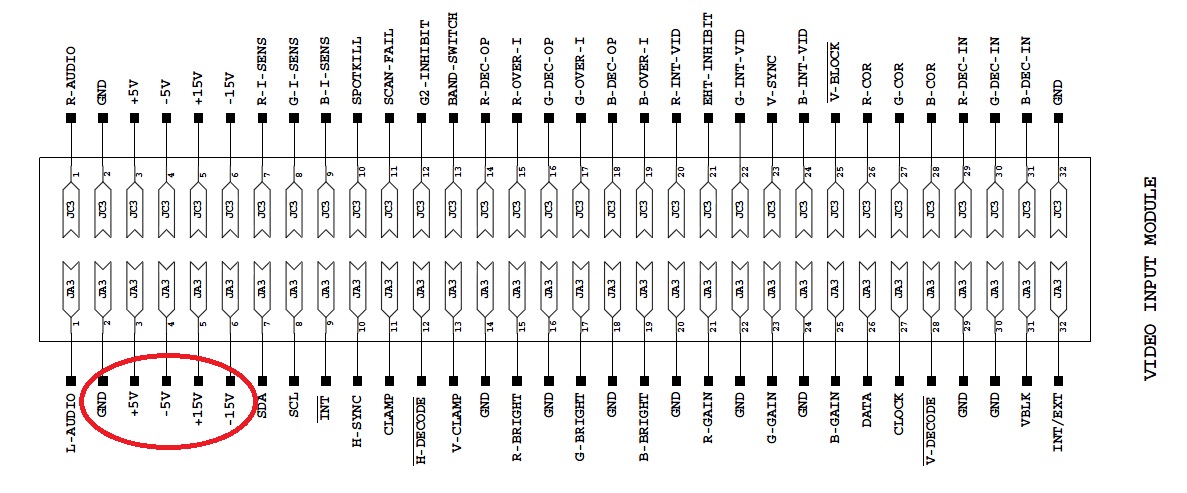
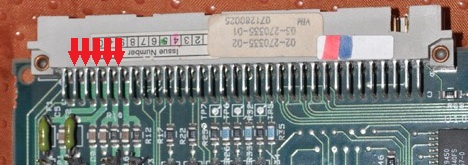
The VIM receives four voltages (+15V / -15V / +5V / -5V) from the LVPS. Those can be measured at the VIM's main connector. Unfortunately this connector is not accessible when the VIM is plugged in. Usually you would check those lines using an extender board.
Once I had to measure them, I soldered five wires (one additional for GND) to the connector pins and let them come out where the second video board would sit. Worked well for me, but: Be extremely careful! Any contact between the wires and/or frame will most certainly not only fry the LVPS but other boards as well!!!
Those two green little parts to the left of the first picture are two fuses. You can check those as well.
See below pictures for details...
Regards,
barclay66
| Description: |
|
| Filesize: |
179.58 KB |
| Viewed: |
4520 Time(s) |
|
| Description: |
|
| Filesize: |
43.72 KB |
| Viewed: |
5375 Time(s) |
|
|
|
| Back to top |
|
|
Curt Palme
CRT Tech
Joined: 08 Mar 2006
Posts: 24396
Location: Langley, BC
TV/Projector: All of them!
|
| Posted: Tue Jul 26, 2011 2:10 pm Post subject: |
|
|
|
I don't thnik anything internal to the sets is damaging the multi decoder. I would get a cheapie $25 DVDO line doubler and use the RGB inputs though. I've got a couple here. Way better picture quality than Svideo via the Svideo input.
|
|
| Back to top |
|
|
barclay66
Joined: 27 Jun 2011
Posts: 1304
Location: Germany
TV/Projector: Marquee 9500 Ultra
|
| Posted: Tue Jul 26, 2011 2:33 pm Post subject: |
|
|
That would be a major improvement. Bye bye scanlines...
Regards,
barclay66
|
|
| Back to top |
|
|
-Pjackso
Joined: 31 Mar 2006
Posts: 791
Location: Oklahoma
|
| Posted: Tue Jul 26, 2011 11:54 pm Post subject: |
|
|
Thanks for all the input. (ha ha.. thanks for all the "INPUT".)
...As for the S-video: I completely agree. I was already thinking of trying to sneak an upscaler into the mix.
I have an old Samsung TS360 that I'm not using. That would be a start. (upscaler and convert to VGA->RGBHV)
1) Barclay66, you mentioned possible damaging voltages from the S-video cable ...say due to bad wire insluation. Since you brought that up, that could be possible. The S-video cable that is being used is snaked under the carpet, and has been there for AT LEAST 12 years. There's no idea how many times it's been walked on, rolled on (furniture dolly), ...whatever.
It worked fine for the 50" tv, but it may have S-video circuit protection. (?)
How would I check the voltage of the S-video? (my brief google search didn't help)
I'll also check the board input volatages (+15V / -15V / +5V / -5V). I've got an old IDE ribbon cable around here somewhere. I'll use that to solder-on and snake outside the case. Thanks for the caution note.
2) Curt, you mentioned that you don't think the projector is frying the board. ...So you think it's an external problem too?
Nash said the MSD boards were bad for reliablility. Is that your opinion too?
Edit: If the little green fuses are bad, what size fuses for replacements?
Thanks!
_________________
-Nothing relevant to add.
|
|
| Back to top |
|
|
AnalogRocks
Forum Moderator

Joined: 08 Mar 2006
Posts: 26706
Location: Toronto, Ontario, Canada
TV/Projector: Sony 1252Q, AMPRO 4000G
|
| Posted: Wed Jul 27, 2011 2:10 am Post subject: |
|
|
What about a bad ground in the mix? Put your meter across the S-video cable then to the projector chassis and see if there's any voltage there.
_________________
Tech support for nothing
CRT.
HD done right!
|
|
| Back to top |
|
|
draganm

Joined: 08 Mar 2006
Posts: 8990
Location: Colorado
|
| Posted: Wed Jul 27, 2011 4:52 pm Post subject: |
|
|
| barclay66 wrote: | | The VIM receives four voltages (+15V / -15V / +5V / -5V) from the LVPS. |
I believe Paul is asking about the Multi standard Decoder board which sits above the VIM. It is powered seperately from the backplane but shares the +5, -15, and +15 lines. If there was a fault on one of those I would expect damage to something else and not just the MSD.
http://www.hometheater1.com/pdf/Electrohome/Marquee_Power_Supply_Troubleshooting.pdf
I think AnalogR is right, set your meter to Dc voltage and check the outside of the S-video connector. There should not be any voltage present here. If there is none, then check the voltage on the center pin, should be around 1 volt I believe for line level signal.
Best thing is to send all the MSD boards to recycling and run a decent RGB signal though. 
|
|
| Back to top |
|
|
barclay66
Joined: 27 Jun 2011
Posts: 1304
Location: Germany
TV/Projector: Marquee 9500 Ultra
|
| Posted: Wed Jul 27, 2011 10:00 pm Post subject: |
|
|
| draganm wrote: | | I believe Paul is asking about the Multi standard Decoder board which sits above the VIM |
Hi,
I'm aware of this. It's just that the VIM is the only board in that area I have schematics for. The other boards at least will receive the +5V / +15V / -15V as well (can be seen in Backplane Motherboard schematics). So controlling these voltages can't do any harm as long as safety precautions are taken.
@Pjackso:
The insulation fault I was referring to is the type of failure which seldomly can occur in the source device itself, not the cable. In this case portions of the mains voltage "jump" over to parts where it should not be. In extreme cases you could get an electric shock when only touching the device's case (a loose wire inside or shorted capacitor/mains filter/transformer can cause this). More often there will be noise voltage between the device's ground and earth. For the identification of these faults there exist special insulation testers (like this one:
http://en.sourcetronic.com/shop/Insulation-Tester). Of course this is expensive equipment only worth the investment when used on a daily basis.
You could try the following (this is the suggestion of AnalogRocks, just with a little bit more of detail):
- Unplug the S-Video cable from the Marquee
- Set the voltage meter to AC measurement (Auto-Range if possible)
- Connect one tip to the Marquee's frame. Look for good contact
- Hold the other tip to the S-Video connector's shield
Now the meter might read several Volts. If you now take a resistor of about 100K Ohm and connect it across the two meter tips the voltage you read should be almost zero. If not, then your source device could have an insulation fault.
Regarding the fuses on the VIM: Each of those has 3 Amps.
Regards,
barclay66
|
|
| Back to top |
|
|
|
|




