|
As this forum is rarely used anymore, we've locked it. Feel free to browse and read. Questions? Please reach out to us directly. Cheers! |

|
 |
|
|
| Author |
Message |
WanMan

Joined: 19 Mar 2006
Posts: 10270
|
| Posted: Sun Feb 06, 2011 11:38 am Post subject: Sorting the maddness of your catalog. |
|
|
Ok, so when the wife and I moved our Blu-ray and DVD stuff downstairs it didn't get immediately unpacked. In fact, most of it is still packed in boxes. I'm curious to know how some of you sort your goods on the shelves. Do you go my alphabetical listing (0-9, a-z), genre (mystery, science fiction, westerns), separate by boxed sets [and steelbooks] or series (Band of Brothers, James Bond films), by studio (Criterion, Warner Bros., Fox), a collaboration of these, or something funky (bar code)?
Fixed your typo in the tittle ~AR ;D
_________________
Trust no one. Absolutely no one. Advice of the board.
|
|
| Back to top |
|
 |
drice1234

Joined: 07 Oct 2006
Posts: 1309
Location: Allen, Texas
|
| Posted: Sun Feb 06, 2011 3:42 pm Post subject: |
|
|
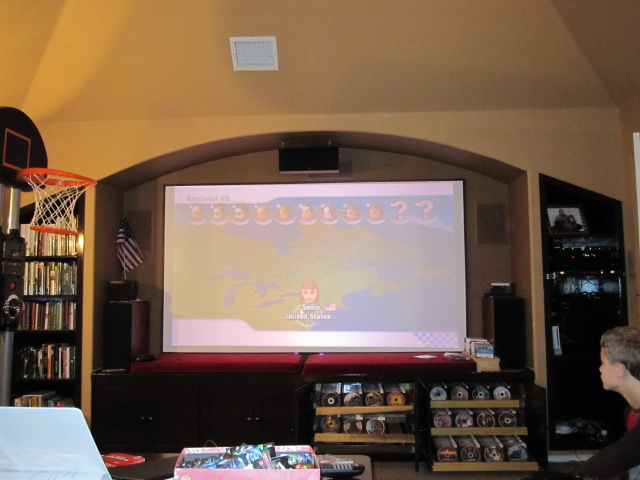
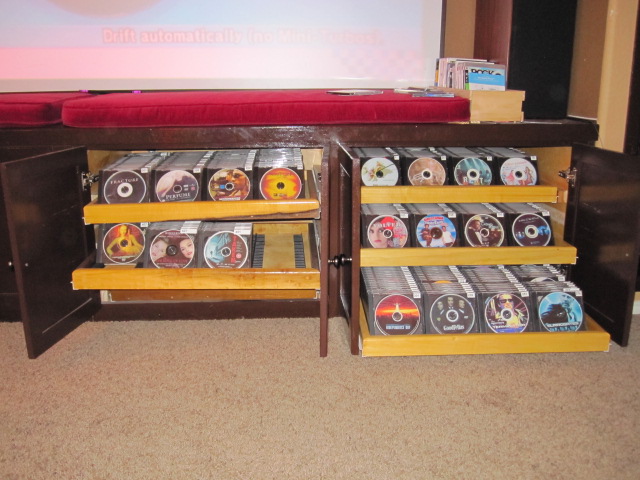
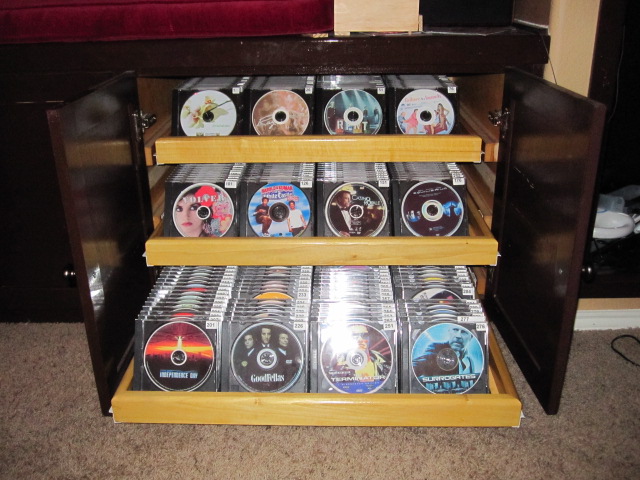
I just switched my cataloging over to the Collectorz software and am very happy with it . It even has an iPhone, iPad and android app that you can view your movies via these methods. You just need to type in the name of the movie and hit the search button and it goes on the internet and downloads all of the info on the movie. You can also scan the barcode on the movie and it will do the same. I figured trying to sort alphabetically, by genre, etc would be a hassle cause you would need to shuffle everything around whenever you added a new movie. I put a number label on each movie and then put this number in the index field when I input the data in the software. That way when you figure out which movie you want to watch you just go find it by number in your collection. I had a cabinet built under my screen with slide out drawers on which I put dvd holders that allow you to flip the case forward a little so you can see the case behind. I started out with just single dvd cases but as the collection grew I started using the dvd cases that hold 2 dvd's.
http://www.collectorz.com
http://www.rockler.com/product.cfm?page=27&filter=cd%20holder
| Description: |
|
| Filesize: |
93.39 KB |
| Viewed: |
4326 Time(s) |
|
| Description: |
|
| Filesize: |
116.67 KB |
| Viewed: |
4326 Time(s) |
|
| Description: |
|
| Filesize: |
126.86 KB |
| Viewed: |
4326 Time(s) |
|
|
|
| Back to top |
|
|
dturco

Joined: 06 Feb 2009
Posts: 3778
Location: Eastern Shore Maryland
TV/Projector: Runco DLP VX-3000i Marquee 9500 parts doner
|
| Posted: Sun Feb 06, 2011 3:49 pm Post subject: |
|
|
I have no order what so ever, Well that makes sense to anyone but me. The movies are arranged by actor, or by, "Reminds me of this other movie, or box sets next the big screen version of the T. V. series". Or the director, M. Night Shamalon has his own little spot, just because his movies, only remind me of How bad the other one was and I bought it anyway?
Another Example, Wild West, Independence Day, Men in Black, MIB 2. All Will Smith.
Then, I Robot, is next to Bicentennial Man, which is next to Artificial Intelligence. Not all will Smith  But remind me of the other movie. But remind me of the other movie.
The Time Machine, 1960, [Rod Taylor] is next to, Time after Time, 1979, [Malcolm Mcdowell] next to The Time Machine [Guy Pierce].2002
Star Gate the series has it's own shelf but the Movie is on that shelf with it.
Star Wars and Star Trek [The movies and series] are next to each other.
Then all boxed sets are next to each other and sequels are next to each other.
And the all animated movies are next to other animated movies.
And then all of the Blu-ray movies are stacked on top of the rest, but in the same kind of dis-jointed order because they're bluray right?
Good system or what? 
And from the way you write, this method should make perfect sense to you and be easily implemented, No?
_________________
Firefly rules. Can't stop the signal.
http://www.hulu.com/firefly
|
|
| Back to top |
|
|
ChrisWiggles
Opinionated SOB
Joined: 12 Mar 2006
Posts: 2529
Location: Seattle
|
| Posted: Sun Feb 06, 2011 8:03 pm Post subject: |
|
|
| dturco wrote: | I have no order what so ever, Well that makes sense to anyone but me. The movies are arranged by actor, or by, "Reminds me of this other movie, or box sets next the big screen version of the T. V. series". Or the director, M. Night Shamalon has his own little spot, just because his movies, only remind me of How bad the other one was and I bought it anyway?
Another Example, Wild West, Independence Day, Men in Black, MIB 2. All Will Smith.
Then, I Robot, is next to Bicentennial Man, which is next to Artificial Intelligence. Not all will Smith But remind me of the other movie.
The Time Machine, 1960, [Rod Taylor] is next to, Time after Time, 1979, [Malcolm Mcdowell] next to The Time Machine [Guy Pierce].2002
Star Gate the series has it's own shelf but the Movie is on that shelf with it.
Star Wars and Star Trek [The movies and series] are next to each other.
Then all boxed sets are next to each other and sequels are next to each other.
And the all animated movies are next to other animated movies.
And then all of the Blu-ray movies are stacked on top of the rest, but in the same kind of dis-jointed order because they're bluray right?
Good system or what?
And from the way you write, this method should make perfect sense to you and be easily implemented, No? |
This is what my music collection looks like.
It actually works amazingly for me. I can find any CD almost immediately.
God help anyone else though...
For movies everything is on a server in alphabetical order. Pretty simple.
And I have only a handful of BD movies. I mainly rent. A lot. A whole lot. I don't even want to think about how much money I've spent renting movies...
|
|
| Back to top |
|
|
AnalogRocks
Forum Moderator

Joined: 08 Mar 2006
Posts: 26706
Location: Toronto, Ontario, Canada
TV/Projector: Sony 1252Q, AMPRO 4000G
|
| Posted: Sun Feb 06, 2011 9:01 pm Post subject: |
|
|
I have piles
...of media. When I put it down it doesn't get moved so if I remember where I last saw it I can find it next time.
_________________
Tech support for nothing
CRT.
HD done right!
|
|
| Back to top |
|
|
WanMan
Joined: 19 Mar 2006
Posts: 10270
|
| Posted: Mon Feb 07, 2011 1:04 am Post subject: |
|
|
Ok, so it appears that I am not the only one that will not be conforming to anything normal. 
_________________
Trust no one. Absolutely no one. Advice of the board.
|
|
| Back to top |
|
|
greg_mitch
Joined: 03 May 2006
Posts: 5320
|
| Posted: Mon Feb 07, 2011 2:12 am Post subject: |
|
|
| drice1234 wrote: | I just switched my cataloging over to the Collectorz software and am very happy with it . It even has an iPhone, iPad and android app that you can view your movies via these methods. You just need to type in the name of the movie and hit the search button and it goes on the internet and downloads all of the info on the movie. You can also scan the barcode on the movie and it will do the same. I figured trying to sort alphabetically, by genre, etc would be a hassle cause you would need to shuffle everything around whenever you added a new movie. I put a number label on each movie and then put this number in the index field when I input the data in the software. That way when you figure out which movie you want to watch you just go find it by number in your collection. I had a cabinet built under my screen with slide out drawers on which I put dvd holders that allow you to flip the case forward a little so you can see the case behind. I started out with just single dvd cases but as the collection grew I started using the dvd cases that hold 2 dvd's.
http://www.collectorz.com
http://www.rockler.com/product.cfm?page=27&filter=cd%20holder |
You should meet my wife. You two would get along great!
|
|
| Back to top |
|
|
wallace123456

Joined: 14 Aug 2006
Posts: 2236
Location: Northwest VA area
|
| Posted: Sat Feb 19, 2011 12:56 am Post subject: |
|
|
I downloaded and tried collectorz program. But, when I tried to view the back cover, it was hard to read. Of course when I zoomed in, it made it worse. Still looking.
wallace
_________________
Life Is Good, But BBQ Is Better! BBQ Competition Team
|
|
| Back to top |
|
|
|
|
|
|
|
You cannot post new topics in this forum
You cannot reply to topics in this forum
You cannot edit your posts in this forum
You cannot delete your posts in this forum
You cannot vote in polls in this forum
You cannot attach files in this forum
You can download files in this forum
|
Forum powered by phpBB © phpBB Group
|
|




