| Author |
Message |
jeffslife

Joined: 17 Apr 2010
Posts: 4190
Location: ohio usa
|
| Posted: Thu Oct 28, 2010 1:41 am Post subject: STARTING MY THIRD COMPLETE SET UP |
|
|
My first set up albeit a complete nightmare was ok.
The second set up,my picture was much improved
Now I am attempting to get a PERFECT 1080i picture.
I think my problem begins with my green lens not being square to begin with.
So that is where I am starting, I came to this conclusion from my last thread.
The problem is I am not sure how to be SURE it is parallel and square
I cannot figure out a way to measure this as I have no single clear
reference point to work off of.
As usual I am at a complete loss here.
_________________
We are ALL job creators !
|
|
| Back to top |
|
 |
AFryia

Joined: 09 Mar 2006
Posts: 965
Location: S.E. Michigan VPH-G70Q
|
| Posted: Thu Oct 28, 2010 1:57 am Post subject: |
|
|
Square the chassis to the screen.
Green normally only needs flapping top and bottom 'V' (up/down). 'H' should be neutral from the factory.
If 'H' was adjusted you need to first square the chassis then adjust green lens flap 'H' (left/right).
_________________
My Volt Blog
|
|
| Back to top |
|
|
jeffslife
Joined: 17 Apr 2010
Posts: 4190
Location: ohio usa
|
| Posted: Thu Oct 28, 2010 2:10 am Post subject: |
|
|
thanks, chassis is square and centered within 1/32 of an inch.
H is as best I can tell measuring off a machined surface to a cast surface
within .022 inch left side to right side measuring with depth micrometer.
is that close enough?
the pj is no longer level across the top machined surface
I dont know why, it was before.
It appears to be lower in one end about .06 inch( 1/16 roughly)
is that gonna be a big deal?
It all seems secure now.
unless the house moved.
also the throw on my 54 x96 inch 16:9 ratio screen is 129.5 inches
ecrabb made clear to me FLAPPING in a way that i can wrap my head
around (thanks again) so I am trying at this point to solve any other problems
before I get to (what was before) the nightmare of flapping.
THANKS FOR ALL YOUR HELP
maybe this time I will get it perfect.
_________________
We are ALL job creators !
|
|
| Back to top |
|
|
tse
Joined: 03 May 2006
Posts: 1014
Location: Sweatbucket, Fl.
|
| Posted: Thu Oct 28, 2010 1:21 pm Post subject: |
|
|
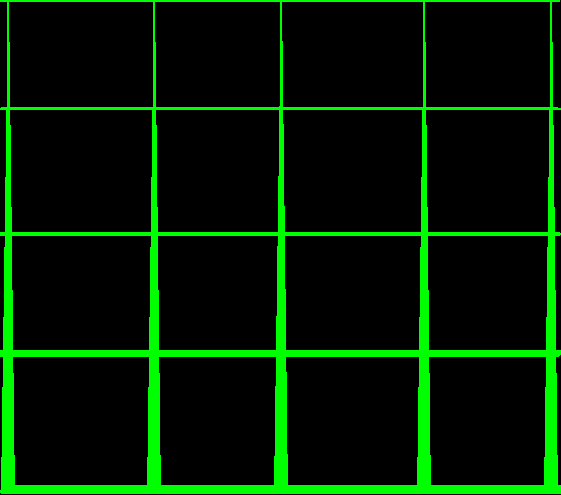
Put up a crosshatch on green, adjust h and v size to near max (4x3 aspect). Use an unused channel if you want to keep your current size/aspect. Defocus the lens slightly, enough to make the lines a bit wider than when focused. If the lens is not properly adjusted the lines will not be the same width top to bottom and/or left to right. The pic shows the vertical adjustment not set right. Adjust until the vertical lines are the same width top to bottom and the horizontal lines are the same width left to right. When they are you will see all parts of the image come into focus at the same point when the lens focus is adjusted.
Scott
| Description: |
|
| Filesize: |
5.98 KB |
| Viewed: |
3431 Time(s) |
|
_________________
"Were we directed from Washington when to sow and when to reap, we would soon want bread."
Thomas Jefferson
|
|
| Back to top |
|
|
jeffslife
Joined: 17 Apr 2010
Posts: 4190
Location: ohio usa
|
| Posted: Thu Oct 28, 2010 2:41 pm Post subject: |
|
|
You say used an unused channel. I cannot find a way to SELECT a channel the G70 seems to pick its own settings right now for example it goes to 41. If I am capable of changing this I would need SPECIFIC directions as I have no clue and (i could be wrong)
but the moome board seems to disable many options in the menu. Maybe it is not the moome maybe they are disabled for other unknown reasons.
_________________
We are ALL job creators !
|
|
| Back to top |
|
|
VideoGrabber
Joined: 09 Apr 2006
Posts: 933
Location: Michigan
|
| Posted: Thu Oct 28, 2010 3:14 pm Post subject: |
|
|
What he means is feed it a signal for a rez you're not currently using, like 800x600. The PJ will lock onto (or create) a new 'channel' for that setting, and you can tweak the h/v settings to maximize your grid.
Getting the tube geometry correct is something that can be done at any rez, and will remain correct when you switch back to your other settings.
_________________
- Tim
|
|
| Back to top |
|
|
jeffslife
Joined: 17 Apr 2010
Posts: 4190
Location: ohio usa
|
| Posted: Thu Oct 28, 2010 3:41 pm Post subject: |
|
|
OK I get it now, I can feed it dvd instead of BD and it will sync to that frequency and change channels on its own.
THANKS for the explanation.
_________________
We are ALL job creators !
|
|
| Back to top |
|
|
AFryia
Joined: 09 Mar 2006
Posts: 965
Location: S.E. Michigan VPH-G70Q
|
| Posted: Thu Oct 28, 2010 11:03 pm Post subject: |
|
|
| jeffslife wrote: |
H is as best I can tell measuring off a machined surface to a cast surface
within .022 inch left side to right side measuring with depth micrometer.
is that close enough? |
That will get you close but I'm not a fan of that method. One would have to assume the tube face was perfectly parallel to the metal ring of the "C" element. It all depends on how the tube was installed and how much variability the manufacturer had.
You should judge by the image projected IMO.
|
|
| Back to top |
|
|
AFryia
Joined: 09 Mar 2006
Posts: 965
Location: S.E. Michigan VPH-G70Q
|
| Posted: Thu Oct 28, 2010 11:10 pm Post subject: |
|
|
| jeffslife wrote: | | I cannot find a way to SELECT a channel the G70 seems to pick its own settings right now for example it goes to 41. |
Then there are 31 pre-defined USER settings already saved to memory. Or you have later firmware and memory select is set to manual.
On your very first setup, when you are done, hold the memory button for something like 20-30 seconds and save registration to all memory blocks. (the manual says 5sec., don't believe it) I believe this will reset the USER memory so it will start back at MEM 10 (1-9 are PJ PRESET blocks).
|
|
| Back to top |
|
|
secstate
Joined: 20 Mar 2006
Posts: 720
|
| Posted: Fri Oct 29, 2010 12:03 am Post subject: |
|
|
|
Cannot help you on the G70 setup but if it is any consolation I have gone through literally dozens of full setups on the various Barcos I have owned. It just takes a while to learn and then once you learn you get a new projector and they all have their own idiosyncrasies which require a few full setups to learn (or maybe I am just a slow learner).
|
|
| Back to top |
|
|
jeffslife
Joined: 17 Apr 2010
Posts: 4190
Location: ohio usa
|
| Posted: Fri Oct 29, 2010 3:51 am Post subject: |
|
|
The lines in the grid worked great, I need an extra set of eyes close to the screen to get it perfect as I cant find binoculars that will focus at such a short distance,but it is vastly improved. Do I need to have the H and V lines the same width as each other? And if so
when I do the RED and BLUE (again) should I make those lines measure the same width as green?
I have another question about registration I am saving for later.
_________________
We are ALL job creators !
|
|
| Back to top |
|
|
|
|




