|
As this forum is rarely used anymore, we've locked it. Feel free to browse and read. Questions? Please reach out to us directly. Cheers! |

|
 |
|
|
| Author |
Message |
cygnus23
Joined: 26 Jul 2008
Posts: 13
|
| Posted: Wed Aug 11, 2010 4:25 pm Post subject: XG 1100 horizontal noise |
|
|
Hi all,
new setup of a XG I've had in storage while awaiting the unending process of theater building. video chain is sony BDP-S570 --> Denon 3311ci --> moome Full-xg card. sony player and denon are both set to 1080i. I have a pretty nice image after several hours of tweaking, but I'm seeing some horizontal noise (very thin, not conforming to scan lines, almost at a slight tilt) whenever there is very bright (near 100ire) content. Any ideas what would cause this?
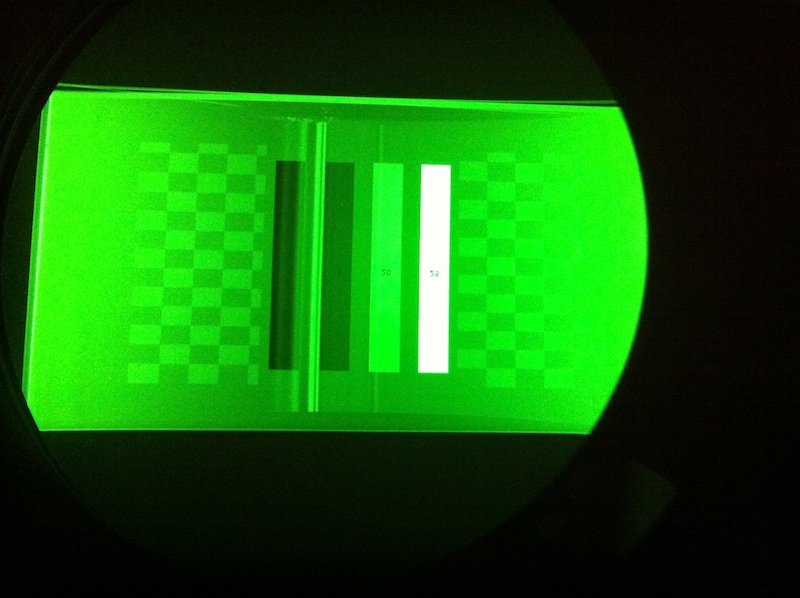
Also, although I know that the XG has issues with 1080p input at standard HD timing, when incoming video is at 1080i, and I have brightness up to the point where I can see even a hint of raster, I get a couple noticeable vertical lines near the middle of the image. The actual video content is not wrapping at all, and I have basically eliminated the bands by (painstainkingly) adjusting my ref. white controls with the Guy Kuo/KennyG et all guides. My blacks look really good, I just wonder, should they be there, lurking, or is something amiss? I'm going to try and attach a photo I took before I got everything adjusted, so you can see the bands. There's also a pattern up from on of the test discs, unfortunately, but the bars are easy to see.
Would the horizontal noise be at all related?
| Description: |
| Green tube showing pattern and vertical bands |
|
| Filesize: |
117.71 KB |
| Viewed: |
1617 Time(s) |
|
|
|
| Back to top |
|
 |
jarseneau

Joined: 06 Nov 2007
Posts: 323
Location: WI
|
| Posted: Fri Aug 13, 2010 1:50 pm Post subject: |
|
|
To me this looks like wrap around but the part that is being wrapped is blank image areas on both sides. I'm guessing this is caused by the source device settings. Maybe you need to switch to 16:9 mode or the opposite if that is what it is set to currently.
Does the 'ghost' wrapping go away when you use the projector size control to narrow the image? I think the problem is that the raster is too large causing the wrapping and the image inside the raster needs to be stretched horizontally so it fills the raster width.
_________________
Jerry
|
|
| Back to top |
|
|
cygnus23
Joined: 26 Jul 2008
Posts: 13
|
| Posted: Fri Aug 20, 2010 4:38 am Post subject: |
|
|
|
Okay, here's the deal...I played with the size and position in the OPERATE menu, and the size did not effect the bar. It was there with both vertical and horizontal size adjustment, and did not move with regards to proportion to the edges. When I changed the horizontal position, the lines moved from side to side, going all the way to the left side and then wrapping around to the "front" or moving all the way to the right and "wrapping" around to the front. I heard some one mention the "back raster" before...am I seeing this and is there a way to adjust that so it's invisible? If I move the positioning, the active image area shifts to the side and the bar moves to the opposite side. Just as the bar "wraps" to the front, the image begins to wrap to the back, and same if reversed to the other side. THis would technically solve the problem by putting the bar at the edge of the raster, while leaving the image area "unwrapped". The problem then is that for green, the image isn't centered, and I can't adjust the image back to center because I can't do it in RASTER CENTERING, correct? Is there another option, or should I not be seeing the "back raster"? If you look at the image above, the active image area is straight across the top and bottom, as one would assume, but the other visible raster area is curved, with the visible (in black scenes) brightish bar only extending vertically between the curved area of the raster. Any thoughts?
|
|
| Back to top |
|
|
|
|
|
|
|
You cannot post new topics in this forum
You cannot reply to topics in this forum
You cannot edit your posts in this forum
You cannot delete your posts in this forum
You cannot vote in polls in this forum
You cannot attach files in this forum
You can download files in this forum
|
Forum powered by phpBB © phpBB Group
|
|




