|
As this forum is rarely used anymore, we've locked it. Feel free to browse and read. Questions? Please reach out to us directly. Cheers! |
|
|
 |
|
|
| Author |
Message |
Revox
Joined: 13 Feb 2008
Posts: 158
|
| Posted: Tue Jul 13, 2010 12:11 pm Post subject: Gamma filter as a software addon |
|
|
I am thinking about fixing my gamma problems:
My room is not black painted, so i had problems with high contrast scenes. The details in the black parts of the immage are missing. I think you know what i am talking about.
So i tried Windows Media Player Classic with FFDshow filter and Reclock.
There is a Gamma correction. This correction worked very well, but expand the contrast to much in low contrast dark scenes.
So i am searching for a filter i am able to control a view parameters.
There must be some software plugins which are a little close to the gammaX hardware.
Greetings from Germany, Stefan
|
|
| Back to top |
|
 |
perisoft

Joined: 29 Aug 2007
Posts: 2920
Location: Ithaca, NY
|
| Posted: Fri Aug 06, 2010 3:26 am Post subject: Re: Gamma filter as a software addon |
|
|
| Revox wrote: | I am thinking about fixing my gamma problems:
My room is not black painted, so i had problems with high contrast scenes. The details in the black parts of the immage are missing. I think you know what i am talking about.
So i tried Windows Media Player Classic with FFDshow filter and Reclock.
There is a Gamma correction. This correction worked very well, but expand the contrast to much in low contrast dark scenes.
So i am searching for a filter i am able to control a view parameters.
There must be some software plugins which are a little close to the gammaX hardware.
Greetings from Germany, Stefan |
VideoEqualizer. Pair that with a DSLR that can have a manually set white point, adjust each gamma point for each channel using images of the target IRE, and you've got amazing calibration for $0 and a few hours.
Good: It's system level, so will fix your desktop, games, etc.
Bad: It won't change video overlays, so PowerDVD etc won't work with it. But you're already using FFDshow, so that's no problem.
Before:
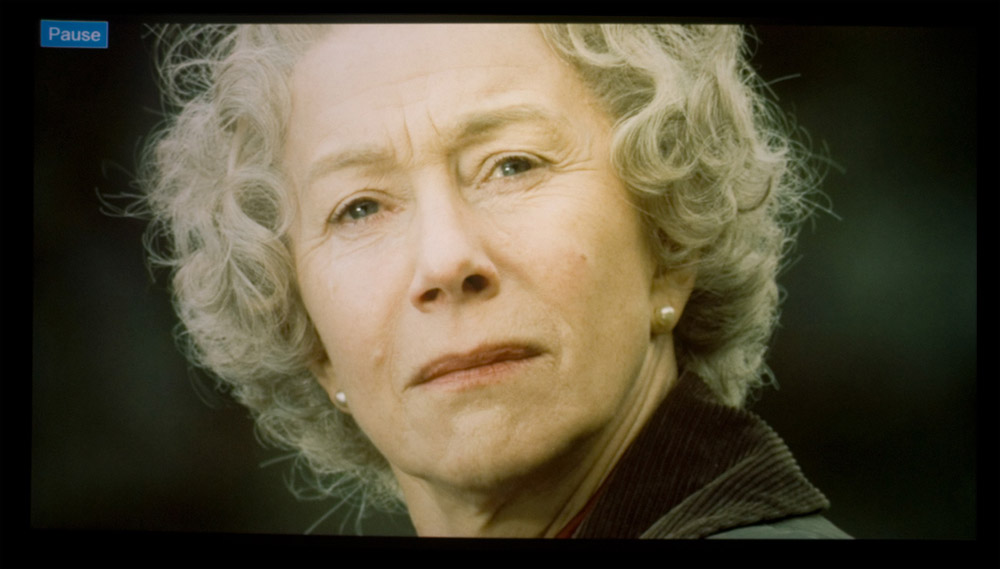
After:
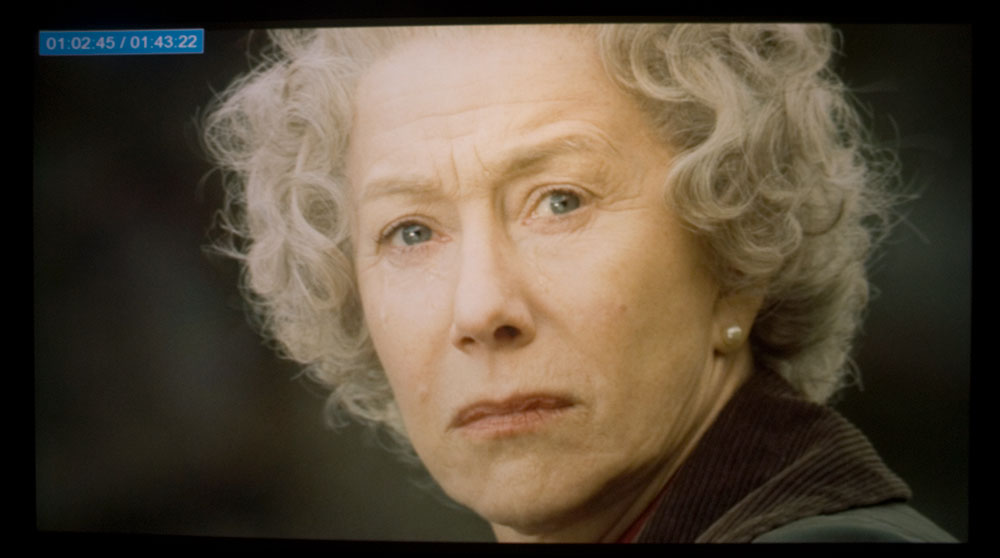
I've touched it up since, so it looks rather better. Photos assume your display is D6500, obviously.
_________________

|
|
| Back to top |
|
|
akajester

Joined: 09 Jul 2008
Posts: 934
Location: Wisconsin
|
| Posted: Fri Aug 06, 2010 1:59 pm Post subject: |
|
|
|
I'm having a hard time telling the difference between the two shots above. Maybe it's my poor monitor. Last time I ran through grayscale my gamma looked pretty good but wasn't a perfect line. would it be worth doing this? just not so sure the change would be worth the time investment. Thanks!
|
|
| Back to top |
|
|
perisoft
Joined: 29 Aug 2007
Posts: 2920
Location: Ithaca, NY
|
| Posted: Fri Aug 06, 2010 5:53 pm Post subject: |
|
|
| akajester wrote: | | I'm having a hard time telling the difference between the two shots above. Maybe it's my poor monitor. Last time I ran through grayscale my gamma looked pretty good but wasn't a perfect line. would it be worth doing this? just not so sure the change would be worth the time investment. Thanks! |
Probably your monitor - or you're blind.  The uncalibrated one is pretty greenish. The uncalibrated one is pretty greenish.
Depending on your PJ's characteristics, you might have it pretty well nailed without doing anything drastically detailed like I did, so whether it's worth the effort or not is hard to tell from here. You also *need* a DSLR or some form of meter to do it.
I thought things looked pretty good until I did the VideoEqualizer run, and then it was like, "Whooah..." - you don't realize until you see it how dramatic the difference is.
With a DSLR and an old version of VideoEqualizer that messed up the interpolation and point setting so it took about five times as long as it needed to, I put about 3 hours in to do it. With a new version it shouldn't be difficult. I just used a ramp in the Nokia Monitor Test, and selected channels with the Barco. That's really not the Right Way to do it, since low IREs were getting brightened by the high IREs nearby, so really you'd want to do it with a 10% window that you alter each go-around, but I didn't have the time to make a series of images to do it. Even so, though, the results were good.
REALLY what should be done is to auto-compensate per-frame for the low ANSI by darkening low IRE parts of the screen that are washed out by the high-IRE parts... come up with a way to define washout at low IREs depending on the total IRE of the frame, and alter gamma to match.
If you were REALLY REALLY clever, the thing to do would be to correct (to some degree) for low ANSI by calculating the way an individual area of brightness halos, and then darken the surrounding areas by inverting the known halo - obviously this wouldn't work once the IREs got down so low you couldn't lower them enough anymore, but theoretically you should be able to make a gray-to-white transition perfect by dimming the gray where it's washed out by the halo from the white.
But I digress.
Edit: I don't care if I digress. The real question here is whether each pixel's halo adds independently, or whether the halo acts nonlinearly, so two pixels of white next to each other halo more (or less) than two individual pixels. It seems like it ought to be linear; each bit of the lens doesn't 'know' what's next to it. But I'd have to prove that experimentally.
This shouldn't be too expensive to do computationally...
The other question is whether the subsequent nonlinear drop in ANSI below a certain IRE differential threshold would be disconcerting. And the further question is whether low ANSI is even really perceived when it's, say, a 30IRE bit that shows as 35IRE due to halo. Maybe we don't notice that and only notice when it's 0IRE that shows as 5IRE due to halo. In that case, this wouldn't have much of a subjective impact at all. But I have to think it would make a significant difference in situations where you have, say, a dim-but-not-black barn with an open door...
I might just cross-post this to the main CRT forum if I don't think of a killer issue...
Another edit: I bet that doing a really large radius unsharp mask does exactly this! I gotta check... If I bloom an image and then... *opens photoshop*
_________________
|
|
| Back to top |
|
|
akajester
Joined: 09 Jul 2008
Posts: 934
Location: Wisconsin
|
| Posted: Fri Aug 06, 2010 7:02 pm Post subject: |
|
|
That would explain why I don't see the difference, I don't see many green colors. too funny.
I have an i1 display 2 I was going to use with HCFR, similar to when I did the grayscale. I'm guessing that would work too? I'd like to give the software a try if anything just to further my education.
Thanks!
dale
|
|
| Back to top |
|
|
perisoft
Joined: 29 Aug 2007
Posts: 2920
Location: Ithaca, NY
|
| Posted: Fri Aug 06, 2010 7:31 pm Post subject: |
|
|
| akajester wrote: | That would explain why I don't see the difference, I don't see many green colors. too funny.
|
Oh, and you're blaming your monitor? That's just not fair! 
_________________
|
|
| Back to top |
|
|
|
|
|
|
|
You cannot post new topics in this forum
You cannot reply to topics in this forum
You cannot edit your posts in this forum
You cannot delete your posts in this forum
You cannot vote in polls in this forum
You cannot attach files in this forum
You can download files in this forum
|
Forum powered by phpBB © phpBB Group
|
|



