Return to the CurtPalme.com main site CurtPalme.com Home Theater Forum
A forum with a sense of fun and community for Home Theater enthusiasts!
Products for Sale ] [ FAQ: Hooking it all up ] [ CRT Primer/FAQ ] [ Best/Worst CRT Projectors List ] [ Setup Tips & Manuals ] [ Advanced Procedures ] [ Newsletter ]
 
Blu-ray disc release list and must-have titles. Buy the latest and best Blu-ray titles to show off in your home theater!

 As this forum is rarely used anymore, we've locked it. Feel free to browse and read. Questions? Please reach out to us directly. Cheers! 

EXT-FULLHD v2 HDMI 1080i Issue

 
This forum is locked: you cannot post, reply to, or edit topics.   This topic is locked: you cannot edit posts or make replies.    CurtPalme.com Forum Index -> Moome Products
Author Message
Nekoman


Joined: 12 Jun 2010
Posts: 1


Posted: Sat Jun 12, 2010 9:02 pm    Post subject: EXT-FULLHD v2 HDMI 1080i Issue

Hello I just purchased the EXT-FULLHD v2 Which BTW I got Super Fast Ordered it on 06-07-2010 and received it Today 06-12-2010 From Taiwan Which is super fast shipping IMO.

I am using the EXT-FULLHD v2 to connect my WD TV Live HD and my Samsung BD-1600 to my Mitsubishi XD300U Projector.

720p works perfectly with no issues whatsoever.

1080i does not work on any hdmi device I have hooked to the EXT-FULLHD v2 Just displays no input on my projector.

1080p Displays a horizontally mirrored picture and my projector thinks the correct display mode is SXGA63 which could be part of the problem.

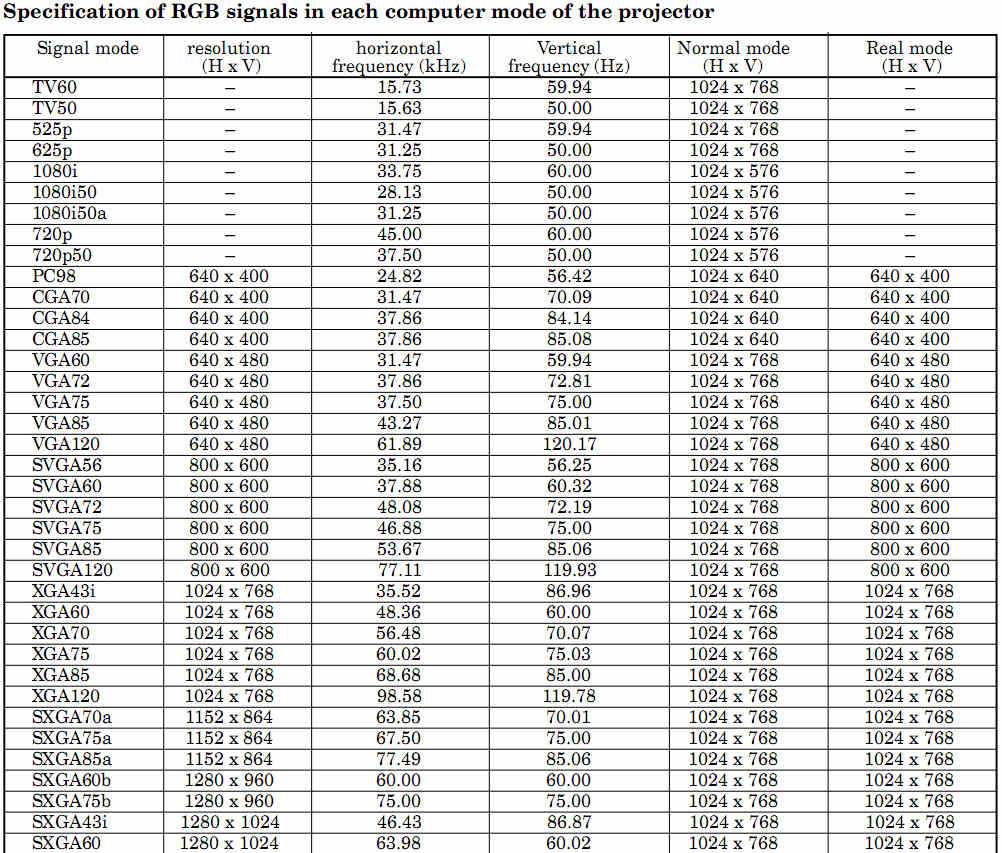
My Projector Directly Supports 720p and 1080i I would like to get the 1080i Mode working as I have found this to display the sharpest text and images on my projector.

I know my projector can display 1080i at 60Hz because I can run from Component Output of my WD-TV Live and the BD-1600 To the projector just fine and it correctly identifies the signal as 1080i.

I have tried messing with the Dip Switches following the manual for Sync and that did not allow 1080i to work at all.

I am hoping someone here may be able to help. I love the product so far and if I can get either 1080i or P to work that would just make it all the better.

I have included a picture of how the image looks at 1080P Horizontally Mirrored and 720p working perfectly as well as the specs of the Projector.

If you need any more info to help please ask and I will respond as quickly as I am able to.

Thanks in Advance for any assistance.


xd300u.jpg
 Description:
Mitsubishi XD300U Projector Supported Resolutions
 Filesize:  178.46 KB
 Viewed:  5211 Time(s)

xd300u.jpg


720p1.jpg
 Description:
720p Working Perfectly

Download
 Filename:  720p1.jpg
 Filesize:  282.45 KB
 Downloaded:  604 Time(s)


1080p1.jpg
 Description:
1080p Showing Horizontal Mirroring

Download
 Filename:  1080p1.jpg
 Filesize:  290.77 KB
 Downloaded:  670 Time(s)

Back to top
Rolls-Royce


Joined: 30 Sep 2007
Posts: 288
Location: Victorville, CA

Posted: Sun Jun 27, 2010 2:25 am    Post subject:

I own a WDTV HD Live as well as a EXT-FULLHD V2. It sounds as though you need to change both the WDTV and the BD-1600 to 1080i from AUTO in their HDMI setup routines. The EXT-FULLHD's EDID reports it as a 1080p device (which it is), so if an attached source is set to AUTO, they'll connect at 1080p. You have to have an HDMI connection active AND a component or composite video cable connected (to see the setup menu) in order to set the BD player. The WDTV Live is more finicky. If it sees an HDMI connection first, it won't activate the analog video outs, and vice-versa. Since I have a 1080p set in another room, I just take my WDTV Live there (where it will connect just fine in 1080i or AUTO) and set it to output 1080i.

After this is done, you do have to make sure that you turn off whichever source (BD-1600 or WDTV Live) you are using BEFORE you power off the EXT-FULLHD, or else they will revert to AUTO and you'll have to set them again. Like yours, my EXT-FULLHD is connected to a 1080i display, so I'm very familiar with having to do all this. Sad

_________________
....Royce....
Back to top
This forum is locked: you cannot post, reply to, or edit topics.   This topic is locked: you cannot edit posts or make replies.    CurtPalme.com Forum Index -> Moome Products All times are GMT
Page 1 of 1
You cannot post new topics in this forum
You cannot reply to topics in this forum
You cannot edit your posts in this forum
You cannot delete your posts in this forum
You cannot vote in polls in this forum
You cannot attach files in this forum
You can download files in this forum