| Author |
Message |
kal
Forum Administrator

Joined: 06 Mar 2006
Posts: 18114
Location: Ottawa, Canada
TV/Projector: JVC DLA-NZ7
|
| Posted: Thu Mar 23, 2006 6:59 pm Post subject: Barco owners! Horz linearity off? Ringing on left? The fix! |
|
|
Note: The projector in question is a Zenith 1200 (Cine 8 Onyx) but this should hold true for just about any Barco as the design of this board is fairly similar between the 800/801/808/1208/1209.
I was having 3 problems:
(1) My horizontal green linearity was off. Grids on the left were 5" wide and slowly increased in size until 7" on the right hand side.
(2) The raster was actually slightly bent in and out of the screen on the left side (like a curtain) which looks like ringing or vertical lines (banding). Horizontal lines also had a slight up/down 'squiggle' to them in this area because of this 'curtain' effect. (My solution was to shift the image area all the way to the right in the raster and compensate with high & low raster shift/h-phase adjustments - not recommended for stability).
(3) I couldn't get enough image/raster width, even with H-width set to 99. (My solution was to reduce my HTPC porch settings and increase the SMPS P2 pot's deflection voltage slightly over 48V to compensate).
But one pot fixed all of this: The P1 horizontal linearity pot on the horiz deflection board. Mine was turned all the way CCW !
Turning it CW expanded or flattened out the left side 'curtain' effect so that grid sizes matched the right side (problem 1 and 2 solved). This also made the entire image wider (problem 3 solved)!

People have always said that Barco's don't have horizontal linearity controls... this should get you were you need to (hopefully).
Techs:
Barco service manuals (808/1208/1209/etc) indicate that the the PJ should be fed a 18Khz signal and P1 should be adjusted for correct horizontal linearity. It also says that the PJ should be fed a slightly lower frequency signal of 15.6Khz (NTSC) and that the core of T1 should be adjusted as well for correct horizontal linearity.
Why two ways to adjust linearity at almost the exact same frequency? (I can't adjust T1 since I don't have extender boards, but my guess is that therefore it's probably never been touched and is fine).
Kal
_________________

Support our site by using our affiliate links. We thank you!
My basement/HT/bar/brewery build 2.0
|
|
| Back to top |
|
 |
Person99
Joined: 09 Mar 2006
Posts: 4899
Location: Flower Mound, TX
|
| Posted: Thu Mar 23, 2006 7:02 pm Post subject: |
|
|
Kal, thank you, thank you, thank you for posting this over here. I have the "The raster was actually slightly bent in and out of the screen on the left side (like a curtain) which looks like ringing or vertical lines (banding). Horizontal lines also had a slight up/down 'squiggle' to them in this area because of this 'curtain' effect"
I didn't notice this that much initially when you posted this thread over at ****** because it is minor on mine, but on some frequencies I've found it quite noticable now.
Dave
|
|
| Back to top |
|
|
kal
Forum Administrator
Joined: 06 Mar 2006
Posts: 18114
Location: Ottawa, Canada
TV/Projector: JVC DLA-NZ7
|
|
| Back to top |
|
|
secstate
Joined: 20 Mar 2006
Posts: 720
|
| Posted: Fri Mar 24, 2006 3:18 pm Post subject: |
|
|
|
Thanks for posting this. I had a 1208 I could never get the horizontal linearity right on. My current 808 seems perfect. Also note that the ringing can also be caused by an overheated coil on the horizontal module. Bjørn identified this problem a year or so ago, though it might only impact 120x series Barcos.
|
|
| Back to top |
|
|
kal
Forum Administrator
Joined: 06 Mar 2006
Posts: 18114
Location: Ottawa, Canada
TV/Projector: JVC DLA-NZ7
|
|
| Back to top |
|
|
Frostbite
Joined: 22 Apr 2007
Posts: 24
|
| Posted: Wed Jun 18, 2008 12:33 pm Post subject: |
|
|
Oh! I'll have to try this. I own a 1209s/E and I was having problems fitting the entire 1080p image from the PS3/TViX within the raster and read about the "forcing the projector into high scanning mode by turning the P1 pot on the sync board" solution on this superb forum. After turning said pot fully ccw, I can now see the entire active image area, which is great, but now the wavy lines/curtain effect and ringing in the left side of the image is painfully evident. I'll try adjusting the P1 pot on the horizontal deflection board like you explained, then. I suppose you should adjust the pot while the projector is on. Is that correct?
Thanks!
|
|
| Back to top |
|
|
jkruger

Joined: 24 Oct 2007
Posts: 2435
Location: Carlsbad, CA
|
| Posted: Wed Jun 18, 2008 1:18 pm Post subject: |
|
|
|
I have the same problem on my 1209s. Can this info be posted in the barco tips and tricks area so it's easy to find in the future?
|
|
| Back to top |
|
|
Ile

Joined: 09 Mar 2006
Posts: 1491
Location: Jyväskylä, Finland
|
| Posted: Wed Jun 18, 2008 1:19 pm Post subject: |
|
|
It can be adjusted projector on, but 1209s have own P64 linearity pot for high frequency range (green led is on) in small Hdef sub board.
P1 is meant to be adjusted with 18kHz signal (low frequency range), but 808 don't have separate high frequency range so P1 is only choice for us.
|
|
| Back to top |
|
|
Frostbite
Joined: 22 Apr 2007
Posts: 24
|
| Posted: Wed Jun 18, 2008 10:35 pm Post subject: |
|
|
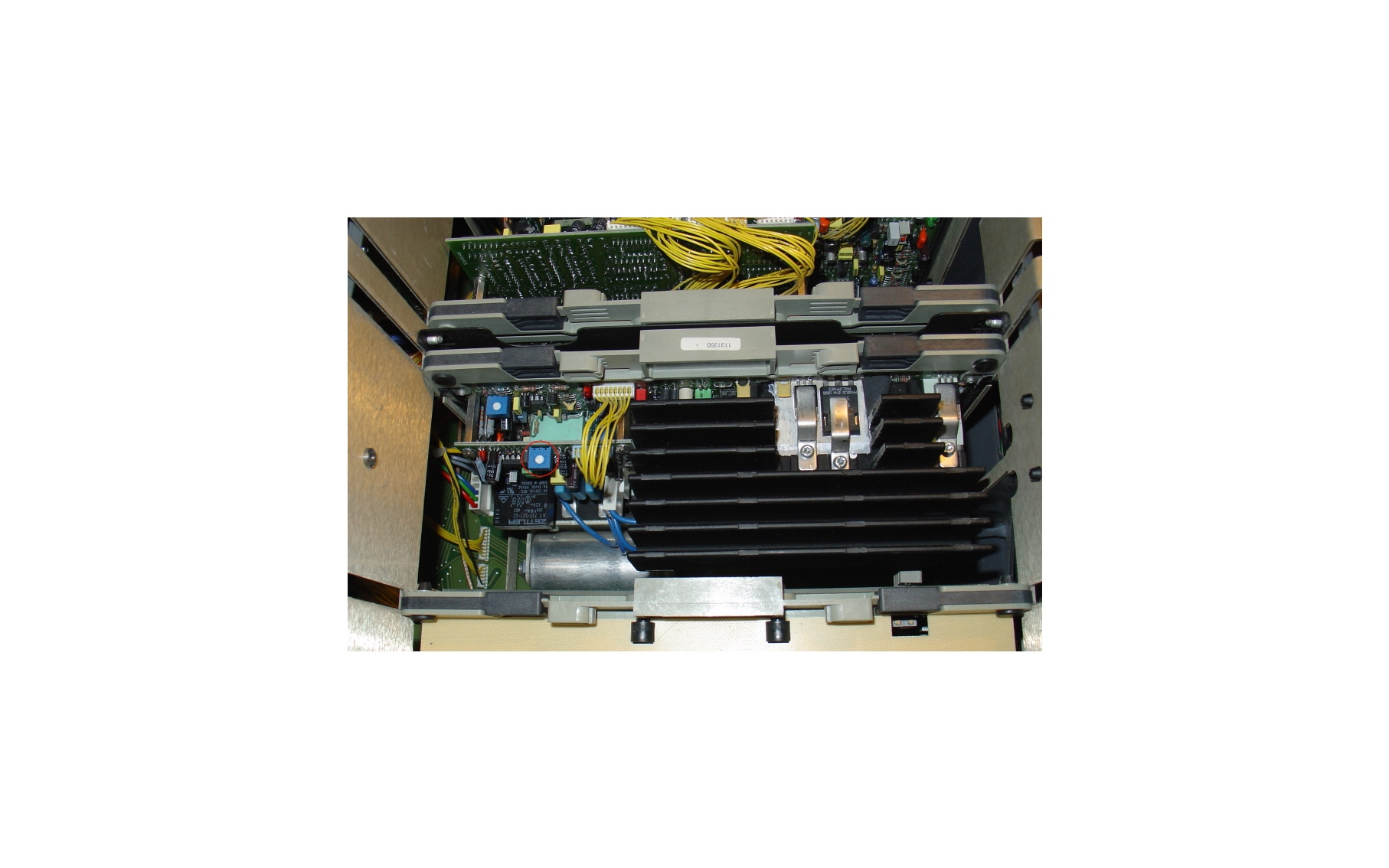
I see. I want to make sure I do things right, so I've attached an image and indicated which pot I believe it is that you refer to. Is it the one? Thanks!
| Description: |
|
| Filesize: |
428.43 KB |
| Viewed: |
7151 Time(s) |
|
|
|
| Back to top |
|
|
Ile
Joined: 09 Mar 2006
Posts: 1491
Location: Jyväskylä, Finland
|
| Posted: Thu Jun 19, 2008 6:37 am Post subject: |
|
|
That's it.
Attached full procedure.
|
|
| Back to top |
|
|
jkruger
Joined: 24 Oct 2007
Posts: 2435
Location: Carlsbad, CA
|
| Posted: Thu Jun 19, 2008 6:43 am Post subject: |
|
|
|
My 1209s does not have the sub board. Is this because it is actually a Runco 1100? Is this why it has a narrower bandwidth rating?
|
|
| Back to top |
|
|
Frostbite
Joined: 22 Apr 2007
Posts: 24
|
| Posted: Thu Jun 19, 2008 10:52 am Post subject: |
|
|
|
There. I tried adjusting the pot but sadly it didn't make much of a difference. The banding was still there after the adjustment, although more faint, as I adjusted the pot fully ccw. Lesser adjustments didn't have any noticeable impact at all. I couldn't leave it like that, though, as linearity got bad at that position. Could it be a burnt/overheated coil that's causing the problem, then? I'll have to check the horizontal module...
|
|
| Back to top |
|
|
Ile
Joined: 09 Mar 2006
Posts: 1491
Location: Jyväskylä, Finland
|
| Posted: Thu Jun 19, 2008 11:21 am Post subject: |
|
|
Runco 1100 is based to Data 1209s, so it won't have "high frequency mode". That sub board and scan reversal board over tubes are missing...
Frostbite.
Did you test also P1 for adjustment?
It could be that only customized porch setting (=scaler or htpc) helps. Does it have same problem with 1080i?
|
|
| Back to top |
|
|
Frostbite
Joined: 22 Apr 2007
Posts: 24
|
| Posted: Thu Jun 19, 2008 12:30 pm Post subject: |
|
|
Ile,
I haven't really tried running 1080i but I'll check. Anyway, if i run 1080p in low scanning mode, the problem with the wavy lines and ringing goes away, but then I can't fit the active image within the raster. Too much is cropped off. Adjusting P1? Do you mean I should try adjusting P1 while I run 1080p in low scanning mode or that P1 adjustment could affect this problem even when I run 1080p in high scanning mode?
To use a scaler such as the iScan VP50 Pro is definitely a potential solution but I thought I'd look around for an alternative remedy first. Too bad the iScan HD+, which I currently use, won't let you adjust 1080p input signal settings.
I'll be out of town for a few days, so if I don't promptly reply to any potential posts you now know the reason. Thank you.
|
|
| Back to top |
|
|
zGman
Joined: 22 May 2006
Posts: 599
|
| Posted: Thu Jun 19, 2008 1:39 pm Post subject: Barco |
|
|
Hi,
I have found in several instances that the "squiggley lines" on the left side of the
image can be very significantly reduced by easing up on the Zone Focus adjustment.
This won't eliminate the "ringing" but can substantially improve the convergence near
the edge of the image. (this has to be done for each color and can also be done for the
right side if you have similar issues there)
It is also possible to use Zone Astig to improve the focus, but this takes time to
iterate - can't get too wild with any setting & have to keep track of the spot shape.
If you are using a HTPC as a source, you can increase the "back porch" setting,
and then use the Phase adjustment to recenter the picture. I was able to get rid of
the "ringing" almost completely on my G808S for that source.
Cheers,
G
|
|
| Back to top |
|
|
Frostbite
Joined: 22 Apr 2007
Posts: 24
|
| Posted: Tue Jun 24, 2008 6:27 am Post subject: |
|
|
|
I'll take a look. Thank you.
|
|
| Back to top |
|
|
|
|




