| Author |
Message |
Arizona Dan
Joined: 06 Sep 2009
Posts: 21
Location: Chandler Arizona
|
| Posted: Sun Apr 11, 2010 8:46 pm Post subject: Graphics card |
|
|
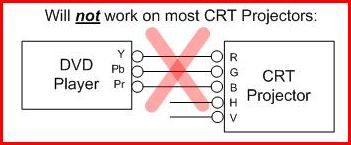
I have been using my Runco DTV 943 for about a year and have really enjoyed it. Just installed a 132" Da Lite HP screen with great success. I really love the image I am getting. My CRT is connected to the Scientific Atlanta box from COX digital using the RGB rca connectors and it works great. I am a little confused though, because according to the hook up primer, connecting the RGB from COX (or Blue Ray, DVD player, etc.) to just three of the inputs is not suppose to work. My projector has six choices of inputs, and one of the choices does work. All of this is leading up to a question. Is there a graphics card for a PC that has equivalent RGB connectors that will work with my projector. I know about the HD Fury products. I could buy a graphic card with HDMI and a HDFury2 and this would work. This would cost around $200 or more.
Since the RGB connectors (I may not be using the correct terms) on the Scientific Atlanta box work properly, is there a graphic card that has the same type of RGB connectors that would work?
I have read most of the information on this site, but still need a little help.
Dan
| Description: |
| This works on my projector. |
|
| Filesize: |
20.43 KB |
| Viewed: |
3595 Time(s) |
|
|
|
| Back to top |
|
 |
ecrabb
Forum Moderator

Joined: 13 Mar 2006
Posts: 15909
Location: Utah
TV/Projector: JVC RS40, Epson 5010
|
| Posted: Sun Apr 11, 2010 9:07 pm Post subject: |
|
|
Hi, Dan -
The output on your cable box, DVD player and BD player that you're referring to as "RGB" is actually called "component" or "YPrPb". It's NOT RGB, even though the cables are often color-coded as such.
The reason it works in spite of what the primer says is that the Barco 701 (or 708) your Runco is based on is a relatively newer projector designed more for the home market, so it included the more consumer-oriented component inputs. That's also why the primer says that connection won't work on most CRT projectors. Only the last few years' worth of models (for the most part) had those inputs.
As for a video card, you wouldn't have to use a video card that outputs component, as the projector is perfectly capable of handling standard RGBHV output for every run-of-the-mill video card with a VGA or DVI connector on it. You just have to tell the projector you want to use an RGB (vs. YPrPb) signal.
If you still want to go component, we'll have to wait for some others to chime in... I know some ATI video cards will output component with a VGA-component cable, but I can't tell which models or if nvidia cards will also do that.
I'm going to move the thread to the HTPC forum since an HTPC guy is who will be able to answer the main question.
Cheers,
SC
|
|
| Back to top |
|
|
Arizona Dan
Joined: 06 Sep 2009
Posts: 21
Location: Chandler Arizona
|
| Posted: Sun Apr 11, 2010 9:22 pm Post subject: |
|
|
|
Thanks SC for the information and thanks for moving this to the correct forum. From your reply, it sounds like it may be easy to connect the Runco (Barco) to my PC. Can anyone in the HTPC forum help me? Would pictures of the back of my PC and projector help?
|
|
| Back to top |
|
|
ecrabb
Forum Moderator
Joined: 13 Mar 2006
Posts: 15909
Location: Utah
TV/Projector: JVC RS40, Epson 5010
|
| Posted: Sun Apr 11, 2010 11:37 pm Post subject: |
|
|
No problem, Dan!
Your Runco should have an input with five BNC connectors - they'd be chrome push/turn type locking connectors. If so, then all you need is a VGA (actually HD-15) to RGBHV cable, like this:

http://www.monoprice.com/products/product.asp?c_id=102&cp_id=10203&cs_id=1020304&p_id=90&seq=1&format=2
Somebody else that knows can chime in, but I know some Barcos needed negative synch, so you may need to configure that... Thought, maybe the newer 70x chassis changed that (or made it configurable).
SC
|
|
| Back to top |
|
|
Arizona Dan
Joined: 06 Sep 2009
Posts: 21
Location: Chandler Arizona
|
| Posted: Mon Apr 12, 2010 12:45 am Post subject: |
|
|
I like the way this is sounding - really really great.
What kind of resolution can I get with this - 1080 hopefluuly? Is it a function of my graphic card?
Dan
|
|
| Back to top |
|
|
akajester

Joined: 09 Jul 2008
Posts: 934
Location: Wisconsin
|
| Posted: Mon Apr 12, 2010 2:04 pm Post subject: |
|
|
If you have a pci express slot, ati and nvideo both make some low end cards around $25 - $50 that will work great for any htpc. They support DXVA (direct x video acceleration) which with a compatible software player will allow you to run 1080 source while keeping your processor load VERY low. AGP cards will work too but things get more time consuming to set up. Many of the card companies have dropped the agp models from their drivers to save space. So you may THINK that the model will work but then find out you have incompatibilities, etc.
That being said, I've had good luck with the ati radeon 3000 and 4000 series and you can get them real cheap from newegg.
From looking at the specs of your pj, I would guess that 720p would work great but 1080 wouldn't. Even so, 720p looked great on my barco, so you may be perfectly happy with that.
|
|
| Back to top |
|
|
|
|





