| Author |
Message |
justtaint
Joined: 21 May 2007
Posts: 191
Location: Chicago
|
| Posted: Sun Feb 28, 2010 8:22 pm Post subject: Runco 991 basic setup help |
|
|
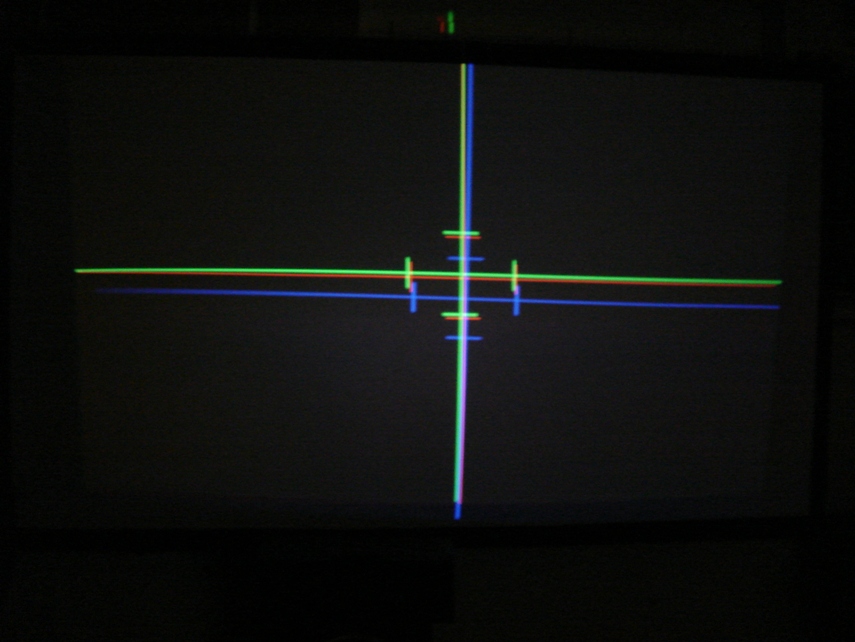
Completely frustrated right now. I've spend the last couple hours trying to figure out this problem. I'm sure its something really simple but with my limited experience with CRT projectors and zero with this Runco 991 (XG-75) I'm at a total loss.
I've zeroed out every setting that I could find, but I can't seem to get the blue to come close to matching up with the green.
Picture is attached. A nudge in the right direction would be appreciated. Just doing a basic setup on a table before I put it up on the ceiling.
| Description: |
|
| Filesize: |
184.44 KB |
| Viewed: |
6062 Time(s) |
|
_________________
Thomas
Sony 1272
|
|
| Back to top |
|
 |
Tom.W

Joined: 09 Mar 2006
Posts: 6635
|
| Posted: Sun Feb 28, 2010 8:26 pm Post subject: |
|
|
|
Have you tried slightly turning the yoke on the Blue tube ?
|
|
| Back to top |
|
|
justtaint
Joined: 21 May 2007
Posts: 191
Location: Chicago
|
| Posted: Sun Feb 28, 2010 8:38 pm Post subject: |
|
|
I should have clarified what the problem in the image is. I can't get the horizontal blue line to match up with R/G.
Thank you for suggesting to turn the blue's yoke, I tweaked that, so now the lines match up vertically.
_________________
Thomas
Sony 1272
|
|
| Back to top |
|
|
Zebu Fellenz
Joined: 21 Dec 2006
Posts: 2567
|
| Posted: Sun Feb 28, 2010 8:40 pm Post subject: |
|
|
|
I have no experience with the XG but if it's anything like the G70 you may have two centering adjustments, one fine adjustment, and a coarse adjustment, on the G70 you need to be in service mode to access the coarse adjustment, any chance this could be something similar?
|
|
| Back to top |
|
|
justtaint
Joined: 21 May 2007
Posts: 191
Location: Chicago
|
| Posted: Sun Feb 28, 2010 8:53 pm Post subject: |
|
|
I can max out Static on the blue and it still doesn't match up. There doesn't seem to be a coarse and fine on that one like some of the others adjustments(Ctrl +).
_________________
Thomas
Sony 1272
|
|
| Back to top |
|
|
Tom.W
Joined: 09 Mar 2006
Posts: 6635
|
|
| Back to top |
|
|
dvh99

Joined: 25 Dec 2009
Posts: 2158
Location: nederland
|
| Posted: Sun Feb 28, 2010 9:03 pm Post subject: |
|
|
cant you just shift the raster like in the marquees?
_________________
1 answer always poses multiple questions.
marquee 9500ultra HD10L moome hdmi1.3 v3+ some mods.
|
|
| Back to top |
|
|
justtaint
Joined: 21 May 2007
Posts: 191
Location: Chicago
|
| Posted: Sun Feb 28, 2010 9:04 pm Post subject: |
|
|
Yes, I have, thanks. I've been trying to follow the "Definitive CRT Projector Setup Guide" since that's based on the XG series.
Since this projector was once part of a side stack a lot of the adjustments were way off, but that shouldn't affect this problem.
_________________
Thomas
Sony 1272
|
|
| Back to top |
|
|
MikeEby

Joined: 24 Jun 2007
Posts: 5237
Location: Osceola, Indiana
|
| Posted: Sun Feb 28, 2010 9:05 pm Post subject: |
|
|
There is a reference raster centering adjustment. It will effect all memory locations. I think you need to use the 3151 passcode to access it. DO NOT mess with any other reference ajustments. The only one I have ever touched is the raster centering. Once you get the center close then I would go to the tilt/skew.
Mike
_________________
Doing HD since the last century!
|
|
| Back to top |
|
|
justtaint
Joined: 21 May 2007
Posts: 191
Location: Chicago
|
| Posted: Sun Feb 28, 2010 9:10 pm Post subject: |
|
|
Using the Ref. raster centering I got the Blue to line up, it was zeroed previously. I had to take it up to 36 on the blue (0 on R/G).
Not convinced that I don't have another issue with maybe my mechanical setup, but now its close enough that I can continue with my setup.
Thank you for the help.
_________________
Thomas
Sony 1272
|
|
| Back to top |
|
|
jarseneau

Joined: 06 Nov 2007
Posts: 323
Location: WI
|
| Posted: Mon Mar 01, 2010 1:16 pm Post subject: |
|
|
The ASTIG rings on the neck of the blue tube could be out of adjustment. Do they appear to still have the bead of silicone that locks their position in place? If it looks untouched I'd leave it be and look for another cause. Have you set the H/V Scheimflug tabs correctly for your screen size? There should be directions inside the case near the lenses.
_________________
Jerry
|
|
| Back to top |
|
|
justtaint
Joined: 21 May 2007
Posts: 191
Location: Chicago
|
| Posted: Mon Mar 01, 2010 1:52 pm Post subject: |
|
|
The scheimflug tabs are set correctly, I took care of that when I switched in the new(er) tubes. I did accidentally bump the astig rings when I was switching out the tubes, it appeared that someone had moved them before. There wasn't any silicone to lock them in place.
_________________
Thomas
Sony 1272
|
|
| Back to top |
|
|
MikeEby
Joined: 24 Jun 2007
Posts: 5237
Location: Osceola, Indiana
|
| Posted: Mon Mar 01, 2010 1:55 pm Post subject: |
|
|
Oh...If they have been moved then that for sure could cause your problem.
Mike
_________________
Doing HD since the last century!
|
|
| Back to top |
|
|
Ben851
Joined: 13 Sep 2008
Posts: 221
Location: Ottawa, Ontario
|
| Posted: Mon Mar 01, 2010 2:57 pm Post subject: |
|
|
Is raster centering software controlled on the XG? I had this exact problem with my 6PG and just had to manually adjust the centering magnets on the tube itself...
_________________
Thanks,
Ben
|
|
| Back to top |
|
|
jarseneau
Joined: 06 Nov 2007
Posts: 323
Location: WI
|
| Posted: Mon Mar 01, 2010 4:03 pm Post subject: |
|
|
Raster centering is electronically controlled via menu settings. There are no centering rings to adjust. I'm betting now that the ASTIG for the blue needs to be setup. There is a setup guide http://www.curtpalme.com/Astig.shtm but it won't mention raster movement per se. I would start by nulling out the rings. I forget if you put the tab pairs to align or 180 apart to do that but you'll know you're there if you move the pair together and nothing changes. The basic premise of the rings is that you impart the direction of the adjustment by moving the set in unison and you adjust the strength by the differential between the tab pairs. The 2-pole pair should allow you to shift the image as you rotate it around the neck. Place the 2-pole tab pair in a non-null (like 90 degrees to each other) and rotate in unison until you get the image in the correct place. From that point use the ASTIG setup guide for the rest of the setup.
_________________
Jerry
|
|
| Back to top |
|
|
justtaint
Joined: 21 May 2007
Posts: 191
Location: Chicago
|
| Posted: Mon Mar 08, 2010 5:53 pm Post subject: |
|
|
All six were siliconed in place, but I was able to adjust the 2-pole to get the blue back in line with the red/green.
_________________
Thomas
Sony 1272
|
|
| Back to top |
|
|
Curt Palme
CRT Tech
Joined: 08 Mar 2006
Posts: 24396
Location: Langley, BC
TV/Projector: All of them!
|
| Posted: Mon Mar 08, 2010 6:06 pm Post subject: |
|
|
| justtaint wrote: | | All six were siliconed in place, but I was able to adjust the 2-pole to get the blue back in line with the red/green. |
That's not how to do it. USe the metal tabs on the main yokes to shift the raster, use the astig rings for astig only (although the 2 pole will indeed shift the raster around as well).
|
|
| Back to top |
|
|
jarseneau
Joined: 06 Nov 2007
Posts: 323
Location: WI
|
| Posted: Mon Mar 08, 2010 7:31 pm Post subject: |
|
|
The XG's don't have any tabs on the main yoke. I agree that this isn't the right way, but as the poster said earlier that the astig rings were accidentally shifted, it's possible that the correct placement of the 2-pole magnet could be found by getting the raster about right, then tweaking the 2-pole to center the core.
_________________
Jerry
|
|
| Back to top |
|
|
justtaint
Joined: 21 May 2007
Posts: 191
Location: Chicago
|
| Posted: Mon Mar 08, 2010 7:40 pm Post subject: |
|
|
| jarseneau wrote: | | The XG's don't have any tabs on the main yoke. I agree that this isn't the right way, but as the poster said earlier that the astig rings were accidentally shifted, it's possible that the correct placement of the 2-pole magnet could be found by getting the raster about right, then tweaking the 2-pole to center the core. |
I had to be "mis-remembering", as when I went to adjust the 2pole the silicone was still in place. I must have bumped them on the tube I was taking out.
_________________
Thomas
Sony 1272
|
|
| Back to top |
|
|
|
|





