| Author |
Message |
kaal

Joined: 17 Feb 2009
Posts: 9
|
| Posted: Fri Oct 02, 2009 3:08 am Post subject: Stress Level Soaring - How do you connect HTPC/HDFury2/HDTV |
|
|
How do you get a picture on the HDTV?
I've got a 6 month old DIY home theatre PC with a Radeon HD4870 video card, a LG blu-ray drive GGC H20L, a new HDFury2 and a 2002 1080i analog HDTV.
The HDFury2 is installed to a dual link DVI connector on the video card to the HDMI input on the HDFury2 & then the supplied component connector to the HDTV
The screen choices ATI Catalyst software showed the following choices for connecting a 2nd display with Extended Desktop
#1 - digital flat panel (HDFury2)
results - 1920 x 1080 at 40 Hz
#2 - DTV (component video)
results - 720 x 576 at 25i Hz
The connectors on the video card are
- 2 dual link DVI
- 1 TV output (round 9 pin male to component female)
| Description: |
|

Download |
| Filename: |
1.jpg |
| Filesize: |
106.5 KB |
| Downloaded: |
3 Time(s) |
|
|
| Back to top |
|
 |
AnalogRocks
Forum Moderator

Joined: 08 Mar 2006
Posts: 26706
Location: Toronto, Ontario, Canada
TV/Projector: Sony 1252Q, AMPRO 4000G
|
| Posted: Fri Oct 02, 2009 3:22 am Post subject: |
|
|
You need to see if the ATi software has a 1080i setting available for the second display. The video card see's the HDFury2 as a 1080P display and you need 1080i.
If you can't set the resolution to 1080i then you'll need powerstrip.
1080i is 1920x1080 60i
You need to connect the HDFury2 to the DVI output using a DVI to HDMI cable. Then plug the HDFUry2 into the TV, make sure to set the side switch on the HDFury2 to YUV ( component ) and make sure you have the HDFury2's power supply plugged in.
_________________
Tech support for nothing
CRT.
HD done right!
|
|
| Back to top |
|
|
AnalogRocks
Forum Moderator
Joined: 08 Mar 2006
Posts: 26706
Location: Toronto, Ontario, Canada
TV/Projector: Sony 1252Q, AMPRO 4000G
|
| Posted: Fri Oct 02, 2009 3:31 am Post subject: |
|
|
One more thing. I just noticed you have the ATi control center in Basic mode. You'll need to go advanced to get to the other features.
_________________
Tech support for nothing
CRT.
HD done right!
|
|
| Back to top |
|
|
kaal
Joined: 17 Feb 2009
Posts: 9
|
| Posted: Fri Oct 02, 2009 3:51 am Post subject: |
|
|
| AnalogRocks wrote: | You need to see if the ATi software has a 1080i setting available for the second display. The video card see's the HDFury2 as a 1080P display and you need 1080i.
|
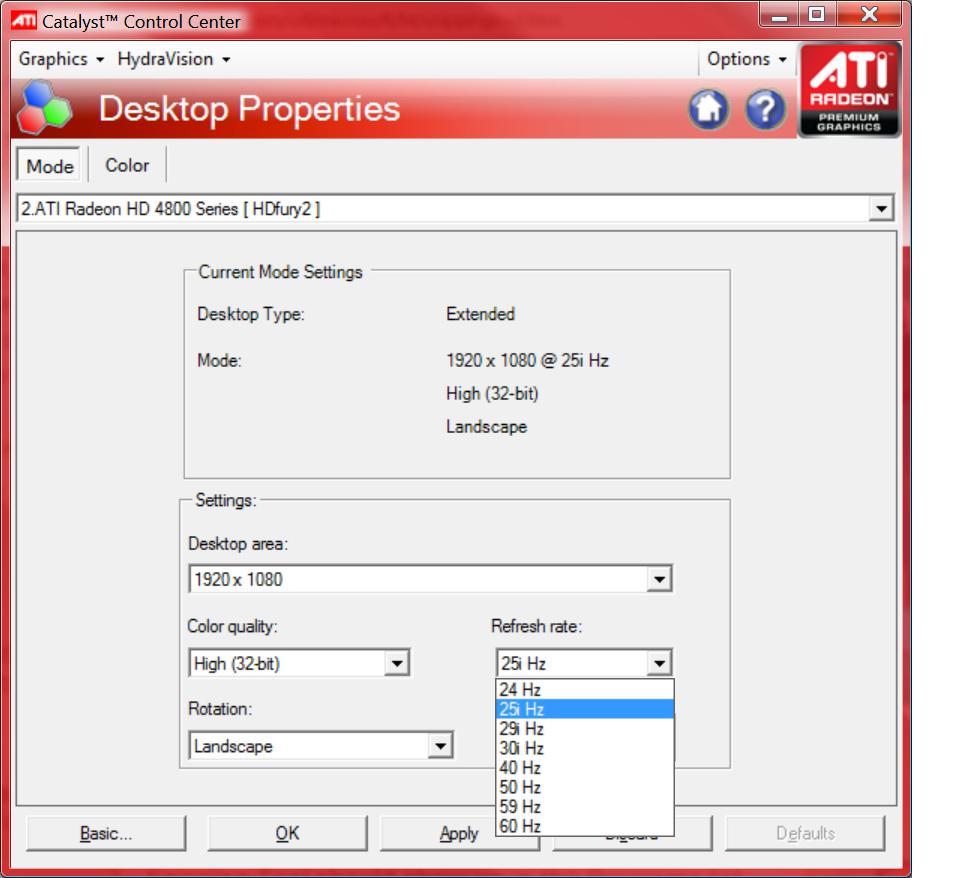
This is what I've figured out so far for 1920 x 1080
interlace options are
25i
29i
30i
non-interlace are
24
40
50
59
60
| Description: |
|
| Filesize: |
84.34 KB |
| Viewed: |
69 Time(s) |
|
|
|
| Back to top |
|
|
AnalogRocks
Forum Moderator
Joined: 08 Mar 2006
Posts: 26706
Location: Toronto, Ontario, Canada
TV/Projector: Sony 1252Q, AMPRO 4000G
|
| Posted: Fri Oct 02, 2009 3:54 am Post subject: |
|
|
Ok 1080i 30i is another way of saying 1080i 60i.
You are in North America right? I see you're with Shaw cable so I guessed.
_________________
Tech support for nothing
CRT.
HD done right!
|
|
| Back to top |
|
|
kaal
Joined: 17 Feb 2009
Posts: 9
|
| Posted: Fri Oct 02, 2009 4:07 am Post subject: |
|
|
| AnalogRocks wrote: |
If you can't set the resolution to 1080i then you'll need powerstrip. |
What's that?
| AnalogRocks wrote: | | You need to connect the HDFury2 to the DVI output using a DVI to HDMI cable. Then plug the HDFUry2 into the TV, make sure to set the side switch on the HDFury2 to YUV ( component ) and make sure you have the HDFury2's power supply plugged in. |
I've done all of this.
|
|
| Back to top |
|
|
kaal
Joined: 17 Feb 2009
Posts: 9
|
| Posted: Fri Oct 02, 2009 4:40 am Post subject: |
|
|
| AnalogRocks wrote: | | Ok 1080i 30i is another way of saying 1080i 60i. |
OK - refresh rate set to 30i. With a setting of extended desktop & 1920 x 1080 @30i & I changed my HDTV's input to video 1. Then I moved my web page onto the HDTV. Results: no picture on the HDTV & the web page disappeared. I had to get another PC to continue this thread as I can't access my browser any more  [/quote] [/quote]
| AnalogRocks wrote: | | You are in North America right? I see you're with Shaw cable so I guessed. |
How do you know that? I'm in Victoria, BC
|
|
| Back to top |
|
|
AnalogRocks
Forum Moderator
Joined: 08 Mar 2006
Posts: 26706
Location: Toronto, Ontario, Canada
TV/Projector: Sony 1252Q, AMPRO 4000G
|
| Posted: Fri Oct 02, 2009 4:24 pm Post subject: |
|
|
| kaal wrote: | | AnalogRocks wrote: | | Ok 1080i 30i is another way of saying 1080i 60i. |
OK - refresh rate set to 30i. With a setting of extended desktop & 1920 x 1080 @30i & I changed my HDTV's input to video 1. Then I moved my web page onto the HDTV. Results: no picture on the HDTV & the web page disappeared. I had to get another PC to continue this thread as I can't access my browser any more
| AnalogRocks wrote: | You are in North America right? I see you're with Shaw cable so I guessed.
| Kaal wrote: | | How do you know that? I'm in Victoria, BC |
|
|
I'm a moderator. I can see your IP address.
Not to overlook the obvious stuff. Is input 1 on the TV 1080i?
Powerstrip is a video tweaking utility to set custom resolutions on the PC.
http://entechtaiwan.com/util/ps.shtm
Powerstrip has some 1080i timings built in. On mine they were called "HDTV derived 1080i"
It's shareware. Download it and give it a try.
Jeremy
_________________
Tech support for nothing
CRT.
HD done right!
|
|
| Back to top |
|
|
kaal
Joined: 17 Feb 2009
Posts: 9
|
| Posted: Fri Oct 02, 2009 5:09 pm Post subject: |
|
|
| AnalogRocks wrote: |
Not to overlook the obvious stuff. Is input 1 on the TV 1080i? |
This wasn't overlooked. My hdtv has 2 hi-def inputs. One is connected to my hdtv cable box & the other 1 I was trying to set up this HDFury2 thing. I even reversed the 2 to check that the connections worked. The tv connections worked on both but Fury didn't.
My stress level is now over the top. As I mentioned earlier, I lost my browser window & couldn't get it back unto my main monitor. My whole computer froze up while trying to do a system restore. I'm now in the process of reinstalling WinVista from the ground up.
I'm giving up trying to use my computer with my TV. the stuff's for sale
https://www.curtpalme.com/forum_archived/viewtopic.php@t=18126.html
| AnalogRocks wrote: | Powerstrip is a video tweaking utility to set custom resolutions on the PC.
http://entechtaiwan.com/util/ps.shtm
Powerstrip has some 1080i timings built in. On mine they were called "HDTV derived 1080i"
It's shareware. Download it and give it a try.
Jeremy |
This looks like it is way beyond my comfort/skill level!
Thanks very much for all your help & suggestions.
KAAL
|
|
| Back to top |
|
|
jkruger

Joined: 24 Oct 2007
Posts: 2435
Location: Carlsbad, CA
|
| Posted: Fri Oct 02, 2009 5:26 pm Post subject: |
|
|
|
you have a PM
|
|
| Back to top |
|
|
AnalogRocks
Forum Moderator
Joined: 08 Mar 2006
Posts: 26706
Location: Toronto, Ontario, Canada
TV/Projector: Sony 1252Q, AMPRO 4000G
|
| Posted: Fri Oct 02, 2009 9:26 pm Post subject: |
|
|
Ahh well sorry it didn't work out for you.
_________________
Tech support for nothing
CRT.
HD done right!
|
|
| Back to top |
|
|
|
|





