| Author |
Message |
drice1234

Joined: 07 Oct 2006
Posts: 1309
Location: Allen, Texas
|
| Posted: Tue Sep 15, 2009 2:51 am Post subject: Sony blue adjustment help |
|
|
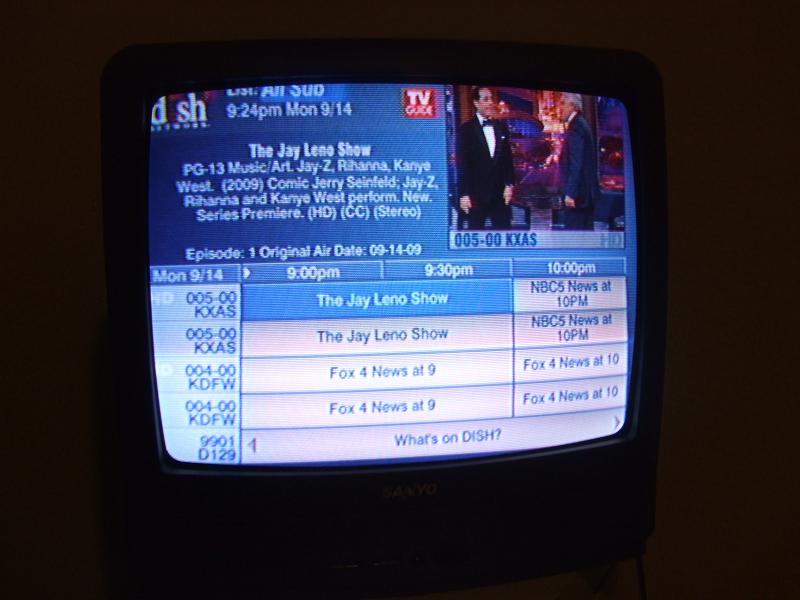
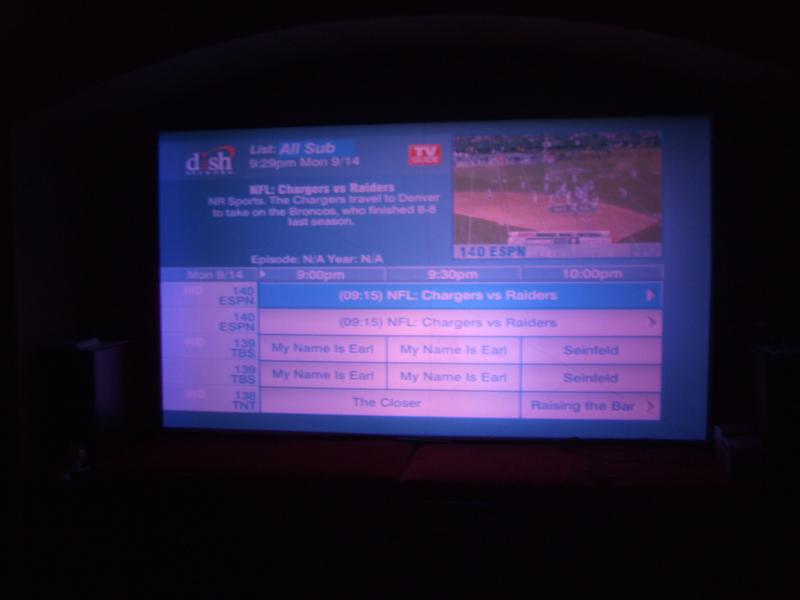
I recently installed my backup D50 which had lower hours than my current unit. The problem that I am having is that the blue display is more green than blue. This is most noticeable when viewing the channel guide screen. Is there any adjustment available to get this more blue than green. I have attached a few pics that give a general idea of what it looks like. The second is the channel guide with the projector which is quite a bit more aqua color looking than the picture shows and the first is the channel guide on a normal CRT tv. Thanks for any suggestions.
Dan
| Description: |
|
| Filesize: |
60.42 KB |
| Viewed: |
4156 Time(s) |
|
| Description: |
|
| Filesize: |
37.58 KB |
| Viewed: |
4157 Time(s) |
|
|
|
| Back to top |
|
 |
drice1234
Joined: 07 Oct 2006
Posts: 1309
Location: Allen, Texas
|
| Posted: Thu Sep 17, 2009 12:20 pm Post subject: |
|
|
Bump. No suggestions on how to take care of this issue? Come on guys. If I had a gun wielding liberal communist beer drinking pot smoking hamster up my ass I'd have a least 20 suggestions by now on how to get it out. 
Dan
|
|
| Back to top |
|
|
CIR Engineering

Joined: 25 Aug 2008
Posts: 4269
Location: Chicago USA & Berlin Germany
|
| Posted: Thu Sep 17, 2009 2:14 pm Post subject: Re: Sony blue adjustment help |
|
|
| drice1234 wrote: | I recently installed my backup D50 which had lower hours than my current unit. The problem that I am having is that the blue display is more green than blue. This is most noticeable when viewing the channel guide screen. Is there any adjustment available to get this more blue than green. I have attached a few pics that give a general idea of what it looks like. The second is the channel guide with the projector which is quite a bit more aqua color looking than the picture shows and the first is the channel guide on a normal CRT tv. Thanks for any suggestions.
Dan |
The blue tube can't change color. Each tube only emits a color that is a product of its phosphor and color corrected lenses. Assuming RGB input, if you have too much blue in a regular image with all three tubes running than you have a bad gray scale that needs adjustment. If you are running component, then you may have a bad gray scale, or you might have the color/tint set wrong.
craigr
_________________
JETI 1501-HiRes 2nm Spectroradiometer
JETI 1211 Spectroradiometer
Photo Research PR-650 Spectroradiometer
Klein K10-A Colorimeter
Murideo Fresco SIX-G HDMI 2.x Multimedia Generator
Murideo Fresco SIX-A HDMI 2.x Analyzer
Light Illusion ColourSpace XPT Color Calibration Software
Light Illusion LightSpace XPT Pro Version 10.x Color Calibration Software
OMARDRIS JVC Software Patch to use K10-A and Jeti with JVC OEM AutoCal Software!
Sencore CR7000 CRT Tube Analyzer / Rejuvenater
Authorized Dealer for Lumagen & just about everything worth buying 
www.CIR-Engineering.com - craigr@cir-engineering.com
Phone: 865-405-6892
|
|
| Back to top |
|
|
akajester

Joined: 09 Jul 2008
Posts: 934
Location: Wisconsin
|
| Posted: Mon Sep 21, 2009 4:29 pm Post subject: |
|
|
| drice1234 wrote: | Bump. No suggestions on how to take care of this issue? Come on guys. If I had a gun wielding liberal communist beer drinking pot smoking hamster up my ass I'd have a least 20 suggestions by now on how to get it out.
Dan |
Have you gone through the grayscale calibration on your d50?
|
|
| Back to top |
|
|
drice1234
Joined: 07 Oct 2006
Posts: 1309
Location: Allen, Texas
|
| Posted: Mon Sep 21, 2009 5:47 pm Post subject: |
|
|
| Quote: | | Have you gone through the grayscale calibration on your d50? |
I have not yet. I did set the bias back to factory default and that seemed to help some. I am trying to get my new hdmi receiver working now and then will try to tackle the grayscale after that. I read the instructions very briefly. Do I need a meter to do this? I do have the Avia DVD but have not broke the seal on it yet.
Thanks
Dan
|
|
| Back to top |
|
|
akajester
Joined: 09 Jul 2008
Posts: 934
Location: Wisconsin
|
| Posted: Mon Sep 21, 2009 7:06 pm Post subject: |
|
|
|
Yes you'll need a colorimeter of some sort. It would be near impossible to adjust by eye. Even a cheap spyder2 would get you decent results.
|
|
| Back to top |
|
|
Curt Palme
CRT Tech
Joined: 08 Mar 2006
Posts: 24396
Location: Langley, BC
TV/Projector: All of them!
|
| Posted: Mon Sep 21, 2009 7:14 pm Post subject: |
|
|
| akajester wrote: | | Yes you'll need a colorimeter of some sort. It would be near impossible to adjust by eye. Even a cheap spyder2 would get you decent results. |
True, but following the manual for gain and bias will get it a lot closer than what it is now. That's assuming the green tube isn't really worn, which can also have the set display what you posted above.
|
|
| Back to top |
|
|
ecrabb
Forum Moderator

Joined: 13 Mar 2006
Posts: 15909
Location: Utah
TV/Projector: JVC RS40, Epson 5010
|
| Posted: Mon Sep 21, 2009 8:11 pm Post subject: |
|
|
I'm with Curt - you can get the grayscale in the ballpark without a meter. This machine isn't even in the right city!
My votes are a very worn green, a bad green neck board amp, or something awry with a component source cabling. I'm thinking about component cabling because of how the green field is green, but the white text is magenta (no green). Seems like a colorspace-ish thing - like the source is cabled RGB, but the input is setup for component. Still, let's eliminate source for a moment. Two questions, Dan:
A) Can you get the machine to display the white warmup screen looking anything close to white?
B) Have you looked at the green tube to evaluate its condition?
SC
|
|
| Back to top |
|
|
drice1234
Joined: 07 Oct 2006
Posts: 1309
Location: Allen, Texas
|
| Posted: Mon Sep 21, 2009 8:37 pm Post subject: |
|
|
| Quote: | A) Can you get the machine to display the white warmup screen looking anything close to white?
B) Have you looked at the green tube to evaluate its condition? |
Yes, the white warm up screen looks fine and I have not taken the lens off to look at the tube but this unit has 1800 hours on it compared with the 4800 on the one I replaced. When I am in the menu screen the left side of the menu has a blue background that looks like it should. My video chain is Satellite and PS3 to 3x1 switcher, 40' hdmi cable, HDFury2 with GammaX and short 5 bnc connector that came with the HDFury to the projector. I have input A set to RGB. I have also changed the input to YPrPb and switched the HDFury2 to this setting and obtained a picture. I had the HDFury2 at the head end for awhile and utilized a long 5 BNC cable while I replaced the bad 40' hdmi cable. I do have 2 spare D50's that I can swap parts out with if there are any suggestions.
Thanks
Dan
|
|
| Back to top |
|
|
ecrabb
Forum Moderator
Joined: 13 Mar 2006
Posts: 15909
Location: Utah
TV/Projector: JVC RS40, Epson 5010
|
| Posted: Mon Sep 21, 2009 8:44 pm Post subject: |
|
|
| drice1234 wrote: | | Yes, the white warm up screen looks fine |
OK, cool - we can eliminate a tube or neck board, then. That leaves a source/cabling issue, or perhaps something in the video input section of the projector. I was thinking you could switch input cards, but the D50 doesn't have a removable input card, does it? I'd try a composite or S-video source next just to potentially isolate where the color shift is happening (and isolate/eliminate an RGB/component issue), but after that is about where my troubleshooting expertise runs out. Curt, your turn!
SC
|
|
| Back to top |
|
|
akajester
Joined: 09 Jul 2008
Posts: 934
Location: Wisconsin
|
| Posted: Mon Sep 21, 2009 9:43 pm Post subject: |
|
|
|
Boy, knowing up front that it only happens on one source would've been helpful, haha. I hope you get it narrowed down. Sure would be awesome if it was just a cable issue.
|
|
| Back to top |
|
|
drice1234
Joined: 07 Oct 2006
Posts: 1309
Location: Allen, Texas
|
| Posted: Mon Sep 21, 2009 10:22 pm Post subject: |
|
|
|
I'll connect the composite out of my satellite receiver and the component out of the PS3 up tonight and see if the problem persist on these sources.
|
|
| Back to top |
|
|
drice1234
Joined: 07 Oct 2006
Posts: 1309
Location: Allen, Texas
|
| Posted: Tue Sep 22, 2009 12:45 pm Post subject: |
|
|
|
I connected the composite out of the satellite receiver and the guide display is still more of an aqua then blue. I changed out the A board and the problem remained. I ran out of time but will connect an lcd display on the end of the chain to make sure that the guide is the proper color on this.
|
|
| Back to top |
|
|
|
|





