|
As this forum is rarely used anymore, we've locked it. Feel free to browse and read. Questions? Please reach out to us directly. Cheers! |

|
 |
|
|
| Author |
Message |
HK-Steve
Joined: 15 Jul 2006
Posts: 849
Location: Switzerland
TV/Projector: Marquee 9500, Epson 8100
|
| Posted: Fri Jul 03, 2009 8:25 am Post subject: Marquee 9500 HV turns ON then OFF about every 2 seconds |
|
|
Hey Everyone,
Well it has finally happened, after about 5 months with the covers "ON" my projector, My Wife has been so happy that I am not modifying and testing anymore  , I have my first real problem. , I have my first real problem.
My 9500 has been running faultless for all that time, watched lots of Blu-ray movies
on Tuesday I turn ON the projector and after 5 mins, the screen goes blank  the have been tubes shut down, No HV. the have been tubes shut down, No HV.
No led's on the CLM, Shutdown the projector, power off, restart projector, doesn't fix.
Replace the HVPS with my spare, which then runs until last night.
I can hear a relay clicking in the LVPS, HV ON, then the relay clicks, HV Off. a cylce every 2 seconds approx.
Picture zooms in when HV comes back on.
Replace LVPS, still same problem, removed Focus board, still same problem.
Pull VIM, check all fuses, all good.
Pull the HDM, and remove Daughter Board, clean pins, re-install the boards, still same problem.
Changed VIM for my spare, same problem.
My suspect is the HDM, am I looking in the right place??
I don't have a working spare, so I don't have a chance to test if I am correct.
Appreciate any help/advice.
Much Appreciated
Cheers
Steve
|
|
| Back to top |
|
 |
HK-Steve
Joined: 15 Jul 2006
Posts: 849
Location: Switzerland
TV/Projector: Marquee 9500, Epson 8100
|
| Posted: Fri Jul 03, 2009 8:56 am Post subject: |
|
|
OK, Some more info,
I have been trying a few things this morning, and have found the following.
I can get the internal crosshatch test paterns up and running, which does not turn the HV OFF,
but the full white field Turns it OFF, then does the 2 second on off bit..
I could also watch a little TV, until the white level of the image was over about 60%, then the HV would turn OFF, ONetc.
So Next is the VNB's, would this be the next place to look??
Cheers
Steve
|
|
| Back to top |
|
|
mp20748
Joined: 12 Sep 2006
Posts: 5689
Location: Maryland
TV/Projector: 9500LC Ultra / Super 02 and 03 VIM
|
| Posted: Fri Jul 03, 2009 9:27 am Post subject: |
|
|
| HK-Steve wrote: |
So Next is the VNB's, would this be the next place to look??
Cheers
Steve |
The problem is most likely one of the next boards.
Do this test, with the projector running (when it's pulsing off/on) - press "COLOR" on remote, then 1 (red) - 2 (green) - 3 (blue).
If that does not isolate the problem, do the same (press color) and then 4 (green/red) - 5 (green/blue) - 6 (blue/red).
Do so staying into each button change for at least 10 seconds. Use the full white field internal test pattern.
This should help to isolate which neck board. If it's not the neck board, the VIM is suspect. The circuit that mutes the video and shuts down the neck boards is on the VIM. That circuit has only been known by me to fail when the projector has had HV flashing (HV arching) problems.
|
|
| Back to top |
|
|
1031

Joined: 22 Mar 2006
Posts: 657
Location: Finland
|
| Posted: Fri Jul 03, 2009 9:29 am Post subject: |
|
|
| HK-Steve wrote: | OK, Some more info,
I have been trying a few things this morning, and have found the following.
I can get the internal crosshatch test paterns up and running, which does not turn the HV OFF,
but the full white field Turns it OFF, then does the 2 second on off bit..
I could also watch a little TV, until the white level of the image was over about 60%, then the HV would turn OFF, ONetc.
So Next is the VNB's, would this be the next place to look??
Cheers
Steve |
Sounds like it shuts down when beamcurrent gets high. Probably one of VNB`s or VIM.
_________________
Marquee 9500LC (Frankenyokes / Thomas electric tubes / HD-10L / +many mod´s)
DVDO VP-50
New hobby, Rally
http://www.youtube.com/watch?v=vX2Rtpr1njs
http://www.youtube.com/watch?v=6ZP9FEFXV5c
http://www.youtube.com/watch?v=j065vei6j6s
http://www.facebook.com/pages/JTS-Racing-team/204443719572685
|
|
| Back to top |
|
|
HK-Steve
Joined: 15 Jul 2006
Posts: 849
Location: Switzerland
TV/Projector: Marquee 9500, Epson 8100
|
| Posted: Fri Jul 03, 2009 10:03 am Post subject: |
|
|
Thanks for the comments, but, no go,
I can turn on each tube individaully, and it still goes through the 2 second cyle of on and off.
I can get contrast down from the original 56 to 26 and it will run, but after 2 mins, starts the cycle again.
Brightness is at 44 for my night setting, but it doesn't make any difference either when turned down
The VIM was changed to my spare, but does the same thing.
Grrrrrrrrrrrrrrrrrrrrrrrrrrrrrrrrrrrrrrrrrrrrrrrrr
I really hope this is not my CLM again, the last one had the issue of the horizontal sync lines,

Suggestions??
Cheers
Steve
|
|
| Back to top |
|
|
mp20748
Joined: 12 Sep 2006
Posts: 5689
Location: Maryland
TV/Projector: 9500LC Ultra / Super 02 and 03 VIM
|
| Posted: Fri Jul 03, 2009 10:29 am Post subject: |
|
|
|
disconnect the multi-pin connector to each neck board one at a time...
|
|
| Back to top |
|
|
HK-Steve
Joined: 15 Jul 2006
Posts: 849
Location: Switzerland
TV/Projector: Marquee 9500, Epson 8100
|
| Posted: Fri Jul 03, 2009 10:53 am Post subject: |
|
|
Thanks Mike,
But, still does it with one VNB disconnected.
Started with Red disconnected, reconnected, then Green etc.
Also changed to another VIM which I repaired before installing, but still same problem.
The HDM is only board which has not been changed, think that it is the HDM??
Hmmmm, This is a good one 
Cheers
Steve
|
|
| Back to top |
|
|
mp20748
Joined: 12 Sep 2006
Posts: 5689
Location: Maryland
TV/Projector: 9500LC Ultra / Super 02 and 03 VIM
|
| Posted: Fri Jul 03, 2009 11:10 am Post subject: |
|
|
| HK-Steve wrote: |
The HDM is only board which has not been changed, think that it is the HDM??
Steve |
The HDM could cause this, but not when the brightness is increased. That would indicate something in the video chain, mainly the neck boards.
The only other thing I'm thinking about is what you mentioned here:
| HK-Steve wrote: |
Replace the HVPS with my spare, which then runs until last night.
I can hear a relay clicking in the LVPS, HV ON, then the relay clicks, HV Off. a cylce every 2 seconds approx.
Picture zooms in when HV comes back on.
Replace LVPS, still same problem, removed Focus board, still same problem.
Steve |
In that instance, when the relay was clicking, the LVPS is indicating what usually happens when there's an unusual load on one of the rails.
You should pull the front cover and watch for which LED blinks when this happens. If you have the LED chart, it would inicate the voltage rail that would be causing this.
If all is fine with the image when it's working, the problem is most likely caused from having too much capacitance on the rails. Which for some reason, that LVPS does not like to see high capacitance on the rails. The main place to check for this would be the CLM. It's very important to NOT over-cap those rails.
The second place that would cause this is either of the +/- 85 volt rails, which are on the neck boards and C50 on the HDM.
|
|
| Back to top |
|
|
Nashou66

Joined: 12 Jan 2007
Posts: 16171
Location: West Seneca NY
|
| Posted: Fri Jul 03, 2009 12:13 pm Post subject: |
|
|
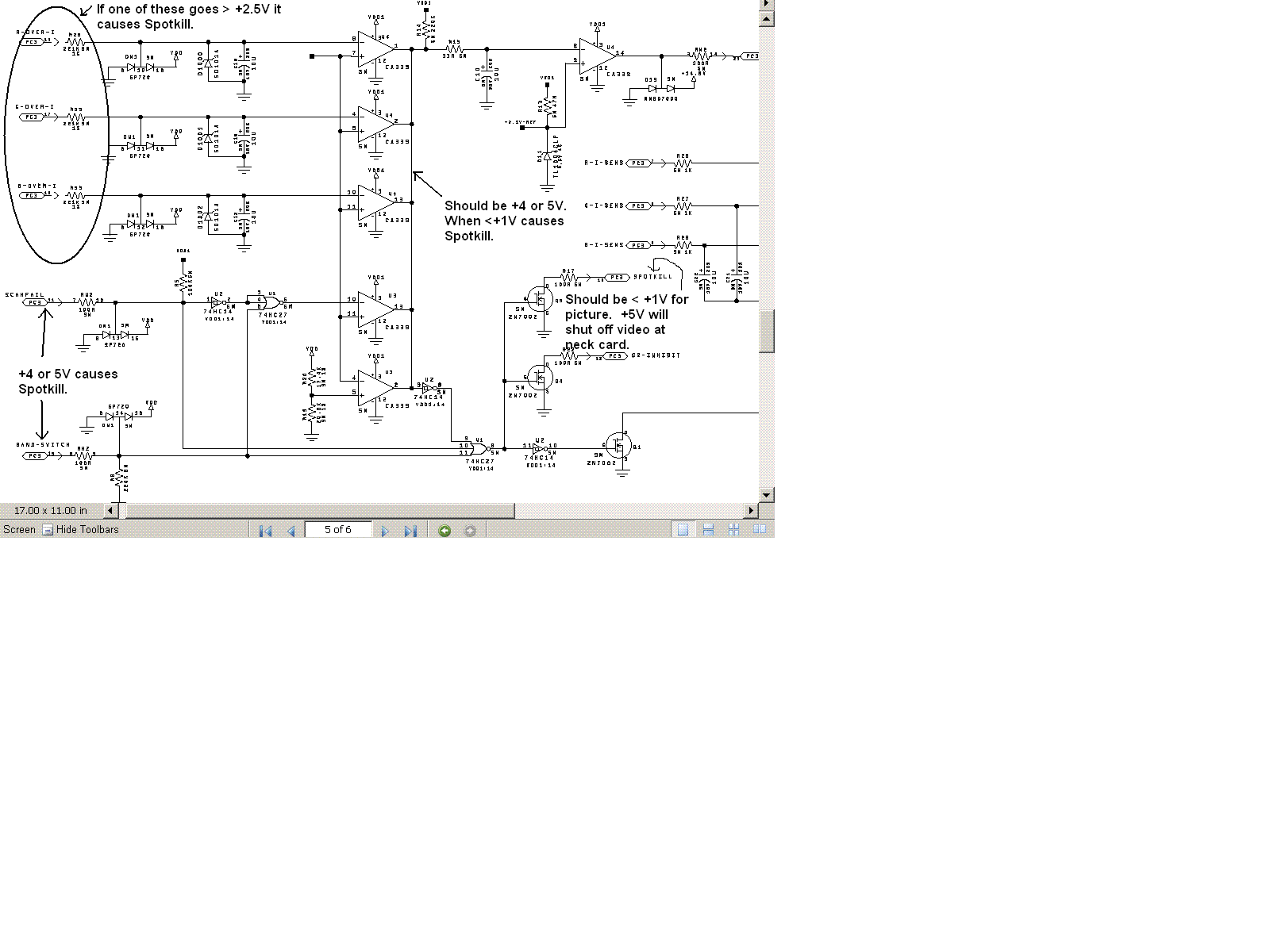
First off you sound like you have the same problem i have had. if you check on the Vim where the I-Over signals come in you might have a problem there.
here is a link TSE sent me with voltages to check on the Vim.
See attachment
The other problem your showing with the lines is most likely the DPB chip U7. there is a thread on AVS about that with the same pics.
Athanasios
| Description: |
|
| Filesize: |
33.96 KB |
| Viewed: |
5875 Time(s) |
|
_________________
Don't blame your underwear for your crooked ass~ unknown Greek philosopher
"Republicans believe every day is the Fourth of July, but the Democrats believe every day is April 15." --- President Reagan
One Smart Dog!!!
Marquee High Performance Bellows now shipping!!
Marquee Modifications and Performance Enhancement
Marquee C-element and Bellow removal
Last edited by Nashou66 on Fri Jul 03, 2009 12:38 pm; edited 1 time in total
|
|
| Back to top |
|
|
Tom.W

Joined: 09 Mar 2006
Posts: 6635
|
| Posted: Fri Jul 03, 2009 12:33 pm Post subject: |
|
|
" Sorry but you are not authorized to view or download this Attachment " ??? 
|
|
| Back to top |
|
|
Nashou66
Joined: 12 Jan 2007
Posts: 16171
Location: West Seneca NY
|
|
| Back to top |
|
|
HK-Steve
Joined: 15 Jul 2006
Posts: 849
Location: Switzerland
TV/Projector: Marquee 9500, Epson 8100
|
| Posted: Fri Jul 03, 2009 3:11 pm Post subject: |
|
|
Right, I have done some more testing, this is what I have done.
There are no LED's showing on the LVPS when the relay clicks, or even at any stage of startup.
Even with 1x VNB connected it still happens, each color by itself, does not fix the problem,
can I run with no VNB's connected ??
I changed my CLM and DPB, still happenns,
The VIM has been changed 3 times an 03p, 02p plus a 2005-03p version., still happens
I will check the voltages on the VIM with my extension kit later,
but if the voltages are wrong, then what board does it point to for the fault??
The lines were a problem with my CLM Main Board, DPB was OK. CLM was replaced.
So at the moment,
I am running a stock LVPS, HVPS, CLM, FCM, HDM and daughter board, VIM. still the same problem.
I will pull the VNB's out for a visual inspection,
but I think I am wasting my time, as I don't think this is where the problem is.
So, thinking of the HV, could the splitter cause this?? (thinking out loud) 
Appreciate all the advice so far, anything else??
Cheers
Steve
|
|
| Back to top |
|
|
tse
Joined: 03 May 2006
Posts: 1014
Location: Sweatbucket, Fl.
|
| Posted: Fri Jul 03, 2009 8:02 pm Post subject: |
|
|
| Nashou66 wrote: | First off you sound like you have the same problem i have had. if you check on the Vim where the I-Over signals come in you might have a problem there.
here is a link TSE sent me with voltages to check on the Vim.
See attachment
The other problem your showing with the lines is most likely the DPB chip U7. there is a thread on AVS about that with the same pics.
Athanasios |
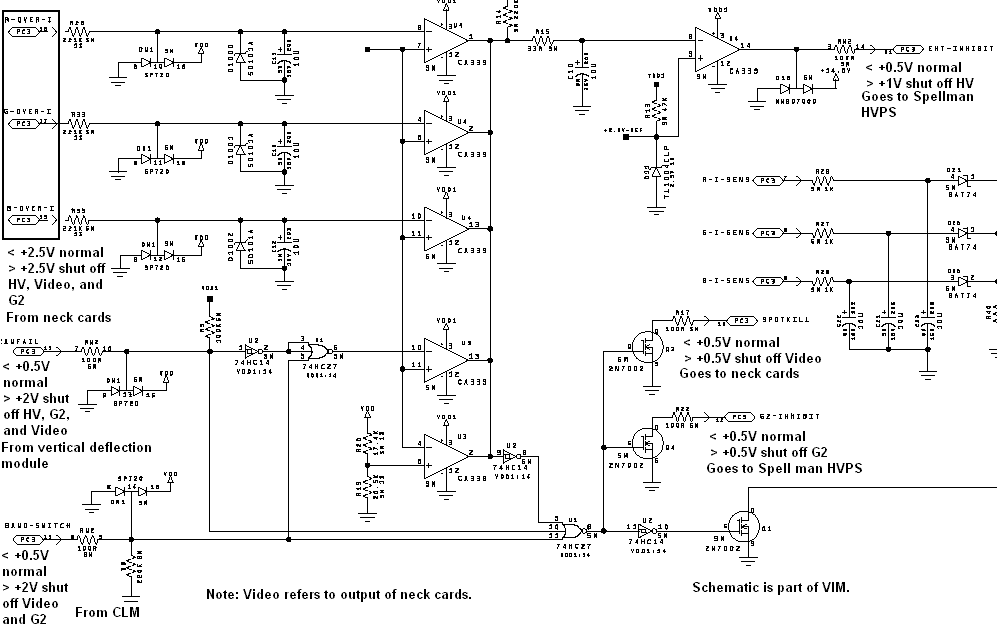
Attached is an improved version of notes on the Marquee circuit that shuts down the video, HV, and G2 when there is an abnormal condition. If something is shutting down and these shutdown signals are normal that would indicate perhaps a problem with the HV or LVPS. The shutdown problems could be happenning because one or more of these signals are telling the HVPS or neck cards to shutdown. Electrohome could have made things alot easier with a couple of LEDs that indicated problems but didn't happen.
Scott
| Description: |
|
| Filesize: |
22.81 KB |
| Viewed: |
7544 Time(s) |
|
_________________
"Were we directed from Washington when to sow and when to reap, we would soon want bread."
Thomas Jefferson
|
|
| Back to top |
|
|
Curt Palme
CRT Tech
Joined: 08 Mar 2006
Posts: 24396
Location: Langley, BC
TV/Projector: All of them!
|
| Posted: Fri Jul 03, 2009 8:29 pm Post subject: |
|
|
|
It really comes down to swapping the HVPS. You might have internal arcing which can cause exactly what you are seeing. I've seen that here a few times before. I've got good stock of HVPS.
|
|
| Back to top |
|
|
Nashou66
Joined: 12 Jan 2007
Posts: 16171
Location: West Seneca NY
|
| Posted: Fri Jul 03, 2009 8:33 pm Post subject: |
|
|
Mike mention's the LVPS can have issues if there is lots of capacitance added to the boards. Steve, I know you have done extensive addition of filtering to every board on your Marquee, do you think the LVPS has finally had enough? I think for the types of mods we want to do we need a more robust LVPS.
Scott, i do like your idea of leds on the Vim in the Spotkill and HV shut down section, this could be a fun project
Athanasios
_________________
Don't blame your underwear for your crooked ass~ unknown Greek philosopher
"Republicans believe every day is the Fourth of July, but the Democrats believe every day is April 15." --- President Reagan
One Smart Dog!!!
Marquee High Performance Bellows now shipping!!
Marquee Modifications and Performance Enhancement
Marquee C-element and Bellow removal
|
|
| Back to top |
|
|
tse
Joined: 03 May 2006
Posts: 1014
Location: Sweatbucket, Fl.
|
| Posted: Sat Jul 04, 2009 12:49 am Post subject: |
|
|
The diagnostic LED on the LVPS will turn on if the power supply shuts down from having too much capacitance on a rail.
Scott
_________________
"Were we directed from Washington when to sow and when to reap, we would soon want bread."
Thomas Jefferson
|
|
| Back to top |
|
|
HK-Steve
Joined: 15 Jul 2006
Posts: 849
Location: Switzerland
TV/Projector: Marquee 9500, Epson 8100
|
| Posted: Sat Jul 04, 2009 6:59 am Post subject: |
|
|
Thanks to you all,
I have another HVPS being shipped to me so I will try that when it arrives, Thanks Curt for the offer.
The replacement one was my spare, tested OK 2 years ago, and has been shelved till now. Oh Well.
The LVPS has been replaced by an unmodified one, so this is not the problem.
In my last post, I stated which boards had been put back to OEM unmodified. So this is nothing to do with modifications.
Thanks Scott for the drawing, I will do some testing later today to see what the voltages are at each test point.
Appreciate the comments and advice.
Cheers
Steve
|
|
| Back to top |
|
|
tvless

Joined: 20 Jun 2009
Posts: 76
Location: Ontario
|
| Posted: Sat Jul 04, 2009 1:08 pm Post subject: |
|
|
wow !! this is sooo interesting 4me!!!! I am not sure why do I work for the auto industry.... I want to know the end of this thread, to know more.... and more.. and more..... never before a mechanical guy put so much attention to a circuit board thread before.... I guess....
_________________
-Sony CRT VPH 1251Q upgraded to 1271Q
- Extron DVS 150 Digital Video Scaler
- DVI & Component Moome input Hi Def card - Old
|
|
| Back to top |
|
|
AnalogRocks
Forum Moderator

Joined: 08 Mar 2006
Posts: 26706
Location: Toronto, Ontario, Canada
TV/Projector: Sony 1252Q, AMPRO 4000G
|
| Posted: Sat Jul 04, 2009 4:03 pm Post subject: |
|
|
I sugest reading all the back post's on the main CRT forum. I did. It took 3.5 years however
_________________
Tech support for nothing
CRT.
HD done right!
|
|
| Back to top |
|
|
HK-Steve
Joined: 15 Jul 2006
Posts: 849
Location: Switzerland
TV/Projector: Marquee 9500, Epson 8100
|
| Posted: Sun Jul 05, 2009 8:35 am Post subject: |
|
|
Some more info for you all,
Did some testing this morning, and found the following,
R-over I = -0.537v Normal value < 2.5v
G-over I = -0.536v Normal value < 2.5v
B-over I = -0.031v Normal value < 2.5v
Scan fail = 0.122v Normal value < 0.5v
Band switch = 0.035v Normal value < 0.5v
EHT inhibit = 0.028v Normal value < 0.5v
Spotkill = 0.320v Normal value < 0.5v
G2 inhibit = 0.015v Normal value < 0.5v
So from this the Blue VNB looks like the problem, Scott do you agree??
Not sure why I got negative values for the R, G, B-over I. ???
More to come. Off with more covers on the 9500.
Cheers
Steve
|
|
| Back to top |
|
|
|
|
|
|
|
You cannot post new topics in this forum
You cannot reply to topics in this forum
You cannot edit your posts in this forum
You cannot delete your posts in this forum
You cannot vote in polls in this forum
You cannot attach files in this forum
You can download files in this forum
|
Forum powered by phpBB © phpBB Group
|
|




