|
As this forum is rarely used anymore, we've locked it. Feel free to browse and read. Questions? Please reach out to us directly. Cheers! |

|
 |
|
|
| Author |
Message |
ecrabb
Forum Moderator

Joined: 13 Mar 2006
Posts: 15909
Location: Utah
TV/Projector: JVC RS40, Epson 5010
|
| Posted: Sat May 16, 2009 3:50 pm Post subject: IFB-HD remote or gamma broken? |
|
|
Guys,
I'm borrowing an IFB-HD from a friend to evaluate and compare to my original HD Fury and relatively complex analog signal chain. Unfortunately, I'm having a problem... I can't seem to get the remote to make the card do anything.
I changed the power jumper to jumper 1 (recommended for D50/G70/G90 and installed the card. The first thing I noticed is that I have to run the G70 brightness to nearly max to see 5 IRE. It's impossible to see 1 IRE or the BTB box on the pluge or to raise the background (0 IRE) above pure black... even at max brightness. I've cranked the pot on the card from one end to the other and can't make any visible impact on the image.
The remote... It won't make the card do anything. The manual says the yellow light should blink with recognized IR commands, and the yellow light should go solid after 20 or 25 button presses. The yellow light is never one, save for when there's no HDCP link on the HDMI input. I put brand new batteries in the remote to make sure it wasn't the remote.
Am I doing something wrong or is the Moome card busted? Any ideas for further testing? Would Moome take this older card back for repair or possibly pay to upgrade to the new card?
I think it's a 1.332 if that matters. Thanks for any insights you might have.
SC
|
|
| Back to top |
|
 |
AnalogRocks
Forum Moderator

Joined: 08 Mar 2006
Posts: 26706
Location: Toronto, Ontario, Canada
TV/Projector: Sony 1252Q, AMPRO 4000G
|
| Posted: Sat May 16, 2009 4:01 pm Post subject: |
|
|
WHich card is this? The DVI/YPbPr or the HDMI/YPbPr?
_________________
Tech support for nothing
CRT.
HD done right!
|
|
| Back to top |
|
|
ecrabb
Forum Moderator
Joined: 13 Mar 2006
Posts: 15909
Location: Utah
TV/Projector: JVC RS40, Epson 5010
|
| Posted: Sat May 16, 2009 4:17 pm Post subject: |
|
|
HDMI/YPbPr.
Oh, and I forgot to mention that yes, the gamma board is indeed securely attached to the header.
SC
|
|
| Back to top |
|
|
rabies_70

Joined: 15 Feb 2007
Posts: 1189
Location: Carlsbad, CA
TV/Projector: Sony G70Q
|
| Posted: Sat May 16, 2009 7:07 pm Post subject: |
|
|
I've got almost the same issue and have for quite some time. I actually have NEVER been able to get the remote to work more than once or twice ever. To be honest I have a couple other things going on that have taken priority over the theater so it hasn't driven me totally nuts yet.
I can sometimes get it to sense a single command or two, but even after waiting 5 to 15 seconds I can never get it to respond again. This is my second card with a remote that doesn't act right. With neither one was I ever able to get it to act right with the trim pots. The light seems to stay on when it feels like it, not when it is at the max adjustment.
_________________
Ray
I am an iconoclast
|
|
| Back to top |
|
|
ecrabb
Forum Moderator
Joined: 13 Mar 2006
Posts: 15909
Location: Utah
TV/Projector: JVC RS40, Epson 5010
|
| Posted: Sat May 16, 2009 8:06 pm Post subject: |
|
|
Thanks - That's good to know, Ray. Sounds like yours ain't right, either. I'd have more hope if I'd EVER gotten the yellow light to come on with the pot OR with the remote. The ONLY time the yellow light is on is until the HDMI handshake occurs.
I gotta email my buddy and see how it behaved when he was using it... Maybe it's never worked right. Anybody know what Moome's repair policy is like?
SC
|
|
| Back to top |
|
|
AnalogRocks
Forum Moderator
Joined: 08 Mar 2006
Posts: 26706
Location: Toronto, Ontario, Canada
TV/Projector: Sony 1252Q, AMPRO 4000G
|
| Posted: Sat May 16, 2009 9:08 pm Post subject: |
|
|
I have one here. It was a PITA to set up. I set it up in my 1271 switcher. The remote does work on mine.
_________________
Tech support for nothing
CRT.
HD done right!
|
|
| Back to top |
|
|
rabies_70
Joined: 15 Feb 2007
Posts: 1189
Location: Carlsbad, CA
TV/Projector: Sony G70Q
|
| Posted: Sat May 16, 2009 10:29 pm Post subject: |
|
|
I am glad to have my moome cards, I just hate the idea of sending it to taiwan for god knows how long it would take to get there, get repaired and and returned. I am really not trying to dig Mr Moome, I know he's busy and this has been a labor of love for him. I just know his time is in short supply and I really don't want to be without a theater for once again, god knows how long.
Mr Moome if you're seeing this can you advise us what you would like us to do? I am absolutely willing to pay for expedited shipping costs and what ever parts may need fixin.
Thanks,
Ray
(A loyal Moome products customer)
_________________
Ray
I am an iconoclast
|
|
| Back to top |
|
|
ecrabb
Forum Moderator
Joined: 13 Mar 2006
Posts: 15909
Location: Utah
TV/Projector: JVC RS40, Epson 5010
|
| Posted: Sun May 17, 2009 3:08 pm Post subject: |
|
|
Yeah, it'll be interesting to see how Moome would like us to proceed.
Ray, you could always pick up an old HD Fury used or a new one for $140 to use while the Moome card is getting repaired. Just an ideer. Then, either sell it or keep it around as a backup.
Oh, I thought of another question... You aren't using a PS3 as your BD source, are you? Probably the most annoying thing about the PS3 is the annoying video mode switching when play a movie. Depending on the movie, it switches modes 3-5 times before the movie actually starts... The FBI warning screen, the rating screen, etc... Now, with the HD Fury, it was only mildly annoying with a barely noticeable flicker and sync/resolution change. With the Moome card, I get BRIGHT WHITE flashes a couple of times before the movie starts. It's REALLY obnoxious in a pitch black room. If I were inclined to seizures, I'd have definitely had a few by now. Anybody observed this with the Moome and PS3 (or another BD player for that matter)?
SC
Last edited by ecrabb on Mon May 18, 2009 12:48 am; edited 1 time in total
|
|
| Back to top |
|
|
rabies_70
Joined: 15 Feb 2007
Posts: 1189
Location: Carlsbad, CA
TV/Projector: Sony G70Q
|
| Posted: Mon May 18, 2009 12:39 am Post subject: |
|
|
I'm using a Sony-BDP 550 for Blu. I love it. Not a single hiccup since getting rid of my Samsung crap. I haven't noticed any flickering during the changes you describe. But I'm sure I'll notice them now
I used to have a Fury. Ive got another project going on currently (maybe some pics later...)and I am being super LAZY about tearing into anything in the theater right now. Sleeping dogs and all.
_________________
Ray
I am an iconoclast
|
|
| Back to top |
|
|
ecrabb
Forum Moderator
Joined: 13 Mar 2006
Posts: 15909
Location: Utah
TV/Projector: JVC RS40, Epson 5010
|
| Posted: Mon May 18, 2009 12:54 am Post subject: |
|
|
Oh, if you had the issue, you'd have noticed it, Ray. It's like a damn camera flash in a dark room... right in your eyes. It's nasty. I know it's a PS3 thing, though. somebody else will chime in.
SC
|
|
| Back to top |
|
|
moome
Joined: 01 Jun 2007
Posts: 497
|
| Posted: Mon May 18, 2009 6:31 am Post subject: Re: IFB-HD remote or gamma broken? |
|
|
| ecrabb wrote: | Guys,
I'm borrowing an IFB-HD from a friend to evaluate and compare to my original HD Fury and relatively complex analog signal chain. Unfortunately, I'm having a problem... I can't seem to get the remote to make the card do anything.
I changed the power jumper to jumper 1 (recommended for D50/G70/G90 and installed the card. The first thing I noticed is that I have to run the G70 brightness to nearly max to see 5 IRE. It's impossible to see 1 IRE or the BTB box on the pluge or to raise the background (0 IRE) above pure black... even at max brightness. I've cranked the pot on the card from one end to the other and can't make any visible impact on the image.
The remote... It won't make the card do anything. The manual says the yellow light should blink with recognized IR commands, and the yellow light should go solid after 20 or 25 button presses. The yellow light is never one, save for when there's no HDCP link on the HDMI input. I put brand new batteries in the remote to make sure it wasn't the remote.
Am I doing something wrong or is the Moome card busted? Any ideas for further testing? Would Moome take this older card back for repair or possibly pay to upgrade to the new card?
I think it's a 1.332 if that matters. Thanks for any insights you might have.
SC |
HI:
Could you try again set it in another input?
Sincerely
Moome
|
|
| Back to top |
|
|
ecrabb
Forum Moderator
Joined: 13 Mar 2006
Posts: 15909
Location: Utah
TV/Projector: JVC RS40, Epson 5010
|
| Posted: Mon May 18, 2009 7:15 am Post subject: |
|
|
Hi, Moome -
You mean you want me to try the component input instead of the HDMI? Or, do you mean to try the card in a different slot? Since the G70 only has one slot, moving the card isn't really a viable option. 
Thanks for the help!
SC
|
|
| Back to top |
|
|
moome
Joined: 01 Jun 2007
Posts: 497
|
| Posted: Tue May 19, 2009 4:28 pm Post subject: |
|
|
can you send a picture of the card, so we can make sure what version IFB you have? please send to moome@curtpalme.com
and we will tell you how to proceed~
thanks
|
|
| Back to top |
|
|
newspencer
Joined: 16 Aug 2009
Posts: 2
Location: Florida, Broward
|
| Posted: Sun Aug 16, 2009 2:31 pm Post subject: |
|
|
| rabies_70 wrote: | I've got almost the same issue and have for quite some time. I actually have NEVER been able to get the remote to work more than once or twice ever. To be honest I have a couple other things going on that have taken priority over the theater so it hasn't driven me totally nuts yet.
I can sometimes get it to sense a single command or two, but even after waiting 5 to 15 seconds I can never get it to respond again. This is my second card with a remote that doesn't act right. With neither one was I ever able to get it to act right with the trim pots. The light seems to stay on when it feels like it, not when it is at the max adjustment. |
I also have same problem with Sony HDMI card, flickers but no action from remote.
Projector; Sony VPH-1292Q
Last edited by newspencer on Mon Aug 17, 2009 1:36 am; edited 1 time in total
|
|
| Back to top |
|
|
moome
Joined: 01 Jun 2007
Posts: 497
|
| Posted: Sun Aug 16, 2009 4:53 pm Post subject: |
|
|
| newspencer wrote: | | rabies_70 wrote: | I've got almost the same issue and have for quite some time. I actually have NEVER been able to get the remote to work more than once or twice ever. To be honest I have a couple other things going on that have taken priority over the theater so it hasn't driven me totally nuts yet.
I can sometimes get it to sense a single command or two, but even after waiting 5 to 15 seconds I can never get it to respond again. This is my second card with a remote that doesn't act right. With neither one was I ever able to get it to act right with the trim pots. The light seems to stay on when it feels like it, not when it is at the max adjustment. |
I also have same problem with Sony HDMI card, no action from remote.
Projector; Sony VPH-1292Q |
the IR angle is narrow, so did you aim to the IR receiver?
|
|
| Back to top |
|
|
newspencer
Joined: 16 Aug 2009
Posts: 2
Location: Florida, Broward
|
| Posted: Mon Aug 24, 2009 12:58 pm Post subject: |
|
|
| moome wrote: | | newspencer wrote: | | rabies_70 wrote: | I've got almost the same issue and have for quite some time. I actually have NEVER been able to get the remote to work more than once or twice ever. To be honest I have a couple other things going on that have taken priority over the theater so it hasn't driven me totally nuts yet.
I can sometimes get it to sense a single command or two, but even after waiting 5 to 15 seconds I can never get it to respond again. This is my second card with a remote that doesn't act right. With neither one was I ever able to get it to act right with the trim pots. The light seems to stay on when it feels like it, not when it is at the max adjustment. |
I also have same problem with Sony HDMI card, no action from remote.
Projector; Sony VPH-1292Q |
the IR angle is narrow, so did you aim to the IR receiver? |
Tried from every possible angle. A red led in upper left of card will flash when pressing some keys on remote, but never any changes with card. Would like it to at least be able to switch from input 0 to 1.
Is there a jumper or other way to activate the remote?
|
|
| Back to top |
|
|
moome
Joined: 01 Jun 2007
Posts: 497
|
| Posted: Tue Aug 25, 2009 7:51 am Post subject: |
|
|
| newspencer wrote: | | moome wrote: | | newspencer wrote: | | rabies_70 wrote: | I've got almost the same issue and have for quite some time. I actually have NEVER been able to get the remote to work more than once or twice ever. To be honest I have a couple other things going on that have taken priority over the theater so it hasn't driven me totally nuts yet.
I can sometimes get it to sense a single command or two, but even after waiting 5 to 15 seconds I can never get it to respond again. This is my second card with a remote that doesn't act right. With neither one was I ever able to get it to act right with the trim pots. The light seems to stay on when it feels like it, not when it is at the max adjustment. |
I also have same problem with Sony HDMI card, no action from remote.
Projector; Sony VPH-1292Q |
the IR angle is narrow, so did you aim to the IR receiver? |
Tried from every possible angle. A red led in upper left of card will flash when pressing some keys on remote, but never any changes with card. Would like it to at least be able to switch from input 0 to 1.
Is there a jumper or other way to activate the remote? |
remote Key #1 ==> active input 0
remote Key #2 ==> active input 1
|
|
| Back to top |
|
|
purpleflower
Joined: 25 Aug 2009
Posts: 1
|
| Posted: Tue Aug 25, 2009 9:51 am Post subject: |
|
|
Tipard MTS Converter, simple to operate and multifunctional MTS file Converter, allows you to convert MTS video to AVI, 3GP, WMV, FLV, MP4, MPG and all other videos that you need. The MTS Converter multiple inputting formats would surprise you much, like convert TS, M2TS, Tod, Mod and other video files to your devices or upload to Internet for sharing with friends. Furthermore, This MTS file Converter adds the highlight to create music from videos and audios for your music listening.
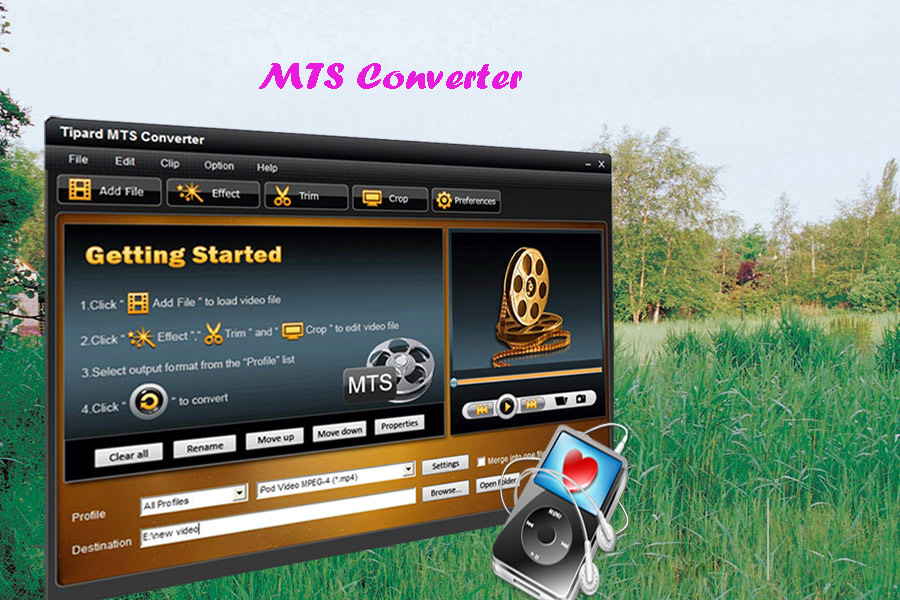
This converter also has several features. Take 5 of them for example:
1. Full and accurate support for HD videos and general videos
Tipard MTS Converter supports broad HD videos and general videos, like convert MTS to other video/audio formats that your player compatible, convert TS, M2TS, MP4, 3GP, AVI, WMV, FLV, SWF, MOV, and something else.
2. Ability to convert video or convert audio to music
Get music from videos, and convert among AAC, AC3, AIFF, AMR, AU, FLAC, MP3, M4A, MP2, OGG, WAV, WMA audios.
3. High level in video editing capabilities
Create different video effect by adjusting the Brightness, Contrast, Saturation and Volume of the video.
4. Powerful solution to trim, crop and merge video
Provide the simple to operate way to trim you need segment of the MTS file, crop the video play region to suit your players, and merge several video clips into one file for your successive enjoyment.
5. Personified ouput video/audio settings
Easily set the video Encoder, Resolution, Frame Rate, Video Bitrate. You can also directly input your own resolution as the form of "XXX*XXX"; set the Audio Encoder, Sample Rate, Channels, Audio Bitrate. You also can save all the output settings as your preference, which is saved in the user-defined column automatically.
|
|
| Back to top |
|
|
|
|
|
|
|
You cannot post new topics in this forum
You cannot reply to topics in this forum
You cannot edit your posts in this forum
You cannot delete your posts in this forum
You cannot vote in polls in this forum
You cannot attach files in this forum
You can download files in this forum
|
Forum powered by phpBB © phpBB Group
|
|




