| Author |
Message |
Thor

Joined: 09 May 2007
Posts: 75
Location: Denmark
|
| Posted: Fri May 01, 2009 9:27 am Post subject: Little green problem? |
|
|
And it's not with the little green men from Mars, I have living in my backyard!
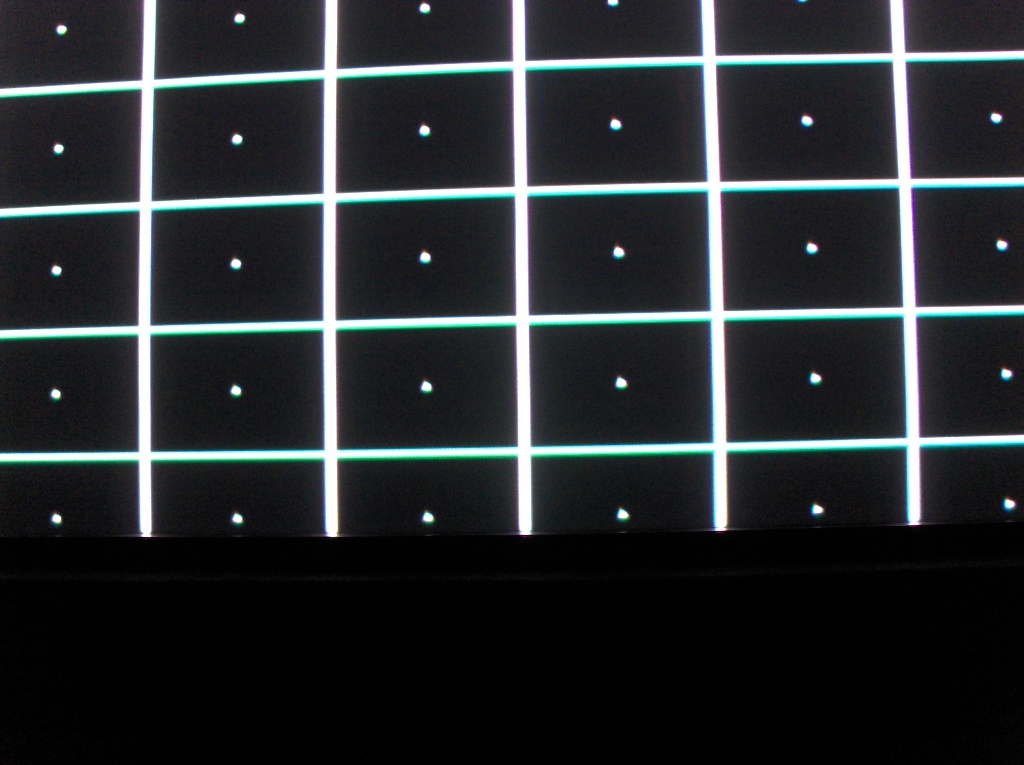
On my 9500LC Ultra, on the green tube from the middle of the image and to the bottom, the rasterlines are increasingly getting thicker.
So I can't get the bottom half of the image as sharp as the top half. Most times it's not that noticeable, but we watch a lot of movies with subtitles, and it clear that the subtitles are somewhat unsharp.
I have spend many hours with the 2 poled flare ring and the magnetic coil and the stigmator menu, and followed every procedure, incl. Bill Blue, from this site, but I just can't get it right. The blue and red are fine.
I have titled the back of the PJ up about ½ inch, but that should't be a problem?
Do I need new flare rings, maybe 6 poled, would that do anything?
Any suggestions are welcome, thanks
Morten.
HTPC:
1080p 72 Hz Blu-ray
1080p 60 Hz DVD
GT-17 lenses
| Description: |
|
| Filesize: |
224.93 KB |
| Viewed: |
2982 Time(s) |
|
|
|
| Back to top |
|
 |
Elaine Benes
Joined: 25 Apr 2006
Posts: 1416
|
| Posted: Fri May 01, 2009 12:18 pm Post subject: |
|
|
|
Did you verify your scheimpfluge setup is done very well ? Sounds more like a sheimpfluge issue to me if it is only one quadrant of the screen...Or is it mirrored on the tubeface when you look at it through the lens ?
|
|
| Back to top |
|
|
Nashou66

Joined: 12 Jan 2007
Posts: 16171
Location: West Seneca NY
|
|
| Back to top |
|
|
Thor
Joined: 09 May 2007
Posts: 75
Location: Denmark
|
| Posted: Fri May 01, 2009 2:07 pm Post subject: |
|
|
| Elaine Benes wrote: | | Did you verify your scheimpfluge setup is done very well ? Sounds more like a sheimpfluge issue to me if it is only one quadrant of the screen...Or is it mirrored on the tubeface when you look at it through the lens ? |
I thought a first it was a sheimpfluge problem, so I worked a long time with that without success. It's very hard to tell when I look through the lenses, if is doing it on the CRT face. Can it be a problem with the lens itself? I can try swapping them, and see it that changes anything??
Athanasios:
I have just tried to do as you said, but it didn't change anything.
But, I can see now that my first description of the problem wasn't quite accurate. The lines doesn't get thicker them self, but there comes a shadow of the line beneath it, that gets thicker further down the image?
|
|
| Back to top |
|
|
Nashou66
Joined: 12 Jan 2007
Posts: 16171
Location: West Seneca NY
|
|
| Back to top |
|
|
draganm

Joined: 08 Mar 2006
Posts: 8990
Location: Colorado
|
| Posted: Fri May 01, 2009 9:14 pm Post subject: |
|
|
| Thor wrote: |
But, I can see now that my first description of the problem wasn't quite accurate. The lines doesn't get thicker them self, but there comes a shadow of the line beneath it, that gets thicker further down the image? |
sounds like a streaking problem, either from the neck-board or possibly deflection circuitry.
|
|
| Back to top |
|
|
Thor
Joined: 09 May 2007
Posts: 75
Location: Denmark
|
| Posted: Tue May 05, 2009 6:58 am Post subject: |
|
|
Hi Guys,
It turned out to be a lens problem, and an embarrassing one too.  It turned out that I somehow have calculated the distance from screen to projector all wrong. I don't know how, but I have ended up placing the PJ too far back to get the GT-17's focusing right. (132" from screen to foot of PJ) It turned out that I somehow have calculated the distance from screen to projector all wrong. I don't know how, but I have ended up placing the PJ too far back to get the GT-17's focusing right. (132" from screen to foot of PJ)
So I tried to put the old regular HD10 on I have, and now the shadow line have disappeared, and over all sharpness looks better. 
But now my black has turned grey  When I see very dark scenes the black is somewhat okay, but in very bright scenes, the 1:2.35 bars on the 16:9 and other black things in the image turns brighter. It's like the light from the image washes out the black. Is this perhaps due the "poor" quality of the regular HD10's? When I see very dark scenes the black is somewhat okay, but in very bright scenes, the 1:2.35 bars on the 16:9 and other black things in the image turns brighter. It's like the light from the image washes out the black. Is this perhaps due the "poor" quality of the regular HD10's?
|
|
| Back to top |
|
|
draganm
Joined: 08 Mar 2006
Posts: 8990
Location: Colorado
|
| Posted: Tue May 05, 2009 6:49 pm Post subject: |
|
|
| Thor wrote: | | But now my black has turned grey When I see very dark scenes the black is somewhat okay, but in very bright scenes, the 1:2.35 bars on the 16:9 and other black things in the image turns brighter. It's like the light from the image washes out the black. Is this perhaps due the "poor" quality of the regular HD10's? |
some of this is inherent to CRT, but LC really helps to reduce it. IT can also be an electronics issue, I have seen an improvement in ANSI contrast with modified/upgraded electronics in a Marquee.
|
|
| Back to top |
|
|
Thor
Joined: 09 May 2007
Posts: 75
Location: Denmark
|
| Posted: Sun May 10, 2009 2:03 pm Post subject: |
|
|
|
If I want same quality lenses as the GT-17's, but with the focus range as standard HD10's, what should I look for?
|
|
| Back to top |
|
|
|
|





