| Author |
Message |
radar

Joined: 05 Dec 2007
Posts: 72
Location: Sydney, Australia
|
| Posted: Fri Feb 27, 2009 11:25 am Post subject: Marquee 8500 - 4 parrallel lines across screen (photo) |
|
|
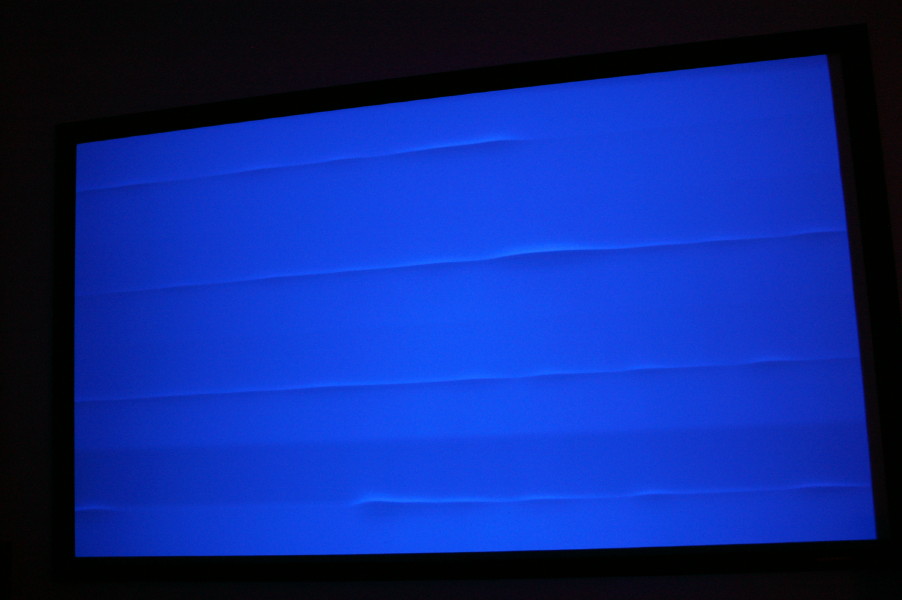
I have a Marquee 8500 which only recently I notice 4 faint lines across a plain white screen. I swiched colours and noticed its only really appears on the blue. Changing source makes no apparent difference. What I did notice is that when I have the Horizontal frequency at 15hz, all 3 colours have 4 faint lines (very hard to see), but on the blue tube, the lines are more visible. The lines are in a different spot depending on the colour. If I increase the HF to 30hz, the red and green remain the same, but the blue is more noticeable still. When I increase to 48hz, the lines on the blue tube is very visible. Have a look at the photo. I have heard of banding, but I don't know if this is it. I have also tried moving the 'bow' as I heard this causes banding? But this makes no difference... it just makes the lines 'bowed'!
[/img]
Any idea what this is and how to fix?
Thanks,
Kevin.
| Description: |
|
| Filesize: |
64.07 KB |
| Viewed: |
9812 Time(s) |
|
|
|
| Back to top |
|
 |
Nashou66

Joined: 12 Jan 2007
Posts: 16171
Location: West Seneca NY
|
|
| Back to top |
|
|
Curt Palme
CRT Tech
Joined: 08 Mar 2006
Posts: 24396
Location: Langley, BC
TV/Projector: All of them!
|
| Posted: Fri Feb 27, 2009 1:14 pm Post subject: |
|
|
|
I have one CLM here with a similar problem, and it wasn't socketed chips, it's a fault somewhere on the board. If cleaning the chips doesn't work, send it to me and I can repair or swap it out with a spare.
|
|
| Back to top |
|
|
Nashou66
Joined: 12 Jan 2007
Posts: 16171
Location: West Seneca NY
|
| Posted: Fri Feb 27, 2009 2:08 pm Post subject: |
|
|
| Curt Palme wrote: | | I have one CLM here with a similar problem, and it wasn't socketed chips, it's a fault somewhere on the board. If cleaning the chips doesn't work, send it to me and I can repair or swap it out with a spare. |
You know curt you might be right,IIRC I think i had to re solder a few caps that had cold solder joints near one of the chips under the DPB, I first had it doing what this pic above showed then it would randomly re initialize the PJ after about 30 minutes.
I don't know which capacitor it was as I did a whole bunch at the same time, But they were the buffering caps next to the socketed IC's. Check those Curt.
Athanasios
_________________
Don't blame your underwear for your crooked ass~ unknown Greek philosopher
"Republicans believe every day is the Fourth of July, but the Democrats believe every day is April 15." --- President Reagan
One Smart Dog!!!
Marquee High Performance Bellows now shipping!!
Marquee Modifications and Performance Enhancement
Marquee C-element and Bellow removal
|
|
| Back to top |
|
|
Curt Palme
CRT Tech
Joined: 08 Mar 2006
Posts: 24396
Location: Langley, BC
TV/Projector: All of them!
|
| Posted: Fri Feb 27, 2009 3:15 pm Post subject: |
|
|
|
Funny, I'm learning the importance about buffering caps, despite being in electronics for 30+ years. I just worked on 3 boards, all of which had open caps causing random problems.
|
|
| Back to top |
|
|
Nashou66
Joined: 12 Jan 2007
Posts: 16171
Location: West Seneca NY
|
| Posted: Fri Feb 27, 2009 3:21 pm Post subject: |
|
|
| Curt Palme wrote: | | Funny, I'm learning the importance about buffering caps, despite being in electronics for 30+ years. I just worked on 3 boards, all of which had open caps causing random problems. |
WOW!!! that makes me feel better about the things I have learned this past two years !! I think in electronics there is never
an end to what there is to learn.
Athanasios
_________________
Don't blame your underwear for your crooked ass~ unknown Greek philosopher
"Republicans believe every day is the Fourth of July, but the Democrats believe every day is April 15." --- President Reagan
One Smart Dog!!!
Marquee High Performance Bellows now shipping!!
Marquee Modifications and Performance Enhancement
Marquee C-element and Bellow removal
|
|
| Back to top |
|
|
Tim in Phoenix

Joined: 21 Oct 2006
Posts: 4409
Location: Phoenix
|
| Posted: Fri Feb 27, 2009 9:28 pm Post subject: |
|
|
Hello
Try unplugging the blue convergence yoke, see what that does if anything.
.
|
|
| Back to top |
|
|
mp20748
Joined: 12 Sep 2006
Posts: 5689
Location: Maryland
TV/Projector: 9500LC Ultra / Super 02 and 03 VIM
|
| Posted: Fri Feb 27, 2009 11:58 pm Post subject: |
|
|
That's a really weird one there.
I'm also thinking the HDM or LVPS.
|
|
| Back to top |
|
|
Tim in Phoenix
Joined: 21 Oct 2006
Posts: 4409
Location: Phoenix
|
| Posted: Sat Feb 28, 2009 12:49 am Post subject: |
|
|
Hello
I can't tell from the picture; either the luminance is unstable or the raster is bunching and spreading.
.
|
|
| Back to top |
|
|
Nashou66
Joined: 12 Jan 2007
Posts: 16171
Location: West Seneca NY
|
|
| Back to top |
|
|
radar
Joined: 05 Dec 2007
Posts: 72
Location: Sydney, Australia
|
| Posted: Sat Feb 28, 2009 2:17 am Post subject: |
|
|
|
I unplugged the blue convergence yoke from the back board (in the middle) and the problem went away. Does this narrow things down?
|
|
| Back to top |
|
|
radar
Joined: 05 Dec 2007
Posts: 72
Location: Sydney, Australia
|
| Posted: Sat Feb 28, 2009 2:37 am Post subject: |
|
|
Ok... read AVS... let me check U44 as per Nashou66.
BTW... fantastic to get such help from all the top 8500 guys!!!
|
|
| Back to top |
|
|
Curt Palme
CRT Tech
Joined: 08 Mar 2006
Posts: 24396
Location: Langley, BC
TV/Projector: All of them!
|
| Posted: Sat Feb 28, 2009 4:53 am Post subject: |
|
|
|
It would not be the H board, the lines would be vertical if that was the case. It's either a bad convergence output board (unlikely) or bad info coming from the CLM to the convergence board
|
|
| Back to top |
|
|
radar
Joined: 05 Dec 2007
Posts: 72
Location: Sydney, Australia
|
| Posted: Sat Feb 28, 2009 7:37 am Post subject: |
|
|
U44 is good. I tested it with a multimeter. The next step (I suppose) is touch up as many joints as I can with the multimeter looking for dry joints on the CLM. MAN... there are a LOT of places to look.
One thing to note is that its only really happening on the Blue... not all colours. I'm assuming the CLM treats each colour seperately. If not, then maybe its not the CLM?
One of the problems with being in Sydney, Australia , is I think I'm the only bloke within (literally) 10,000miles of the next person with a M8500.
Curt... have you ever spoken to anyone in Australia with a Marquee? If there was, I'd at least have a chance of swapping over the CLM to narrow things down. Also, can you pls send me a PM with cost of a working CLM you might have. If I can't find the problem, it may actually be cheaper to just send a working one rather than sending mine all the way to Vancouver.
|
|
| Back to top |
|
|
radar
Joined: 05 Dec 2007
Posts: 72
Location: Sydney, Australia
|
| Posted: Sat Feb 28, 2009 11:04 am Post subject: |
|
|
Is it safe to run the PJ without the DPB? This could narrow it down to the DPB if the fault goes away.
Also, I don't have a chip puller.... Any safe way to remove the chips without one or should I just go buy one just to do this once off diagnosis?!
|
|
| Back to top |
|
|
Nashou66
Joined: 12 Jan 2007
Posts: 16171
Location: West Seneca NY
|
| Posted: Sat Feb 28, 2009 11:47 am Post subject: |
|
|
| radar wrote: | Is it safe to run the PJ without the DPB? This could narrow it down to the DPB if the fault goes away.
Also, I don't have a chip puller.... Any safe way to remove the chips without one or should I just go buy one just to do this once off diagnosis?! |
It wont run with out the board. that sends all the frequency signals and band switching. I guaranty its the DPB chips and or the CLM chips that need a cleaning. Any Computer store should have an IC chip puller. it can be done with two thin screw drivers but you could damage a pin if it doesn't pop out straight up.
Athanasios
_________________
Don't blame your underwear for your crooked ass~ unknown Greek philosopher
"Republicans believe every day is the Fourth of July, but the Democrats believe every day is April 15." --- President Reagan
One Smart Dog!!!
Marquee High Performance Bellows now shipping!!
Marquee Modifications and Performance Enhancement
Marquee C-element and Bellow removal
|
|
| Back to top |
|
|
radar
Joined: 05 Dec 2007
Posts: 72
Location: Sydney, Australia
|
| Posted: Sun Mar 01, 2009 10:16 am Post subject: |
|
|
Ok... bought the chip puller (US$7). Pulled all the removable chips off the DPB and refitted them three times each. Put card back in PJ. No change. Pulled all the removable chips off the CLM and refitted them three times each. Put card back in PJ. No change.
Next step... buy a magnifying glass and go over the DPB and CLM and look for dry joints. If I find the little rascal I'll report back here.
If no luck, then it looks like replacement time.
Any further suggestions to isolate given its only the circuits affecting the BLUE tube only?
|
|
| Back to top |
|
|
fishlogan
Joined: 02 Jan 2008
Posts: 14
|
| Posted: Sun Mar 01, 2009 10:47 am Post subject: |
|
|
i thought you get those lines from excessive zone adjustment. If i try to correct my green geometry with too much zone i get that tearing horizontal line like your pic
try adjusting your zones with an all white screen and adjust them too their full hoiz range and se if it makes it better or worse
also, where in aus are you?
|
|
| Back to top |
|
|
Nashou66
Joined: 12 Jan 2007
Posts: 16171
Location: West Seneca NY
|
| Posted: Sun Mar 01, 2009 12:52 pm Post subject: |
|
|
| radar wrote: | Ok... bought the chip puller (US$7). Pulled all the removable chips off the DPB and refitted them three times each. Put card back in PJ. No change. Pulled all the removable chips off the CLM and refitted them three times each. Put card back in PJ. No change.
Next step... buy a magnifying glass and go over the DPB and CLM and look for dry joints. If I find the little rascal I'll report back here.
If no luck, then it looks like replacement time.
Any further suggestions to isolate given its only the circuits affecting the BLUE tube only? |
You could try this but i never have but seen it done on youtube and mentioned here and other forums. Heat up your oven to about 250 f and bake it till some of the solder joints get soft, then take it out and let it cool. I never tried this so just a warning. But lots of manufactures actually do this or more specific wave form soldering ovens.
I may test it with a spare board i have here that has been acting up and I dont use.
Athanasios
_________________
Don't blame your underwear for your crooked ass~ unknown Greek philosopher
"Republicans believe every day is the Fourth of July, but the Democrats believe every day is April 15." --- President Reagan
One Smart Dog!!!
Marquee High Performance Bellows now shipping!!
Marquee Modifications and Performance Enhancement
Marquee C-element and Bellow removal
|
|
| Back to top |
|
|
mp20748
Joined: 12 Sep 2006
Posts: 5689
Location: Maryland
TV/Projector: 9500LC Ultra / Super 02 and 03 VIM
|
| Posted: Sun Mar 01, 2009 10:47 pm Post subject: |
|
|
| Nashou66 wrote: | Heat up your oven to about 250 f and bake it till some of the solder jonints get soft, then take it out and let it cool. I never tried this so just a warning. But lots of manufactures actually do this or more specific wave form soldering ovens.
I may test it with a spare board i have here that has been acting up and I dont use.
Athanasios |
This is a very good method for SOME PC boards, but you'll need to first make sure it'll work on the board you intend to fix using this method.
It works well with basic boards that are not multi level solder through. More complex boards that has massive IC pin connections and solder through points can be damaged using this method. Especially older boards. they are already stretching and warping, and that's the nature of the problems. When fixing them with an oven method they can stretch and warp even more, to include loose some contacts all together.
this is a very good idea for new boards. older boards have taking on a different personality, and have become very finicky with age and heat.
|
|
| Back to top |
|
|
|
|





