|
As this forum is rarely used anymore, we've locked it. Feel free to browse and read. Questions? Please reach out to us directly. Cheers! |

|
 |
|
|
| Author |
Message |
perisoft

Joined: 29 Aug 2007
Posts: 2920
Location: Ithaca, NY
|
| Posted: Tue Nov 04, 2008 3:57 am Post subject: Fun with colors! |
|
|
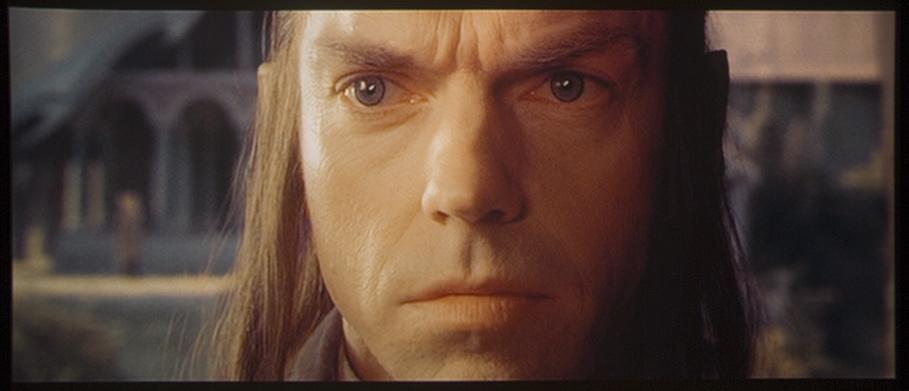
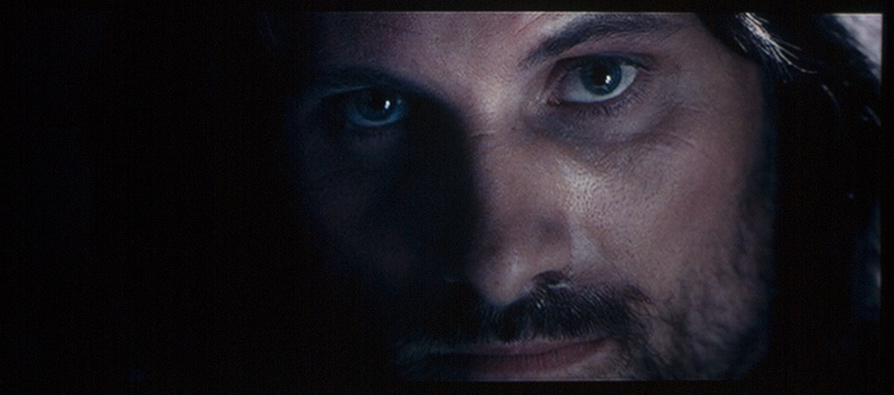
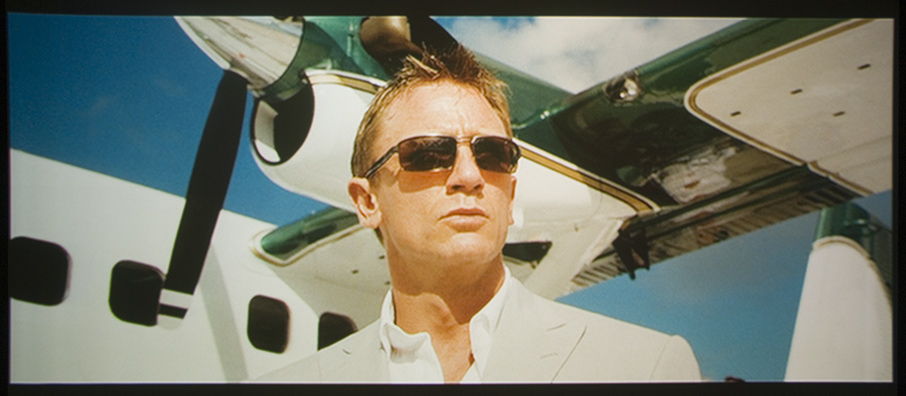
So, since avisynth is still giving me fits, I decided to play around with colors a bit. I set up the D80 on an actual tripod (!) and decided to try calibrating the white point with the camera (I didn't try messing with gamma, though it's on the list).
I'd set the white point by eye, and found something interesting - it was WAY off according to the camera's onboard analysis, which shows a histogram for each channel - and it said that there was WAY too much blue, and the R/G balance wasn't so hot either. Knocking the blue back made everything look far too red to me, but I figured I'd let the camera do the talking and see where it got me.
For all of this, I had the white balance on the camera set to 6100k (it was either that or 6500, I think, and I wasn't sure what the standard is for HT - anyone know? I saw that NTSC is 6300 or such, but that seems pretty warm).
Anyway, as one might expect, this actually made the camera capture what was on the screen quite well, whereas before the colors looked completely wrong vs. what I saw on the screen.
So, without further ado, some results of the night's work. The camera's gamma seems to be off a bit - the low end is much more visible in real life than with the camera - but aside from that I'm pretty happy. All of this is SD, by the way.
| Description: |
|
| Filesize: |
114.61 KB |
| Viewed: |
4194 Time(s) |
|
| Description: |
|
| Filesize: |
120.33 KB |
| Viewed: |
4195 Time(s) |
|
| Description: |
|
| Filesize: |
136.14 KB |
| Viewed: |
4194 Time(s) |
|
_________________

|
|
| Back to top |
|
 |
Nashou66

Joined: 12 Jan 2007
Posts: 16171
Location: West Seneca NY
|
|
| Back to top |
|
|
AnalogRocks
Forum Moderator

Joined: 08 Mar 2006
Posts: 26706
Location: Toronto, Ontario, Canada
TV/Projector: Sony 1252Q, AMPRO 4000G
|
| Posted: Tue Nov 04, 2008 6:53 am Post subject: |
|
|
D65 or 6500K is the standard.
Interesting idea though.
_________________
Tech support for nothing
CRT.
HD done right!
|
|
| Back to top |
|
|
johnsmith808
Joined: 15 Oct 2008
Posts: 100
|
| Posted: Tue Nov 04, 2008 8:40 am Post subject: |
|
|
For the life of me, I wouldn't be able to tell if the greyscale was off or not. That's one thing I've never attempted to tweak.
Maybe ignorance is bliss?
|
|
| Back to top |
|
|
perisoft
Joined: 29 Aug 2007
Posts: 2920
Location: Ithaca, NY
|
| Posted: Tue Nov 04, 2008 12:00 pm Post subject: |
|
|
| Nashou66 wrote: | you do need to do your greyscale, looks a bit greenish yellowish to me, use kals guide.
Athanasios |
Yeah, no doubt. All I did for this setup was set the white point (and black for each channel), throw up a ramp, and adjust the gamma for each channel separately. It goes a long way from a 'default' setup, which is so far off it's not even funny, but it's not perfect.
I'm going to try doing some hand-measurements using the camera - measure the grayscale by hand using a photo of a ramp. My theory is that the camera should be pretty damned accurate - after all, it's just a really complicated colorimeter, and if there's one thing that would piss off a pro photographer, it's bad grayscale tracking. So it ought to be pretty good. Hell, it cost ten times as much as a Spyder; it better be! 
It'll be a pain in the ass to do, but it'll be interesting to see the results.
_________________
|
|
| Back to top |
|
|
Brian Hampton

Joined: 22 Apr 2006
Posts: 1173
|
| Posted: Wed Nov 05, 2008 11:06 pm Post subject: |
|
|
I ran through Kal's Guide this Am.
(I just happened to have a few hours of "free time")
It was fun and useful. I'm very happy with the results.
-Brian
|
|
| Back to top |
|
|
perisoft
Joined: 29 Aug 2007
Posts: 2920
Location: Ithaca, NY
|
| Posted: Thu Nov 06, 2008 3:24 am Post subject: |
|
|
So, I decided to mess with the colors some more this evening. It looks like the camera's a good way to set white point, but without MUCH better detailed gamma control, I don't see how I can do much for real gray tracking. The multipoint gamma app from the a-site works, but it's buggy as hell (pops an error box with each command but then executes it anyway) and nearly impossible to use precisely (eg, no grids on the gamma adjustment).
What's biting me in the ass is that I can get the low end gamma nice, but the *steps* are much bigger at low IRE than high IRE. The difference between 100IRE and 70IRE, visually, is maybe 10%, but the difference between 30IRE and 20IRE is more like 30%, even though 10IRE is still visible. You can see gradation all the way through; nothing is CRUSHED, per-se, but it's certainly not linear to the naked eye.
Pisses me off.
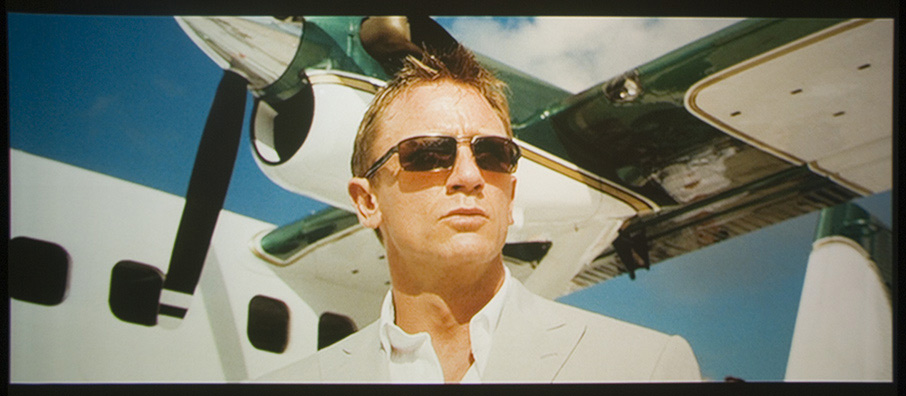
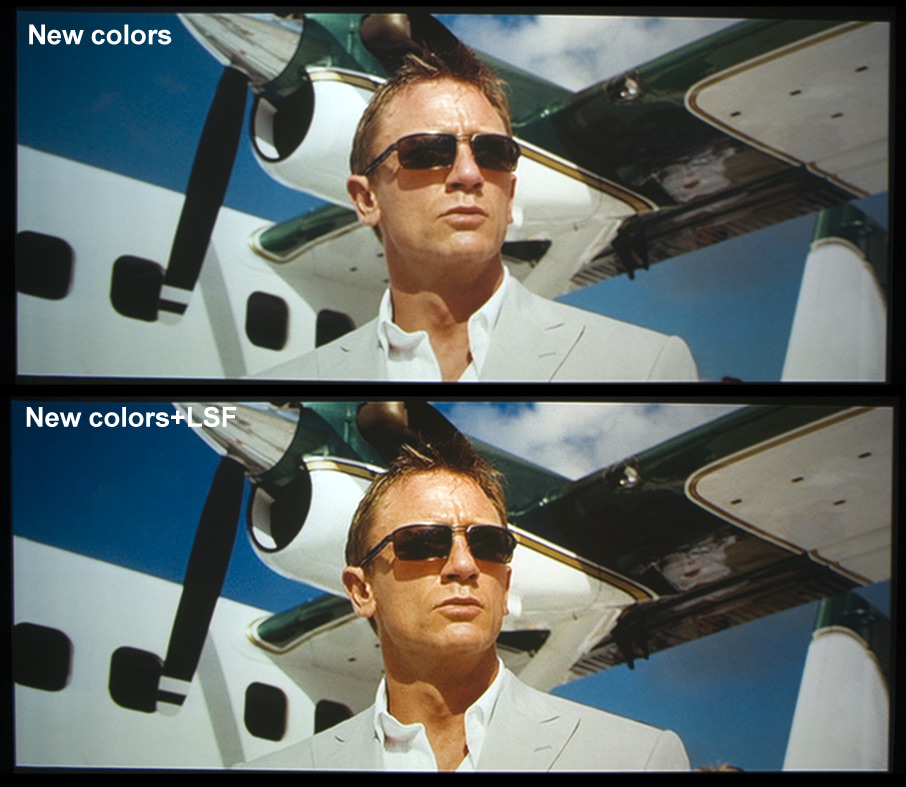
I tried ditching the weird custom ramps and playing with the Barco's cutoff/midlights settings WHILE playing with normal gamma adjustments on the PC - all by eye - and came up with this. It looks not bad colorwise, and is somewhat better on the squish-at-the-top and steep-at-the-bottom, but a comparison with the original I had going before suggests it's much 'less' at low IREs. They're not gone, just lower. But I don't know whether it's 'right' or not - no colorimeter and no $ makes perisoft a frustrated boy!
I finally got mt working with limitedsharpenfaster and threw a shot on there using LSF to show some sharpness difference. Obviously you can't see so much with the thing downscaled to ~850px wide, but you can still tell the difference. For some reason it's altering the colors a bit, too - gotta figure that out. I think it happens in the scaling step.
| Description: |
| Colors with whitepoint set via the D80. |
|
| Filesize: |
110.91 KB |
| Viewed: |
4015 Time(s) |
|
| Description: |
| Whitepoint with the D80 and gamma done (again) by eye. |
|
| Filesize: |
187.94 KB |
| Viewed: |
4015 Time(s) |
|
_________________
|
|
| Back to top |
|
|
AnalogRocks
Forum Moderator
Joined: 08 Mar 2006
Posts: 26706
Location: Toronto, Ontario, Canada
TV/Projector: Sony 1252Q, AMPRO 4000G
|
| Posted: Thu Nov 06, 2008 3:26 am Post subject: |
|
|
Loosing the yellow push. 
_________________
Tech support for nothing
CRT.
HD done right!
|
|
| Back to top |
|
|
Nashou66
Joined: 12 Jan 2007
Posts: 16171
Location: West Seneca NY
|
|
| Back to top |
|
|
AnalogRocks
Forum Moderator
Joined: 08 Mar 2006
Posts: 26706
Location: Toronto, Ontario, Canada
TV/Projector: Sony 1252Q, AMPRO 4000G
|
| Posted: Thu Nov 06, 2008 4:34 am Post subject: |
|
|
LSF Long Slow F...never mind
_________________
Tech support for nothing
CRT.
HD done right!
|
|
| Back to top |
|
|
Nashou66
Joined: 12 Jan 2007
Posts: 16171
Location: West Seneca NY
|
|
| Back to top |
|
|
|
|
|
|
|
You cannot post new topics in this forum
You cannot reply to topics in this forum
You cannot edit your posts in this forum
You cannot delete your posts in this forum
You cannot vote in polls in this forum
You cannot attach files in this forum
You can download files in this forum
|
Forum powered by phpBB © phpBB Group
|
|




