| Author |
Message |
DARNOLD
Joined: 14 Mar 2008
Posts: 61
Location: St. Louis
|
| Posted: Fri Mar 14, 2008 7:19 pm Post subject: electrohome ecp3100 newbie |
|
|
Greetings all!
just got this unit and don't know squat about it other than I've downloaded and printed out all the available info I can find and am starting to learn.......
it came with only the RGB SYNC 10 PIN input module so I don't know what I can connect to determine if this unit works.
can someone help me get started in the right direction?
I'd like to get the "enhanced pc interface" module and strictly use output from computer.
Are these mods still available?
Would appreciate any help I can get........
Thank you
_________________
.............and may GOD bless...............
|
|
| Back to top |
|
 |
Tim in Phoenix

Joined: 21 Oct 2006
Posts: 4409
Location: Phoenix
|
| Posted: Fri Mar 14, 2008 7:42 pm Post subject: |
|
|
Hello
The enhanced pc module only does CGA/EGA so don't bother. The 10 pin module will take in RGBS on the 10 pin connection and RGBHV on the BNCs. The 913 module has dual RGBHV and can be found cheep. There was no component board offered, so you are limited to an HTPC or RGB sources unless you spring for an HD Fury or other transcoder.
.
|
|
| Back to top |
|
|
Bruce 09
Joined: 08 Mar 2006
Posts: 747
Location: Kamloops BC, Canada
|
| Posted: Fri Mar 14, 2008 7:58 pm Post subject: |
|
|
| Tim in Phoenix wrote: | Hello
The enhanced pc module only does CGA/EGA so don't bother. The 10 pin module will take in RGBS on the 10 pin connection and RGBHV on the BNCs. The 913 module has dual RGBHV and can be found cheep. There was no component board offered, so you are limited to an HTPC or RGB sources unless you spring for an HD Fury or other transcoder.
. |
I know Curt has those RGBHV modules you will need to get one of these first. Unless you find a cable like this one But will need to be a male version .
http://img339.imageshack.us/img339/8374/miscitems015nr4.jpg
Tim I have been looking for a pin out chart for a ten pin connector I finally found one (the one pictured) But it had been so long I forgot the ecp2000 has a female connector so does this cable .
Any ideas anybody ?
|
|
| Back to top |
|
|
DARNOLD
Joined: 14 Mar 2008
Posts: 61
Location: St. Louis
|
| Posted: Fri Mar 14, 2008 8:03 pm Post subject: thanks tim |
|
|
I got family in Arizona. Wish I was there.
Can you tell me what I can hook up to the 10-pin or the bnc's?
No equipment I have has such connectors and I'm not sure what adapts. I'd like to run my sanyo DRW-500 dvd recorder (which is also a tv tuner) or just a vcr if possible to see what's up.
The outputs on the sanyo are:
RCA video out
s-video out
component video out (3 rca's)
I just want to verify the unit works prior to purchasing any peripherals
Can I hook up anything?
Thanks
Dave
_________________
.............and may GOD bless...............
|
|
| Back to top |
|
|
Tim in Phoenix
Joined: 21 Oct 2006
Posts: 4409
Location: Phoenix
|
| Posted: Fri Mar 14, 2008 9:10 pm Post subject: Re: thanks tim |
|
|
| DARNOLD wrote: | Can you tell me what I can hook up to the 10-pin or the bnc's?
No equipment I have has such connectors and I'm not sure what adapts. I'd like to run my sanyo DRW-500 dvd recorder (which is also a tv tuner) or just a vcr if possible to see what's up.
The outputs on the sanyo are:
RCA video out
s-video out
component video out (3 rca's)
I just want to verify the unit works prior to purchasing any peripherals
Can I hook up anything?
Thanks
Dave |
Nope, you need a Decoder card for ECP (composite or S in) or an external transcoder (component) or RGB out of a pc.
Otherwise, you are limited to a test grid from the 3100 itself.
.
|
|
| Back to top |
|
|
DARNOLD
Joined: 14 Mar 2008
Posts: 61
Location: St. Louis
|
| Posted: Sat Mar 15, 2008 6:25 am Post subject: Thanks Tim |
|
|
Tim, thanks for responding and please bear with me as this is all new to me. I have wanted a projector since the 80's when a friend showed me his blacked-out basement theater with his old uncles Heahtkit GR-8000 projection TV. I was awestruck!
off topic still, I have a father near the border somewhere out there, my brother Tim was in Cottonwood Ariz. till around '78, and my brother Steve is in Camp Verde. I miss Arizona all too much! When I was 6, I was drowning in the Verde river and was saved by someone diving from a electrical tower into the river. Wow, the good old days.
Anyway, I just want to see what this Electrohome 3100 does. I dont have any equipment that will directly connect to this without some type of adaptor. is there a card i can install in my computer to give me the RGB out of a pc you spoke of?
"Nope, you need a Decoder card for ECP (composite or S in)"
Is this a card that goes into the second available slot on the proj? I don't see anything in the picture from this website that shows all the interface modules for the ECP.
"or an external transcoder (component)"
What would this be? A separate device to give "component" output from my dvd-r the capability to input using rca to bnc cabling to the proj?
"or RGB out of a pc"
(see above)
Let me know if i'm not getting the gist here ok?
thanks,
Dave
_________________
.............and may GOD bless...............
|
|
| Back to top |
|
|
AnalogRocks
Forum Moderator

Joined: 08 Mar 2006
Posts: 26706
Location: Toronto, Ontario, Canada
TV/Projector: Sony 1252Q, AMPRO 4000G
|
| Posted: Sat Mar 15, 2008 6:44 am Post subject: |
|
|
Have a read here: http://www.curtpalme.com/CRTPrimer.shtm
and especially here: http://www.curtpalme.com/CRTPrimer_17.shtm
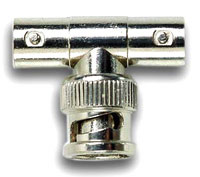
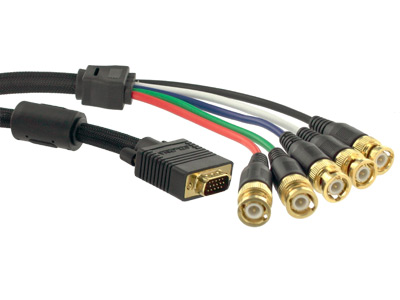
It may help explain things to you. If your projector has the corect input, that is, 5 BNC connectors labeled RGBHV or 4 labeled RGBS you can use what is called a break out cable. It has a VGA connector on one end and 5 BNC connectors on the other. You may have to tie the H and the V together to get a picture that doesn't roll. To do that you need a BNC T adaptor. You plug the VGA cable end into your video card on your computer but first set the desktop for something like 800x600 or 1024x768.
| Description: |
|
| Filesize: |
8.44 KB |
| Viewed: |
12636 Time(s) |
|
| Description: |
| VGA ( aka RGB ) to RGBHV breakout cable. |
|
| Filesize: |
22.09 KB |
| Viewed: |
12636 Time(s) |
|
_________________
Tech support for nothing
CRT.
HD done right!
|
|
| Back to top |
|
|
DARNOLD
Joined: 14 Mar 2008
Posts: 61
Location: St. Louis
|
| Posted: Sat Mar 15, 2008 6:55 am Post subject: baadda boom baadda bing! |
|
|
THANK YOU!
I'LL BE SCOURING THE TOWN TOMORROW FOR JUST SUCH A THING!
I understand about the 800x600 too.....
THANK YOU
THANK YOU
THANK YOU
Dave
_________________
.............and may GOD bless...............
|
|
| Back to top |
|
|
AnalogRocks
Forum Moderator
Joined: 08 Mar 2006
Posts: 26706
Location: Toronto, Ontario, Canada
TV/Projector: Sony 1252Q, AMPRO 4000G
|
| Posted: Sat Mar 15, 2008 6:49 pm Post subject: Re: baadda boom baadda bing! |
|
|
| DARNOLD wrote: | THANK YOU!
I'LL BE SCOURING THE TOWN TOMORROW FOR JUST SUCH A THING!
I understand about the 800x600 too.....
THANK YOU
THANK YOU
THANK YOU
Dave |
You're welcome.
_________________
Tech support for nothing
CRT.
HD done right!
|
|
| Back to top |
|
|
DARNOLD
Joined: 14 Mar 2008
Posts: 61
Location: St. Louis
|
| Posted: Wed Mar 19, 2008 3:46 am Post subject: waiting for the break-out cable to arrive......... |
|
|
i've been reading up on this pj and one thing immediately came to mind when i read in the user's manual the following:
"Settings are stored in battery backed-up, non-volatile memory."
This unit has sat for some 7 or so years in a basement here in St. Louis. I'm wanting to know where this "battery" is located and should it be changed or checked for leakage, damage?
Would this be located on the motherboard typical of a computer?
(Looks like I would pretty much have to disassemble the whole thing to get to the motherboard)
Would appreciate any help on this topic 
Thanks!
_________________
.............and may GOD bless...............
|
|
| Back to top |
|
|
AnalogRocks
Forum Moderator
Joined: 08 Mar 2006
Posts: 26706
Location: Toronto, Ontario, Canada
TV/Projector: Sony 1252Q, AMPRO 4000G
|
| Posted: Wed Mar 19, 2008 3:57 am Post subject: |
|
|
It's in the Dallas chip. From what I've read that is. I don't have an ECP.
_________________
Tech support for nothing
CRT.
HD done right!
|
|
| Back to top |
|
|
DARNOLD
Joined: 14 Mar 2008
Posts: 61
Location: St. Louis
|
| Posted: Wed Mar 19, 2008 5:29 am Post subject: keep in mind i'm a newbie |
|
|
without alot of electronics experience
but does this mean that the memory is stored in a chip upon shut-down and there's no real "battery" (nickel. ni-cad, etc.) ?
sorry if this seems, you know................
Thanks for responding AnalogRocks
From what I've been reading around these parts, you seem to know your stuff
_________________
.............and may GOD bless...............
|
|
| Back to top |
|
|
AnalogRocks
Forum Moderator
Joined: 08 Mar 2006
Posts: 26706
Location: Toronto, Ontario, Canada
TV/Projector: Sony 1252Q, AMPRO 4000G
|
| Posted: Thu Mar 20, 2008 1:20 am Post subject: Re: keep in mind i'm a newbie |
|
|
| DARNOLD wrote: | without alot of electronics experience
but does this mean that the memory is stored in a chip upon shut-down and there's no real "battery" (nickel. ni-cad, etc.) ?
sorry if this seems, you know................
Thanks for responding AnalogRocks
From what I've been reading around these parts, you seem to know your stuff |
Well I do a pretty good job pretending anyways 
There is a battery inside the Dallas chip with a rated life span of 7-10 years. Some last longer some don't.
That battery keeps the memory for the projector setup when the projector is not pluged into the AC power. Without the battery you can do the setup, unplug the projector for a while and when you turn it back on you'll have to redo your setup from scratch.
_________________
Tech support for nothing
CRT.
HD done right!
|
|
| Back to top |
|
|
DARNOLD
Joined: 14 Mar 2008
Posts: 61
Location: St. Louis
|
| Posted: Sat Mar 22, 2008 5:14 am Post subject: RUNNING SCARED AND OUT OF TIME |
|
|
RUNNING SCARED AND OUT OF TIME
OK, I did it...........
I plugged in the ECP 3100 with an SVGA to RGBHV cable connected to a PC's 15 pin video out.
Set a 48" da-lite screen @ 6'.
Turned on the pj.
pressed source
1
2
after turning off all lighting in the room i could see an image but not anything discernable
however, in the lenses i could see my windows desktop
i then pressed "help"
on the screen was a green image of text but totally out of focus
loosened the rear wingnut on green to try and focus, but at its best it was still illegible
Loosened the front wingnut and adjusted, still no focus
did however realize image is upside down which totally blows this for me
i don't have the knowledge or time to reverse vertical yokes
i'm in the middle of remodeling the house and want a floor mounted unit
AAAAAARRRRRRGGGGHHHHH!
i would at least like to see a focused image even upside down
am i doing something wrong?
HELP?
_________________
.............and may GOD bless...............
|
|
| Back to top |
|
|
Sonynut

Joined: 08 Aug 2006
Posts: 367
Location: Bradford,PA
|
| Posted: Sat Mar 22, 2008 5:32 am Post subject: |
|
|
Sounds like you need to read the manual to find the correct distance from your screen according to your screen size. Also, the wingnut closest to the tubes adjusts the center focus, the outermost the corner focus, in the order they need adjusted. Without being at the correct distance, you'll never focus correctly AND fill your screen. You are either wayy to close or too far away from it. My guess is too close. An average figure for an 80" diagonal 4:3 screen is approximately 8 feet. The closest you can be and focus is approximately 5 feet. Not to mention correct toe-in for the tubes/etc.(remember you have to get the 3 color images exactly on top of each other(convergence)).
To switch the upside down/ backwards image you need to perform a polarity change. I am not familiar with ECPs but most machines have connectors that get flipped around to do this(POWER OFF and UNPLUGGED), again this is in the install manual and not a biggie . Just make sure everything is correct before powering back up.
Don't panic. You are seeing your desktop in the lenses, which is a good thing. You'll learn the rest with patience.
Whatever you do, DON'T feed the projector too high a resolution- most machines protect themselves against this, but just to be safe, don't go any higher than 1280x1024/ 60hz. Your projector will probably max out at 1024x768 while still being borderline readable, though.
Enjoy your new machine, and welcome to the CRT obsessive club!
Wow.. took 3 edits before I got all the errors out of this post.. time for bed LOL
_________________
1272 Stack coming soon:)
|
|
| Back to top |
|
|
DARNOLD
Joined: 14 Mar 2008
Posts: 61
Location: St. Louis
|
| Posted: Sat Mar 22, 2008 5:42 am Post subject: ........... |
|
|
thanks for your response Sonynut
manual said factory preset at 6' srceen distance yields 60x45" image
so i figured i'd start there. help text image is discernable as far as length across and height on screen. not really missing any text 'cept at the edges slightly
just can't focus..............
again, I AM SUPER NEWBIE to all this but have somewhat of a technical backgroud in electronics, but all self taught, by the book, and slowly............
_________________
.............and may GOD bless...............
|
|
| Back to top |
|
|
gonyr
Joined: 11 Jan 2007
Posts: 138
Location: western NY
|
| Posted: Sat Mar 22, 2008 7:23 pm Post subject: |
|
|
Reversing the plugs for floor/ceiling is easy, although somtimes they get a little stuck and are a real pain to pull out.
Read through this: http://www.curtpalme.com/ElectrohomeECP_Layout1.shtm so you at least know where all the various parts are. There's a picture of the plugs that need to be reversed somewhere in there. You can also download and print the whole manual from that page, and it will walk you through everything step by step (including how to reverse the scan). I had an ECP 3100 for my first projector a little more than a year ago. It was very easy to set up and is a great 1st projector to learn on.
Good luck.
|
|
| Back to top |
|
|
DARNOLD
Joined: 14 Mar 2008
Posts: 61
Location: St. Louis
|
| Posted: Sun Mar 23, 2008 2:41 am Post subject: MOVING RIGHT ALONG |
|
|
thanks for the info gonyr
ok, i just reversed p6 and p8 deflection yoke plugs at all three deflection boards
image looking into green lens is now inverted (up-side down)
projected image is right-side up
still no focus ability with screen at 6' to 10' distance
should i be able to focus the green lens to when looking directly into it, it should be clear?
text appears to be "shaky" also but right now i do not have the pc in line to the inputs
shoul i re-connect my svga to 5 bnc cable and fire the pc even though i'm only looking at the help menu?
is there anybody out there?
working away .................
_________________
.............and may GOD bless...............
|
|
| Back to top |
|
|
DARNOLD
Joined: 14 Mar 2008
Posts: 61
Location: St. Louis
|
| Posted: Sun Mar 23, 2008 2:52 am Post subject: BY THE WAY...... |
|
|
THIS THING IS TOO CLEAN!!!!!!!!!!!!!!
i've fiddled around with my fair share of "OLD" gear, but upon uncovering this unit i expected to need a shop-vac to clear a path to anything
much to my disbelief, this thing is pristine lookin
i plan on trying to contact the guy i got it from to verify its actual use
he was working with the installation contractor on where this was set up
it was only in use from 1991 or 1992 till around 1999
i thought he said it was from a country club or some such but i hope to determine it's "actual" useage and set-up where it was installed until removed and stored by him
..................
_________________
.............and may GOD bless...............
|
|
| Back to top |
|
|
Sonynut
Joined: 08 Aug 2006
Posts: 367
Location: Bradford,PA
|
| Posted: Sun Mar 23, 2008 2:55 am Post subject: |
|
|
You must look at the screen to focus.. walking back and forth between the projector and the
screen and fine tuning will help ALOT. The image will always look focused when looking directly into the lens. There is an electronic focus, as described in the manual, that needs to be set if the image is NOT focused looking into the lenses or directly at the tubes.
_________________
1272 Stack coming soon:)
|
|
| Back to top |
|
|
|
|




