|
As this forum is rarely used anymore, we've locked it. Feel free to browse and read. Questions? Please reach out to us directly. Cheers! |

|
 |
|
|
| Author |
Message |
ecrabb
Forum Moderator

Joined: 13 Mar 2006
Posts: 15909
Location: Utah
TV/Projector: JVC RS40, Epson 5010
|
| Posted: Thu Mar 06, 2008 9:25 pm Post subject: Cool HTPC storage device... Drobo - "storage robot" |
|
|
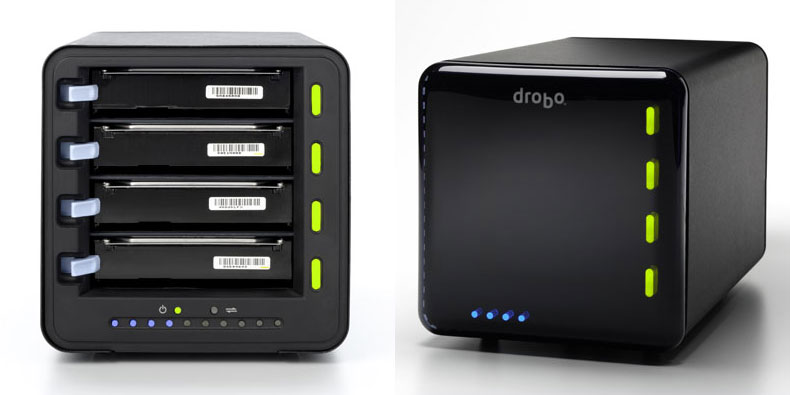
Drobo 'Storage Robot' ($499)
http://www.drobo.com/products_drobo.aspx
OK, this thing isn't cheap, but not bad, either. Regardless, I think it's pretty cool. It's like a cross between JBOD and RAID, but they took all the management and thinking out of it and made it completely automated. It looks neat until you watch the video, and then it looks even neater.
http://www.drobo.com/products_demo.aspx
Supports Windows and Mac (NTFS, FAT32, HFS+).
It's not cheap - $499 for an empty box. But, then you just slap in whatever SATA drives you like or have laying around. No expensive sleds or carriers, no special adapters... just slide the bare drive in.
They also have a NAS device for it called DroboShare ($199):
http://www.drobo.com/products_droboshare.aspx
It supports Mac/Win/Linux.
It looks like a pretty slick way to build a big media server to me - especially if you don't want to get into the nitty-gritty of RAID management and filesystem/server config.
SC
PS - I have no association with the company - I just thought it looked cool and might of interest to the HTPC'ers around here.
| Description: |
|
| Filesize: |
34.23 KB |
| Viewed: |
12863 Time(s) |
|
|
|
| Back to top |
|
 |
rabies_70

Joined: 15 Feb 2007
Posts: 1189
Location: Carlsbad, CA
TV/Projector: Sony G70Q
|
| Posted: Thu Mar 06, 2008 10:05 pm Post subject: |
|
|
I LOVE drobo
_________________
Ray
I am an iconoclast
|
|
| Back to top |
|
|
ecrabb
Forum Moderator
Joined: 13 Mar 2006
Posts: 15909
Location: Utah
TV/Projector: JVC RS40, Epson 5010
|
| Posted: Thu Mar 06, 2008 10:19 pm Post subject: |
|
|
Ray, do you have one/use one? Or, do you mean you like the idea of it?
Or, does 'drobo' have some other meaning I'm not familiar with? 
SC
|
|
| Back to top |
|
|
whats6x7
Joined: 04 Oct 2006
Posts: 5924
|
| Posted: Thu Mar 06, 2008 10:28 pm Post subject: |
|
|
This is sort-of on-topic. If I want to convert my DVD library to instant-access files to store on this thing, what is the most efficient yet good looking codec (wmv/avi/divx) and what program will take an episode disk (like Stargate) and pull the individual episodes out automatically. I have AnyDVD so no worries about the protection.
_________________
it takes a village, but not just any village—and certainly not the village of Corleone on the outskirts of Palermo, Sicily!
|
|
| Back to top |
|
|
ecrabb
Forum Moderator
Joined: 13 Mar 2006
Posts: 15909
Location: Utah
TV/Projector: JVC RS40, Epson 5010
|
| Posted: Thu Mar 06, 2008 10:39 pm Post subject: |
|
|
Personally, with how cheap storage is, I'd rip the main feature(s) off the disk as-is and not re-compress at all. But, it depends on how large your collection is (and how much of it you want on-line of course), how much storage you want to buy, and how much you value your time.
You can re-encode (takes time, but saves space, and loses quality) or not (less time, more space, no quality loss).
How many DVD's do you have and how fast of a computer do you have?
SC
|
|
| Back to top |
|
|
rabies_70
Joined: 15 Feb 2007
Posts: 1189
Location: Carlsbad, CA
TV/Projector: Sony G70Q
|
| Posted: Thu Mar 06, 2008 10:44 pm Post subject: |
|
|
Naw I WISH I had one. Next time I've got 900.00 I have no other use for I am getting one. It is exactly what I wanted for christmas
_________________
Ray
I am an iconoclast
|
|
| Back to top |
|
|
whats6x7
Joined: 04 Oct 2006
Posts: 5924
|
| Posted: Thu Mar 06, 2008 10:46 pm Post subject: |
|
|
Point taken, I could just rip straight to VOB files and let PowerDVD play them like regular DVDs. If I rip them to fit on standard DVD I should be able to put 225 or more on a terabyte, right? I'd say that's enough on-demand storage. I think I'm going to buy one of these things.
Is there a friendly little player box that I can attach to my network to feed VOB files to another projector in my house?
_________________
it takes a village, but not just any village—and certainly not the village of Corleone on the outskirts of Palermo, Sicily!
|
|
| Back to top |
|
|
WanMan

Joined: 19 Mar 2006
Posts: 10270
|
| Posted: Fri Mar 07, 2008 12:09 am Post subject: |
|
|
Provided you can find a case and power supply, there are $130 motherboards out there with nine (9) SATA2 connectors.
_________________
Trust no one. Absolutely no one. Advice of the board.
|
|
| Back to top |
|
|
MikeEby

Joined: 24 Jun 2007
Posts: 5237
Location: Osceola, Indiana
|
| Posted: Fri Mar 07, 2008 2:00 am Post subject: |
|
|
| WanMan wrote: | | Provided you can find a case and power supply, there are $130 motherboards out there with nine (9) SATA2 connectors. |
I have to agree 500 bucks for that does seem a bit high, but it does looks nice. It’s probably total plug and play so if someone doesn't like messing building a system there is some value there. A Suse Linux server is pretty darn easy to setup. The thing I don’t like about a system like that is it probably has a proprietary power supply so if it goes bad out of warranty you throw it away.
Mike
_________________
Doing HD since the last century!
|
|
| Back to top |
|
|
AnalogRocks
Forum Moderator

Joined: 08 Mar 2006
Posts: 26706
Location: Toronto, Ontario, Canada
TV/Projector: Sony 1252Q, AMPRO 4000G
|
| Posted: Fri Mar 07, 2008 4:38 am Post subject: |
|
|
Need's some screaming green paint on the front panel 
_________________
Tech support for nothing
CRT.
HD done right!
|
|
| Back to top |
|
|
ecrabb
Forum Moderator
Joined: 13 Mar 2006
Posts: 15909
Location: Utah
TV/Projector: JVC RS40, Epson 5010
|
| Posted: Fri Mar 07, 2008 6:58 am Post subject: |
|
|
| WanMan wrote: | | Provided you can find a case and power supply, there are $130 motherboards out there with nine (9) SATA2 connectors. |
Provided you can find a computer and some hard drives, you don't need anything else. I know what your point is, but if you have a bunch of sh*t just sitting around, then you probably don't need one of these things - you can just build a server. But, I'd like to see you add a drive our two to your 9-drive motherboard. Can you do it in 30 seconds and not even shut the machine down?
Plus, the thing is low-power compared to a PC! Specs say typical 'busy' condition with 4 drives is about 40W. With the NAS appliance, it's still under 50W. A big PC case with processors, graphics card, fans and drives is going be drawing at least double that, if not triple. $25/year to run vs. $75/year.
| MikeEby wrote: | | I have to agree 500 bucks for that does seem a bit high, but it does looks nice. It’s probably total plug and play so if someone doesn't like messing building a system there is some value there. A Suse Linux server is pretty darn easy to setup. The thing I don’t like about a system like that is it probably has a proprietary power supply so if it goes bad out of warranty you throw it away. |
I don't think it's really that high at all given what it will do. A good 4-bay USB 2.0/Firewire RAID enclosure by itself is around $200. So, for another $300, you get a completely automated JBOD/RAID solution. When I say automated, I mean you don't have to do ANYTHING, except slap a drive in. Enterprise hardware that does some of this stuff costs thousands.
Wait, you guys didn't watch the video, did you? Go watch the video, and then come back and try to tell me it isn't slicker than sh*t.
I'm not saying everybody needs one, but compared to manually setting up a RAID, and manually managing it, and manually adding disks (or worse yet, removing or swapping a disk)... well, there is no comparison.
SC
|
|
| Back to top |
|
|
WanMan
Joined: 19 Mar 2006
Posts: 10270
|
| Posted: Fri Mar 07, 2008 12:56 pm Post subject: |
|
|
| ecrabb wrote: | | WanMan wrote: | | Provided you can find a case and power supply, there are $130 motherboards out there with nine (9) SATA2 connectors. |
Provided you can find a computer and some hard drives, you don't need anything else. I know what your point is, but if you have a bunch of sh*t just sitting around, then you probably don't need one of these things - you can just build a server. But, I'd like to see you add a drive our two to your 9-drive motherboard. Can you do it in 30 seconds and not even shut the machine down?
Plus, the thing is low-power compared to a PC! Specs say typical 'busy' condition with 4 drives is about 40W. With the NAS appliance, it's still under 50W. A big PC case with processors, graphics card, fans and drives is going be drawing at least double that, if not triple. $25/year to run vs. $75/year.
| MikeEby wrote: | | I have to agree 500 bucks for that does seem a bit high, but it does looks nice. It’s probably total plug and play so if someone doesn't like messing building a system there is some value there. A Suse Linux server is pretty darn easy to setup. The thing I don’t like about a system like that is it probably has a proprietary power supply so if it goes bad out of warranty you throw it away. |
I don't think it's really that high at all given what it will do. A good 4-bay USB 2.0/Firewire RAID enclosure by itself is around $200. So, for another $300, you get a completely automated JBOD/RAID solution. When I say automated, I mean you don't have to do ANYTHING, except slap a drive in. Enterprise hardware that does some of this stuff costs thousands.
Wait, you guys didn't watch the video, did you? Go watch the video, and then come back and try to tell me it isn't slicker than sh*t.
I'm not saying everybody needs one, but compared to manually setting up a RAID, and manually managing it, and manually adding disks (or worse yet, removing or swapping a disk)... well, there is no comparison.
SC |
Being Mac-oriented I would expect that kind of 30-second response.  Considering that my PC cases do not need screws to get into and out of, and that all the hard drives are sitting on rubber-footed trays, the simply two cable plug & plug operation is easy for me. And the benefit is another computer for which I can do things like surf, rip, and stream. Considering that my PC cases do not need screws to get into and out of, and that all the hard drives are sitting on rubber-footed trays, the simply two cable plug & plug operation is easy for me. And the benefit is another computer for which I can do things like surf, rip, and stream.
_________________
Trust no one. Absolutely no one. Advice of the board.
|
|
| Back to top |
|
|
ecrabb
Forum Moderator
Joined: 13 Mar 2006
Posts: 15909
Location: Utah
TV/Projector: JVC RS40, Epson 5010
|
| Posted: Fri Mar 07, 2008 3:29 pm Post subject: |
|
|
I'm not talking about how easy it is to open the frickin' case and plug the drive in - that's the easy part! Besides, I don't need a screwdriver to open any of my desktop Mac cases, either. The last Mac I bought that required a screwdriver to get into the case was in 1995. As for the Mac dig you always have to get in... You can say whatever you want - I don't care. I actually USE BOTH platforms every day - and like and dislike both for different reasons. So, at least I'm not arguing from a position of ignorance.
What I'm saying is so much easier is the configuration and setup. The Drobo does it all for you - automatically, on-the-fly. You don't have to think about spanning, mirroring, etc. - it does it all for you. It tells you when it's getting full. When it is, you just slap a new drive in - even while the drives are running, writing, whatever... and the Drobo adds the drives to the useable space and you're off and running. Can you add a drive to a software RAID on Windows or Linux? Sure. But, let's see you do it in two minutes.
As for being able to use a computer for other stuff... Duh. Thanks. But, like everyone else in the world, you probably ALREADY have a computer (or three), and you don't want to add ANOTHER just for mass storage. For a lot of people, this is great. You don't have ANOTHER computer and OS to maintain, ANOTHER computer to suck kW from the wall, more noisy fans, more input devices, another display/KVM mess...
As for cost, your example is nice, but you act as if everybody has a case, power supply, keyboard, mouse, display, RAM, SATA cables, and a spare OS just laying around waiting to be turned into a server. I don't. It would cost me quite close to $500 to build the computer you're talking about (more if I used Windows), and it wouldn't be NEARLY as easy to setup or maintain. Not even close in fact. Yeah, I know... Linux is free and a computer would do other things. Fine. You go ahead and do that. I need less sh*t to complicate my life - not more. I'll be in my theater watching movies while you're dicking around trying to figure out why Windows didn't install the correct driver for this device or that device.
Seriously... just answer me... Did you watch the video yet or not? I bet you still haven't watched it!
SC
|
|
| Back to top |
|
|
Heywood Jablome

Joined: 12 Mar 2006
Posts: 1548
|
| Posted: Wed Aug 12, 2009 8:29 pm Post subject: |
|
|
Resurrecting an old thread... I may soon buy the DroboPro (8 slots and built-in NAS) with 4 2TB drives raw for the office as REALLY cheap iSCSI storage. Dell, CDW, and DR's own online store for about $2500
There's a community developing around these (as they are Linux based) and now feature a user-supported UPnP server for XBox360 streaming.
http://www.drobostore.com/store/drobo/en_US/pd/CategoryID.14398600/productID.125671900
UPnP (among other) support: http://www.drobo.com/droboapps/index.php
_________________
"Those countries which lag behind in industry, in the application of mechanics and technical chemistry, in the careful selection and utilization of natural products, where the respect for such activities does not permeate all classes of society, will unfailingly decline in prosperity. They will sink faster when neighbor states, with an energetic exchange between science and industry, go forward with renewed vitality."
-- Baron Alexander von Humboldt: 1769-1859
|
|
| Back to top |
|
|
perisoft

Joined: 29 Aug 2007
Posts: 2920
Location: Ithaca, NY
|
| Posted: Thu Aug 13, 2009 2:42 am Post subject: |
|
|
If you ask me, "Drobo" sounds like a seedy Star Wars character - the kind that would play dumb until Han Solo roughed him up a bit.
_________________

|
|
| Back to top |
|
|
greg_mitch
Joined: 03 May 2006
Posts: 5320
|
|
| Back to top |
|
|
Heywood Jablome
Joined: 12 Mar 2006
Posts: 1548
|
| Posted: Thu Aug 13, 2009 3:58 pm Post subject: |
|
|
NewEgg has them for $299 after MIR:
http://www.newegg.com/Product/Product.aspx?Item=N82E16822240010
_________________
"Those countries which lag behind in industry, in the application of mechanics and technical chemistry, in the careful selection and utilization of natural products, where the respect for such activities does not permeate all classes of society, will unfailingly decline in prosperity. They will sink faster when neighbor states, with an energetic exchange between science and industry, go forward with renewed vitality."
-- Baron Alexander von Humboldt: 1769-1859
|
|
| Back to top |
|
|
Heywood Jablome
Joined: 12 Mar 2006
Posts: 1548
|
| Posted: Thu Aug 13, 2009 3:59 pm Post subject: |
|
|
Oh, and NewEgg and Amazon have the Pro (no drives) for about $1300 brand new.
_________________
"Those countries which lag behind in industry, in the application of mechanics and technical chemistry, in the careful selection and utilization of natural products, where the respect for such activities does not permeate all classes of society, will unfailingly decline in prosperity. They will sink faster when neighbor states, with an energetic exchange between science and industry, go forward with renewed vitality."
-- Baron Alexander von Humboldt: 1769-1859
|
|
| Back to top |
|
|
akajester

Joined: 09 Jul 2008
Posts: 934
Location: Wisconsin
|
| Posted: Thu Aug 13, 2009 4:02 pm Post subject: |
|
|
| whats6x7 wrote: | Point taken, I could just rip straight to VOB files and let PowerDVD play them like regular DVDs. If I rip them to fit on standard DVD I should be able to put 225 or more on a terabyte, right? I'd say that's enough on-demand storage. I think I'm going to buy one of these things.
Is there a friendly little player box that I can attach to my network to feed VOB files to another projector in my house? |
I've always liked the iso format myself. then you can mount them in daemon tools and play them just like you inserted the dvd with no loss of quality or compression. Most htpc apps like media portal allows auto mounting of iso files which is sweet.
|
|
| Back to top |
|
|
akajester
Joined: 09 Jul 2008
Posts: 934
Location: Wisconsin
|
| Posted: Thu Aug 13, 2009 4:05 pm Post subject: |
|
|
| ecrabb wrote: |
I don't think it's really that high at all given what it will do. A good 4-bay USB 2.0/Firewire RAID enclosure by itself is around $200. So, for another $300, you get a completely automated JBOD/RAID solution. When I say automated, I mean you don't have to do ANYTHING, except slap a drive in. Enterprise hardware that does some of this stuff costs thousands.
|
I setup pc's for some local vj's and the only reliable raid firewire kit I could find without drives is close to $1500. All the raid processing is handled by the external drive. This enclosure is a steal to handle all that at $499!
|
|
| Back to top |
|
|
|
|
|
|
|
You cannot post new topics in this forum
You cannot reply to topics in this forum
You cannot edit your posts in this forum
You cannot delete your posts in this forum
You cannot vote in polls in this forum
You cannot attach files in this forum
You can download files in this forum
|
Forum powered by phpBB © phpBB Group
|
|




