| Author |
Message |
AnalogRocks
Forum Moderator

Joined: 08 Mar 2006
Posts: 26706
Location: Toronto, Ontario, Canada
TV/Projector: Sony 1252Q, AMPRO 4000G
|
| Posted: Mon Mar 17, 2008 12:07 am Post subject: |
|
|
That is very coo!
_________________
Tech support for nothing
CRT.
HD done right!
|
|
| Back to top |
|
 |
jmayes
Joined: 27 Jan 2008
Posts: 116
|
| Posted: Thu Mar 20, 2008 3:51 am Post subject: |
|
|
Great work dude!  The power in these box's is just waiting to be unlashed! The power in these box's is just waiting to be unlashed!
Sorry to be so gone but work has over taken me and kept me from playing with pet projects. Wake up Tom your next instructions are to follow!!!
Jeff 
|
|
| Back to top |
|
|
Tom.W

Joined: 09 Mar 2006
Posts: 6635
|
| Posted: Thu Mar 20, 2008 3:53 am Post subject: |
|
|
Waiting for your next lesson ! 
|
|
| Back to top |
|
|
jmayes
Joined: 27 Jan 2008
Posts: 116
|
| Posted: Thu Mar 20, 2008 3:54 am Post subject: Barco serial Hookup |
|
|
Ok, I needed to know the baud rate the Barco 800 works at and with a quick Google this site came up. He has posted all the manuals (service and user) as well as every bit of tech related material ever printed for the model so all 800 users should book mark this page;
http://www.lynxxx.nl/barco/downloads.asp
Unfortunately after scanning the owners manual I never could come up with a default baud rate, in fact the 800 manual does not admit that RS232 control is even there, no DB9 showing on the connection panel either. So I am abit in the dark on the projector operation itself. I did find some references that the 1208 has a user defined baud rate so it's in the menu's somewhere and you need to check it and/or set it. For this exorcise I will assume it's set to 9600 baud (N-8-1) which is real standard.
Here we go, this is going to somewhat abbreviated now that I have already laid out the steps to do much of this earlier- if you don't understand things starting at step-2 you should review the previous posts from me leading up to this one. Refer to page 6, post 8 for the index of my previous postings.
Step 1; As far as setup in Simpl, the default Baud rate is 9600-N-8-1 so if that's what the projector is set at it will not need to be changed in Simpl. If you do want to change it, go to the Configure Mode (Icon 16), then expand the System tree in the bottom right window, Find "CNCOMH-2A", expand that and right click on "Port A", select Configure from the pop-up menu. The port Configuration screen will appear. One of the tabs on top of that screen is "Serial Settings", that is where you change Baud Rate and bit settings. While your in the Configure screen you might want to Rename the "Port A, bla, bla, bla" to "Port A - Barco Projector" or something like that.
Step 2; Now goto the Program mode in Simpl (Icon 15), On the left side (Symbol Library), open the tree and find "Crestron Modules", then find "All Crestron Modules", go down the list to the "B"'s and select "Barco 800+801+1208 Projector", click down on it and drag it to the Detail View (right most window) and drop it in a open area. You might need to scroll your other symbols out of the way first.
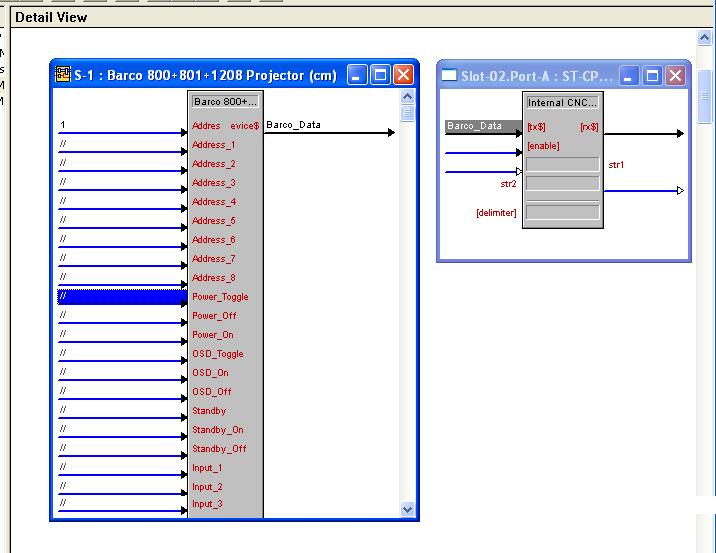
Step 3; In Program view (middle window), open "Central Control Modules", Then Slot-02: RS232", then click down on Port-A and drag it to the Detail view just to the right of the Barco symbol (keep them both on your screen at the same time) See Attach pix below;
Step 4: In the Barco Symbol, the only hookup on the right is Device$, this is the serial output that needs to be wired to the serial port-A symbol. Click on it and give it a name like "Barco_Data" (nice pun).
Step 5; now click on the label you gave the signal in Step 4 (Barco_Data) and drag it to the TX$ line on the RS232 Port-A Symbol (it's in the upper left hand corner)
Step 6, Wire up the button press's from your Touchpanel Symbol to the Barco Symbol like you did before with the other IR devices.
Step 7, Right click on the Barco Symbol and select "Make Symbol Complete", that will add "//" to all unused lines and take the "*" off of the top of the Symbol and allow you to download your program. At this point your program should look like the picture I have attached below with the exception of the buttons you have wired up. If your program looks different you should review the above steps again.
Step 8, Connect your Barco to Port-A on the Controller, download and play!
Good luck Tom and Happy Birthday!
Jeff
| Description: |
|
| Filesize: |
54.45 KB |
| Viewed: |
17694 Time(s) |
|
|
|
| Back to top |
|
|
Tom.W
Joined: 09 Mar 2006
Posts: 6635
|
| Posted: Thu Mar 20, 2008 3:59 am Post subject: |
|
|
|
A bit late {10PM) but will give it a go after work tomorrow
|
|
| Back to top |
|
|
jmayes
Joined: 27 Jan 2008
Posts: 116
|
| Posted: Thu Mar 20, 2008 4:04 am Post subject: |
|
|
Bam! Tom, You got it!!
Also for all you Crestron Lurkers out there, I found a great source of information (other then the Yahoo group of course) in the form of a Blog
http://crestrontutorials.blogspot.com/
There is 3+ years of Blogging over crestron here and alot of it is step by step for learning folks so it's great reading but very hard to research with unless you....(Drum Roll).....
Use Googles site search feature!
Soooo... If you put your search term into google for example "Ethernet" and add "Site:" and the site address, google will only return results from that site.
So try it, put "ethernet site:crestrontutorials.blogspot.com" in Google (sans the quotes, space between ETHERNET and SITE plus that is a Colon after SITE)
And you will see some very interesting stuff, insert your query in place of "ethernet" (mutiable words are fine) and this site becomes very powerful!
Enjoy! 
Jmayes
|
|
| Back to top |
|
|
Tom.W
Joined: 09 Mar 2006
Posts: 6635
|
| Posted: Tue Mar 25, 2008 12:16 am Post subject: |
|
|
|
Hey thanks Jeff ! All is up and running 8) Would like to upgrade the ST-CP any ideas ?
|
|
| Back to top |
|
|
jmayes
Joined: 27 Jan 2008
Posts: 116
|
| Posted: Thu Mar 27, 2008 3:26 am Post subject: |
|
|
| Tom.W wrote: | | Hey thanks Jeff ! All is up and running 8) Would like to upgrade the ST-CP any ideas ? |
This is good news!!!! You will be a pro in no time!!!
What is it you don't think the st-cp can not do for you? With the expansion modules like the video-sensor which I need to cover now you have the basic devices working. Really you can do about anything with that unit. Also see my response to this in the other thread (part 1)
It's about time to start another thread and start covering the touchpanel part so you can customize your screens. Now there you have a lot of upgrade possibilities !!
Why don't you give us a run down on exactly what is working now and then we chart out how to proceed and grow it.
Time to hear the wish list too
Great work!
JM
|
|
| Back to top |
|
|
Tom.W
Joined: 09 Mar 2006
Posts: 6635
|
| Posted: Thu Mar 27, 2008 3:38 am Post subject: |
|
|
|
How many total devices will the ST-CP control with four separate emitters ?
|
|
| Back to top |
|
|
jmayes
Joined: 27 Jan 2008
Posts: 116
|
| Posted: Thu Mar 27, 2008 3:45 am Post subject: |
|
|
| Tom.W wrote: | | How many total devices will the ST-CP control with four separate emitters ? |
You can have many devices on one Emitter, so use the blaster to cover several items, the only real reason for more IR ports is if you have two or more identical pieces of equipment that use the same IR codes, then you put a separate strip on different channels, otherwise you can combine any number of strips together using an splitter or amp. I have about 12 devices on one port now on my system with no problems. I also have a CNX series controller which is the same as your st-cp.
To expand further, you would add for instance a CN-TVAV box which connects using the Cresnet. That box will provide another IR output, serial output, and Digital inputs. Crestron has about 50 different box's that will interface to your unit to do specific things so I think you are good to go for some time.
Tally Ho!
JM
|
|
| Back to top |
|
|
Tom.W
Joined: 09 Mar 2006
Posts: 6635
|
| Posted: Thu Mar 27, 2008 5:02 am Post subject: |
|
|
|
Thanks Jeff. Not expecting any conflicts but how do you combine all commands to one IR emitter channel ?
|
|
| Back to top |
|
|
jmayes
Joined: 27 Jan 2008
Posts: 116
|
| Posted: Thu Mar 27, 2008 3:22 pm Post subject: |
|
|
| Tom.W wrote: | | Thanks Jeff. Not expecting any conflicts but how do you combine all commands to one IR emitter channel ? |
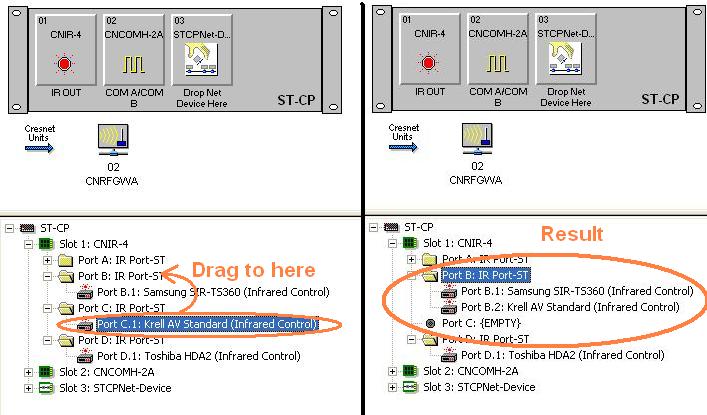
Just drag another IR driver to the same port, in the system tree you can even pull them from one port to another so if you already have a DVD on port2 and you want to have it come out the blaster on port one, just drag it from port2 to port1. Like I said you can stack any number of IR types on one channel with no conflicts, only one will be transmitted at any time.
| Description: |
|
| Filesize: |
58.45 KB |
| Viewed: |
17566 Time(s) |
|
|
|
| Back to top |
|
|
stefuel

Joined: 07 Mar 2006
Posts: 3353
Location: Green Harbor MA USA
|
| Posted: Fri Mar 28, 2008 10:02 am Post subject: |
|
|
| jmayes wrote: | | Tom.W wrote: | | Thanks Jeff. Not expecting any conflicts but how do you combine all commands to one IR emitter channel ? |
Just drag another IR driver to the same port, in the system tree you can even pull them from one port to another so if you already have a DVD on port2 and you want to have it come out the blaster on port one, just drag it from port2 to port1. Like I said you can stack any number of IR types on one channel with no conflicts, only one will be transmitted at any time. |
I knew you could do this but never had the need to try it as the CNMSX PRO has plenty of IR outputs. See, ya learn something new every day. Thanks, J
We need some more interesting topics started to keep this thread alive. My UPS project works like a charm. I did have one glitch for one day that I didn't ever figure out. Two times in one day, my system went in shut-down mode without the power going off. It hasn't happened since. The only thing I can figure is the UPS went into protection by means of "smart trim" or "smart boost". I might have the sensitivity too close.
_________________
Chip
A Barco is only a AmPro with training wheels
Card carrying member of the AVS chain gang.
|
|
| Back to top |
|
|
Tom.W
Joined: 09 Mar 2006
Posts: 6635
|
| Posted: Sat Mar 29, 2008 12:30 am Post subject: |
|
|
|
Maybe a part 3 on building screen templates ?
|
|
| Back to top |
|
|
stefuel
Joined: 07 Mar 2006
Posts: 3353
Location: Green Harbor MA USA
|
| Posted: Tue Apr 08, 2008 1:44 am Post subject: |
|
|
I guess everyone's a pro now. I was hoping this thread would keep cranking along with new and more exiting stuff, like how to make naked lady buttons on your touch panel
_________________
Chip
A Barco is only a AmPro with training wheels
Card carrying member of the AVS chain gang.
|
|
| Back to top |
|
|
Tom.W
Joined: 09 Mar 2006
Posts: 6635
|
| Posted: Tue Apr 08, 2008 2:40 am Post subject: |
|
|
Hi Chip,
Today I received a loaner ST-1500 touchscreen from Jeff. Looks like templates are next. Will test the screen out when the battery pack is charged... 8)
|
|
| Back to top |
|
|
az_max
Joined: 19 Feb 2008
Posts: 12
|
| Posted: Wed Apr 09, 2008 7:40 pm Post subject: |
|
|
| jmayes wrote: | | Tom.W wrote: | | How many total devices will the ST-CP control with four separate emitters ? |
You can have many devices on one Emitter, so use the blaster to cover several items, the only real reason for more IR ports is if you have two or more identical pieces of equipment that use the same IR codes, then you put a separate strip on different channels, otherwise you can combine any number of strips together using an splitter or amp. I have about 12 devices on one port now on my system with no problems. I also have a CNX series controller which is the same as your st-cp.
To expand further, you would add for instance a CN-TVAV box which connects using the Cresnet. That box will provide another IR output, serial output, and Digital inputs. Crestron has about 50 different box's that will interface to your unit to do specific things so I think you are good to go for some time.
Tally Ho!
JM |
You can also hang more than one emitter off an IR port. there needs to be a 33ohm resistor in series with them to limit the current. You might do this in a larger install or with a device with only one or two IR ports (CN-tv comes to mind). I've never had to do it, but handy to know. I ran out of serial ports before I ran out of unique IR ports.
|
|
| Back to top |
|
|
comm
Joined: 09 Mar 2006
Posts: 46
|
| Posted: Tue May 06, 2008 2:38 am Post subject: |
|
|
I have been reading through these treads and finally got my hands on a ST-CP to try out for myself. Does anyone know where I can get the software mentioned in the first few posts?
Also are the IR emitters specific to Crestron hardware or can I use any generic emitter (ie xantech or other)?
David
|
|
| Back to top |
|
|
jmayes
Joined: 27 Jan 2008
Posts: 116
|
| Posted: Tue May 06, 2008 3:03 am Post subject: |
|
|
| comm wrote: |
Also are the IR emitters specific to Crestron hardware or can I use any generic emitter (ie xantech or other)?
David |
Yes, they are generic- xentech work fine.
Welcome!
JM
|
|
| Back to top |
|
|
comm
Joined: 09 Mar 2006
Posts: 46
|
| Posted: Tue May 06, 2008 3:25 am Post subject: |
|
|
Thank you!
I have been looking to try my hand at Crestron for quite a while now. I was thrilled to find a great resource in the CRT backyard.
David
|
|
| Back to top |
|
|
|
|




