| Author |
Message |
mcm4u
Joined: 08 Jan 2008
Posts: 15
Location: QC, Canada
|
| Posted: Wed Jan 09, 2008 5:59 pm Post subject: NEC 9PG - brightness problem |
|
|
Hello, I have a NEC 9PG and the brightness adjustment does not work. Any idea way?
Thanks for all sugestions.
_________________
mcm4u
|
|
| Back to top |
|
 |
dbaisey
Joined: 09 Mar 2006
Posts: 821
Location: Southern Cal LA / Seattle WA
|
| Posted: Wed Jan 09, 2008 6:09 pm Post subject: |
|
|
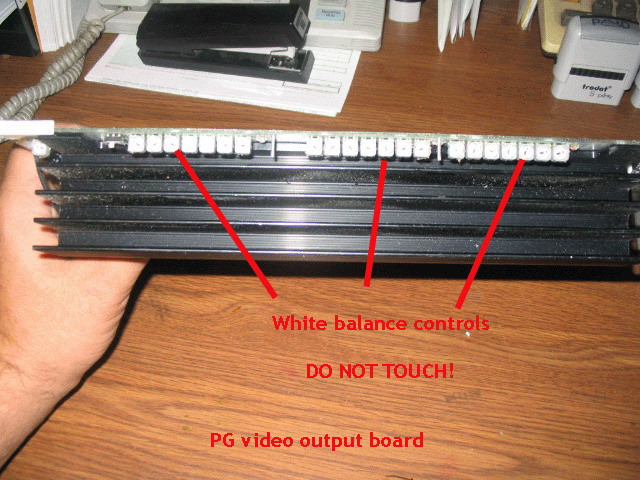
Locate the test - normal switch at the end of the video out board. (Its tiny) Most likely is in the test position. Put to normal but you may have to store the settings afterwards. Doug
See link: http://www.curtpalme.com/NECPG_Layout1.shtm
[/img]
| Description: |
|
| Filesize: |
126.36 KB |
| Viewed: |
3733 Time(s) |
|
|
|
| Back to top |
|
|
mcm4u
Joined: 08 Jan 2008
Posts: 15
Location: QC, Canada
|
| Posted: Thu Jan 10, 2008 1:00 am Post subject: brightness |
|
|
Thank you.
I have verified the switch. Is in Normal position.
The cursor is moving ( 0-100%) on the screen whe i tried to adjust, but no change in the brightness....
_________________
mcm4u
|
|
| Back to top |
|
|
dbaisey
Joined: 09 Mar 2006
Posts: 821
Location: Southern Cal LA / Seattle WA
|
| Posted: Thu Jan 10, 2008 1:07 am Post subject: |
|
|
Hit the info button then go to AKB, check to see if this is set to off, it should be for normal running. You have to be in the service mode so use 2580 when it asks. You might want to download the manuals so your more familiar with the set. Doug
If your source has a brightness function check to make sure its not turned up. Dont turn any pots!
Have you had normal brightness before? Doug
|
|
| Back to top |
|
|
mcm4u
Joined: 08 Jan 2008
Posts: 15
Location: QC, Canada
|
| Posted: Thu Jan 10, 2008 5:49 pm Post subject: |
|
|
Hi,
Thank you for your help.
I just bought this projector with low hours and I never had this adjustment ( brightness)
Now is working fine , but no brightness adjustment. THe AKB is off, I look in to the manual and do not found solution.
I think may be is a hardware issue?
I've been done a eeprom reset in the begining and maybe is from there? ( After that I have no password for adjustments and I can't set one)
_________________
mcm4u
|
|
| Back to top |
|
|
dbaisey
Joined: 09 Mar 2006
Posts: 821
Location: Southern Cal LA / Seattle WA
|
| Posted: Thu Jan 10, 2008 6:08 pm Post subject: |
|
|
See PM. Have you contacted the seller for customer support? I wouldn't be doing anything until you let them know you don't have this function. Doug
PM= Private messages
|
|
| Back to top |
|
|
|
|




