| Author |
Message |
DisTreSs
Joined: 19 Nov 2007
Posts: 39
|
| Posted: Wed Dec 26, 2007 12:01 pm Post subject: |
|
|
I believe that I suffer from this same issue on my BG808s. 
Strange thing about this is that displaying 1080p60 on a HTPC via VGA (no Powerstrip, no tweaking, just standard Windows res) does not exhibit this problem, but using the HDFury of a friend of mine drops the left portion of the image. No amount of H-Phase adjustment compensates... 720p on the other hand does not have this problem even with the HDFury.
Added to that the Xbox360 does the same on 1920x1080 when hooked up to the PJ via its VGA cable: left portion of screen simply does not fit.
I have not yet performed the last Xbox update but maybe they adjusted some res timings again which might improve the situation??
|
|
| Back to top |
|
 |
Curt Palme
CRT Tech
Joined: 08 Mar 2006
Posts: 24396
Location: Langley, BC
TV/Projector: All of them!
|
| Posted: Thu Feb 07, 2008 12:43 am Post subject: |
|
|
Here's a bump for this, since I have a customer with the same problem. Cutting and pasting from what I sent to Eric at Elite Vision to see if he has any ideas:
Hey Eric, got a question for you. Have you done any experimenting with that HDFury available on my site? I have a local customer that inherited a 4600. It was bought new by the previous home owner from Ampro, probably back in 1996-7 or so. It's a plain 4600, not the later 4600 HD I believe.
It's been hooked to a Faroudja line doubler for forever, and the new owner went BLuRay with an HDFury. We experienced massive H phase shift to the left, so that even with the phase control at 100%, the image was still short a few inches on the right side of the screen. 1080i was better, but still needed the phase control at 100%. I tried a different Fury, new cabling, shorter cabling, etc. Nothing worked. THe source is a PS3. We ended up leaving the setup at 1080i, which was OK, but not perfect.
I finally got a couple of 4600HDs here. I also have a couple of Furys and cabling here and have a Toshiba A3 1080p HD DVD player on my bench. I tried the setup today, and everything works fine. THe H phase has to be at about 80, but I can overshoot the image on the right side, unlike at the customer's place.
I am guessing the difference is in the software rather than the hardware from the 4600 to the 4600HD? Mine has software revision 4.17, Jan 1997 vintage. I'll email the customer and will get him to check what he has.
So.. comments? Can a plain 4600 be upgraded to a 4600HD?
So... I'm wondering if a plain 4600 experiences H shift issues, whereas the later software on the 4600HD do not?
|
|
| Back to top |
|
|
Curt Palme
CRT Tech
Joined: 08 Mar 2006
Posts: 24396
Location: Langley, BC
TV/Projector: All of them!
|
| Posted: Thu Feb 07, 2008 12:44 am Post subject: |
|
|
|
Oh, PS: While the Fury worked instantly and locked with no issues to the A3, I did find that at 1080p I needed the external power supply. At 1080i, the supply from the A3 worked fine.
|
|
| Back to top |
|
|
macgyver655
Joined: 22 Aug 2007
Posts: 8508
|
| Posted: Thu Feb 07, 2008 12:50 am Post subject: |
|
|
|
I had a conversation with Eric about a month ago on the firmware they are useing and if they are updateing and his response was they are just useing old Ampro CPU board's and whatever firmware is on them. They are not capable of updateing firmware. I guess we'll see what his response is.
|
|
| Back to top |
|
|
macgyver655
Joined: 22 Aug 2007
Posts: 8508
|
| Posted: Thu Feb 07, 2008 1:00 am Post subject: |
|
|
|
Curt. If you find that this is a firmware issue and updateing your customers firmware solves the issue I can flash some chips for you. I have already copied some 2600, 3300 and 4300 chips and flashed some blanks sucessfully. I have some blanks left. Let me know.
|
|
| Back to top |
|
|
Curt Palme
CRT Tech
Joined: 08 Mar 2006
Posts: 24396
Location: Langley, BC
TV/Projector: All of them!
|
| Posted: Thu Feb 07, 2008 1:03 am Post subject: |
|
|
|
I've got a couple of 4600 CPU boards here (found during my massive cleanup!) so I'll drop those in and see if I have a 4600 HD spare.. I'll post later tonight.
|
|
| Back to top |
|
|
macgyver655
Joined: 22 Aug 2007
Posts: 8508
|
| Posted: Thu Feb 07, 2008 1:14 am Post subject: |
|
|
|
If the CPU board is a 4600HD, the board number should be 81399 and the sticker on IC8 should have 37415.
|
|
| Back to top |
|
|
Curt Palme
CRT Tech
Joined: 08 Mar 2006
Posts: 24396
Location: Langley, BC
TV/Projector: All of them!
|
| Posted: Thu Feb 07, 2008 1:22 am Post subject: |
|
|
|
OK, I got mad and had to grab all of the CPU boards I had and threw them into the 4600 HD. They all worked fine, although I didn't converge them. Just enough though to see that 1080p didn't H shift the image to the left. So this is a hardware issue. I think all I can do now is take the Toshiba A3, my Fury, the Crescendo box that I all had hooked up over to the customer's place to see if that combination will work. If not, it's a problem with the older 4600s, and I don't have an older and newer model here to compare the two.
|
|
| Back to top |
|
|
tse
Joined: 03 May 2006
Posts: 1014
Location: Sweatbucket, Fl.
|
| Posted: Thu Feb 07, 2008 2:06 am Post subject: |
|
|
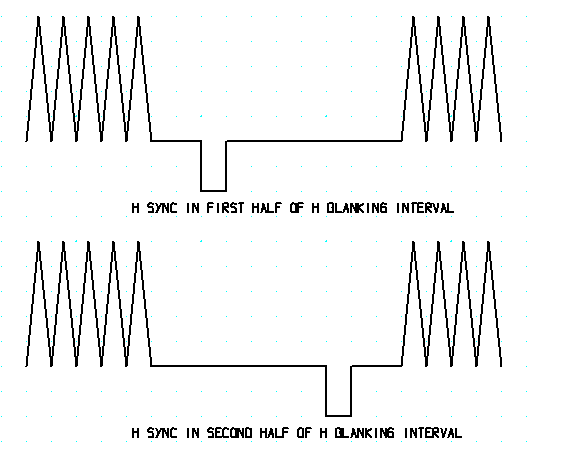
The sync hardware is set up to work when the horizontal sync happens in the first half of the horizontal blanking interval. If the sync is in the second half of the blanking the phase might not have enough range. The symptom is the picure is too far to the left. There are some caps on the horizontal bd that can be changed to fix the problem.
Scott
| Description: |
|
| Filesize: |
7.81 KB |
| Viewed: |
3797 Time(s) |
|
_________________
"Were we directed from Washington when to sow and when to reap, we would soon want bread."
Thomas Jefferson
|
|
| Back to top |
|
|
macgyver655
Joined: 22 Aug 2007
Posts: 8508
|
| Posted: Thu Feb 07, 2008 3:02 am Post subject: |
|
|
| tse wrote: | The sync hardware is set up to work when the horizontal sync happens in the first half of the horizontal blanking interval. If the sync is in the second half of the blanking the phase might not have enough range. The symptom is the picure is too far to the left. There are some caps on the horizontal bd that can be changed to fix the problem.
Scott |
If this is the culprit Curt, you may want to take a know working horiz. board with you also.
|
|
| Back to top |
|
|
stefuel

Joined: 07 Mar 2006
Posts: 3353
Location: Green Harbor MA USA
|
| Posted: Thu Feb 07, 2008 10:19 am Post subject: |
|
|
| tse wrote: | The sync hardware is set up to work when the horizontal sync happens in the first half of the horizontal blanking interval. If the sync is in the second half of the blanking the phase might not have enough range. The symptom is the picure is too far to the left. There are some caps on the horizontal bd that can be changed to fix the problem.
Scott |
Is this a problem with bad caps or are you telling us to swap in caps of a different value to resolve the problem. I have this problem (to a lessor extent) on my 4600HD. I do have the range to adjust it out but it's maxed. What caps on the horizontal board should we look at?
_________________
Chip
A Barco is only a AmPro with training wheels
Card carrying member of the AVS chain gang.
|
|
| Back to top |
|
|
papalek

Joined: 08 Mar 2006
Posts: 1536
Location: Longs SC
|
| Posted: Thu Feb 07, 2008 11:07 am Post subject: |
|
|
My 4600 is not a HD model and I have no problems with shift. I have the HD-Fury hooked up to the HD-DVD player. I use the same channel in the 4600 as the HD-cable box that is runnung through a transcoder.
_________________
My current list of PJ's AmPro 1 1/2-4600,4200, 1/2-3600,2600.
I do love my AmPro's
|
|
| Back to top |
|
|
tse
Joined: 03 May 2006
Posts: 1014
Location: Sweatbucket, Fl.
|
| Posted: Fri Feb 08, 2008 1:31 am Post subject: |
|
|
| stefuel wrote: | | tse wrote: | The sync hardware is set up to work when the horizontal sync happens in the first half of the horizontal blanking interval. If the sync is in the second half of the blanking the phase might not have enough range. The symptom is the picure is too far to the left. There are some caps on the horizontal bd that can be changed to fix the problem.
Scott |
Is this a problem with bad caps or are you telling us to swap in caps of a different value to resolve the problem. I have this problem (to a lessor extent) on my 4600HD. I do have the range to adjust it out but it's maxed. What caps on the horizontal board should we look at? |
The caps are not bad, it is just that a scenario where h sync would be in the second half of the h blanking interval wasn't anticipated. I think that is the problem.
Somebody break out a scope and check!
If that is the reason then changing the value of C35 on the horizontal bd should fix things up. It is now 1200pF. Try a 1500 or 2200pF and see if the picture doesn't move more to the right. My brain is struggling with this right now so the cap might have to be a smaller value. Just mark the picture position, change the cap and see which way the picture moves.
Scott
_________________
"Were we directed from Washington when to sow and when to reap, we would soon want bread."
Thomas Jefferson
|
|
| Back to top |
|
|
Curt Palme
CRT Tech
Joined: 08 Mar 2006
Posts: 24396
Location: Langley, BC
TV/Projector: All of them!
|
| Posted: Fri Feb 15, 2008 12:18 am Post subject: |
|
|
OK, update. Today I took my perfectly working Toshiba A3 and Fury and Crescendo 2200 over to the customer's house to compare to his PS3 and his Fury. (My own setup worked fine with the two 4600s I had here in the shop.
I STILL got the H shift to the left with wraparound, 100% H phase gave an OK pix as before, but the image was still shifted left. That was for all resolutions, so the problem is most definitely in the projector, not the source.
Next week I'll pull the projector to see what I cna find in it. I've still got one of the 4600HDs here that I can swap modules out of. Once I find the cause, I'll post again.
|
|
| Back to top |
|
|
|
|




