| Author |
Message |
schneirc
Joined: 24 Aug 2006
Posts: 39
|
| Posted: Wed Nov 21, 2007 10:54 pm Post subject: Having Problems With New EXT-HD |
|
|
I got my EXT-HD box yesterday, but there was no manual. The one on-line is does not tell you how to change setting and such.
The reason I say this is becuase I hooked my XBOX 360 and PS3 up with the box to my projector.
Equipment: AmPro 4600 and trying to run Xbox 360 and PS3 at 1080p. (The reason I bought the box)
XBOX 360 (component cables)
The colors look right and everything seemed to be ok, but then I noticed the picture is pushed to the left and no amount of phase or left blanking adjustment will show me the left side of the picture. This literly has cut off about 1/8th of the screen on the left side and the center of the picture is pushed over to the left.
PS3 (HDMI)
Colors look extremely dark and has a dark band type distortion on the top portion of the picture.
--------------------------
I have tried any setting I could find on the PS3 and XBOX. (Works find in 1080i, but my old box did that). So I need to see if there are any settings I can do on the EXT-HD box itself. Since it didn't come with a manual and I can't find one that properly documents my options on the box (like jumpers and even if it has any) I am at a loss.
Any ideas? I am having family over for Thanksgiving and would love to resolve this tonight 
Thanks for any help you can provide.
|
|
| Back to top |
|
 |
moome
Joined: 01 Jun 2007
Posts: 497
|
| Posted: Thu Nov 22, 2007 12:33 am Post subject: |
|
|
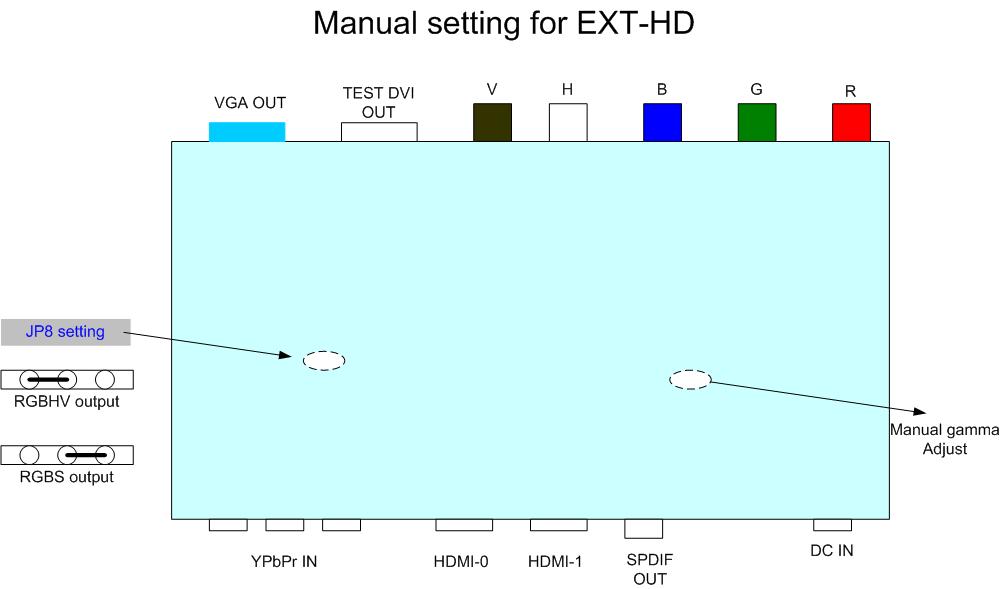
hi, the shifting problem will need adjust your projector's shift to correct it, or you can try set RGBS mode to your ampro!
you will need open the box, there is a jumper can set RGBS output!
|
|
| Back to top |
|
|
kal
Forum Administrator

Joined: 06 Mar 2006
Posts: 18114
Location: Ottawa, Canada
TV/Projector: JVC DLA-NZ7
|
|
| Back to top |
|
|
Gino

Joined: 22 Apr 2006
Posts: 1363
Location: Trinity Beach, AUSTRALIA
|
| Posted: Thu Nov 22, 2007 1:53 am Post subject: |
|
|
I think the problem with the xbox360 at 1080p is a known issue with the timings/porches... happens to everyone else who has their xbox360 outputting 1080p directly to their crt projector
_________________
( B ) ( G ) ( R ) Blendzilla Down Under ( R ) ( G ) ( B ) - Tubes of Fury
|
|
| Back to top |
|
|
kal
Forum Administrator
Joined: 06 Mar 2006
Posts: 18114
Location: Ottawa, Canada
TV/Projector: JVC DLA-NZ7
|
|
| Back to top |
|
|
overclkr

Joined: 08 Mar 2006
Posts: 4227
|
| Posted: Thu Nov 22, 2007 2:47 am Post subject: |
|
|
| kal wrote: | Gino's right: Sorry I missed it the first time but the Xbox360 *component* output is generally considered as broken. You have to use the HDMI output (only available on the Elite version).
Kal |
Kal, the HDMI 1080P out is broken as well on the 360, unless moome figured out a way to fix it. 
Cliffy
|
|
| Back to top |
|
|
kal
Forum Administrator
Joined: 06 Mar 2006
Posts: 18114
Location: Ottawa, Canada
TV/Projector: JVC DLA-NZ7
|
|
| Back to top |
|
|
ralpharch
Joined: 02 Nov 2007
Posts: 211
Location: Derwood
|
| Posted: Thu Nov 22, 2007 3:38 am Post subject: Remote Control Problems |
|
|
Sort of jumping in to avoid cluttering the other thread - but I have a problem with controls on my Unit.
The remote control will work for a while (eg switching inputs/adjusting gamma/power on off) then it will stop working for a while. When its not working even the front panel switches (power on/off) and input change don't work either.
so I don't think its a problem with the remote itself (changed batteries which were good anyway) but something inside the unit.
Moome - any ideas on a quick fix or am I involved in a need to return/exchange?
Powering the unit off will get it working again (and responding to the commands of the remote) but it doesn't seem practical as is (especially as a prime use for me will be switching inputs between HDMI1 2 and component)
Also waiting a while seems to get controls working again.
____________________
Edit to note below is response from Moome:
yes! there is a ROM will save the status when you change input or gamma or other thing,
ROM writing is slow, so sometimes will slow response. if you can not accept the response time,
just let me know!
Last edited by ralpharch on Thu Nov 22, 2007 4:08 pm; edited 1 time in total
|
|
| Back to top |
|
|
WTS
Joined: 08 Mar 2006
Posts: 1276
Location: Calgary
|
| Posted: Thu Nov 22, 2007 2:06 pm Post subject: |
|
|
Hmmm, that problem was suppose to have been fixed.
_________________
Thanks
Walter
|
|
| Back to top |
|
|
moome
Joined: 01 Jun 2007
Posts: 497
|
| Posted: Thu Nov 22, 2007 3:41 pm Post subject: Re: Remote Control Problems |
|
|
| ralpharch wrote: | Sort of jumping in to avoid cluttering the other thread - but I have a problem with controls on my Unit.
The remote control will work for a while (eg switching inputs/adjusting gamma/power on off) then it will stop working for a while. When its not working even the front panel switches (power on/off) and input change don't work either.
so I don't think its a problem with the remote itself (changed batteries which were good anyway) but something inside the unit.
Moome - any ideas on a quick fix or am I involved in a need to return/exchange?
Powering the unit off will get it working again (and responding to the commands of the remote) but it doesn't seem practical as is (especially as a prime use for me will be switching inputs between HDMI1 2 and component)
Also waiting a while seems to get controls working again.
|
yes! there is a ROM will save the status when you change input or gamma or other thing,
ROM writing is slow, so sometimes will slow response. if you can not accept the response time,
just let me know!
and i upload a setting picture of manual gamma setting and RGBS output mode!
| Description: |
|
| Filesize: |
35.33 KB |
| Viewed: |
19864 Time(s) |
|
|
|
| Back to top |
|
|
ralpharch
Joined: 02 Nov 2007
Posts: 211
Location: Derwood
|
| Posted: Thu Nov 22, 2007 4:06 pm Post subject: |
|
|
| Quote: | yes! there is a ROM will save the status when you change input or gamma or other thing,
ROM writing is slow, so sometimes will slow response. if you can not accept the response time,
just let me know! |
Thanks for that feedback - I imagine you will get many others thinking there is a problem when in fact it is just a very slow response (maybe half a minute or so?)
You may want to consider adding an FAQ to avoid posts like mine.
Knowing that -of course I can live with it in slow speed as once it is adjusted I would rarely do anything with it other than switch inputs (ok - maybe adjust gamma on the fly if I ever figure that out).
All I know is that I really enjoyed a River Runs Through it on HDnet last night using my new toy.
Thanks Moome!
|
|
| Back to top |
|
|
kal
Forum Administrator
Joined: 06 Mar 2006
Posts: 18114
Location: Ottawa, Canada
TV/Projector: JVC DLA-NZ7
|
| Posted: Thu Nov 22, 2007 4:10 pm Post subject: |
|
|
Moome, are you saying that it takes ~30 seconds to switch inputs? Or that once you've switched, you can't switch again for 30 seconds? Or that only after adjusting gamma that you can't switch inputs for 30 seconds?
| moome wrote: | | If you can not accept the response time, just let me know! |
What are the options available? What can be done?
| moome wrote: | | i upload a setting picture of manual gamma setting ... |
When would you want to use the manual gamma adjustment and not the remote control? How do the two work together?
Kal
_________________

Support our site by using our affiliate links. We thank you!
My basement/HT/bar/brewery build 2.0
|
|
| Back to top |
|
|
whizzard94
Joined: 03 Oct 2006
Posts: 12
|
| Posted: Sat Nov 24, 2007 12:21 am Post subject: |
|
|
I had trouble with the IR until i remove the plastic covering. 
jer
_________________
LONG LIVE HD DVD!
HD DVD > Blur Ray
|
|
| Back to top |
|
|
WTS
Joined: 08 Mar 2006
Posts: 1276
Location: Calgary
|
| Posted: Sat Nov 24, 2007 12:32 am Post subject: |
|
|
The plastic covering on what?
_________________
Thanks
Walter
|
|
| Back to top |
|
|
whizzard94
Joined: 03 Oct 2006
Posts: 12
|
| Posted: Sat Nov 24, 2007 1:01 am Post subject: |
|
|
The remote.
_________________
LONG LIVE HD DVD!
HD DVD > Blur Ray
|
|
| Back to top |
|
|
WTS
Joined: 08 Mar 2006
Posts: 1276
Location: Calgary
|
| Posted: Sat Nov 24, 2007 1:05 am Post subject: |
|
|
okay.
_________________
Thanks
Walter
|
|
| Back to top |
|
|
PEH
Joined: 14 Sep 2007
Posts: 18
|
| Posted: Thu Nov 29, 2007 3:24 pm Post subject: Re: Remote Control Problems |
|
|
| ralpharch wrote: | Sort of jumping in to avoid cluttering the other thread - but I have a problem with controls on my Unit.
The remote control will work for a while (eg switching inputs/adjusting gamma/power on off) then it will stop working for a while. When its not working even the front panel switches (power on/off) and input change don't work either.
so I don't think its a problem with the remote itself (changed batteries which were good anyway) but something inside the unit.
Moome - any ideas on a quick fix or am I involved in a need to return/exchange?
Powering the unit off will get it working again (and responding to the commands of the remote) but it doesn't seem practical as is (especially as a prime use for me will be switching inputs between HDMI1 2 and component)
Also waiting a while seems to get controls working again.
____________________
Edit to note below is response from Moome:
yes! there is a ROM will save the status when you change input or gamma or other thing,
ROM writing is slow, so sometimes will slow response. if you can not accept the response time,
just let me know! |
I received my unit on Monday and have it connected to my Sony D50 using an XA2 and a Samsung 1400 for sources. While trying to use this unit I have experienced this same problem. The remote will work for awhile and then it simply stops functioning. When a button is pushed there is no light flash indicating signal receipt. The unit won't power down, switch inputs or adjust gamma. The only way to get it to function again is to unplug it and plug it back in. In addition, I have had the unit off overnight and attempted to power on the next day with the remote and even the front panel button for that matter, and the unit will not come on without going thru the unplug re-plug routine., This is totally unacceptable. Has anyone figured out how to solve this problem?
|
|
| Back to top |
|
|
garyfritz

Joined: 08 Apr 2006
Posts: 12088
Location: Fort Collins, CO
|
| Posted: Thu Nov 29, 2007 9:39 pm Post subject: |
|
|
Just hooked up my EXT HD and noticed these problems:
* The same "freeze up, buttons don't work, have to pull the power" problem mentioned above.
* I tried using the EXT HD's optical port to feed audio from the HD-A2's HDMI to my receiver, but got no sound. When I plugged the optical cable directly into the HD-A2, the sound worked.
* HDMI from my HD-A2 HD-DVD player looks OK. DVI->HDMI from my Momitsu SD DVD player has a very strong green cast and possibly other color errors. Any guesses what might cause that?
|
|
| Back to top |
|
|
paw

Joined: 08 Mar 2006
Posts: 1176
Location: Arvada, CO
|
| Posted: Fri Nov 30, 2007 3:43 am Post subject: |
|
|
Gary
P 53 of the user's guide talks about the Digital Out HDMI. Looks like it needs to be set to AUTO. There was an interesting note
Note
Setting “Auto” or “PCM” will reduce output level of multi
channel sound from the ANALOG AUDIO OUTPUT jacks and
the DIGITAL AUDIO OUTPUT BITSTREAM/PCM jack if you:
– view the playback picture on an HDMI TV connected to
this player.
– play an HD DVD video disc of a certain type, recorded in
linear PCM format.
In this case,the output level will be restored by setting to
“Downmixed PCM”.
Something to remember if you do switch to the SPDIF output
Also, p 60 describes the various sound format conversions.
_________________
Aubrey
|
|
| Back to top |
|
|
garyfritz
Joined: 08 Apr 2006
Posts: 12088
Location: Fort Collins, CO
|
| Posted: Fri Nov 30, 2007 3:53 am Post subject: |
|
|
Um.  I'm sure that's supposed to mean something useful but I'm having trouble deciphering it. I'm sure that's supposed to mean something useful but I'm having trouble deciphering it. 
It says it will "reduce output level" -- presumably just lowering the volume -- if you view on an HDMI TV (isn't that what most people would be doing?) or play a linear-PCM HD DVD. I'm not doing either so I don't think it applies, but I'll go try setting it to "downmixed PCM" to see if anything changes.
|
|
| Back to top |
|
|
|
|





