|
As this forum is rarely used anymore, we've locked it. Feel free to browse and read. Questions? Please reach out to us directly. Cheers! |

|
 |
|
|
| Author |
Message |
jkruger

Joined: 24 Oct 2007
Posts: 2435
Location: Carlsbad, CA
|
| Posted: Fri Jan 11, 2008 6:06 am Post subject: |
|
|
|
But 20% of us are here for The unmoderated freeflowing feel of the forum....
|
|
| Back to top |
|
 |
ecrabb
Forum Moderator

Joined: 13 Mar 2006
Posts: 15909
Location: Utah
TV/Projector: JVC RS40, Epson 5010
|
| Posted: Fri Jan 11, 2008 6:08 am Post subject: |
|
|
Huh, that's funny... The topic switched from tubes to... tubes.
SC
|
|
| Back to top |
|
|
Fujifrontier

Joined: 20 Oct 2007
Posts: 354
Location: San Antonio, Texas
|
| Posted: Fri Jan 11, 2008 4:34 pm Post subject: |
|
|
HAHAHA!!!!
I'm so STUPID. During the process of neutralisation of the pots and after centring the green raster, I didn't touch any of the green related controls after that, as it turns out my problems were quite simple afterall, the keystone was easily corrected with a knob I had mistaken for a green adjustment. I now have a spot on, square picture with mostly correct pincushion. Just have to work on the edges a bit but it's MUCH better than it was. The blue and red HBOW are a teeny bit off but I now have my focused scanlines like before. Absolutely beautiful even with some minor defects. Next time instead of getting all fussed up like an old cat I'll just take a breather and twiddle every pot till I have it right  I'll post some pics later. I'll post some pics later.
One last issue - G2 balance.... tones are all off.
|
|
| Back to top |
|
|
AnalogRocks
Forum Moderator

Joined: 08 Mar 2006
Posts: 26706
Location: Toronto, Ontario, Canada
TV/Projector: Sony 1252Q, AMPRO 4000G
|
| Posted: Fri Jan 11, 2008 5:47 pm Post subject: |
|
|
How many times have you run the setup now Fujifrontier?
_________________
Tech support for nothing
CRT.
HD done right!
|
|
| Back to top |
|
|
jkruger
Joined: 24 Oct 2007
Posts: 2435
Location: Carlsbad, CA
|
| Posted: Fri Jan 11, 2008 6:35 pm Post subject: |
|
|
I think he's ready to step up to a 1272....
Fuji - Check Your PM.
|
|
| Back to top |
|
|
Fujifrontier
Joined: 20 Oct 2007
Posts: 354
Location: San Antonio, Texas
|
| Posted: Fri Jan 11, 2008 10:32 pm Post subject: |
|
|
|
I'm posting from my phone so I cant check PM till later. Oh, probably about 4-5 times now. I think it's fun. I'm a perfectionist by nature, so the defects that prompt me to redo the setup drive me batshit, like white edges in the centre bleeding red on one side and blue on the other, due to my bad setup. I thhink i'm on my way, we'll see how this goes.
|
|
| Back to top |
|
|
Nitmoe
Joined: 10 Jan 2008
Posts: 60
Location: Iowa, USA
|
| Posted: Sat Jan 12, 2008 3:12 am Post subject: |
|
|
|
Glad that you got things straightened out. The bow adjustments can be the trickiest ones to get spot on. It's a real back and forthe between the bow and skew to get it right. When making these adustments I find it helps to move the adustment off, so the lines are next to each other, instead of lined up on top of each other, and then move it back to see how they look together. I still think that your deflection yoke on the red may be off, and possible blue too, but this is an advanced procedure to correct, but if you follow the steps, it's totally worth it, and not that bad. If your skew and bow pots are centered, and they appear tilted, you really should make this adjustment. This will make a world of difference in getting the red and blue lined up all the way across the screen. Like I had said, the closer your pots are to center (of coarse they won't be dead on center) the less problems you will have with the convergance drifting apart.
|
|
| Back to top |
|
|
Fujifrontier
Joined: 20 Oct 2007
Posts: 354
Location: San Antonio, Texas
|
| Posted: Sat Jan 12, 2008 3:46 am Post subject: |
|
|
|
I'll attempt the blue and red on a day I have free time. The bow and skew pots are maxed out in order to be relatively straight, so you're on to something. I didn't fire it up today, no time. Sunday :devil:
|
|
| Back to top |
|
|
Nitmoe
Joined: 10 Jan 2008
Posts: 60
Location: Iowa, USA
|
| Posted: Sat Jan 12, 2008 11:22 pm Post subject: |
|
|
Once you get the hang of setup, there is nothing better than having a nice flat screen to view on. Those ripples can get quite annoying, and there are some inexpensive ways to get a decent screen. On the tightest budget, I would reccomend what I did for my first screen. There is a seller on ebay that deals with rubberized canvas type material, which you use to make your own screen. Get a piece of that, and some cheap 1x2's from any lumber store, and you'll be much happier. This seller has what he calls seconds, pieces that have some minor defect. This is what I bought, and it's hardly noticeable. here is a link to one he has now.
http://cgi.ebay.com/BLOWOUT-SECONDS-SALE-76x110-PROJECTOR-SCREEN-MATERIAL_W0QQitemZ250203929754QQihZ015QQcategoryZ48655QQssPageNameZWDVWQQrdZ1QQcmdZViewItem
|
|
| Back to top |
|
|
AnalogRocks
Forum Moderator
Joined: 08 Mar 2006
Posts: 26706
Location: Toronto, Ontario, Canada
TV/Projector: Sony 1252Q, AMPRO 4000G
|
| Posted: Sat Jan 12, 2008 11:31 pm Post subject: |
|
|
Just go to a local fabric store and ask for black out cloth. It's used to line drapes to keep the light out.
_________________
Tech support for nothing
CRT.
HD done right!
|
|
| Back to top |
|
|
Fujifrontier
Joined: 20 Oct 2007
Posts: 354
Location: San Antonio, Texas
|
| Posted: Sun Jan 13, 2008 2:03 am Post subject: |
|
|
|
That's what I have. I went to joann fabrics right before christmas and bought a piece of blackout cloth. It's a bit ripply now but it doesn't bother me - yet. I'll fix it after I work up th nerve to touch the yokes.
|
|
| Back to top |
|
|
Nitmoe
Joined: 10 Jan 2008
Posts: 60
Location: Iowa, USA
|
| Posted: Sun Jan 13, 2008 9:31 pm Post subject: |
|
|
|
Aligning the yokes isn't as bad as it may seem. Just make sure you center all of the bow and skew pots before you start. Also, be sure to center all of the corner adjustments (H and V tilt) as well, these will throw you off a bit.
|
|
| Back to top |
|
|
Fujifrontier
Joined: 20 Oct 2007
Posts: 354
Location: San Antonio, Texas
|
| Posted: Tue Jan 15, 2008 9:34 pm Post subject: |
|
|
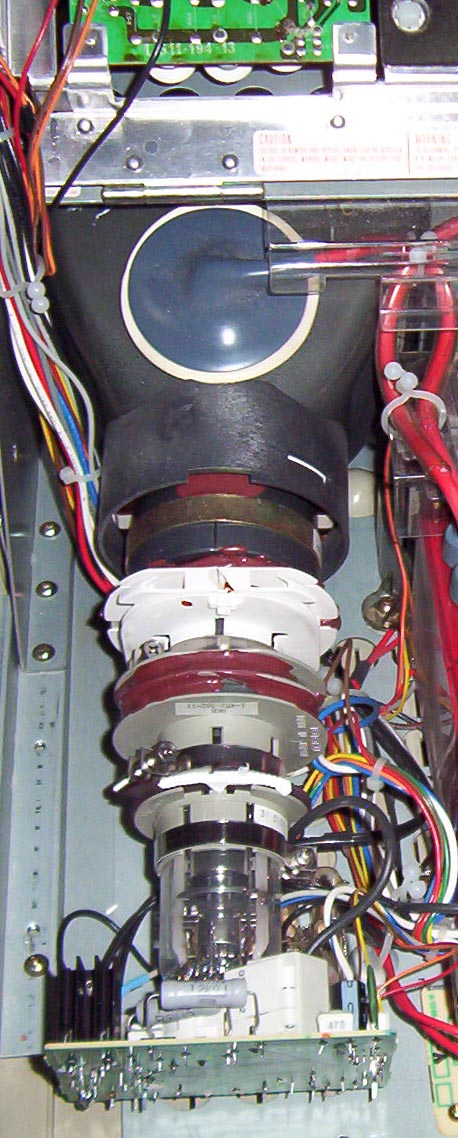
it's not as clear as it would be if it was a TV.... sorry.
Which one is the one I'm going to turn? There's a few rings and stuff sealed with the glue, as you can see. Care to circle the correct one?
| Description: |
|
| Filesize: |
143.83 KB |
| Viewed: |
6838 Time(s) |
|
|
|
| Back to top |
|
|
Nitmoe
Joined: 10 Jan 2008
Posts: 60
Location: Iowa, USA
|
| Posted: Wed Jan 16, 2008 2:59 am Post subject: |
|
|
|
The one you need is all of the way to the front (right next to the bell) The big white part and the coil and magnet ahead of it will all turn as one unit. You need to loosen the radiator style clamp on the big white part, and then there is two-sided tape underneath, where you can't seem it. At the end of the tube, near the neck board that plugs in to the back side, the tabs with the white stuss are for astigmatism adjustment. This controls the shape of the dots produced by the tube, which should be round, and you shouldn't have to mess with that. The coil in between is the convergance yoke, and turning this shouldn't have much affect on the image, certainly not worth messing with it. When yo go to adjust the deflection yoke (near the bell), you want something non-conductive that you can use to turn this by the white plastic part. Just make sure that once you habe this loosened, get the PJ nice and warm, so that it will be easier to move (not so jerky) Once you get to doing it, it's pretty easy. The hardest part is geting ready for the adjustment, especially with this being your first time. You may feel like getting creative in finding a way to move the yoke during adjustment, just make sure to do all of your playing before plugging it back in.
|
|
| Back to top |
|
|
Nitmoe
Joined: 10 Jan 2008
Posts: 60
Location: Iowa, USA
|
| Posted: Wed Jan 16, 2008 3:02 am Post subject: |
|
|
Another note - As for the blackout cloth, I haven't seen any on a roll wide enough for my application. The ones I have seen were 54 or 56 inches wide (can't remember) but my screen size is 105 by 59
Last edited by Nitmoe on Wed Jan 16, 2008 3:07 am; edited 1 time in total
|
|
| Back to top |
|
|
Zebu Fellenz
Joined: 21 Dec 2006
Posts: 2567
|
| Posted: Wed Jan 16, 2008 3:06 am Post subject: |
|
|
Nitmoe-
Check Ebay
|
|
| Back to top |
|
|
Nitmoe
Joined: 10 Jan 2008
Posts: 60
Location: Iowa, USA
|
| Posted: Wed Jan 16, 2008 3:12 am Post subject: |
|
|
|
Hmm, I just checked ebay, still not seeing anything to fit my needs, some pieces there are wider than 54, but not long enough, and even with these being too small, they still cost more than my one-off piece. Is the blackout cloth better than the canvas?
|
|
| Back to top |
|
|
Fujifrontier
Joined: 20 Oct 2007
Posts: 354
Location: San Antonio, Texas
|
| Posted: Mon Jan 21, 2008 2:59 am Post subject: |
|
|
I watched family guy for a good while, to get the tubes nice and warm, and loosened B and R yoke clamps. I rotated blue to match the green horizontally. (I would turn the PJ off and then rotate the yoke, and turn it back on again, took me about 4 power cycles) That plastic collar at the top will rotate the yoke, so I had a heavy finger on the red, rotating it niggle by niggle when I brushed my pinky against one of those damn posts near the focus pack, and god damn was that a surprise. The bitch bit me!  I now have a tiny blister on my right pinky. I'm quite grateful it didn't do more.. but I got blue and red registered to green horizontally. I now have a tiny blister on my right pinky. I'm quite grateful it didn't do more.. but I got blue and red registered to green horizontally.
The electronic registration took less than 5 minutes, and none of the pots are fully maxed like they were!!!! The picture is AMAZING. I'm never letting go of this little Sony, even though it bit me. 
|
|
| Back to top |
|
|
Nitmoe
Joined: 10 Jan 2008
Posts: 60
Location: Iowa, USA
|
| Posted: Mon Jan 21, 2008 3:32 am Post subject: |
|
|
|
I've been working with cars for some 15 years, and in that field blood sweat and tears are required to get the job done. Glad you had success with the yoke adjustment, and I hope you didn't need that pinky for a week or so. I once took the tip off of my pinky with a bandsaw, it grew back.
|
|
| Back to top |
|
|
AnalogRocks
Forum Moderator
Joined: 08 Mar 2006
Posts: 26706
Location: Toronto, Ontario, Canada
TV/Projector: Sony 1252Q, AMPRO 4000G
|
| Posted: Mon Jan 21, 2008 4:50 am Post subject: |
|
|
| Nitmoe wrote: | | Hmm, I just checked ebay, still not seeing anything to fit my needs, some pieces there are wider than 54, but not long enough, and even with these being too small, they still cost more than my one-off piece. Is the blackout cloth better than the canvas? |
It stretches, see this thread: https://www.curtpalme.com/forum_archived/viewtopic.php@t=1726.html
_________________
Tech support for nothing
CRT.
HD done right!
|
|
| Back to top |
|
|
|
|
|
|
|
You cannot post new topics in this forum
You cannot reply to topics in this forum
You cannot edit your posts in this forum
You cannot delete your posts in this forum
You cannot vote in polls in this forum
You cannot attach files in this forum
You can download files in this forum
|
Forum powered by phpBB © phpBB Group
|
|




