| Author |
Message |
jkruger

Joined: 24 Oct 2007
Posts: 2435
Location: Carlsbad, CA
|
| Posted: Fri Oct 26, 2007 2:49 pm Post subject: 1272 convergence |
|
|
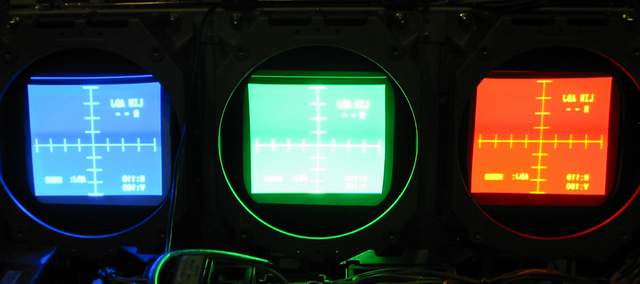
I have remounted the tubes with springs and grommets for the mechanical convergence mod and opened up the raster. After doing the mechanical convergence it seems that the red lens is angled inward so far that the cover will not fit well (pushes out on the red lens) and the springs on it are at the end of the usable travel, almost no pressure on the crt. Has anyone ever run into this and what could be causing it? There also seems to be a curve in the green along the lower right edge.
| Description: |
|
| Filesize: |
18.06 KB |
| Viewed: |
3413 Time(s) |
|
|
|
| Back to top |
|
 |
Vibe
Joined: 03 Apr 2006
Posts: 164
Location: SoCal
|
| Posted: Fri Oct 26, 2007 11:13 pm Post subject: |
|
|
1. I think you should make those raster sizes just a little smaller, you are really pushing it to the edge there. That will probably fix the green corner issue.
2. The only reason I can think of why the red is angled in so much would be that your projector is not square with the screen, causing you to angle the red more. You might think it's square, but there are many variables that could affect this. like maybe the wall your screen is on is not straight.
What size screen are you setting up?
|
|
| Back to top |
|
|
tony359

Joined: 04 Aug 2006
Posts: 378
|
| Posted: Fri Oct 26, 2007 11:15 pm Post subject: |
|
|
Did you try resetting all settings and starting again from scratch?
Your G2 or BIAS is too high, you should'nt see rasters so bright.
Ciao
Antonio
|
|
| Back to top |
|
|
jkruger
Joined: 24 Oct 2007
Posts: 2435
Location: Carlsbad, CA
|
| Posted: Sat Oct 27, 2007 2:59 am Post subject: |
|
|
|
I turned the brightness all the way up to maximize the rasters per previous instructions, that's why it looks so bright in the photo. The internal test patterns are a little bigger than a projected image so I think the projected image in normal use will be a safe size. I rechecked the centering and squareness again with another person checking my work and got the same results. I think I will try swapping lenses around to see if it changes. The red lens has a serial number 250 digits lower than the other two which are only 3 digits apart. I don't think that would make any difference but it's something I noticed.
|
|
| Back to top |
|
|
jkruger
Joined: 24 Oct 2007
Posts: 2435
Location: Carlsbad, CA
|
| Posted: Sat Oct 27, 2007 3:27 am Post subject: |
|
|
|
Okay, I swapped the lenses around, blue to red, red to green.. etc.. no change at all. The lens flapping ring on that tube was installed incorrectly when I got it and it appeared that someone had done a lot of messing around with it. Any and all suggestions are appreciated.
|
|
| Back to top |
|
|
wallace123456
Joined: 14 Aug 2006
Posts: 2236
Location: Northwest VA area
|
| Posted: Sat Oct 27, 2007 3:37 am Post subject: |
|
|
Read this post all the way thru http://www.avsforum.com/avs-vb/showthread.php?t=922925 This is a really good thread with great info. Also, you really need to read over, and over again the set-up info from Curt's site.
You will need to adjust the yoke on the red crt to get it sqaure with the green.
wallace
_________________
Life Is Good, But BBQ Is Better! BBQ Competition Team
|
|
| Back to top |
|
|
jkruger
Joined: 24 Oct 2007
Posts: 2435
Location: Carlsbad, CA
|
| Posted: Sat Oct 27, 2007 5:53 am Post subject: |
|
|
| tony359 wrote: | Did you try resetting all settings and starting again from scratch?
Ciao
Antonio |
Okay, I found it. I reset the red zone to factory spec and it's fine. I thought I had reset them all before. On to the next phase. 
Last edited by jkruger on Sat Oct 27, 2007 2:10 pm; edited 1 time in total
|
|
| Back to top |
|
|
tony359
Joined: 04 Aug 2006
Posts: 378
|
| Posted: Sat Oct 27, 2007 8:21 am Post subject: |
|
|
Glad that you found the solution! 
Ciao
Antonio
|
|
| Back to top |
|
|
jkruger
Joined: 24 Oct 2007
Posts: 2435
Location: Carlsbad, CA
|
| Posted: Sat Oct 27, 2007 9:07 pm Post subject: |
|
|
| wallace123456 wrote: | Also, you really need to read over, and over again the set-up info from Curt's site.
You will need to adjust the yoke on the red crt to get it sqaure with the green.
wallace |
can the yoke adjustment affect one edge of the raster like that? I thought it said the yoke would take care of rotational orientation of the whole thing. 
|
|
| Back to top |
|
|
wallace123456
Joined: 14 Aug 2006
Posts: 2236
Location: Northwest VA area
|
| Posted: Sat Oct 27, 2007 9:46 pm Post subject: |
|
|
| jkruger wrote: | | can the yoke adjustment affect one edge of the raster like that? I thought it said the yoke would take care of rotational orientation of the whole thing. |
No, it will only adjust the rotational orientation as you say.
wallace
_________________
Life Is Good, But BBQ Is Better! BBQ Competition Team
|
|
| Back to top |
|
|
|
|





