| Author |
Message |
rsh
Joined: 01 Aug 2007
Posts: 66
|
| Posted: Tue Nov 06, 2007 9:24 pm Post subject: |
|
|
Well,
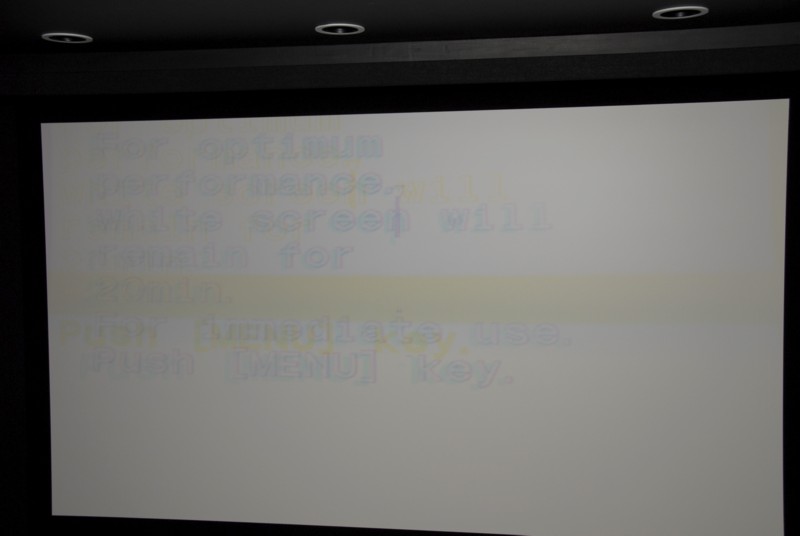
I left the PJ in the standby mode yesterday. Today came back to check on it, and saw 88 in orange error. I had to turn the main switch off, then on and the I was able to tunr the PJ on with the RC, and in one minute after the white screen showing 20min warm up left, it switched to white screen and would not react to the RC any longer except as I mentioned STANDBY command. I will try upload the OS one more time tonight to see if it helps.
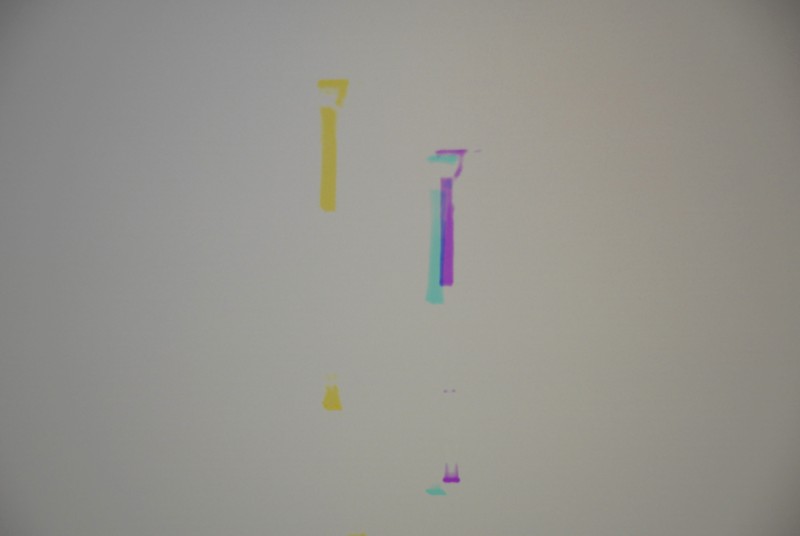
I am attaching two pictures I was able to take. Ignore wide Yellow line - it is from the flash I think, and sorry for poor pictures... but you can see the weird marks.
| Description: |
|
| Filesize: |
54.54 KB |
| Viewed: |
4989 Time(s) |
|
| Description: |
|
| Filesize: |
63.05 KB |
| Viewed: |
4989 Time(s) |
|
|
|
| Back to top |
|
 |
Frank D
Joined: 20 Jun 2006
Posts: 73
|
| Posted: Tue Nov 06, 2007 10:16 pm Post subject: |
|
|
Those are some weird marks for sure.
Is it possible to set the warm up screen not to come on? If not from the RC them maybe directly form the control on the projector?
Picture kind of looks like you need to do some calibration. Can you use the remote on the G90 to reset all values to either factory or service just to see what happens?
|
|
| Back to top |
|
|
Curt Palme
CRT Tech
Joined: 08 Mar 2006
Posts: 24396
Location: Langley, BC
TV/Projector: All of them!
|
| Posted: Tue Nov 06, 2007 10:23 pm Post subject: |
|
|
Those are deflection burn marks right on the tubes. Shine a flashlight into the lenses and see if you can see those marks on the faces of the tubes. If so, you need up to three new tubes, and at this point I'd write the set off..
This is the THIRD G90 with deflection burns that I've seen in a month. Mind you, one doesn't really count, with water having been poured into the set.. Still, that's two sets in a month with deflection burns.
|
|
| Back to top |
|
|
rsh
Joined: 01 Aug 2007
Posts: 66
|
| Posted: Tue Nov 06, 2007 10:23 pm Post subject: |
|
|
Frank,
I do not have enought time to do that. At some point within 1 to 5 minutes the PJ stops reacting to any RC commands.
I did not try the control pannel on PJ, I will - thanks for the tip, but I doubt that will help.
I will try to upload the OS one more time tonight.
|
|
| Back to top |
|
|
rsh
Joined: 01 Aug 2007
Posts: 66
|
| Posted: Tue Nov 06, 2007 10:26 pm Post subject: |
|
|
Curt,
How would this happen? I was very carefull with this PJ. I only watched movies - no static images, the contrast and brightness was set at 50 an 60. The PJ was callibrated by Rojer Galvin, and I only did some touch ups with conversions once a year maybe.
???????
|
|
| Back to top |
|
|
Curt Palme
CRT Tech
Joined: 08 Mar 2006
Posts: 24396
Location: Langley, BC
TV/Projector: All of them!
|
| Posted: Tue Nov 06, 2007 11:49 pm Post subject: |
|
|
Your Horizontal sweep failed, thus the V lines down the tube faces.
I have not serviced A G90 (yet). I also haven't followed this whole thread, I just jumped in for some reason right as you posted those horrible pix of toasted tubes, but if you were playing around with memory resets or flashing a chip, then it's possible that somehow the set lost H drive which I would think was controlled by the CPU board.
Since you are getting an image now, I'd run the set off and on even if you're not watching it. See if you get a bright line down the middle of the screen at turnon or turnoff ever. If so, that will nuke a new set of tubes immediately, so if you are going to retube, make damn sure the set of the set is 100% before doing so. You're looking at $5K in tubes though, and with the possibility of another fault in the set, you might want to change sets completely.
|
|
| Back to top |
|
|
rsh
Joined: 01 Aug 2007
Posts: 66
|
| Posted: Wed Nov 07, 2007 12:07 am Post subject: |
|
|
Curt,
Whch line are you talking about? Yellow thick one? it is not there - I believe it came from the flash when I was taking a picture.
Roman
|
|
| Back to top |
|
|
Curt Palme
CRT Tech
Joined: 08 Mar 2006
Posts: 24396
Location: Langley, BC
TV/Projector: All of them!
|
| Posted: Wed Nov 07, 2007 12:29 am Post subject: |
|
|
|
No, I'm talking about the lines in the first all white image above. You should see those marks on the tube faces with the power off while looking into the tubes.
|
|
| Back to top |
|
|
rsh
Joined: 01 Aug 2007
Posts: 66
|
| Posted: Wed Nov 07, 2007 12:44 am Post subject: |
|
|
Curt,
Yes, I see them
I will send you an email - please reply.
Roman
|
|
| Back to top |
|
|
dochlywd
Joined: 25 Apr 2006
Posts: 346
Location: Saint Louis, Missouri
|
| Posted: Wed Nov 07, 2007 12:41 pm Post subject: |
|
|
Roman,
My G90 is the other unit Curt is talking about. My projector showed up with H-Def Burn in all three tubes. It also goes to an orange 88 in standby. I have uploaded the O.S. a couple of times with no luck in fixing the fault. I swapped in a known working YA board and the set ran perfectly for over two days without shutting down. I haven't noticed any scanning problems when turning on or shutting down so it's still a mystery at this point. Hopefully we'll get his figured out. Oh, and my set showed up with only 158hrs on it and the tubes were pristine, snow white with a nice black burn down the middle. Everyone I've spoken with has said that it is VERY odd that all three have burns since there are a lot of protect circuits in the G90 that it should have NEVER been able to take out all three tubes.
Doc
|
|
| Back to top |
|
|
rsh
Joined: 01 Aug 2007
Posts: 66
|
| Posted: Wed Nov 07, 2007 12:54 pm Post subject: |
|
|
Doc,
Thanks for sharing this info. My tubes were and are in a very pristine condition as well, and these burn marks are big surprize. The projector was very well cared for in smoke free environment. I am not sure how many hours were on the tubes, but should have not been more than 2500 hours.
At the point that I do not know what to do. Looks like I need to just sell it for parts. I am not sure if it is worth repairing it.
I am very frustrated and disappointed.
Roman
|
|
| Back to top |
|
|
|
|




