| Author |
Message |
rsh
Joined: 01 Aug 2007
Posts: 66
|
| Posted: Thu Oct 18, 2007 2:43 pm Post subject: |
|
|
oliverg,
Do you know where can I get it?
Thanks
Roman
|
|
| Back to top |
|
 |
oliverg

Joined: 15 May 2007
Posts: 800
Location: Melbourne, Australia
TV/Projector: Sony G90 X2 - Vidikron Vision 1
|
| Posted: Thu Oct 18, 2007 2:46 pm Post subject: |
|
|
Best talk to Curt about that - he will have a supplier and is probably able to get them cheaper than I can.
All the best
_________________
( R ) G ( G ) 9 ( B ) 0 ( R ) G ( G ) 9 ( B ) 0
( R ) G ( G ) 9 ( B ) 0 ( R ) G ( G ) 9 ( B ) 0
|
|
| Back to top |
|
|
rsh
Joined: 01 Aug 2007
Posts: 66
|
| Posted: Thu Oct 18, 2007 6:49 pm Post subject: |
|
|
I called Sony.
They confirmed that the problem should be with the IC333 - DALLAS DS1245Y-120 chip. They want $176 for the chip !!!
Outrages !!! You can get it on the net for $10 bucks a pop. These have manufactured date of 2006+.
I found one in China, but they want me to buy 10 of these. Anyone want one? 
Looks like I am stick with the large bill for convergence and calibration service, damn !!!

|
|
| Back to top |
|
|
HaydnG90

Joined: 22 May 2006
Posts: 1356
|
| Posted: Thu Oct 18, 2007 7:42 pm Post subject: |
|
|
Ed (glassact) kindly linked me to a US company that sells the Dallas chips we need for our G90's. Not sure what the difference between the 120 and 120+ is though. Cost about $44ea
http://www.newark.com/jsp/search/browse.jsp;jsessionid=IK4KWZJA5L1AMCXDUZ0G13Q?N=0&Ntk=gensearch_001&Ntt=DS1245Y-120&Ntx=&_requestid=51501
Good luck getting your G90 back up and running again.
I haven't changed mine yet but I'm beginning to think this might be a good idea to save some expensive recalibration time. So how to transfer the current settings to a new Dallas chip? Since I've got 2 left feet when it comes to anything regarding computers, does anyone have a step-by-step guide to reprogramming the new chip using an EPROM reader. Is it just a case of pulling the old chip, downloading the the contents to the reader, put the new chip in the reader and download those settings to the new chip. Is this chip soldered onto the board? Which board is it located on?
|
|
| Back to top |
|
|
rsh
Joined: 01 Aug 2007
Posts: 66
|
| Posted: Thu Oct 18, 2007 7:59 pm Post subject: |
|
|
HaydnG90,
Thanks for the link. Looks like the only difference between DS1245Y-120 and DS1245Y-120+ is that the first one is not RoHS compliant. This is necessary only if you make a product that is shipped to Europe.
I guess it is time to order one.
Have you had a problem with this chip and had to replace it?
Anything I need to know before doing it?
Thanks
Roman
|
|
| Back to top |
|
|
HaydnG90
Joined: 22 May 2006
Posts: 1356
|
| Posted: Thu Oct 18, 2007 8:11 pm Post subject: |
|
|
|
No problems yet and I don't anticipate any for a few more years. My G90 was manufactured in Sept 2000 and both the previous owner and myself have always left the unit 'plugged in'. But the risk of losing convergence and colorimetry settings may convince me to do a little preventive maintenance. To anyone who has actually done the switch, was anything screwed up when the new chip was programmed and reinstalled?
|
|
| Back to top |
|
|
Curt Palme
CRT Tech
Joined: 08 Mar 2006
Posts: 24396
Location: Langley, BC
TV/Projector: All of them!
|
| Posted: Thu Oct 18, 2007 8:19 pm Post subject: |
|
|
|
Good old Sony! Nothing like a bit of markup to keep employees paid. Mind you, Barco isn't any better. NEC was quite reasonable when I bought some stuff off them.
|
|
| Back to top |
|
|
rsh
Joined: 01 Aug 2007
Posts: 66
|
| Posted: Thu Oct 18, 2007 8:26 pm Post subject: |
|
|
Curt,
Do you have any chips for sale? I'd rather give you my business...
Roman
|
|
| Back to top |
|
|
Curt Palme
CRT Tech
Joined: 08 Mar 2006
Posts: 24396
Location: Langley, BC
TV/Projector: All of them!
|
| Posted: Thu Oct 18, 2007 8:30 pm Post subject: |
|
|
Sorry no, but I'll order a few from Newark as well so that I have stock.
Cheers!
|
|
| Back to top |
|
|
rsh
Joined: 01 Aug 2007
Posts: 66
|
| Posted: Thu Oct 18, 2007 8:36 pm Post subject: |
|
|
Gents,
If anyone replaced this chip before or knows someone who did, I would appreciate the reference. I would like to get a step, by step instructions, so I do not screw up anything...
Thanks
Roman
|
|
| Back to top |
|
|
HaydnG90
Joined: 22 May 2006
Posts: 1356
|
| Posted: Thu Oct 18, 2007 8:42 pm Post subject: |
|
|
| rsh wrote: | Gents,
If anyone replaced this chip before or knows someone who did, I would appreciate the reference. I would like to get a step, by step instructions, so I do not screw up anything...
Thanks
Roman |
Please share if you get some assistance.
|
|
| Back to top |
|
|
rsh
Joined: 01 Aug 2007
Posts: 66
|
| Posted: Thu Oct 18, 2007 8:44 pm Post subject: |
|
|
I definitelly will, but I would like get the assistance first
Roman
|
|
| Back to top |
|
|
rsh
Joined: 01 Aug 2007
Posts: 66
|
| Posted: Thu Oct 18, 2007 9:16 pm Post subject: |
|
|
One more thing - I just get off the phone with Newark tech support, and they told me that they do not have the manufactured date, and there is no way to find out about it.
Good thing is that the DS1245Y-120+ is RoHS complaint and that means it was made after July 2006.
I guess I need to order the DS1245Y-120+ then.
Any comments?
Roman
|
|
| Back to top |
|
|
oliverg
Joined: 15 May 2007
Posts: 800
Location: Melbourne, Australia
TV/Projector: Sony G90 X2 - Vidikron Vision 1
|
| Posted: Fri Oct 19, 2007 1:55 am Post subject: |
|
|
| HaydnG90 wrote: | Ed (glassact) kindly linked me to a US company that sells the Dallas chips we need for our G90's. Not sure what the difference between the 120 and 120+ is though. Cost about $44ea
http://www.newark.com/jsp/search/browse.jsp;jsessionid=IK4KWZJA5L1AMCXDUZ0G13Q?N=0&Ntk=gensearch_001&Ntt=DS1245Y-120&Ntx=&_requestid=51501
Good luck getting your G90 back up and running again.
I haven't changed mine yet but I'm beginning to think this might be a good idea to save some expensive recalibration time. So how to transfer the current settings to a new Dallas chip? Since I've got 2 left feet when it comes to anything regarding computers, does anyone have a step-by-step guide to reprogramming the new chip using an EPROM reader. Is it just a case of pulling the old chip, downloading the the contents to the reader, put the new chip in the reader and download those settings to the new chip. Is this chip soldered onto the board? Which board is it located on? |
NVM isn't EPROM. AFAIK you need to replace the chip with a blank one and re-init it using S202
Its not soldered onto the board. Its on the YA board.
RSH - take the bad chip out, replace it with the blank one. Use S202 to re-init and copy the frame data from its source . That's all.
You have to make sure you order the correct type of chip - there are two types - take a look at the one you have and make sure its the same type as what you are ordering.
I hope you have good anti-static gear - the YA board is the most expensive board @ $1600 a pop from Sony. If you haven't done this type of work before, get a professional to do it for you.
If you are cursing the cost of re-calibration, imagine how you will feel if you add the cost of a YA board on top of that.
At that point, you're talking 1/2 the cost of another G90
_________________
( R ) G ( G ) 9 ( B ) 0 ( R ) G ( G ) 9 ( B ) 0
( R ) G ( G ) 9 ( B ) 0 ( R ) G ( G ) 9 ( B ) 0
|
|
| Back to top |
|
|
rsh
Joined: 01 Aug 2007
Posts: 66
|
| Posted: Fri Oct 19, 2007 5:46 am Post subject: |
|
|
oliverq,
| Quote: | | You have to make sure you order the correct type of chip - there are two types - take a look at the one you have and make sure its the same type as what you are ordering. |
Which two types?
What is the difference?
Thanks
Roman
|
|
| Back to top |
|
|
oliverg
Joined: 15 May 2007
Posts: 800
Location: Melbourne, Australia
TV/Projector: Sony G90 X2 - Vidikron Vision 1
|
| Posted: Fri Oct 19, 2007 8:08 am Post subject: |
|
|
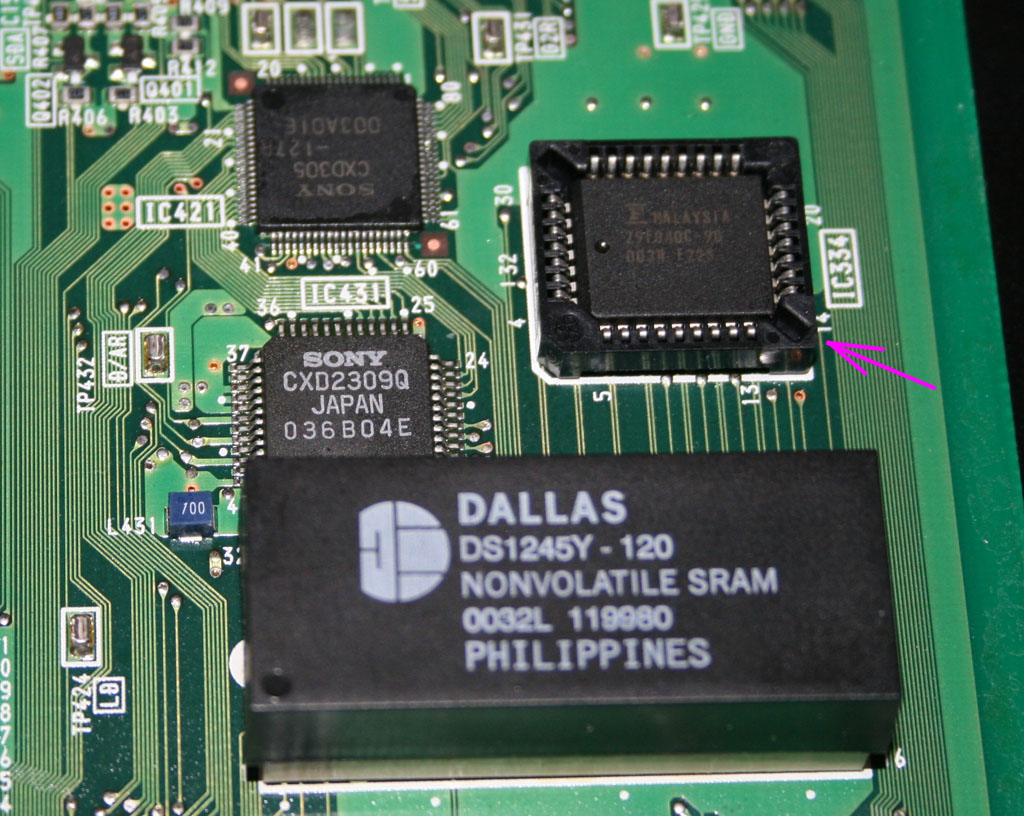
As far as I know there is the PCM (34pin) and DIP (32pin). If you can take a picture for me, close up - I'll tell you which one you have. My G90s both have DIP versions but I can't be sure that all G90s have the same type as I don't know the version/ISS of your YA board. You could risk it and get DIP but I would wait until you have heard back from someone here that knoiws for certain.
OK I've just double checked the pins and there are 32 - so its the DIP chip on mine. Yours will probably be DIP too.
Its a shame Sony didn't use PCM - as with the PCM, you can order the "PC" (power cap) with a new battery on it and you dont have to replace the whole chip. Its not the chip that dies, its the lithium battery.
Lastly - a final warning - the components on the YA board are EXTREMELY sensitive to static. Do not attempt to do this unless you have good anti static gear and you really know what you are doing. If you are wearing synthetics/ have carpeted floors you have a very high risk of killing the whole board. I can't stress how important this is. Keep yourself grounded.
"The DS1245 devices are available in two packages: 32-pin DIP and 34-pin PowerCap Module (PCM).
The 32-pin DIP integrates a lithium battery, an SRAM memory and a nonvolatile control function into a
single package with a JEDEC-standard 600-mil DIP pinout. The 34-pin PowerCap Module integrates
SRAM memory and nonvolatile control along with contacts for connection to the lithium battery in the
DS9034PC PowerCap. The PowerCap Module package design allows a DS1245 PCM device to be
surface mounted without subjecting its lithium backup battery to destructive high-temperature reflow
soldering. After a DS1245 PCM is reflow soldered, a DS9034PC PowerCap is snapped on top of the
PCM to form a complete Nonvolatile SRAM module. The DS9034PC is keyed to prevent improper
attachment. DS1245 PowerCap Modules and DS9034PC PowerCaps are ordered separately and shipped
in separate containers. See the DS9034PC data sheet for further information"
_________________
( R ) G ( G ) 9 ( B ) 0 ( R ) G ( G ) 9 ( B ) 0
( R ) G ( G ) 9 ( B ) 0 ( R ) G ( G ) 9 ( B ) 0
|
|
| Back to top |
|
|
rsh
Joined: 01 Aug 2007
Posts: 66
|
| Posted: Fri Oct 19, 2007 12:39 pm Post subject: |
|
|
Oliverq,
Here is the picture I pulled off from one of the threads on the AVSForum with the DALLAS chip. (ignore the arrow). Mine looks exactly the same. Is that what you have - DIP 32 PIN?
Thanks
Roman
| Description: |
|
| Filesize: |
232.81 KB |
| Viewed: |
10617 Time(s) |
|
|
|
| Back to top |
|
|
oliverg
Joined: 15 May 2007
Posts: 800
Location: Melbourne, Australia
TV/Projector: Sony G90 X2 - Vidikron Vision 1
|
| Posted: Fri Oct 19, 2007 12:49 pm Post subject: |
|
|
That's the one
Cheers
PS Have you tried using S202 yet?
_________________
( R ) G ( G ) 9 ( B ) 0 ( R ) G ( G ) 9 ( B ) 0
( R ) G ( G ) 9 ( B ) 0 ( R ) G ( G ) 9 ( B ) 0
|
|
| Back to top |
|
|
HaydnG90
Joined: 22 May 2006
Posts: 1356
|
| Posted: Fri Oct 19, 2007 2:13 pm Post subject: |
|
|
[/quote]
NVM isn't EPROM. AFAIK you need to replace the chip with a blank one and re-init it using S202
[/quote]
If the blank one is installed and re-init using S202, are all the custom convergence, greyscale and colorimetry settings lost?
|
|
| Back to top |
|
|
HaydnG90
Joined: 22 May 2006
Posts: 1356
|
| Posted: Fri Oct 19, 2007 3:58 pm Post subject: |
|
|
|
Oliverg indicated on the AVS site indicated that the task of copying the contents of one chip to a new one (assuming the old chip is still 'alive') is not that simple. I would certainly be willing to pay a decent amount for someone's time if they were to offer this as a service. Curt............
|
|
| Back to top |
|
|
|
|




