| Author |
Message |
oliverg

Joined: 15 May 2007
Posts: 800
Location: Melbourne, Australia
TV/Projector: Sony G90 X2 - Vidikron Vision 1
|
| Posted: Fri Jul 27, 2007 5:24 am Post subject: |
|
|
Using 162.15 on Vista here (8800GTX) - I have some overscan @50hz for some weird reason but changing to 60 fixes it. 1080p looks quite good.
Kind regards
_________________
( R ) G ( G ) 9 ( B ) 0 ( R ) G ( G ) 9 ( B ) 0
( R ) G ( G ) 9 ( B ) 0 ( R ) G ( G ) 9 ( B ) 0
|
|
| Back to top |
|
 |
Alaric
Joined: 17 Apr 2006
Posts: 127
Location: Huntingdon, Cambs, UK
|
| Posted: Fri Jul 27, 2007 7:22 am Post subject: |
|
|
Hi There,
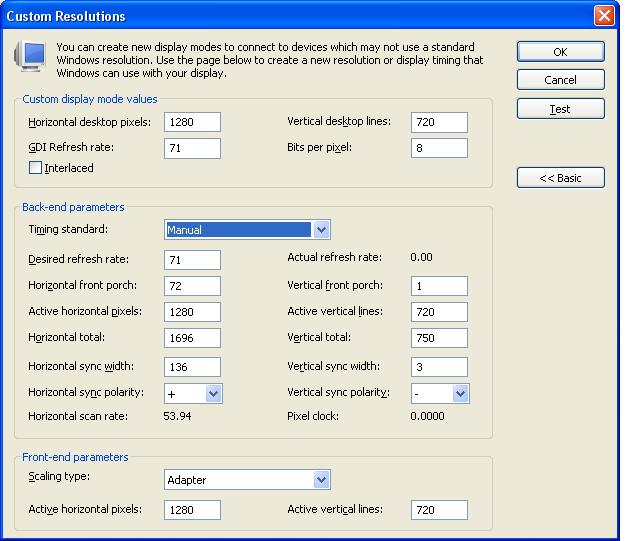
It would seem so in the driver (162.15) that i'm using on XP. I just tried that res the quick way and it gave 71.93 but i think thats just rounding.
enclosed a screen grab of the setting panel...definatly porches there !
MrKing - and just how cheap are a set of PT18 though....
cya,
Lee
| Description: |
|
| Filesize: |
60.3 KB |
| Viewed: |
9601 Time(s) |
|
|
|
| Back to top |
|
|
Mark_A_W
Joined: 15 Mar 2006
Posts: 3068
Location: Sunny Melbourne Australia
|
| Posted: Fri Jul 27, 2007 1:17 pm Post subject: |
|
|
I've never got the Nvidia Custom res panel to actually accept the porch values I want to use. You type it in, and it returns to a big value....GRRR.
I gave up and installed Powerstrip, which also allows me to drive the resolution from a command line, which in turn can be driven automatically by Reclock.
My HD2600XT just arrived - I'll post how that goes.
(Sure, it's not the fastest gaming card around, but I only occasionally play Half Life 2.)
|
|
| Back to top |
|
|
Stonefool
Joined: 24 Dec 2006
Posts: 253
Location: Sweden
|
| Posted: Sat Jul 28, 2007 1:44 am Post subject: Re: Anyone using Nvidia 8800/8600? |
|
|
| Jesse S wrote: | The Nvidia 8x00 series are still not supported by Powerstrip so I'm wondering how people are setting up their custom timings.
Is there any way to access porches and the like via Riva Tuner, or whatever is used to tweak Nvidia cards? I've been using ATI for the last 3 generations but the 2900XT is not as competitive and uses a ton of power and costs more than the mostly faster 8800GTS. |
I never understood why people use pc's for this, but your supposed to be able to do what you want (resolution wise) within the nvidia software.
Powerstrip for nvidia 8x is supposed to be "supported" in the latest beta.
Ofcourse that doesn't mean _your_ card is supported ... that's kind of the idiocy with pc hardware.
_________________
Trying to get everything to work.
|
|
| Back to top |
|
|
Mark_A_W
Joined: 15 Mar 2006
Posts: 3068
Location: Sunny Melbourne Australia
|
| Posted: Sat Jul 28, 2007 2:40 am Post subject: |
|
|
Never understood why people use PCs for what? Custom resolutions?
That's exactly why we use PCs.
...I'm confused.
From my reading of the Powerstrip forum last night, the Nvidia 8x series is not supported, and there's no sign it will be.
|
|
| Back to top |
|
|
Jesse S
Joined: 12 May 2007
Posts: 209
Location: Etobicoke
|
| Posted: Sat Jul 28, 2007 3:27 am Post subject: |
|
|
|
So the question is, does Nvidia's porch control work and can you set exact refresh rates like 71.928 or does it just round off to 71.93?
|
|
| Back to top |
|
|
Elaine Benes
Joined: 25 Apr 2006
Posts: 1416
|
| Posted: Sat Jul 28, 2007 10:14 am Post subject: |
|
|
| Jesse S wrote: | | So the question is, does Nvidia's porch control work and can you set exact refresh rates like 71.928 or does it just round off to 71.93? |
In my setup(XP), yes it works, everything works. Sometimes, for whatever reason, I have to use the arrow to change the porch numbers instead of typing them in, but yes, every adjustment works. The scan rate window is limited to four digits(five places if you count the decimal point).
I've gotten a very nice 1080p setting which is centered and works well using the controls, as well as a 72Hz refresh 1080i setting which is my current favorite...
|
|
| Back to top |
|
|
Jesse S
Joined: 12 May 2007
Posts: 209
Location: Etobicoke
|
| Posted: Sat Jul 28, 2007 2:16 pm Post subject: |
|
|
|
If refresh is 71.93, it's going to drop a frame every 20 seconds or so. Is there any other way to set the refresh on nvidia with more accuracy?
|
|
| Back to top |
|
|
Stonefool
Joined: 24 Dec 2006
Posts: 253
Location: Sweden
|
| Posted: Sat Jul 28, 2007 8:14 pm Post subject: |
|
|
| Mark_A_W wrote: | Never understood why people use PCs for what? Custom resolutions?
That's exactly why we use PCs.
...I'm confused.
From my reading of the Powerstrip forum last night, the Nvidia 8x series is not supported, and there's no sign it will be. |
Yes in the latest beta it is supposed to be supported, but sry my misstake, the advanced timings isn't supported, and of course that's the whole point why people use powerstrip.
You can get a nice dedicated video processor to do all the custom stuff you need, you don't need a whole pc for that. Heck you can get a cheap dvd player to do custom timeings, the only drawback is the videochip.
But why spend $2-3000 on a pc when you can get for the same price a dedicated video processor and dvd player utilizing SDI and still have access to USB2 and Ehternet?
_________________
Trying to get everything to work.
|
|
| Back to top |
|
|
Jesse S
Joined: 12 May 2007
Posts: 209
Location: Etobicoke
|
| Posted: Sun Jul 29, 2007 7:11 am Post subject: |
|
|
|
Those of us who use a PC might ask you the same thing. Why use an outboard video processor when a PC can do everything it can and more?
|
|
| Back to top |
|
|
Joust

Joined: 05 May 2006
Posts: 2429
Location: Almonte, Ontario, Canada
TV/Projector: Marquee 8501LC
|
| Posted: Sun Jul 29, 2007 2:01 pm Post subject: |
|
|
|
I just built a New HTPC. I have the 8600GT. We shall see how she works out.
|
|
| Back to top |
|
|
Ile

Joined: 09 Mar 2006
Posts: 1491
Location: Jyväskylä, Finland
|
| Posted: Sun Jul 29, 2007 6:49 pm Post subject: |
|
|
| Stonefool wrote: | | But why spend $2-3000 on a pc when you can get for the same price a dedicated video processor and dvd player utilizing SDI and still have access to USB2 and Ehternet? |
Because I need one pc anyway. 
When you buy also external hdtv/dtv tuner, HD DVD player and BR player you have spended small fortune to sources. Pc with all these are still about $2-3000.
|
|
| Back to top |
|
|
Jesse S
Joined: 12 May 2007
Posts: 209
Location: Etobicoke
|
| Posted: Tue Jul 31, 2007 7:26 am Post subject: |
|
|
| Joust wrote: | | I just built a New HTPC. I have the 8600GT. We shall see how she works out. |
So, what's the word?
|
|
| Back to top |
|
|
SweetChuck

Joined: 01 Jun 2007
Posts: 134
Location: Queensland Australia
|
| Posted: Wed Aug 01, 2007 12:57 am Post subject: |
|
|
Don't get me started on Nvidia GRRRR
I have a 8600 and wanted the Purevideo HD decoders , which is currently is only supported for Vista , so I install vista and the Hardware decoder works fine but suprise suprise no custom timing function .
So I am back with XP with no hardware decoding (cpu runs @ 90%) but at least I have Custom timing.
Not sure what nvidias deal is 
|
|
| Back to top |
|
|
Mark_A_W
Joined: 15 Mar 2006
Posts: 3068
Location: Sunny Melbourne Australia
|
| Posted: Wed Aug 01, 2007 2:34 am Post subject: |
|
|
Sweetchuck, after some struggling I'm pretty happy with my Ati HD2600XT, but I haven't tried Hardware Accel - I don't need it.
However custom resolutions with powerstrip works flawlessly.
|
|
| Back to top |
|
|
Jesse S
Joined: 12 May 2007
Posts: 209
Location: Etobicoke
|
| Posted: Wed Aug 01, 2007 4:53 am Post subject: |
|
|
|
Can someone confirm if it's possible to get exactly 71.928hz? I'll be getting a q6600 quad core so I could care less if the 8800 has acceleration for h264/vc1.
|
|
| Back to top |
|
|
SweetChuck
Joined: 01 Jun 2007
Posts: 134
Location: Queensland Australia
|
| Posted: Wed Aug 01, 2007 7:47 am Post subject: |
|
|
| Jesse S wrote: | | Can someone confirm if it's possible to get exactly 71.928hz? I'll be getting a q6600 quad core so I could care less if the 8800 has acceleration for h264/vc1. |
Only to 2 decimal points sorry
|
|
| Back to top |
|
|
Jesse S
Joined: 12 May 2007
Posts: 209
Location: Etobicoke
|
| Posted: Wed Aug 01, 2007 6:36 pm Post subject: |
|
|
|
Kind of a deal-breaker no? Without exact refresh it will be dropping frames constantly to stay in sync.
|
|
| Back to top |
|
|
SweetChuck
Joined: 01 Jun 2007
Posts: 134
Location: Queensland Australia
|
| Posted: Wed Aug 01, 2007 11:07 pm Post subject: |
|
|
| Jesse S wrote: | | Kind of a deal-breaker no? Without exact refresh it will be dropping frames constantly to stay in sync. |
Thats it , I would stay away from nvidia period
|
|
| Back to top |
|
|
Stonefool
Joined: 24 Dec 2006
Posts: 253
Location: Sweden
|
| Posted: Thu Aug 02, 2007 1:18 am Post subject: |
|
|
| Ile wrote: | | Stonefool wrote: | | But why spend $2-3000 on a pc when you can get for the same price a dedicated video processor and dvd player utilizing SDI and still have access to USB2 and Ehternet? |
Because I need one pc anyway. |
hehehe, ok. :p
| Quote: | | When you buy also external hdtv/dtv tuner, HD DVD player and BR player you have spended small fortune to sources. Pc with all these are still about $2-3000. |
I don't know about in the US, but in Europe you can't add all that in a PC for the price, not even if you keep away from adequate hardware on some stuff. The problem isn't really the hardware per se (if you get the latest and greatest), even if the latest nvidia ultra card is good it still is inferior*, it also has to do with making a perfect puzzle between hardware components even if they are all from the same manufacturer, but even if you get all that right, your still at the mercy of the software drivers between eoch other, and between all the rest of the active running software.
*It is inferior because if you don't have enough processing power and speed on the rerst of the system, it wont do all that it can in a "timely fashion", especially since it is dependent on what-ever hardware you use for the rest of the system. And of course it is still at the mercy of the software driver/s, which has to take into consideration way too many variables to be able to do its best, even under best of circumstances.
A video processor doesn't care about the rest of your hardware, only the signal. Of course the Crystalio II might be different what with being able to add a harddrive and all, but then it is way up in the blue on the price.
Not to mention it is much simpler to understand what went wrong on/in a video processor, not so with a PC and all its software. 
_________________
Trying to get everything to work.
|
|
| Back to top |
|
|
|
|





