| Author |
Message |
pezzettino
Joined: 06 May 2008
Posts: 37
Location: Bari - Italy
|
| Posted: Wed Apr 15, 2015 11:33 am Post subject: |
|
|
| mp20748 wrote: | | pezzettino wrote: | I got a very good image after many hours of calibration but I'm not be able to take good pictures with my cameras
Can anyone help me to find the right settings?
Thanks |
Get you a point and shoot camera, they are cheap (US $69.00 - 99.00) Fuji is good one to start with..
Once you get something worth using for the shots post back, or let us know what camera you're using. |
I have a NIKON D50 but I choose the wrong settings probably
|
|
| Back to top |
|
 |
mp20748
Joined: 12 Sep 2006
Posts: 5689
Location: Maryland
TV/Projector: 9500LC Ultra / Super 02 and 03 VIM
|
| Posted: Wed Apr 15, 2015 1:15 pm Post subject: |
|
|
| pezzettino wrote: | | mp20748 wrote: | | pezzettino wrote: | I got a very good image after many hours of calibration but I'm not be able to take good pictures with my cameras
Can anyone help me to find the right settings?
Thanks |
Get you a point and shoot camera, they are cheap (US $69.00 - 99.00) Fuji is good one to start with..
Once you get something worth using for the shots post back, or let us know what camera you're using. |
I have a NIKON D50 but I choose the wrong settings probably |
Yep, you're going to have to spend some time finding the best settings. To start check your manual for getting the best low light or dark scenes. To include making sure your 'ISO' is 100 or lowest setting.
|
|
| Back to top |
|
|
pezzettino
Joined: 06 May 2008
Posts: 37
Location: Bari - Italy
|
| Posted: Wed Apr 15, 2015 4:52 pm Post subject: |
|
|
| mp20748 wrote: | | pezzettino wrote: | | mp20748 wrote: | | pezzettino wrote: | I got a very good image after many hours of calibration but I'm not be able to take good pictures with my cameras
Can anyone help me to find the right settings?
Thanks |
Get you a point and shoot camera, they are cheap (US $69.00 - 99.00) Fuji is good one to start with..
Once you get something worth using for the shots post back, or let us know what camera you're using. |
I have a NIKON D50 but I choose the wrong settings probably |
Yep, you're going to have to spend some time finding the best settings. To start check your manual for getting the best low light or dark scenes. To include making sure your 'ISO' is 100 or lowest setting. |
This is the problem
My camera doesn't work under ISO 200
|
|
| Back to top |
|
|
gregstv
Joined: 27 Aug 2007
Posts: 628
Location: Australia
|
| Posted: Sun Apr 19, 2015 1:15 am Post subject: |
|
|
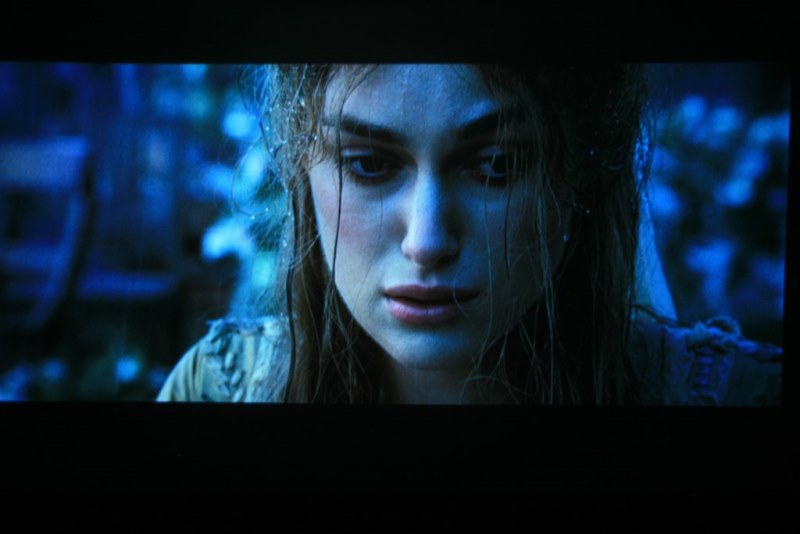
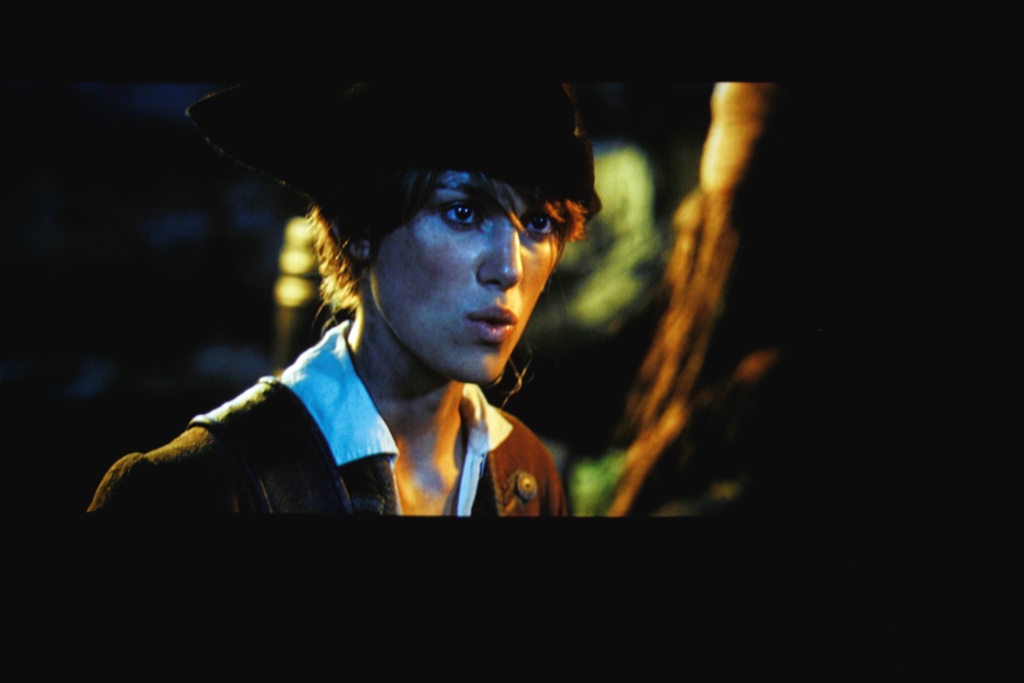
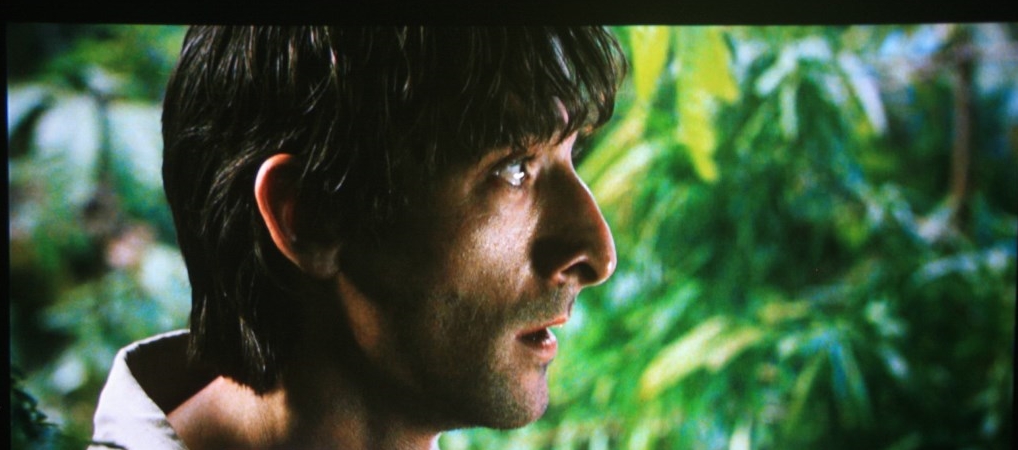
A few shots from the Barco SEOS
| Description: |
|
| Filesize: |
58.81 KB |
| Viewed: |
7927 Time(s) |
|
| Description: |
|
| Filesize: |
86.34 KB |
| Viewed: |
7927 Time(s) |
|
| Description: |
|
| Filesize: |
288.25 KB |
| Viewed: |
7927 Time(s) |
|
|
|
| Back to top |
|
|
pezzettino
Joined: 06 May 2008
Posts: 37
Location: Bari - Italy
|
| Posted: Sun Apr 19, 2015 7:14 pm Post subject: |
|
|
| pezzettino wrote: | | mp20748 wrote: | | pezzettino wrote: | | mp20748 wrote: | | pezzettino wrote: | I got a very good image after many hours of calibration but I'm not be able to take good pictures with my cameras
Can anyone help me to find the right settings?
Thanks |
Get you a point and shoot camera, they are cheap (US $69.00 - 99.00) Fuji is good one to start with..
Once you get something worth using for the shots post back, or let us know what camera you're using. |
I have a NIKON D50 but I choose the wrong settings probably |
Yep, you're going to have to spend some time finding the best settings. To start check your manual for getting the best low light or dark scenes. To include making sure your 'ISO' is 100 or lowest setting. |
This is the problem
My camera doesn't work under ISO 200 |
My actual camera is a Canon Powershot sx400is
The settings are
Mode P
ISO 100
White bal. cloudy
But the pics are always very lightly blueness, livid
|
|
| Back to top |
|
|
mp20748
Joined: 12 Sep 2006
Posts: 5689
Location: Maryland
TV/Projector: 9500LC Ultra / Super 02 and 03 VIM
|
| Posted: Sun Apr 19, 2015 10:53 pm Post subject: |
|
|
| pezzettino wrote: |
My actual camera is a Canon Powershot sx400is
The settings are
Mode P
ISO 100
White bal. cloudy
But the pics are always very lightly blueness, livid |
What does your camera manual say the "Mode P" is for?
And what other "white Balance" options are there?
|
|
| Back to top |
|
|
pezzettino
Joined: 06 May 2008
Posts: 37
Location: Bari - Italy
|
| Posted: Mon Apr 20, 2015 12:20 pm Post subject: |
|
|
| mp20748 wrote: |
What does your camera manual say the "Mode P" is for?
And what other "white Balance" options are there? |
The P mode is like personal or manual mode but only few settings are possible.
The white balance options are:
auto
day light
cloudy
tungst
fluoresc
fluoresc H
personal (very poor)
|
|
| Back to top |
|
|
mp20748
Joined: 12 Sep 2006
Posts: 5689
Location: Maryland
TV/Projector: 9500LC Ultra / Super 02 and 03 VIM
|
| Posted: Mon Apr 20, 2015 12:31 pm Post subject: |
|
|
Maybe the contrast is too low on a few of these..


|
|
| Back to top |
|
|
thewolfman

Joined: 28 Mar 2011
Posts: 1311
Location: Sweden
|
| Posted: Mon Apr 20, 2015 5:56 pm Post subject: |
|
|
LG BP240 Bluray player + ASUS GeForce STRIX GTX 960 2GB + Cooler Master G750M, 750W PSU ordered.. + Baraka bluray for the penny's left. 
I'm hoping that this beefed up power supply will resuscitate the computer, as it has been down for some time and still is, but also solve the weird blue on the left. I read somewhere that an underpowered PC can make the graphics card work overtime with all sorts of strange phenomena. Maybe that's it? Should know by Friday.
|
|
| Back to top |
|
|
mp20748
Joined: 12 Sep 2006
Posts: 5689
Location: Maryland
TV/Projector: 9500LC Ultra / Super 02 and 03 VIM
|
| Posted: Mon Apr 20, 2015 6:09 pm Post subject: |
|
|
And what version Moome card are you using....or did I miss seeing what you use to convert HDMI to RGB.
| thewolfman wrote: | LG BP240 Bluray player + ASUS GeForce STRIX GTX 960 2GB + Cooler Master G750M, 750W PSU ordered.. + Baraka bluray for the penny's left.
I'm hoping that this beefed up power supply will resuscitate the computer, as it has been down for some time and still is, but also solve the weird blue on the left. I read somewhere that an underpowered PC can make the graphics card work overtime with all sorts of strange phenomena. Maybe that's it? Should know by Friday. |
|
|
| Back to top |
|
|
thewolfman
Joined: 28 Mar 2011
Posts: 1311
Location: Sweden
|
| Posted: Tue Apr 21, 2015 4:10 pm Post subject: |
|
|
| mp20748 wrote: | And what version Moome card are you using....or did I miss seeing what you use to convert HDMI to RGB.
| thewolfman wrote: | LG BP240 Bluray player + ASUS GeForce STRIX GTX 960 2GB + Cooler Master G750M, 750W PSU ordered.. + Baraka bluray for the penny's left.
I'm hoping that this beefed up power supply will resuscitate the computer, as it has been down for some time and still is, but also solve the weird blue on the left. I read somewhere that an underpowered PC can make the graphics card work overtime with all sorts of strange phenomena. Maybe that's it? Should know by Friday. |
|
I figure I would hold on to your boards until the new V3 gets here, but for now it's the old V1 something. I'll send you the close ups of that particular card as soon as I fix the PC.
|
|
| Back to top |
|
|
jbmeyer13
Joined: 03 Dec 2010
Posts: 1135
|
| Posted: Tue Apr 21, 2015 4:27 pm Post subject: |
|
|
| thewolfman wrote: | | mp20748 wrote: | And what version Moome card are you using....or did I miss seeing what you use to convert HDMI to RGB.
| thewolfman wrote: | LG BP240 Bluray player + ASUS GeForce STRIX GTX 960 2GB + Cooler Master G750M, 750W PSU ordered.. + Baraka bluray for the penny's left.
I'm hoping that this beefed up power supply will resuscitate the computer, as it has been down for some time and still is, but also solve the weird blue on the left. I read somewhere that an underpowered PC can make the graphics card work overtime with all sorts of strange phenomena. Maybe that's it? Should know by Friday. |
|
I figure I would hold on to your boards until the new V3 gets here, but for now it's the old V1 something. I'll send you the close ups of that particular card as soon as I fix the PC. |
From personal experience I can tell you that if the Moome isn't tweaked it can prevent you from getting the best possible performance out of your setup and not do the MP chain justice. Kurt first mentioned this to me a while back as he was testing various Moome cards he has in his seemingly unending arsenal of Marquee parts. When I recently hooked up a pattern generator and began running 200+ MHz signals via RGBHV I started seeing differences from what my Oppo-Radiance-Moome was displaying. The pattern generator is the proper benchmark to evaluate BW since there's no HDMI B.S. to deal with and the signal is super clean. I realize that it's not possible for everyone to utilize a generator but it validates just how important each component is in a top performing video chain.
_________________
Projector: Modded 9501LC ULtra- MP VIM, Vold VNB, ETECH LVPS, Silver VIM Cables, HD10F's & a V1 case!
|
|
| Back to top |
|
|
thewolfman
Joined: 28 Mar 2011
Posts: 1311
Location: Sweden
|
| Posted: Tue Apr 21, 2015 4:33 pm Post subject: |
|
|
| jbmeyer13 wrote: | | thewolfman wrote: | | mp20748 wrote: | And what version Moome card are you using....or did I miss seeing what you use to convert HDMI to RGB.
| thewolfman wrote: | LG BP240 Bluray player + ASUS GeForce STRIX GTX 960 2GB + Cooler Master G750M, 750W PSU ordered.. + Baraka bluray for the penny's left.
I'm hoping that this beefed up power supply will resuscitate the computer, as it has been down for some time and still is, but also solve the weird blue on the left. I read somewhere that an underpowered PC can make the graphics card work overtime with all sorts of strange phenomena. Maybe that's it? Should know by Friday. |
|
I figure I would hold on to your boards until the new V3 gets here, but for now it's the old V1 something. I'll send you the close ups of that particular card as soon as I fix the PC. |
From personal experience I can tell you that if the Moome isn't tweaked it can prevent you from getting the best possible performance out of your setup and not do the MP chain justice. Kurt first mentioned this to me a while back as he was testing various Moome cards he has in his seemingly unending arsenal of Marquee parts. When I recently hooked up a pattern generator and began running 200+ MHz signals via RGBHV I started seeing differences from what my Oppo-Radiance-Moome was displaying. The pattern generator is the proper benchmark to evaluate BW since there's no HDMI B.S. to deal with and the signal is super clean. I realize that it's not possible for everyone to utilize a generator but it validates just how important each component is in a top performing video chain. |
I always wondered about those pattern generators.. care to share a link with what you've got?
|
|
| Back to top |
|
|
jbmeyer13
Joined: 03 Dec 2010
Posts: 1135
|
| Posted: Tue Apr 21, 2015 4:39 pm Post subject: |
|
|
| thewolfman wrote: | | jbmeyer13 wrote: | | thewolfman wrote: | | mp20748 wrote: | And what version Moome card are you using....or did I miss seeing what you use to convert HDMI to RGB.
| thewolfman wrote: | LG BP240 Bluray player + ASUS GeForce STRIX GTX 960 2GB + Cooler Master G750M, 750W PSU ordered.. + Baraka bluray for the penny's left.
I'm hoping that this beefed up power supply will resuscitate the computer, as it has been down for some time and still is, but also solve the weird blue on the left. I read somewhere that an underpowered PC can make the graphics card work overtime with all sorts of strange phenomena. Maybe that's it? Should know by Friday. |
|
I figure I would hold on to your boards until the new V3 gets here, but for now it's the old V1 something. I'll send you the close ups of that particular card as soon as I fix the PC. |
From personal experience I can tell you that if the Moome isn't tweaked it can prevent you from getting the best possible performance out of your setup and not do the MP chain justice. Kurt first mentioned this to me a while back as he was testing various Moome cards he has in his seemingly unending arsenal of Marquee parts. When I recently hooked up a pattern generator and began running 200+ MHz signals via RGBHV I started seeing differences from what my Oppo-Radiance-Moome was displaying. The pattern generator is the proper benchmark to evaluate BW since there's no HDMI B.S. to deal with and the signal is super clean. I realize that it's not possible for everyone to utilize a generator but it validates just how important each component is in a top performing video chain. |
I always wondered about those pattern generators.. care to share a link with what you've got? |
Kurt actually bought it off ebay and had it shipped to me to play with for a while. I think it's a Chroma 2337.
_________________
Projector: Modded 9501LC ULtra- MP VIM, Vold VNB, ETECH LVPS, Silver VIM Cables, HD10F's & a V1 case!
|
|
| Back to top |
|
|
pezzettino
Joined: 06 May 2008
Posts: 37
Location: Bari - Italy
|
| Posted: Thu Apr 23, 2015 11:27 am Post subject: |
|
|
My last untouched pics of new Marquee setup and calibration


The screen images are best. This is all that I'm able to get by my camera. Sorry
|
|
| Back to top |
|
|
mp20748
Joined: 12 Sep 2006
Posts: 5689
Location: Maryland
TV/Projector: 9500LC Ultra / Super 02 and 03 VIM
|
| Posted: Thu Apr 23, 2015 8:19 pm Post subject: |
|
|


|
|
| Back to top |
|
|
pezzettino
Joined: 06 May 2008
Posts: 37
Location: Bari - Italy
|
| Posted: Fri Apr 24, 2015 12:46 am Post subject: |
|
|
I understand!
It is a real war!
I hope to have the right guns
|
|
| Back to top |
|
|
mp20748
Joined: 12 Sep 2006
Posts: 5689
Location: Maryland
TV/Projector: 9500LC Ultra / Super 02 and 03 VIM
|
| Posted: Fri Apr 24, 2015 11:57 am Post subject: |
|
|
| pezzettino wrote: | I understand!
It is a real war!
I hope to have the right guns |
No war at all. And you do have the right guns. It's just going to take time to get those images into the camera the way you'd want.
The thread is simple about posting shots period. Don't matter what display you own or what it looks like on here, because we know it's not easy to get that same image to show the same way it looks on the screen.
Stay with it..
|
|
| Back to top |
|
|
pezzettino
Joined: 06 May 2008
Posts: 37
Location: Bari - Italy
|
| Posted: Fri Apr 24, 2015 1:18 pm Post subject: |
|
|
|
I was ironic
|
|
| Back to top |
|
|
mp20748
Joined: 12 Sep 2006
Posts: 5689
Location: Maryland
TV/Projector: 9500LC Ultra / Super 02 and 03 VIM
|
| Posted: Fri Apr 24, 2015 1:51 pm Post subject: |
|
|
|
Fine with me. just keep posting. You got my mods looking good, and I'm not being ironic..
|
|
| Back to top |
|
|
|
|





