| Author |
Message |
Clarence

Joined: 08 Mar 2006
Posts: 3827
Location: Smith Mtn Lake, VA
|
| Posted: Tue Jun 12, 2007 7:25 pm Post subject: |
|
|
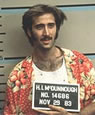
| emdawgz1 wrote: | | Clarence wrote: | one of my favorite movies... "turn to the right"
Any guesses? |
Raising Arizona  |
yep! 
| Description: |
|
| Filesize: |
4.79 KB |
| Viewed: |
11765 Time(s) |
|
|
|
| Back to top |
|
 |
emdawgz1

Joined: 14 Mar 2006
Posts: 7949
|
| Posted: Tue Jun 12, 2007 7:56 pm Post subject: |
|
|
My favorite line...
"That sumbitch. You tell him, I think he's a damn fool, Ed. You tell him I said so - H.I. McDonnough. If he wants to discuss it, he knows where to find me: in the Maricopa County Maximum Security Correctional Facility For Men State Farm, Road Number 31, Tempe, Arizona! I'LL BE WAITIN'! I'll be waitin'."
_________________
Follow my blog
www.thesinglebrother.com
|
|
| Back to top |
|
|
MarkW
Joined: 16 Mar 2006
Posts: 164
Location: Ardmore, AL
|
| Posted: Tue Jun 12, 2007 9:04 pm Post subject: |
|
|
Clarence & Mike,
The one very interesting thing I find in the comparison shots is that the "level of brightness" seems flip flopped between the two examples. In the first set with Gladiator Mikes pictures seems like the brightness is the greater causing some of the washed out look in a couple of detail areas (Sand as noted by Clarence). In the King Kong picture the brightenss setting appears to be higher on Clarence's machine.
I guess the question I would ask is did either of you change settings between pics or can this be a function of the cameras used for the screen shots. I'm not sure it matters either way. By the way the other area to look at is the bars of the birdcage when looking at the detail. That is one I'm going to have to go home and check out.
Mark.....
_________________
Mark....
8501, oh wait and another 8501, and yet another 8501! Oh Yeah and MPMods On The Way!
Moto 6412
DVHS JVC3000
Xbox 360 with HD-DVD
|
|
| Back to top |
|
|
Clarence
Joined: 08 Mar 2006
Posts: 3827
Location: Smith Mtn Lake, VA
|
| Posted: Tue Jun 12, 2007 9:22 pm Post subject: |
|
|
| Clarence wrote: | Ah.. the demo disc from last month's blendzilla meet.
That reminds me... I need to build a new demo disc for Cliff's meet next week. |
| dropzone7 wrote: | | Clarence, any chance I could get a copy of that demo disc? I would of course cover shipping and whatever costs involved. |
Sorry... I learned the hard way to limit distribution to attendees at HT Meets. I used to mail them out, but it snowballs into hundreds of PM's. It gets messy, time consuming, expensive, and my PM box was always overflowed. It's simpler and more fun to just bring a stack to the meets... and I intend it as a little memento for the host and attendees.
Sneak peek...

|
|
| Back to top |
|
|
AnalogRocks
Forum Moderator

Joined: 08 Mar 2006
Posts: 26706
Location: Toronto, Ontario, Canada
TV/Projector: Sony 1252Q, AMPRO 4000G
|
| Posted: Tue Jun 12, 2007 11:12 pm Post subject: |
|
|
LOL that's SO American!
_________________
Tech support for nothing
CRT.
HD done right!
|
|
| Back to top |
|
|
mp20748
Joined: 12 Sep 2006
Posts: 5689
Location: Maryland
TV/Projector: 9500LC Ultra / Super 02 and 03 VIM
|
| Posted: Tue Jun 12, 2007 11:43 pm Post subject: |
|
|
| MarkW wrote: | Clarence & Mike,
The one very interesting thing I find in the comparison shots is that the "level of brightness" seems flip flopped between the two examples. In the first set with Gladiator Mikes pictures seems like the brightness is the greater causing some of the washed out look in a couple of detail areas (Sand as noted by Clarence). In the King Kong picture the brightenss setting appears to be higher on Clarence's machine.
I guess the question I would ask is did either of you change settings between pics or can this be a function of the cameras used for the screen shots. I'm not sure it matters either way. By the way the other area to look at is the bars of the birdcage when looking at the detail. That is one I'm going to have to go home and check out.
Mark..... |
I'm using the exact same memory for both, with no adjustments made for either. However, I've yet to color calibrate the 8500, which I'll be doing tonight. Oh, and for some reason, my camera shows blurry on the left. And that's in everyone of my screenshots. Not sure why it's that way.
I'll calibrate the colors later, and will redo the same screenshots..
|
|
| Back to top |
|
|
mp20748
Joined: 12 Sep 2006
Posts: 5689
Location: Maryland
TV/Projector: 9500LC Ultra / Super 02 and 03 VIM
|
| Posted: Wed Jun 13, 2007 1:26 am Post subject: |
|
|
Ok, I've switched to another VIM, and have done a quick grey scale. I managed to get the bird cage in the first image a bit better. But still, the left side is still somewhat blurry.
Pure analog from Xbox 360 - Marquee 8500 (non LC) - 1080P 60hz


Last edited by mp20748 on Wed Jun 13, 2007 2:38 am; edited 1 time in total
|
|
| Back to top |
|
|
Gino
Joined: 22 Apr 2006
Posts: 1363
Location: Trinity Beach, AUSTRALIA
|
| Posted: Wed Jun 13, 2007 2:26 am Post subject: |
|
|
| MarkW wrote: | Clarence & Mike,
The one very interesting thing I find in the comparison shots is that the "level of brightness" seems flip flopped between the two examples. In the first set with Gladiator Mikes pictures seems like the brightness is the greater causing some of the washed out look in a couple of detail areas (Sand as noted by Clarence). In the King Kong picture the brightenss setting appears to be higher on Clarence's machine.
I guess the question I would ask is did either of you change settings between pics or can this be a function of the cameras used for the screen shots. I'm not sure it matters either way. By the way the other area to look at is the bars of the birdcage when looking at the detail. That is one I'm going to have to go home and check out.
Mark..... |
I'd imagine their camera's are doing auto exposure/metering differently with each scene. Either that or they are changing apertures, iso speed and/or shutter speed settings if in manual mode.
_________________
( B ) ( G ) ( R ) Blendzilla Down Under ( R ) ( G ) ( B ) - Tubes of Fury
|
|
| Back to top |
|
|
Clarence
Joined: 08 Mar 2006
Posts: 3827
Location: Smith Mtn Lake, VA
|
| Posted: Wed Jun 13, 2007 3:26 am Post subject: |
|
|
Yes, I let the camera meter determine the exposure and I take 3 shots and then pick the one that looks the best.
I've noticed that it also makes a difference whether I zoom in all the way, halfway, or zoom out completely. So I try it a few different ways and pick the best.
|
|
| Back to top |
|
|
mtmelvin
Joined: 18 Mar 2006
Posts: 153
Location: Bay Area, CA
|
| Posted: Wed Jun 13, 2007 9:38 am Post subject: |
|
|
This is my first G90 screenshot. I think there's probably lots of room for improvement because I really haven't spent that much time with it. But already it looks pretty damn awesome to me.
This is 1920x1080 from my HTPC onto a 54"x96" SMX screen.

If you look towards the bottom of the screen you can see that I've gone beyond the original wear a little bit. These poor G90's... visable wear at less than 3000 hours. On mine I can actually see 4:3 wear inside the 16:9 wear. It looks like the first owner watched a lot of 4:3 material.
-Mark
|
|
| Back to top |
|
|
Gino
Joined: 22 Apr 2006
Posts: 1363
Location: Trinity Beach, AUSTRALIA
|
| Posted: Wed Jun 13, 2007 12:28 pm Post subject: |
|
|
nice picture.... what camera and what settings? seems to be a lot of black noise though. high iso setting perhaps? what's that I can see behind the screen?
_________________
( B ) ( G ) ( R ) Blendzilla Down Under ( R ) ( G ) ( B ) - Tubes of Fury
|
|
| Back to top |
|
|
Clarence
Joined: 08 Mar 2006
Posts: 3827
Location: Smith Mtn Lake, VA
|
| Posted: Wed Jun 13, 2007 12:40 pm Post subject: |
|
|
| Gino wrote: | | nice picture.... what camera and what settings? |
I agree... great job.
Gino, I'm guessing Mark used a Canon SD110 with 1/8 sec exposure and F2.8
|
|
| Back to top |
|
|
Gino
Joined: 22 Apr 2006
Posts: 1363
Location: Trinity Beach, AUSTRALIA
|
| Posted: Wed Jun 13, 2007 1:07 pm Post subject: |
|
|
You're a clever man Clarence  What do you make of the 5mm focal length? What do you make of the 5mm focal length?
_________________
( B ) ( G ) ( R ) Blendzilla Down Under ( R ) ( G ) ( B ) - Tubes of Fury
|
|
| Back to top |
|
|
mtmelvin
Joined: 18 Mar 2006
Posts: 153
Location: Bay Area, CA
|
| Posted: Wed Jun 13, 2007 2:00 pm Post subject: |
|
|
Clarence, I'm going to ignore the fact that you knew what camera I'm using... it just scares me too much.
As for the settings... uhhhhhh... auto? I don't know! Hahahahaha.
Seriously, flash off, auto everything else. I really don't know what most of the settings in this camera are for. I used the 10 second timer and set it on the coffee table because I always seem to shake when I hold it.
Gino, where are you seeing black noise? In the image? There's hardly any black in the pic so I'm not sure what you're referring to. If you're seeing noise in her eyelashes I'm impressed. And in that case maybe I'm not sure what to look for.
All the black AROUND the screen is the rest of my living room... like my fire place. Here, check out these pics to see what I'm talking about.


It's hardly ideal, but it's the only room I've got. The screen stands off the back wall about 24 inches. Right now I'm getting a little bit of light bouncing off the wall. I was thinking of putting some black velvet on the wall behind the screen. I think that should suck up the reflected light, wouldn't it?
-Mark
|
|
| Back to top |
|
|
overclkr

Joined: 08 Mar 2006
Posts: 4227
|
| Posted: Wed Jun 13, 2007 3:35 pm Post subject: |
|
|
| mtmelvin wrote: | Clarence, I'm going to ignore the fact that you knew what camera I'm using... it just scares me too much.
As for the settings... uhhhhhh... auto? I don't know! Hahahahaha.
Seriously, flash off, auto everything else. I really don't know what most of the settings in this camera are for. I used the 10 second timer and set it on the coffee table because I always seem to shake when I hold it.
Gino, where are you seeing black noise? In the image? There's hardly any black in the pic so I'm not sure what you're referring to. If you're seeing noise in her eyelashes I'm impressed. And in that case maybe I'm not sure what to look for.
All the black AROUND the screen is the rest of my living room... like my fire place. Here, check out these pics to see what I'm talking about.
It's hardly ideal, but it's the only room I've got. The screen stands off the back wall about 24 inches. Right now I'm getting a little bit of light bouncing off the wall. I was thinking of putting some black velvet on the wall behind the screen. I think that should suck up the reflected light, wouldn't it?
-Mark |
Damn!!! Now those are some speakers!!!! Sweet!
Mark,
It's easy to find out what camera your using but it's top secret. I'd have to kill you if I told you. 
Cliffy
|
|
| Back to top |
|
|
dropzone7

Joined: 12 Jun 2007
Posts: 1069
Location: Charlotte, NC
|
| Posted: Wed Jun 13, 2007 4:10 pm Post subject: |
|
|
Yeah, it's pretty easy actually.
* File size: 473930 bytes
* File date: 2007:06:13 10:08:40
* Camera make: Canon
* Camera model: Canon PowerShot SD110
* Date/Time: 2007:04:17 04:55:04
* Resolution: 800 x 600
* Flash used: Yes (auto, red eye reduction mode)
* Focal length: 5.4mm (35mm equivalent: 74mm)
* CCD width: 2.64mm
* Exposure time: 0.017 s (1/60)
* Aperture: f/2.8
* Whitebalance: Auto
* Metering Mode: matrix
|
|
| Back to top |
|
|
Takatuker
Joined: 14 Apr 2007
Posts: 11
Location: Germany
|
| Posted: Wed Jun 13, 2007 8:00 pm Post subject: |
|
|
Hi,
great Thread
All Screenshots are awesome !!
Here a few shots with my setup. NEC XG75 with LumagenVision HDQ, Toshiba HD-E1 at 1080P/48Hz:


and some more:


Still have to work with my Camera
But i hope you like it
Marc
|
|
| Back to top |
|
|
overclkr
Joined: 08 Mar 2006
Posts: 4227
|
| Posted: Wed Jun 13, 2007 10:56 pm Post subject: |
|
|
Nice!
How is 1080P 48hz?
I'm thinking about using this resolution/refresh for the meet.
Cliff
|
|
| Back to top |
|
|
wallace123456
Joined: 14 Aug 2006
Posts: 2236
Location: Northwest VA area
|
| Posted: Wed Jun 13, 2007 11:04 pm Post subject: |
|
|
Infinity RS-1s?
wallace
_________________
Life Is Good, But BBQ Is Better! BBQ Competition Team
|
|
| Back to top |
|
|
mp20748
Joined: 12 Sep 2006
Posts: 5689
Location: Maryland
TV/Projector: 9500LC Ultra / Super 02 and 03 VIM
|
| Posted: Thu Jun 14, 2007 1:13 am Post subject: |
|
|
Clarence, could you post this image next to the same one you posted. I'm trying to dial out that over exposure?

Last edited by mp20748 on Thu Jun 14, 2007 2:14 am; edited 1 time in total
|
|
| Back to top |
|
|
|
|




