| Author |
Message |
garyfritz

Joined: 08 Apr 2006
Posts: 12088
Location: Fort Collins, CO
|
| Posted: Wed Jul 18, 2007 2:03 pm Post subject: |
|
|
Awright!! Way to go Ed!
I haven't gotten around to doing this mod because my problem pretty much went away with the Momitsu brightness change, and because I've been too busy playing with a new G70 lately. But I may get ambitious and do it before I sell the 8500. Thanks for the detailed pix!
Just to clarify: you originally said the LineFix ECO was NOT intended for the rectangular noise artifact I originally posted about. But that IS the artifact that went away when you did the ECO, right?
|
|
| Back to top |
|
 |
CZ Eddie
Joined: 23 Mar 2006
Posts: 1601
Location: Austin, TX
|
| Posted: Wed Jul 18, 2007 5:10 pm Post subject: |
|
|
| garyfritz wrote: |
Just to clarify: you originally said the LineFix ECO was NOT intended for the rectangular noise artifact I originally posted about. But that IS the artifact that went away when you did the ECO, right? |
Yes and no. It mostly went away but it is clearly still there when looking in the lens. It's just not projected in the final image anymore (that I can tell yet).
Congrats on the G70 
_________________
Back after a digital sabatical.
|
|
| Back to top |
|
|
draganm

Joined: 08 Mar 2006
Posts: 8990
Location: Colorado
|
| Posted: Wed Jul 18, 2007 6:15 pm Post subject: |
|
|
Gary if you remember the box and line were plain as day after you ran the Spyder thingy on my screen.  Well, I got rid of both with the following adjustments Projector Brightness - 40 / Theatre Tek Brightness -10 and Gamma +30 or so? I just watched LOTR 2 towers last night and FTB and shadow detail are both very good IMO. Well, I got rid of both with the following adjustments Projector Brightness - 40 / Theatre Tek Brightness -10 and Gamma +30 or so? I just watched LOTR 2 towers last night and FTB and shadow detail are both very good IMO.
Whatever happened with that G70? i'm guessing that since your talking about selling the 8500 you figured out the problem with the green tube?
|
|
| Back to top |
|
|
CZ Eddie
Joined: 23 Mar 2006
Posts: 1601
Location: Austin, TX
|
| Posted: Wed Jul 18, 2007 6:45 pm Post subject: |
|
|
Dragan, you had the same problem on your projector also?
_________________
Back after a digital sabatical.
|
|
| Back to top |
|
|
garyfritz
Joined: 08 Apr 2006
Posts: 12088
Location: Fort Collins, CO
|
| Posted: Wed Jul 18, 2007 6:53 pm Post subject: |
|
|
Honestly I didn't remember seeing the box/etc on Dragan's system -- the mind is the first thing to go -- but it musta been there. Dragan, sounds like you resolved it in a similar way to what I did: source brightness up, projector brightness down.
Haven't had much time to play with the G70. Got the new green tube in, and everything seems cool. Now I'm just learning my way around it. The 8500 is still in the HT (but no time to watch movies, sigh) until I decide if the G70 blows it away.
|
|
| Back to top |
|
|
CZ Eddie
Joined: 23 Mar 2006
Posts: 1601
Location: Austin, TX
|
| Posted: Mon Jul 23, 2007 1:48 am Post subject: |
|
|
Guys,
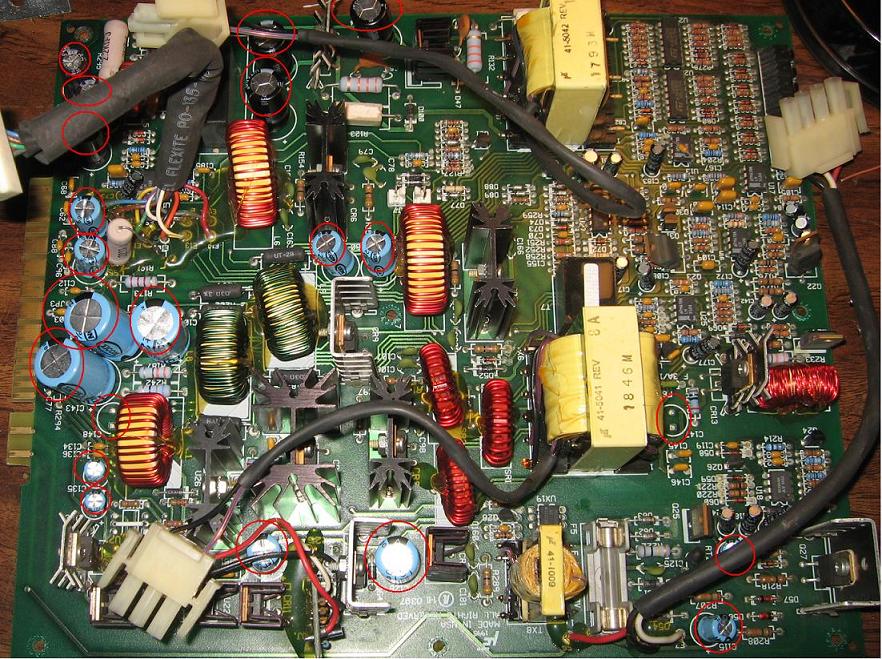
I just replaced all the capacitors on my LVPS.
In addition to now being able to raise brightness levels without losing blacks as quickly, and also now having slightly cleaner tube faces, and *possibly* tighter focus (mebbe?), I can say that the image artifact mentioned in this thread is probably gone. I just spent five minutes looking for it and I can't find it at all right now.
So it could possibly be gone now, or just incredibly reduced, or something. But all in all, I am very satisfied with the time spent (a few hours) with replacing caps on this LVPS!
_________________
Back after a digital sabatical.
|
|
| Back to top |
|
|
CZ Eddie
Joined: 23 Mar 2006
Posts: 1601
Location: Austin, TX
|
| Posted: Mon Jul 23, 2007 1:54 am Post subject: |
|
|
Well actually I left all the tiny 10uF's alone, so I didn't replace all the caps. But I did replace 21 of 'em. Circled below. And let me tell you that the bottom of the two 2200uF 25V's were cracked and nasty brown looking!!!!
| Description: |
|
| Filesize: |
176.82 KB |
| Viewed: |
4374 Time(s) |
|
_________________
Back after a digital sabatical.
|
|
| Back to top |
|
|
tse
Joined: 03 May 2006
Posts: 1014
Location: Sweatbucket, Fl.
|
| Posted: Mon Jul 23, 2007 3:48 am Post subject: |
|
|
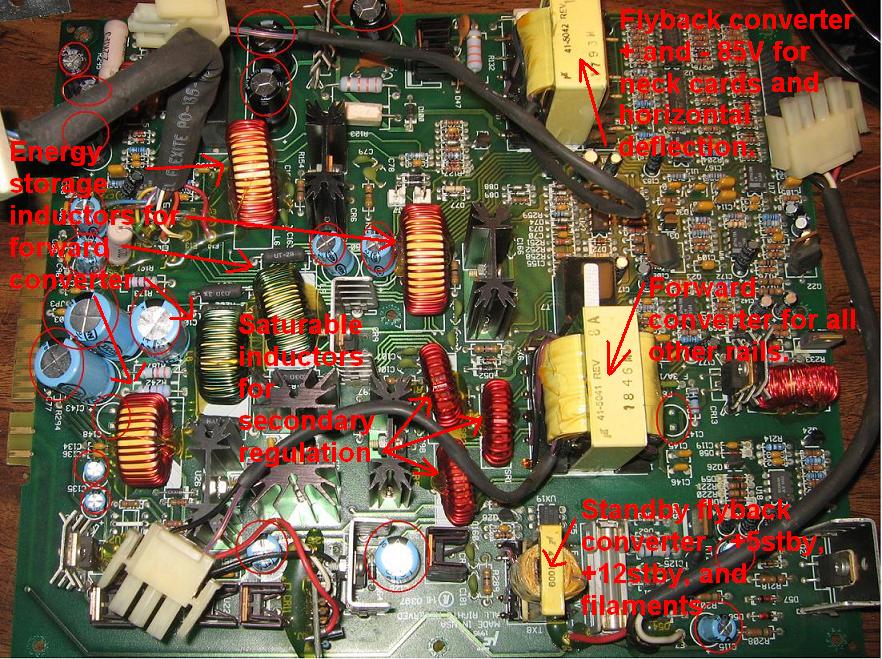
A short description of the LVPS contents. The PCB in the other cover is the PFC converter for drawing power from the AC mains in a clean, low harmonic manner. This is a nice reliable power supply.
Scott
| Description: |
|
| Filesize: |
186.32 KB |
| Viewed: |
4372 Time(s) |
|
_________________
"Were we directed from Washington when to sow and when to reap, we would soon want bread."
Thomas Jefferson
|
|
| Back to top |
|
|
CZ Eddie
Joined: 23 Mar 2006
Posts: 1601
Location: Austin, TX
|
| Posted: Mon Jul 23, 2007 4:19 am Post subject: |
|
|
Nice.. I've saved that pic to my M-Files! 
_________________
Back after a digital sabatical.
|
|
| Back to top |
|
|
PaulB
Joined: 26 Oct 2007
Posts: 359
Location: Bonnie (but rainy) Scotland
|
| Posted: Tue Sep 22, 2009 3:42 pm Post subject: |
|
|
Sorry guys some clarification please. (Resurrecting from the dead but this is a good thread and my query relates directly to it). Line Fix bulletin refers - http://www.curtpalme.com/docs/ElectrohomeMarqueeTechnicalBulletin_LineFix.pdf
In Scott's attachment which details VDC's own internal fix (copy below - pre-dating the bulletin I think), it does not list the fix as being applicable to the -03 VIM. The actual official Tech Bulletin on the other hand states that the fix is for VIMs -02p through 05p, including the -03 VIM.
The -03 VIM layout is not the same as the 02 Vim so does the bulletin apply to it - if it does apply, presumably we still use the exact same connection points but I couldn't actually translate across the connection points shown in the TBF over to my 03 VIM - I think I found two of them but the third remains elusive to say the least!
03 VIM Layout

Thanks,
| Description: |
|

Download |
| Filename: |
Phantln.pdf |
| Filesize: |
75.87 KB |
| Downloaded: |
281 Time(s) |
_________________
Paul
|
|
| Back to top |
|
|
PaulB
Joined: 26 Oct 2007
Posts: 359
Location: Bonnie (but rainy) Scotland
|
| Posted: Tue Oct 13, 2009 5:02 pm Post subject: |
|
|
A bump for anyone who may have the answer to the query above
_________________
Paul
|
|
| Back to top |
|
|
Nashou66

Joined: 12 Jan 2007
Posts: 16171
Location: West Seneca NY
|
|
| Back to top |
|
|
PaulB
Joined: 26 Oct 2007
Posts: 359
Location: Bonnie (but rainy) Scotland
|
| Posted: Tue Oct 13, 2009 6:45 pm Post subject: |
|
|
Aha!
Thanks Nash, I can put the soldering iron back in the drawer for now.
_________________
Paul
|
|
| Back to top |
|
|
|
|




