|
As this forum is rarely used anymore, we've locked it. Feel free to browse and read. Questions? Please reach out to us directly. Cheers! |

|
 |
|
|
| Author |
Message |
garyfritz

Joined: 08 Apr 2006
Posts: 12088
Location: Fort Collins, CO
|
| Posted: Sun May 06, 2007 5:04 pm Post subject: Calibration experts: gamma and low-IRE response?? |
|
|
I'm a calibration amateur, but I've used my colorimeter to set up several models of CRTs for myself and for friends. One of the challenges I face is dealing with the low-IRE crush that most CRTs exhibit.
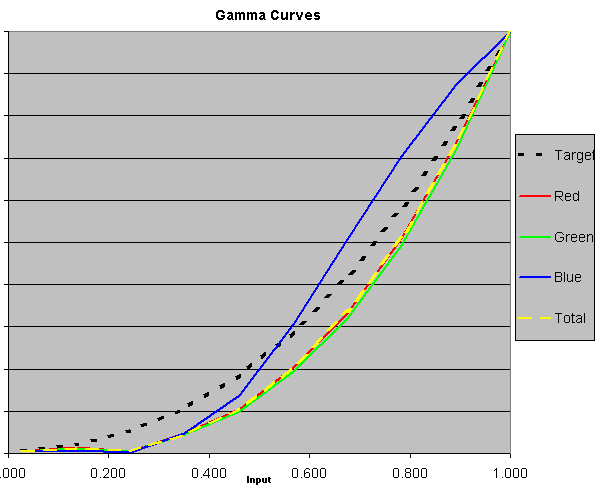
For example, my XG and my 8500 both had terrible black crush. This is common with all CRTs, but seems to be worse with some models. See the attached 8500crush.gif for an example of my 8500 before I calibrated it. The blue had a bad hump that I addressed with blue defocusing, but notice all three colors are far below the ideal gamma=2.5 target. Even if I set the color temp at IRE30, the IRE10-20 luminance levels are still way low.
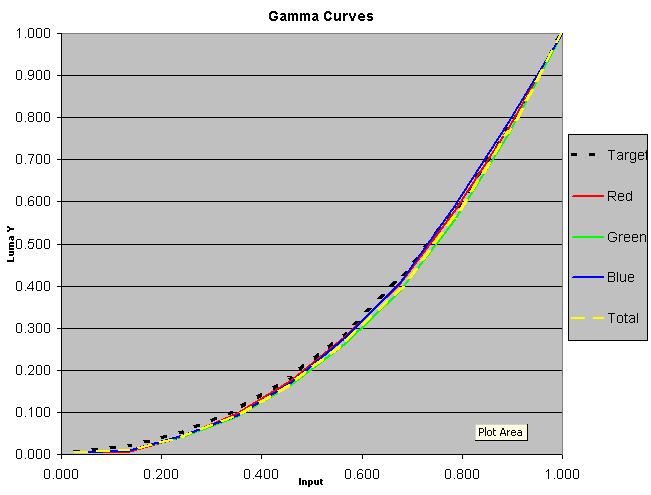
Most good scalers can tweak the response curve to correct for problems like that, but I don't have one. I have one of Kim's transcoder/gamma boxes on my 8500, and it definitely helps a lot -- see 8500gamma.gif.
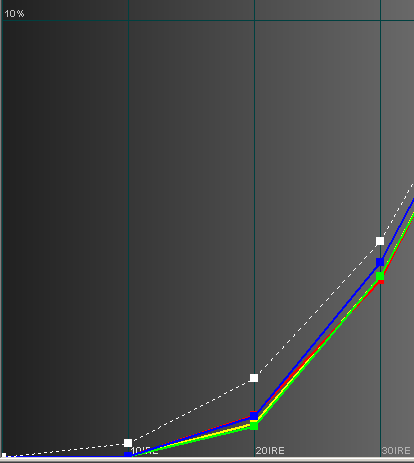
But even with the gamma boost maxed, the low IREs are still lower than they should be. I just re-measured last night with HCFR, a free calibration software tool that (together with a Spyder2 sensor) is more sensitive in low IREs than my old Minolta colorimeter. 8500HCFR.gif shows those results, zoomed in on the low IREs. IRE10 and 20 are 1/3 to 1/2 what they should be, even with Kim's box set to maximum boost. So the dark shadow details are still getting lost. And that's just compared to gamma=2.5. I'd like to at least try a smaller gamma (== higher low-IRE levels), bringing out the shadow details a bit more, but I can't even reach 2.5.
I'd also like to be able to adjust a CRT to have proper gamma and low-IRE levels even WITHOUT an external gamma booster, but I don't know if that's possible.
Are there any calibration techniques to raise up the low end? How can I juggle G2, Gain, Brightness, Contrast, etc to control the low-end luminance and overall gamma, while still maintaining full fade-to-black at IRE0?? Or do I have to choose between crushed blacks (less than without the Kimcoder, but still much lower than they should be) or loss of fade-to-black at IRE 0?
When I set the grayscale, I set D65 at IRE 30 and 80. I generally set the green G2 at a "reasonable" level, then tweak R & B G2 for D6500 at IRE30. I've experimented a bit with setting green G2 higher, but that doesn't seem to help raise the low end, or else I end up counteracting it with Brightness, or something.
Oh, and while I'm at it: I can get a nice tight D6500 for IRE30-100, but IRE20 is always way off -- often 500-1000K off from IRE30. RG&B track nicely above IRE20, but at IRE10-20 they go haywire. Is there any way to get IRE10-20 to fall in line with the rest of the grayscale, or is this just a CRT foible that you have to put up with?
Thanks for any insights,
Gary
| Description: |
|
| Filesize: |
8.72 KB |
| Viewed: |
553 Time(s) |
|
| Description: |
|
| Filesize: |
9.28 KB |
| Viewed: |
551 Time(s) |
|
| Description: |
|
| Filesize: |
43.08 KB |
| Viewed: |
551 Time(s) |
|
|
|
| Back to top |
|
 |
Elaine Benes
Joined: 25 Apr 2006
Posts: 1416
|
| Posted: Mon May 07, 2007 12:27 am Post subject: |
|
|
|
I can't answer any of your questions, but I can pile on board to say I've experienced EXACTLY the same hurdles as you setting up my own ancient 8000, several NEC's I've had, and one done for a buddy. The only projector I've gotten to do flat D6500 from 10 to 100(according to my Philips colorimeter) with decent shadow detail is a buddies G90 being fed from a Lumagen. We used the Lumagen 11 step gamma correction to attain the flat D6500, real black at 0 IRE and decent(but I suspect still lower than it *should* be) gamma from about 4.5 IRE to 20 or so...
|
|
| Back to top |
|
|
arioch
Joined: 17 Nov 2006
Posts: 17
|
| Posted: Mon May 07, 2007 2:11 pm Post subject: |
|
|
I would say that it's impossible to track D65 dE < 4 from 0-100% amplitude ("IRE") without the aid of external equipment on a CRT, yes.
But that's nothing strange as I see it. In a digital display there are degamma algorithms that manage the three primary gamma curves in exactly the same way.
A digital display without degamma data would look preeeeetty weird. 
So... If You have the possibility to tweak/equalize, then by all means do!
|
|
| Back to top |
|
|
OldBeard
Joined: 09 Mar 2006
Posts: 20
Location: Finland
|
| Posted: Wed May 09, 2007 4:06 pm Post subject: |
|
|
I think those pictures are with "black compensation" at ON setting (because the graph is flat at low end), which makes lowest measurement to IRE 0 when it's in reality above IRE 0.
IMHO: black compensation is for digital PJ/displays only.
Sensor -> Configure -> Calibration -> Options -> unselect Black compensation. That should make gamma chart look little different at low IRE immediately, without measuring again.
_________________
Electrohome Marquee 8000, backup: ECP 4100
|
|
| Back to top |
|
|
garyfritz
Joined: 08 Apr 2006
Posts: 12088
Location: Fort Collins, CO
|
| Posted: Wed May 09, 2007 4:58 pm Post subject: |
|
|
|
Hm. I thought Black Compensation was only for things that looked at / analyzed the curve, e.g. if it tried to estimate the gamma. You think it actually changes the way HCFR *reads* the low IREs?
|
|
| Back to top |
|
|
OldBeard
Joined: 09 Mar 2006
Posts: 20
Location: Finland
|
| Posted: Wed May 09, 2007 9:55 pm Post subject: |
|
|
| garyfritz wrote: | | Hm. I thought Black Compensation was only for things that looked at / analyzed the curve, e.g. if it tried to estimate the gamma. You think it actually changes the way HCFR *reads* the low IREs? |
It doesn't effect way how HCFR read. But it affect how HCFR calculate low end gamma. Try it, you'll see...
I measure from PJ, not from the screen (and baffle off).
One tip: Marquee's internal grayscale pattern is very accurate. I use E-Tech's instructions but I made darkest square just lit and then lower G2 few clicks so the darkest square is not lit any more. Watch directly to tube, not from screen. After that measurements should look nice at low end and needs very little G2 adjustment.
_________________
Electrohome Marquee 8000, backup: ECP 4100
|
|
| Back to top |
|
|
garyfritz
Joined: 08 Apr 2006
Posts: 12088
Location: Fort Collins, CO
|
| Posted: Wed May 09, 2007 10:04 pm Post subject: |
|
|
If it only affects how HCFR calculates low-end gamma, that's not going to change what I'm looking at. Look at the 3rd picture in my original post -- the measured levels are way low.
I've been measuring off the screen, since that seems to be far less sensitive to aim than pointing the sensor at the projector. When the sensor is pointed at the pj, it's extremely sensitive to the direction you point it. Aim it a bit off to the side and it "sees" too much blue, or too much red. Reading off the screen doesn't have that sensitivity.
When I set the initial G2, I looked at the screen, not the tube. Guess I can give that a try easily enough. My G2 is probably a bit off from the "standard" G2 because I have color-filtered lenses on R & G, but hopefully proper G2/drive on those tubes would compensate.
|
|
| Back to top |
|
|
garyfritz
Joined: 08 Apr 2006
Posts: 12088
Location: Fort Collins, CO
|
| Posted: Thu May 10, 2007 4:37 am Post subject: |
|
|
OK, I tried setting the G2 the way you said, and it was only a few clicks off of where I had it set already.
However I did notice something else: I forgot there was a brightness control on my DVD player, and it was a few clicks too high. I set that properly, and then my low-IRE levels looked much better. IRE 10 was still way low, but 20 and 30 were almost right. But remember I have my Kimcoder gamma boost on max... it wouldn't look so nice without that.
|
|
| Back to top |
|
|
|
|
|
|
|
You cannot post new topics in this forum
You cannot reply to topics in this forum
You cannot edit your posts in this forum
You cannot delete your posts in this forum
You cannot vote in polls in this forum
You cannot attach files in this forum
You can download files in this forum
|
Forum powered by phpBB © phpBB Group
|
|



