| Author |
Message |
ElTopo

Joined: 07 Nov 2006
Posts: 1640
|
| Posted: Sat Aug 17, 2024 12:01 pm Post subject: |
|
|
Well the price for a BNIB G90 is still not that bad.
If you think of a high end JVC which costs 25k.
_________________
Barco Cine 9 the one and only
|
|
| Back to top |
|
 |
kal
Forum Administrator

Joined: 06 Mar 2006
Posts: 18114
Location: Ottawa, Canada
TV/Projector: JVC DLA-NZ7
|
| Posted: Sat Aug 17, 2024 1:50 pm Post subject: |
|
|
| ElTopo wrote: | | Well the price for a BNIB G90 is still not that bad. If you think of a high end JVC which costs 25k. |
I don't think it's really fair to compare any of the newest JVCs to the Sony G90 as they're completely different tech and in different leagues. Apples and oranges.
The brand new JVC DLA-NZ900 just started shipping and the MSRP is $26K USD. Street price will be less. There's also the NZ800 at $16K USD MSRP. These are the very latest models that command a higher price and have small incremental improvements over the previous NZ9/NZ8/NZ7 line that sell for even less. The NZ9 is around $21K street while the NZ7 is around $7K street. I bought an NZ7 myself back in January (2024) to replace my JVC RS56 from 2013. The extra $$$ for the NZ8/9 wasn't worth it to me to get better optics and more light output on my 8' wide screen (in SDR mode I run the laser power at 0/100 and get 16 ftL).
Comparing any of these JVCs to the Sony G90 you have: Brighter (2200-3300 vs 1300 lumen), better blacks (laser dimming for true 0% light output), HDR10+ support (not only SDR), 4K/120 instead of 1080p/60 max, sharper, better ANSI, quiet (you can't hear the JVCs at all at normal fan setting while the G90 is loud and most will say it requires a hushbox), and a light source that should last longer (~20-40K hour to 50% output laser vs CRT that may get 10K hours). The JVCs are all warrantied/supported/have parts too of course.
The JVC laser projectors are more expensive but you can get one of the previous bulb versions (NX5/NX7/NZ9) for less and probably 1/2 that price if you want to go used.
Kal
_________________

Support our site by using our affiliate links. We thank you!
My basement/HT/bar/brewery build 2.0
|
|
| Back to top |
|
|
ElTopo
Joined: 07 Nov 2006
Posts: 1640
|
| Posted: Sat Aug 17, 2024 3:21 pm Post subject: |
|
|
Well i saw the NZ8 and was very disappointed with the black level.
I had an NZ7 for one day and it went straight back.
I‘m waiting for the new Epson line at the upcoming CEDIA.
In a black cinema you don‘t need high a high value of lumen.
With an AT screen the game would change you need every lumen 
Maybe the fan noise of the G90 could be reduced with a hushbox.
The G90 design looks amazing !
_________________
Barco Cine 9 the one and only
|
|
| Back to top |
|
|
kal
Forum Administrator
Joined: 06 Mar 2006
Posts: 18114
Location: Ottawa, Canada
TV/Projector: JVC DLA-NZ7
|
| Posted: Sat Aug 17, 2024 3:58 pm Post subject: |
|
|
| ElTopo wrote: | Well i saw the NZ8 and was very disappointed with the black level.
I had an NZ7 for one day and it went straight back. |
What firmware version? What mode was Laser Dimming (Dynamic Control) set to? In mode 3 (with the newest firmware 3) it’s truly 100% black with complete fades because it turns the laser off (no light). I don’t actually use this mode ands I find black level excellent without any laser dimming. Just like my previous RS56 I find the black level on my JVC NZ7 better than any crt projectors I owned as does low level detail better without crushing.
| ElTopo wrote: | | In a black cinema you don‘t need high a high value of lumen. |
It’s not that simple. Depends on screen size and gain too (and if the screen’s AT as you mentioned). Then there’s HDR as well. You need lots of light output for that to even get reasonably close with tone mapping. HDR is a non-starter with CRT. Not everyone will care however.
Kal
_________________
Support our site by using our affiliate links. We thank you!
My basement/HT/bar/brewery build 2.0
|
|
| Back to top |
|
|
station_equation
Joined: 04 Aug 2024
Posts: 32
Location: Peoria, IL
|
| Posted: Sat Aug 17, 2024 5:21 pm Post subject: |
|
|
Laser projector isn't going to work with my NES Zapper to play 120" Duck Hunt, though 
Kidding not kidding. I'm very curious about the G90s orbiting scan line feature, though, to reduce the risk of scan line burn-in.
_________________
Jeremy
Sony G90 / Pioneer HLD-X9 / Radiance 2144 / Marantz SR5011
|
|
| Back to top |
|
|
ElTopo
Joined: 07 Nov 2006
Posts: 1640
|
| Posted: Sat Aug 17, 2024 5:22 pm Post subject: |
|
|
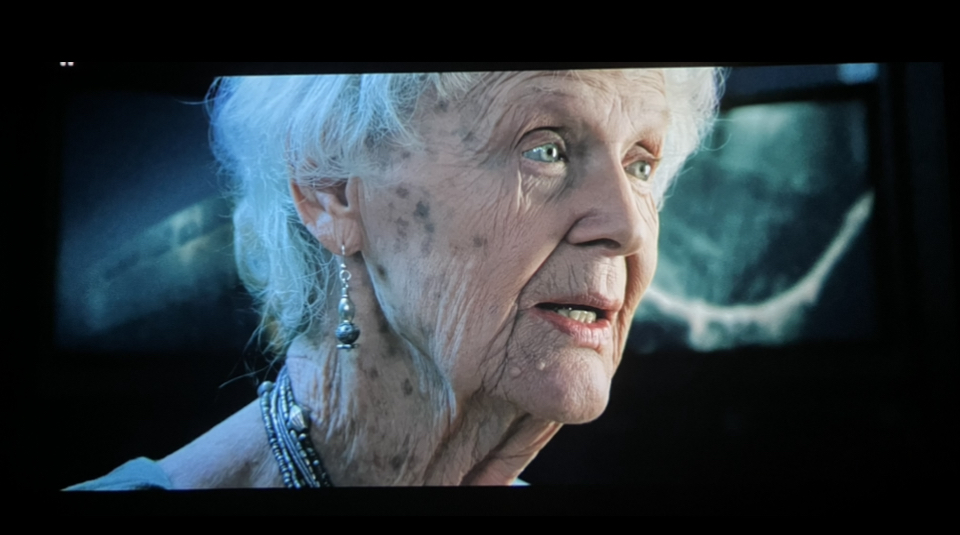
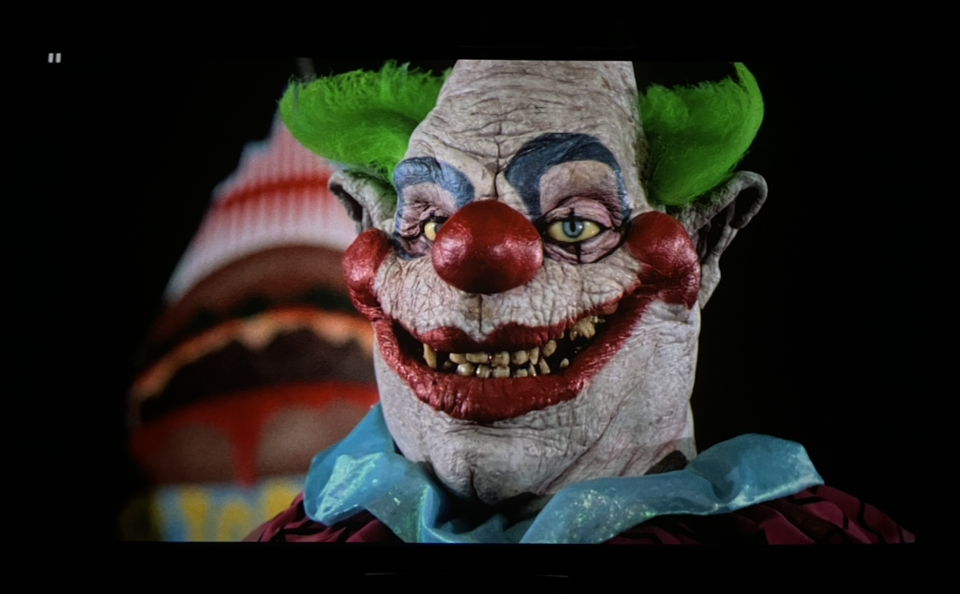
I had the NZ7 with the Lumagen Pro which has some negatives:
- Laser dimming was not possible with the Lumagen Pro in the chain
- Dolby Vision is not accepted with the Lumagen Pro
As for HDR it works pretty well with an Oppo 203 and the internal Moome Card in my Marquee 9500LC Ultra.
Colors are insane good and the 4K masters (downscaled to 1080p) are also better most of the time.
Also DV is nicely tone mapped with the Oppo 203.
| Description: |
|
| Filesize: |
308.21 KB |
| Viewed: |
1106 Time(s) |
|
| Description: |
| 4K in Oppo203 to internal Moome if Marquee 9500LC Ultra |
|
| Filesize: |
339.69 KB |
| Viewed: |
1107 Time(s) |
|
_________________
Barco Cine 9 the one and only
|
|
| Back to top |
|
|
Dancrt
Joined: 16 Sep 2017
Posts: 88
|
| Posted: Sun Aug 18, 2024 4:22 am Post subject: |
|
|
Nice on both accounts
Also I believe RgB 4:4:4 looks good on crt
Still with 4k downscaled to 1080p as
Correct me if I’m wrong but UhD the
Colour channels are 1080p with a lumanace 4k overlay
And 1080p the color information is only 720p with 1080p overlay
Hence why I find 4k discs actually look sharper than 1080p
Discs via Barco 909 with mods and moome card and vp50 pro
For me looks 20-30% sharper (albeit the vp50 pro set to sharpen fine details on both)
Go duck hunt I want to hook mine up too !!! (Can’t find the game)
|
|
| Back to top |
|
|
station_equation
Joined: 04 Aug 2024
Posts: 32
Location: Peoria, IL
|
| Posted: Sun Aug 18, 2024 11:13 pm Post subject: |
|
|
| HaydnG90 wrote: | | Whats the date of manufacture? |
Finally found the build tag, December 2000. It was underneath the left side panel, but I was pulling them anyway to protect the exterior from banging around some narrow doors and staircases.
Also have a Marquee green C-element on the way.
|
|
| Back to top |
|
|
ElTopo
Joined: 07 Nov 2006
Posts: 1640
|
| Posted: Mon Aug 19, 2024 8:02 am Post subject: |
|
|
It would be nice if you do some pics of the green C-element change

_________________
Barco Cine 9 the one and only
|
|
| Back to top |
|
|
kal
Forum Administrator
Joined: 06 Mar 2006
Posts: 18114
Location: Ottawa, Canada
TV/Projector: JVC DLA-NZ7
|
|
| Back to top |
|
|
station_equation
Joined: 04 Aug 2024
Posts: 32
Location: Peoria, IL
|
| Posted: Mon Aug 19, 2024 1:17 pm Post subject: |
|
|
Yeah, I had seen that link and was going to use that as the instruction guide. El Topo, are those the photos you were asking about, or before/after photos of the picture/color quality?
I'm not concerned about the noise. I test fired the G90 in the garage where FedEx dropped it off to make sure I wasn't going to have to send it away for fixes before dropping it into the basement, and from what I've read around the internet, was expecting it to be MUCH louder. Anyway, the theater will be next to my utility room, so the furnace air handler is what's going to need a hushbox first.
|
|
| Back to top |
|
|
HaydnG90

Joined: 22 May 2006
Posts: 1356
|
| Posted: Mon Aug 19, 2024 4:41 pm Post subject: |
|
|
| station_equation wrote: | Yeah, I had seen that link and was going to use that as the instruction guide. El Topo, are those the photos you were asking about, or before/after photos of the picture/color quality?
I'm not concerned about the noise. I test fired the G90 in the garage where FedEx dropped it off to make sure I wasn't going to have to send it away for fixes before dropping it into the basement, and from what I've read around the internet, was expecting it to be MUCH louder. Anyway, the theater will be next to my utility room, so the furnace air handler is what's going to need a hushbox first. |
The G90 predecessor the 1292 is the really noisy beast. In the G90 most of the irritating noise comes from a couple of small PC cooling fans. These can be replaced with quieter units which helps. I personally never found the noise irritating enough, especially after to movie starts to worry. Any my G90 was installed directly over my head.
|
|
| Back to top |
|
|
station_equation
Joined: 04 Aug 2024
Posts: 32
Location: Peoria, IL
|
| Posted: Mon Aug 19, 2024 7:14 pm Post subject: |
|
|
| HaydnG90 wrote: |
The G90 predecessor the 1292 is the really noisy beast. In the G90 most of the irritating noise comes from a couple of small PC cooling fans. These can be replaced with quieter units which helps. I personally never found the noise irritating enough, especially after to movie starts to worry. Any my G90 was installed directly over my head. |
After watching Graham's setup video, it seems like they made a couple of nice developments between the G90 and the 1292. Namely adding knobs to adjust the Scheimpflug rings without having to loosen the lens supports, and dialing back the noise.
_________________
Jeremy
Sony G90 / Pioneer HLD-X9 / Radiance 2144 / Marantz SR5011
|
|
| Back to top |
|
|
station_equation
Joined: 04 Aug 2024
Posts: 32
Location: Peoria, IL
|
| Posted: Wed Aug 21, 2024 1:28 am Post subject: |
|
|
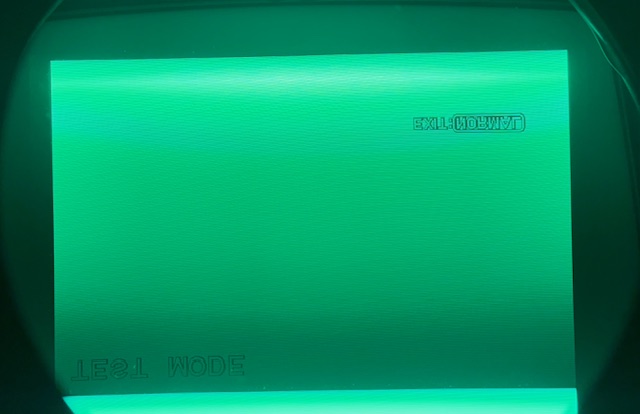
Got it in the basement (successfully?) and starting to play with setup. Taking Kal’s advice to heart, I’m maxing out the phosphor usage then setting the position
Attached is what the factory image size is on the screen. It seems like there is a lot of unused phosphor here, right? When you set the size to MAX, MAX, it looks like it’s just the right size on the tube.
So…why isn’t the factory setting MAX, MAX?
| Description: |
|
| Filesize: |
111.98 KB |
| Viewed: |
908 Time(s) |
|
_________________
Jeremy
Sony G90 / Pioneer HLD-X9 / Radiance 2144 / Marantz SR5011
|
|
| Back to top |
|
|
kal
Forum Administrator
Joined: 06 Mar 2006
Posts: 18114
Location: Ottawa, Canada
TV/Projector: JVC DLA-NZ7
|
|
| Back to top |
|
|
garyfritz

Joined: 08 Apr 2006
Posts: 12088
Location: Fort Collins, CO
|
| Posted: Wed Aug 21, 2024 2:13 pm Post subject: |
|
|
|
You know that's a Bad Thing, right Jeremy? You can crack a tube by running the raster off the edge of the tube. It heats the side of the tube unevenly and kablooey. So don't overdo the maxing-the-raster part. Leave a bit of room at the edges.
|
|
| Back to top |
|
|
kal
Forum Administrator
Joined: 06 Mar 2006
Posts: 18114
Location: Ottawa, Canada
TV/Projector: JVC DLA-NZ7
|
|
| Back to top |
|
|
station_equation
Joined: 04 Aug 2024
Posts: 32
Location: Peoria, IL
|
| Posted: Wed Aug 21, 2024 3:49 pm Post subject: |
|
|
The raster size set in the registration steps is the maximum size the machine will ever project? The separate size adjustment based on input source has me wondering that if I max the default registration size, a specific input would then overdrive that.
Also, the ratio of the horizontal and vertical 0-255 values isn’t a 4:3 ratio. How do you ensure that you aren’t squeezing/stretching?
_________________
Jeremy
Sony G90 / Pioneer HLD-X9 / Radiance 2144 / Marantz SR5011
|
|
| Back to top |
|
|
Curt Palme
CRT Tech
Joined: 08 Mar 2006
Posts: 24396
Location: Langley, BC
TV/Projector: All of them!
|
| Posted: Wed Aug 21, 2024 4:24 pm Post subject: |
|
|
|
Make VERY sure you don't come too close to the edge of the tube face! G90 tubes are known to implode, especially the green ones.
|
|
| Back to top |
|
|
kal
Forum Administrator
Joined: 06 Mar 2006
Posts: 18114
Location: Ottawa, Canada
TV/Projector: JVC DLA-NZ7
|
| Posted: Wed Aug 21, 2024 4:34 pm Post subject: |
|
|
| station_equation wrote: | | The raster size set in the registration steps is the maximum size the machine will ever project? The separate size adjustment based on input source has me wondering that if I max the default registration size, a specific input would then overdrive that. |
Yes - Raster is the max area the active image may occupy. The raster is not (normally) seen on the screen. It's normal to have the raster to be a bit larger than the actual active image area because when the electron gun swings back to the start side you want some "time" for it to stabilize before it starts painting.
It's not uncommon to set the RASTER to be larger than the tube surface and use blanking to blank out left/right/top/bottom to ensure that you don't by accident move the IMAGE that is within the RASTER off the tube face.
| station_equation wrote: | | Also, the ratio of the horizontal and vertical 0-255 values isn’t a 4:3 ratio. How do you ensure that you aren’t squeezing/stretching? |
Set the width in the tubes as you'll always run out of width before height. Then project and measure on screen to ensure you've got the ratio you want.
Kal
_________________
Support our site by using our affiliate links. We thank you!
My basement/HT/bar/brewery build 2.0
|
|
| Back to top |
|
|
|
|




