| Author |
Message |
wanderer
Joined: 11 Jan 2015
Posts: 76
|
| Posted: Mon Aug 12, 2024 4:25 am Post subject: |
|
|
Big congrats on the NIB G90. Do what Kal said - get it on a cart and plan on moving it around for a few weeks while you play around with possible screen sizing while projecting onto the wall, etc, to start with. That 8 feet height will as you've worked out limit what you can do with a 4:3 sizing, but you'll still find it likely more than big enough anyway.
Some info on screen sizes and brightness. I have 2 x Stewart wallscreen deluxe screens here: One is a 16:9 100" G3 Studiotek 1.3 (from 2017) and the other is a 16:9 140" G4 Studiotek 1.3 (from 2023). With my 9in CRT at a properly optimized throw ratio to maximize the raster use, I had 11-12 Ftl on the 100" and about ~6" Ftl on the 140" screen size. Brightness drop makes sense as the 140" 16:9 is almost double the size of the 100" one square inch wise: https://www.displaywars.com/140-inch-16x9-vs-100-inch-16x9.
I run my brightness\contrast at or below factory Runco\Barco default levels, and after 1,500 hours have basically no additional wear on my Green CRT at all. Crank up the light levels and yes, it's going to burn more for sure. Not sure where Sony has it's initial levels set at.
I loved my G3 material for years and didn't think the G4 material would be any better despite being a new formula. I was wrong - it's stunning. For us, the 140" screen size is a much, much better picture than the 100" for a few reasons. First, it's a sharper image on that G4 material don't ask me why, it just is. Second is that the larger screen size just plays to CRTs strength of a pixel free smooth image that looks like film. Third is that in a fully darkened and blacked out room, the brightness does not matter for us at all. Yes, it's at 6ftl for peak whites, but the depth of the image combined with your eyes being absolutely wide open and relaxed due to the lower picture levels just makes for a stunning image. Running lower light output overall also means less visible flicker - we're doing 1080p48 for film on 140" and don't notice the flicker at all.
|
|
| Back to top |
|
 |
ElTopo

Joined: 07 Nov 2006
Posts: 1640
|
| Posted: Mon Aug 12, 2024 9:44 am Post subject: |
|
|
I asked them some time ago and they told me that the YA board has the good batch of the IC's.
So it might be good to check that as well.
cheers
_________________
Barco Cine 9 the one and only
|
|
| Back to top |
|
|
ElTopo
Joined: 07 Nov 2006
Posts: 1640
|
| Posted: Mon Aug 12, 2024 9:48 am Post subject: |
|
|
@station_equation: Did you made an offer on the open box or BNIB one ?
I hope the discount was a big one 
_________________
Barco Cine 9 the one and only
|
|
| Back to top |
|
|
kal
Forum Administrator

Joined: 06 Mar 2006
Posts: 18114
Location: Ottawa, Canada
TV/Projector: JVC DLA-NZ7
|
| Posted: Mon Aug 12, 2024 2:19 pm Post subject: |
|
|
| wanderer wrote: | | Some info on screen sizes and brightness. I have 2 x Stewart wallscreen deluxe screens here: One is a 16:9 100" G3 Studiotek 1.3 (from 2017) and the other is a 16:9 140" G4 Studiotek 1.3 (from 2023). With my 9in CRT at a properly optimized throw ratio to maximize the raster use, I had 11-12 Ftl on the 100" and about ~6" Ftl on the 140" screen size. Brightness drop makes sense as the 140" 16:9 is almost double the size of the 100" one square inch wise: https://www.displaywars.com/140-inch-16x9-vs-100-inch-16x9. |
I'm surprised that a 9" CRT projector would only get you 11-12 ftL on a 100" screen. I'm assuming you mean 100" diagonal and not 100" wide? My screen's 110" diagonal (96x54") and only ~1.1 gain and back when I was using an 8" CRT projector (Barco Cine 8 Onyx clone) I was hitting the 14 ftL as recommended by SMPTE for SDR after my projector was calibrated. Are you measuring light output from a window pattern or whole screen? For displays that have reduced output when a bright fullscreen image is shown (like CRT) you should make sure to use a window pattern and not fullscreen.
| wanderer wrote: | | Third is that in a fully darkened and blacked out room, the brightness does not matter for us at all. Yes, it's at 6ftl for peak whites, but the depth of the image combined with your eyes being absolutely wide open and relaxed due to the lower picture levels just makes for a stunning image. |
I used to say the same thing and truly enjoyed it like you did, but all I can say is don't spend any time with more light output as it's very addictive and you won't want to go back. 
Kal
_________________

Support our site by using our affiliate links. We thank you!
My basement/HT/bar/brewery build 2.0
|
|
| Back to top |
|
|
HaydnG90

Joined: 22 May 2006
Posts: 1356
|
| Posted: Mon Aug 12, 2024 4:27 pm Post subject: |
|
|
| kal wrote: | | wanderer wrote: | | Some info on screen sizes and brightness. I have 2 x Stewart wallscreen deluxe screens here: One is a 16:9 100" G3 Studiotek 1.3 (from 2017) and the other is a 16:9 140" G4 Studiotek 1.3 (from 2023). With my 9in CRT at a properly optimized throw ratio to maximize the raster use, I had 11-12 Ftl on the 100" and about ~6" Ftl on the 140" screen size. Brightness drop makes sense as the 140" 16:9 is almost double the size of the 100" one square inch wise: https://www.displaywars.com/140-inch-16x9-vs-100-inch-16x9. |
I'm surprised that a 9" CRT projector would only get you 11-12 ftL on a 100" screen. I'm assuming you mean 100" diagonal and not 100" wide? My screen's 110" diagonal (96x54") and only ~1.1 gain and back when I was using an 8" CRT projector (Barco Cine 8 Onyx clone) I was hitting the 14 ftL as recommended by SMPTE for SDR after my projector was calibrated. Are you measuring light output from a window pattern or whole screen? For displays that have reduced output when a bright fullscreen image is shown (like CRT) you should make sure to use a window pattern and not fullscreen.
| wanderer wrote: | | Third is that in a fully darkened and blacked out room, the brightness does not matter for us at all. Yes, it's at 6ftl for peak whites, but the depth of the image combined with your eyes being absolutely wide open and relaxed due to the lower picture levels just makes for a stunning image. |
I used to say the same thing and truly enjoyed it like you did, but all I can say is don't spend any time with more light output as it's very addictive and you won't want to go back.
Kal |
I was using a 1.3 gain Studiotek 100" drag 16:9 screen and my calibrator was just getting around 13 ftl and not pushing the contrast. Plenty bright enough in a light controlled dedicated HT room. I put on about 6000 hrs in the 15 years I used the G90 and could detect the slightest reddish discolouration on non letterboxed material.
|
|
| Back to top |
|
|
wanderer
Joined: 11 Jan 2015
Posts: 76
|
| Posted: Mon Aug 12, 2024 8:02 pm Post subject: |
|
|
|
Yes - it was a 100" diagonal screen size I mentioned above. You can absolutely get to 14ftl or higher easily enough - just increase the contrast as per usual. This was measured with the window pattern. The transition from super black to super white at those levels when watching movies was also jarring as my eyes had problems dealing with the overload of the brightness. 9ftl peak white is kind of my limit to go from super black to instant hyper white without having eye discomfort. Having the projector set at a more normal lower white level and just coasting along without burning up the tubes is also a nice thing.
|
|
| Back to top |
|
|
station_equation
Joined: 04 Aug 2024
Posts: 32
Location: Peoria, IL
|
| Posted: Tue Aug 13, 2024 3:13 pm Post subject: |
|
|
| ElTopo wrote: | @station_equation: Did you made an offer on the open box or BNIB one ?
I hope the discount was a big one |
It was the NIB! Though they did remove the machine and repack it for the Dallas chip swap.

|
|
| Back to top |
|
|
wanderer
Joined: 11 Jan 2015
Posts: 76
|
| Posted: Tue Aug 13, 2024 7:53 pm Post subject: |
|
|
|
You just have to smile looking at that box. Cool stuff!
|
|
| Back to top |
|
|
kal
Forum Administrator
Joined: 06 Mar 2006
Posts: 18114
Location: Ottawa, Canada
TV/Projector: JVC DLA-NZ7
|
|
| Back to top |
|
|
Dancrt
Joined: 16 Sep 2017
Posts: 88
|
| Posted: Wed Aug 14, 2024 9:01 am Post subject: |
|
|
Jellous 
|
|
| Back to top |
|
|
station_equation
Joined: 04 Aug 2024
Posts: 32
Location: Peoria, IL
|
| Posted: Wed Aug 14, 2024 1:26 pm Post subject: |
|
|
Hot. Damn. IC421 lot no. 040A02E which is not from the bad batch. The serial number of the machine is 1003, if anyone is tracking these things.
This gamble might have paid off.
_________________
Jeremy
Sony G90 / Pioneer HLD-X9 / Radiance 2144 / Marantz SR5011
|
|
| Back to top |
|
|
garyfritz

Joined: 08 Apr 2006
Posts: 12088
Location: Fort Collins, CO
|
| Posted: Wed Aug 14, 2024 3:19 pm Post subject: |
|
|
| wanderer wrote: | | You can absolutely get to 14ftl or higher easily enough - just increase the contrast as per usual. This was measured with the window pattern. The transition from super black to super white at those levels when watching movies was also jarring as my eyes had problems dealing with the overload of the brightness. |
I had my 8500 set to about 14 ftL (measured on a window), so I had plenty of brightness. What bugged me was the current limitation. Any scene with lots of white/light area maxed out the projector's current capacity, so those scenes looked dingy or dim. Movies like Ice Age, with lots of white, were actually kind of unpleasant to watch. It felt like my vision was dimmed somehow.
My JVC RS45 made an ENORMOUS improvement in that area. You don't have to worry about ANSI lumens with a digital, because there is no dimming with bright scenes. The image has a LOT more "pop" and life.
|
|
| Back to top |
|
|
station_equation
Joined: 04 Aug 2024
Posts: 32
Location: Peoria, IL
|
| Posted: Wed Aug 14, 2024 9:48 pm Post subject: |
|
|
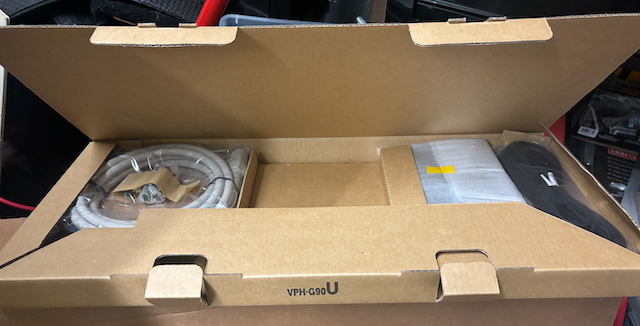
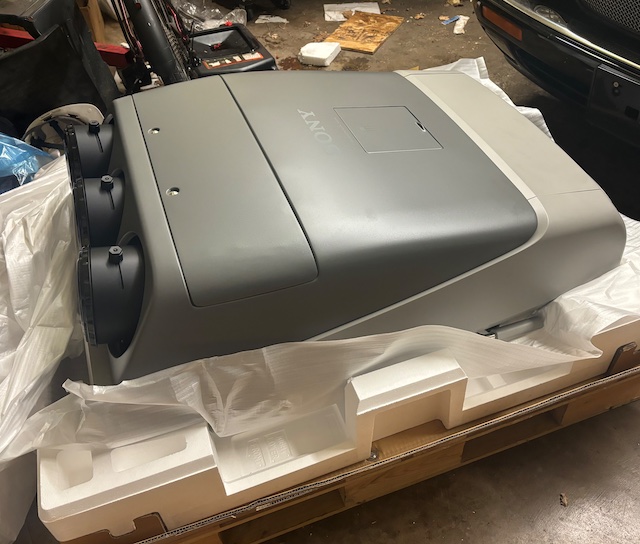
A couple more from the unboxing and I'll stop.
| Description: |
|
| Filesize: |
225.72 KB |
| Viewed: |
961 Time(s) |
|
| Description: |
|
| Filesize: |
117.26 KB |
| Viewed: |
961 Time(s) |
|
|
|
| Back to top |
|
|
HaydnG90
Joined: 22 May 2006
Posts: 1356
|
| Posted: Wed Aug 14, 2024 9:57 pm Post subject: |
|
|
|
You even got the PSS-90 ceiling mount. Did FH throw that in? When you think these were over $60K new, to get one close to $4K BNIB is pretty amazing. And you have one of the latest to come out of Japan. Whats the date of manufacture?
|
|
| Back to top |
|
|
station_equation
Joined: 04 Aug 2024
Posts: 32
Location: Peoria, IL
|
| Posted: Thu Aug 15, 2024 6:51 pm Post subject: |
|
|
Is the build date on the serial number tag somewhere on the machine? I pulled the SN just from the label on the box, and haven't found the sticker on the PJ yet.
I did pay extra for the PSS-90, but they were able to strap it to the G90 to combine on shipping charges. After tax and shipping, which was quite expensive, I ended up at about their ask price for the NIB units.
This is my absolute first CRT projector, so I apologize for being behind the curve. When the picture gets "adjusted" for 16:9, it just sizes out the black letterbox bands so that they don't project, but that still leaves the phosphor within that area unlit, so the "wear" will actually be a reverse wear in that there will be uneven phosphor usage between the 16:9 image and the underused remaining 4:3 area? Can you shift the picture up and down so that it balances out the phosphor? Like, one day move the image so that it's top justified, and others it's bottom justified? I'm setting up a 4:3 screen and blanking out the unused portion, so I can move the blackout curtains up and down as needed.
_________________
Jeremy
Sony G90 / Pioneer HLD-X9 / Radiance 2144 / Marantz SR5011
|
|
| Back to top |
|
|
Dancrt
Joined: 16 Sep 2017
Posts: 88
|
| Posted: Thu Aug 15, 2024 7:55 pm Post subject: |
|
|
If it’s your first one. First thing you have to do is buy a moome hdmi card
I’m Barco 909 now but started with Sony d50 then g70 the difference between
Using anything else vs moome is massive it’s a must not a option
And learning how to adjust your bias and g2 is a must
I have a degree in commercial photography and if took me
Months to get my 909 adjusted so fine I was happy with it
Crt is so hard to get to a point where the picture is breathtaking
A freind has two Barco 909 blended and it took
Us both trying to make it epic months and he wanted to give
Up and just use a modern projector
But now it’s breathtaking and bright as well worth it
He has a vp50 pro now too
And many say don’t push your contrast too high
My poor 909 is pushed so hard anymore power and
The green tube goes blurry (I have dark green filter not light green or none
Which makes it work so much harder but better colour)
I was worried about burn in and it’s now visible on the tube face
But so far not on screen after approx 3,000 hours use on the new tubes.
As much as it’s debateable if I didn’t push my Barco that hard
I would just use my 4k JVC the JVC is out of the box nearly
Perfect but my Barco factory reset and new tubes was
Horrid !!! Do not despair everything is adjustable and
End result for me was my Barco 909 now outputs a
With a dvdo vp50 pro (highly recommend lets you extract sharper
And more colourful image)
That has much finer tone details in the shadows (ub9000 helps as
Does the hdr conversion too sdr and has low Lumans projector
Profile)
Better blacks (moome helps as adjustable gamma without
Moome your blacks would be not as good)
You should be able to move picture but just buy a new green tube
Greg einsman might still sell them
To save your tube use a jvc or other modern
Projector for tv like I do plus the jvc is epic at 3d
Like amazing at 3d your g90 can’t compete in 3d
Motion resolution is soo much better on crt
I can tell between my jvc and the Barco
On high speed iPhone video the jvc
Has ghost images of the previous frames
Crt dosnt except for maybe the occasional highlight
My Barco to beat my JVC is modded electrically
Gregs_tv that used to be in here I have his mods
Which made a massive improvement to contrast and
Fine shadow detail I have no idea if anyone does for a g90 or if it’s
needs such mods the barcos rgb switcher was terrible
The mods fix it (black crush and other issues)
Anyhow my point being there is no point in trying to save
Your tubes just buy spares otherwise you will get better brighter
Picture from a modern JVC
My jvc is still sharper but crt pushed to the max
Is bright and for me better but not pushed to the max
And tweaked to stupid levels the JVC would be better.
I much prefer the CRT image while still not as sharp as
My jvc every other part the Barco excels (except reliability)
Sorry for rambling so much but don’t be surprised
If it’s underwhelming at first you need
Lots of knowledge and maybe even a degree
To understand how to get the most out of it
It’s the bias and g2 and moomes gamma all tied into
One will give the best image from memory
Brightness 50 contrast 80 was my Sony go too
And adjust bias and g2 and moome
The brightness and contrast anything other than
Default would make image poor.
Good luck and for once read the instructions !!!
Bias is explained in the manual from memory
To even get close to a modern projector you will have to
Adjust it to the end of its life I’m very happy I’ve spent way more
Than you have on mine as I’m fussy and love both crt and the JVC
It’s like a digital camera vs film camera
For me the crt is just next level still once adjusted to
To crazy levels default it looked like a old yellowed
1989 style tv it was disheartening to start with
Crt is a hobby not a set and forget for that JVC is the way
To go
Enjoy !!!!
Don’t save the tubes buy more while you can
|
|
| Back to top |
|
|
Dancrt
Joined: 16 Sep 2017
Posts: 88
|
| Posted: Thu Aug 15, 2024 8:05 pm Post subject: |
|
|
Note you might want to look into darker c element if your into colour
From memory g90 has a lighter one to get better tube life
Modern high end projectors will have colours that the best crt can’t get too
As there not rec2020 the phosphor can’t do rec2020 no matter what
|
|
| Back to top |
|
|
HaydnG90
Joined: 22 May 2006
Posts: 1356
|
| Posted: Thu Aug 15, 2024 10:12 pm Post subject: |
|
|
| Dancrt wrote: | Note you might want to look into darker c element if your into colour
From memory g90 has a lighter one to get better tube life
Modern high end projectors will have colours that the best crt can’t get too
As there not rec2020 the phosphor can’t do rec2020 no matter what |
No, Sony used a lighter green C Element to boost brightness to compete with the digitals of the era in less than total light controlled environments. These pjs were primarily aimed at the business market and not HT.
|
|
| Back to top |
|
|
Dancrt
Joined: 16 Sep 2017
Posts: 88
|
| Posted: Fri Aug 16, 2024 1:54 am Post subject: |
|
|
Ah makes sense !!!
I was temped to change mine to the lighter one
But haven’t got one to change too for one
And really want good colour anyway and use the vp50 pro
To add saturation (about 8% more yes might clip a little but looks epic )
|
|
| Back to top |
|
|
HaydnG90
Joined: 22 May 2006
Posts: 1356
|
| Posted: Fri Aug 16, 2024 6:42 am Post subject: |
|
|
|
You'll find the label with the manufacture date located in the sticker on the side of the G90 just below one of the pullout handles.
|
|
| Back to top |
|
|
|
|




