|
As this forum is rarely used anymore, we've locked it. Feel free to browse and read. Questions? Please reach out to us directly. Cheers! |

|
 |
|
|
| Author |
Message |
poen
Joined: 21 Dec 2012
Posts: 51
|
| Posted: Mon Jan 04, 2021 11:29 am Post subject: Sony 1292 - test raster vs actual screen size |
|
|
Hi all,
Finally got the Sony 1292 working (for now) - got a working one by adding 5 broken ones together:)
After setting up / aligning everything I wonder why my testing screens are so much bigger than my actual 1080p/72hz (PC) is so much smaller - I am already @ Max RGB size but not able to fill up my screen while in the test screens go way over my screen borders.
What am I missing?
Thanks for helping:)
|
|
| Back to top |
|
 |
gjaky

Joined: 05 Jun 2010
Posts: 2802
Location: Budapest, Hungary
|
| Posted: Mon Jan 04, 2021 9:58 pm Post subject: |
|
|
The question is what timings do you use?
Display devices have a so called retrace time that is needed for the electron beam to return from the end of the line to the beginning of a new line. This time is specific for each display, and often dependent of the actual scanrate too. Display timings have to accomodate to the display's retrace time to properly fill the raster.
Unfortunately the 1292 brochure does not tell the actual retrace time, but I believe it should be farily short. Anyway, you have to experiment with advanced display timings if your VGA card allows to do this from driver, otherwise you have to use some external tool, like CRU.
You have to get familiar with porches and sync width etc. you can find some explanation about these here.
I guess that you would need a total horizontal pixel count around 2400 for 1080P 72Hz, now you have much more therefore you can't properly fill your raster.
_________________
projectors in the past : NEC 6-9PG xtra, Electrohome Marquee 6-7500, NEC XG 1351 LC ( with super modified Electrohome VNB neckboard !!!)
current: VDC Marquee 9500LC
The MOD: VNB-DB, VIM-DB
|
|
| Back to top |
|
|
poen
Joined: 21 Dec 2012
Posts: 51
|
| Posted: Tue Jan 05, 2021 8:40 pm Post subject: |
|
|
| gjaky wrote: | The question is what timings do you use?
Display devices have a so called retrace time that is needed for the electron beam to return from the end of the line to the beginning of a new line. This time is specific for each display, and often dependent of the actual scanrate too. Display timings have to accomodate to the display's retrace time to properly fill the raster.
Unfortunately the 1292 brochure does not tell the actual retrace time, but I believe it should be farily short. Anyway, you have to experiment with advanced display timings if your VGA card allows to do this from driver, otherwise you have to use some external tool, like CRU.
You have to get familiar with porches and sync width etc. you can find some explanation about these here.
I guess that you would need a total horizontal pixel count around 2400 for 1080P 72Hz, now you have much more therefore you can't properly fill your raster. |
THANKS!
I never knew this was something, thank you so so much for all the advice / help you have provided!!
Running HDMI from my PC to an Amp and from my Amp to the Moome card.
I cannot get my head around CRU- it's too complicated I am afraid.
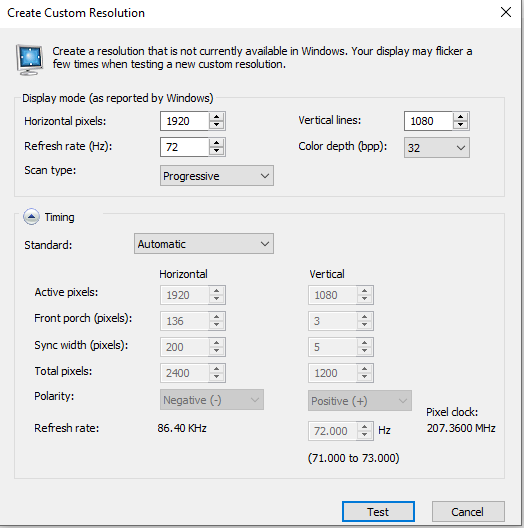
The Nvidia panel - I suppose offers something similar and changing the 'total pixels' here made the difference I have been looking for.
If you have more suggestions on how to improve, please let me know.
The explanation on sync times etc- I understand it but not sure how I can influence this through the Nvidia control panel, and even if I could.. how would I know what to add.
Once again, thank you so much- truly appreciate it!
| Description: |
|
| Filesize: |
23.98 KB |
| Viewed: |
6282 Time(s) |
|
|
|
| Back to top |
|
|
gjaky
Joined: 05 Jun 2010
Posts: 2802
Location: Budapest, Hungary
|
| Posted: Wed Jan 06, 2021 6:53 am Post subject: |
|
|
For 1080P 72Hz aim for horizontal pixels around 2400 and for vertical plane to around 1125, as for porches and sync just distribute the numbers evenly  This will save you some bandwidth. This will save you some bandwidth.
_________________
projectors in the past : NEC 6-9PG xtra, Electrohome Marquee 6-7500, NEC XG 1351 LC ( with super modified Electrohome VNB neckboard !!!)
current: VDC Marquee 9500LC
The MOD: VNB-DB, VIM-DB
|
|
| Back to top |
|
|
poen
Joined: 21 Dec 2012
Posts: 51
|
| Posted: Wed Jan 06, 2021 3:10 pm Post subject: |
|
|
| gjaky wrote: | | For 1080P 72Hz aim for horizontal pixels around 2400 and for vertical plane to around 1125, as for porches and sync just distribute the numbers evenly This will save you some bandwidth. |
Dear Gjaky,
Will try 1125 in the evening- what do you mean with distributing the numbers here evenly? - what are those numbers doing anyway?
While the image is large and filling up the screen I want to, with these settings from my previous post I do get horizontal scan lines- not very visible- but visible.
Lastly, I have a Lumagen XE video processor as well, however would you recommend using this box at all or is what I am doing through PC > AMP > Projector just fine?
|
|
| Back to top |
|
|
gjaky
Joined: 05 Jun 2010
Posts: 2802
Location: Budapest, Hungary
|
| Posted: Wed Jan 06, 2021 3:37 pm Post subject: |
|
|
If you have a resolution that is working now, then don't care about the details of the resolution.
Also I don't see much point in involving the Lumagen ito the video chain if you feed from PC, as PC can do everything you need already.
_________________
projectors in the past : NEC 6-9PG xtra, Electrohome Marquee 6-7500, NEC XG 1351 LC ( with super modified Electrohome VNB neckboard !!!)
current: VDC Marquee 9500LC
The MOD: VNB-DB, VIM-DB
|
|
| Back to top |
|
|
poen
Joined: 21 Dec 2012
Posts: 51
|
| Posted: Wed Jan 06, 2021 3:41 pm Post subject: |
|
|
| gjaky wrote: | If you have a resolution that is working now, then don't care about the details of the resolution.
Also I don't see much point in involving the Lumagen ito the video chain if you feed from PC, as PC can do everything you need already. |
Alright, no Lumagen than.
Well I do have horizontal scan lines that I'd like to get rid of, so I do need to tweak the settings I suppose.
What do you mean with the distribution of those sync figures, they should be equal?
Why is it good to have more bandwidth anyway- what does that do to quality?
|
|
| Back to top |
|
|
gjaky
Joined: 05 Jun 2010
Posts: 2802
Location: Budapest, Hungary
|
| Posted: Thu Jan 07, 2021 7:22 am Post subject: |
|
|
| poen wrote: |
Well I do have horizontal scan lines that I'd like to get rid of, so I do need to tweak the settings I suppose.
|
Can you snap a picture what you mean?
| poen wrote: |
What do you mean with the distribution of those sync figures, they should be equal?
|
roughly yes, so if you have total number of lines say 1125 and the active image is 1080, then you have 45 lines left to distribute among front porch, back porch, and sync width. You can make it 15-15-15, or 10-10-25, the point is do not make too much difference eg. 1-1-43 or the like.
| poen wrote: |
Why is it good to have more bandwidth anyway- what does that do to quality?
|
With raster scanning the electron beam draws the picture line by line. If you consider horizontal lines those are toggling on and off your perceived resolution depends on how much the lines are overlapping, which is mainly depending on optical parameters (like meam size and lens resolution). If you consider vertical lines those are changing on and off pixel by pixel, then you still have the optical limitations as previously PLUS you have an additional factor that is how fast you can control the intensity of the electron beam, obviously this is limited by the electronics within the projector.
Take a look at here 1080P 60Hz looks resolved on the NEC 9PG xtra on the picture, as the vertical 1:1 line box and the horizontal 1:1 line box is about the same brightness, at 1080P 75Hz and beyond this is not the case anymore. In practice this means the picture will loose fine details if the bandwidth is insufficient, it is not just sharpness, more like better color tracking in a dynamic way.
_________________
projectors in the past : NEC 6-9PG xtra, Electrohome Marquee 6-7500, NEC XG 1351 LC ( with super modified Electrohome VNB neckboard !!!)
current: VDC Marquee 9500LC
The MOD: VNB-DB, VIM-DB
|
|
| Back to top |
|
|
poen
Joined: 21 Dec 2012
Posts: 51
|
| Posted: Thu Jan 07, 2021 10:43 am Post subject: |
|
|
Hi Gjaky,
Good explanation / info once again.
I'll take a picture once it's dark again:)
On your examples provided in the link, you seem to get the best/sharpest results with the 85hz settings.
Right now with the settings I am using I find the picture rather soft- I have seen sharper results the projector.
I will keep trying different settings and let you know later how it turns out:)
Thank you!
| gjaky wrote: | | poen wrote: |
Well I do have horizontal scan lines that I'd like to get rid of, so I do need to tweak the settings I suppose.
|
Can you snap a picture what you mean?
| poen wrote: |
What do you mean with the distribution of those sync figures, they should be equal?
|
roughly yes, so if you have total number of lines say 1125 and the active image is 1080, then you have 45 lines left to distribute among front porch, back porch, and sync width. You can make it 15-15-15, or 10-10-25, the point is do not make too much difference eg. 1-1-43 or the like.
| poen wrote: |
Why is it good to have more bandwidth anyway- what does that do to quality?
|
With raster scanning the electron beam draws the picture line by line. If you consider horizontal lines those are toggling on and off your perceived resolution depends on how much the lines are overlapping, which is mainly depending on optical parameters (like meam size and lens resolution). If you consider vertical lines those are changing on and off pixel by pixel, then you still have the optical limitations as previously PLUS you have an additional factor that is how fast you can control the intensity of the electron beam, obviously this is limited by the electronics within the projector.
Take a look at here 1080P 60Hz looks resolved on the NEC 9PG xtra on the picture, as the vertical 1:1 line box and the horizontal 1:1 line box is about the same brightness, at 1080P 75Hz and beyond this is not the case anymore. In practice this means the picture will loose fine details if the bandwidth is insufficient, it is not just sharpness, more like better color tracking in a dynamic way. |
|
|
| Back to top |
|
|
poen
Joined: 21 Dec 2012
Posts: 51
|
| Posted: Sun Jan 10, 2021 4:04 pm Post subject: update |
|
|
Hi Gjaky,
Too difficult getting a picture of the lines I am seeing- sometimes they are there- sometimes less, it does not really bother me.
Spend a fair amount of time adjusting all the settings in the projector yesterday, astig adjustment is so very difficult to get right I feel- but I keep trying.
Regarding the actual colors, gamma, brightness etc, this is also an absolute pain- dark is always too dark and white is always too white- I haven't found an inbetween that works for both.
Any tricks here to tune this perhaps?
|
|
| Back to top |
|
|
gjaky
Joined: 05 Jun 2010
Posts: 2802
Location: Budapest, Hungary
|
|
| Back to top |
|
|
poen
Joined: 21 Dec 2012
Posts: 51
|
| Posted: Mon Jan 11, 2021 10:58 am Post subject: |
|
|
Hi,
Yes for sure, its kind of my bible:)
That video together with: http://www.cinemasource.com/articles/calib_video_proj.pdf
But how to get good color calibration is still tricky, the issue I am having getting the right Gamma/Brightness/Contrast.,.
|
|
| Back to top |
|
|
gjaky
Joined: 05 Jun 2010
Posts: 2802
Location: Budapest, Hungary
|
| Posted: Mon Jan 11, 2021 9:28 pm Post subject: |
|
|
Without knowing the quirks of the 1292... The standard video levels are between 16-235, where the total addressable range is 0-255 by the VGA card. You should set up the grayscale so that level 16 is the black, and level 18 should be visible, probably it is the best to leave the VGA card's gamma at neutral (1.0).
You should draw your own test patterns in paint according to your needs, when setting up low levels avoid using bright portions in the test pattern, because that would ruin your setup, because of the CRTs poor ANSI contrast.
_________________
projectors in the past : NEC 6-9PG xtra, Electrohome Marquee 6-7500, NEC XG 1351 LC ( with super modified Electrohome VNB neckboard !!!)
current: VDC Marquee 9500LC
The MOD: VNB-DB, VIM-DB
|
|
| Back to top |
|
|
|
|
|
|
|
You cannot post new topics in this forum
You cannot reply to topics in this forum
You cannot edit your posts in this forum
You cannot delete your posts in this forum
You cannot vote in polls in this forum
You cannot attach files in this forum
You can download files in this forum
|
Forum powered by phpBB © phpBB Group
|
|




